# Apache access logs - "No cached mapping for this field"
**URL:** https://discuss.elastic.co/t/apache-access-logs-no-cached-mapping-for-this-field/25653
**Category:** Kibana
**Created:** [July 15, 2015, 4:50pm UTC](https://discuss.elastic.co/t/apache-access-logs-no-cached-mapping-for-this-field/25653 "2015-07-15T16:50:45Z")
**Posts on this page:** 8
**Page:** 1
### Author:  [@dixon1dw](https://discuss.elastic.co/u/dixon1dw)
#### Post date: [July 15, 2015, 4:50pm UTC](https://discuss.elastic.co/t/apache-access-logs-no-cached-mapping-for-this-field/25653/1 "2015-07-15T16:50:45Z")
I have setup a ELK stack Proof of Concept and in Kibana I have setup one index pattern (`logstash-*`) using one time-field name (`@timestamp`) I originally setup the logstash-fowarder on two dev servers sending only logs from /var/log/messages & /var/log/secure. All this works great and all the syslog fields are parsed _AND_ indexed properly. However I configured and added sending apache access logs from one of the two dev servers (/var/log/httpd/access\_log) using a grok filter as follows:
```
filter {
if [type] == "apache-access" {
grok {
match => { "message" => "%{COMBINEDAPACHELOG}" }
}
}
date {
match => ["timestamp" , "dd/MMM/yyyy:HH:mm:ss Z"]
}
}
```
Here is an example log Apache access\_log entry from the server:
```
192.168.64.232 - - [14/Jul/2015:13:21:30 -0400] "GET / HTTP/1.1" 302 26 "-" "Mozilla/5.0 (Windows NT 6.1; WOW64) AppleWebKit/537.36 (KHTML, like Gecko) Chrome/43.0.2357.132 Safari/537.36"
```
However my problem is that I cannot use any of these fields (`clientip`, `response`, `verb`, etc.) parsed out of my apache access logs to create visualizations as in kibana when I expand an Apache log it says for each field that gets parsed out "No cached mapping for this field, refresh your mapping from the Settings \> Indices page" however refreshing the mappings does nothing.
I am on the latest current version of logstash (1.5.2), elasticsearch (1.6), and Kibana (4.1.1)

Here is my logstash-forwarder config on the machine sending Apache logs:
```
{
"network": {
"servers": ["logstash.our.domain.com:5000"],
"ssl ca": "/etc/pki/tls/certs/logstash-forwarder.crt",
"timeout": 15
},
"files": [
{
"paths": [
"/var/log/messages",
"/var/log/secure"
],
"fields": { "type": "syslog" }
}
],
"files": [
{
"paths": [
"/var/log/httpd/access_log"
],
"fields": { "type": "apache-access" }
}
]
}
```
Can anyone help me to figure out what is going wrong here, is this a Kibana bug or a problem with my Elastic search configuration or filter or ??
Thank you much in advance!
-Drew
---
### Author:  [@Joe\_Fleming](https://discuss.elastic.co/u/Joe_Fleming)
#### Post date: [July 16, 2015, 4:30pm UTC](https://discuss.elastic.co/t/apache-access-logs-no-cached-mapping-for-this-field/25653/2 "2015-07-16T16:30:16Z")
That message means that Kibana didn't find that mapping when you created the index pattern. Hitting refresh from the indexes settings page for that index (`logstash-*`) should update it.
Can you post your mappings from Elasticsearch and a screenshot of the field list in Kibana?
---
### Author:  [@dixon1dw](https://discuss.elastic.co/u/dixon1dw)
#### Post date: [July 17, 2015, 4:17pm UTC](https://discuss.elastic.co/t/apache-access-logs-no-cached-mapping-for-this-field/25653/3 "2015-07-17T16:17:22Z")
Hi Joe,
I mentioned in my post that refreshing the mappings does nothing for me but I should have clairfied that this was in the location you mentioned in Kibana (Settings \> Indices) it is not updating anything when I do that so something is not right.
It may be my mappings from Elasticsearch, I'm still fairly new to Elasticsearch configuration so I'm not 100% sure where to locate the mappings from Elasticsearch you are wanting me to post so I just wanted to ask you first to verify that I post what you are looking for? What config file contents are you wanting to see here?
I will add a new screenshot of the field list in Kibana from the Discover page below, the screen shot I inserted in my original post shows the fields list just for one Apache log entry while expanded.

---
### Author:  [@Joe\_Fleming](https://discuss.elastic.co/u/Joe_Fleming)
#### Post date: [July 17, 2015, 5:48pm UTC](https://discuss.elastic.co/t/apache-access-logs-no-cached-mapping-for-this-field/25653/4 "2015-07-17T17:48:46Z")
Yeah, I got that refreshing the mappings wasn't working, I was just explaining what it did, and that it _should_ be working 😉
So it looks like Kibana is indeed seeing your fields based on what you posted from Discover. The field list screenshot I was looking for is from the index settings page though - can you post that?
As for the mappings, you can get the field mappings via `http://localhost:9200/logstash-2015.07.15/_mapping`, assuming you have elasticsearch running on localhost. The output is probably going to be pretty big, feel free to put it in a gist or on pastebin or something.
---
### Author:  [@dixon1dw](https://discuss.elastic.co/u/dixon1dw)
#### Post date: [July 17, 2015, 5:59pm UTC](https://discuss.elastic.co/t/apache-access-logs-no-cached-mapping-for-this-field/25653/5 "2015-07-17T17:59:56Z")
Great, thanks for the quick reply! Here is the link to where I put the contents of the \_mapping file:
[http://pastebin.com/EzS6i4hT](http://pastebin.com/EzS6i4hT)
Index settings screenshots:

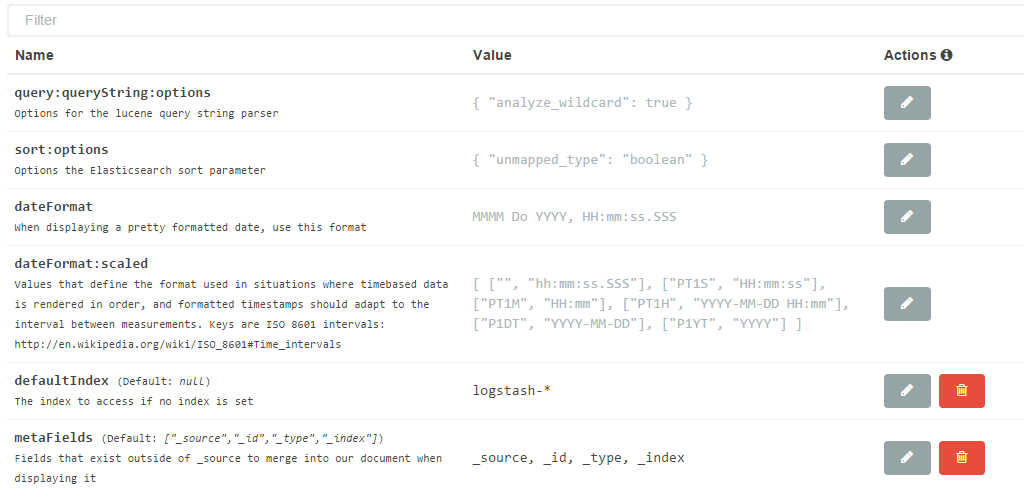
Thank you much!
---
### Author:  [@dixon1dw](https://discuss.elastic.co/u/dixon1dw)
#### Post date: [July 30, 2015, 3:08pm UTC](https://discuss.elastic.co/t/apache-access-logs-no-cached-mapping-for-this-field/25653/6 "2015-07-30T15:08:27Z")
Hi Joe/All,
Just bumping this to the top, it seems to have fallen through the cracks, thank you much for your help with this!
-Drew
---
### Author:  [@liubenlong](https://discuss.elastic.co/u/liubenlong)
#### Post date: [November 28, 2016, 10:37am UTC](https://discuss.elastic.co/t/apache-access-logs-no-cached-mapping-for-this-field/25653/7 "2016-11-28T10:37:36Z")
我也遇到这个问题了,直接在 kibana的settings里【refresh fields list】即可
---
### Author:  [@system](https://discuss.elastic.co/u/system)
#### Post date: [July 6, 2017, 1:33pm UTC](https://discuss.elastic.co/t/apache-access-logs-no-cached-mapping-for-this-field/25653/8 "2017-07-06T13:33:55Z")