# Apache2 User Agent not avalaible in the Visualize menu
**URL:** https://discuss.elastic.co/t/apache2-user-agent-not-avalaible-in-the-visualize-menu/273031
**Category:** Kibana
**Created:** [May 14, 2021, 2:22pm UTC](https://discuss.elastic.co/t/apache2-user-agent-not-avalaible-in-the-visualize-menu/273031 "2021-05-14T14:22:29Z")
**Posts on this page:** 8
**Page:** 1
### Author:  [@dkdlv38](https://discuss.elastic.co/u/dkdlv38)
#### Post date: [May 14, 2021, 2:22pm UTC](https://discuss.elastic.co/t/apache2-user-agent-not-avalaible-in-the-visualize-menu/273031/1 "2021-05-14T14:22:30Z")
Hello all!
I'm trying to create a visualisation to track the user agent of the Apache clients connecting to my website, I have this information in the "Discover" menu, but it doesn't appear in the "Visualize" menu...
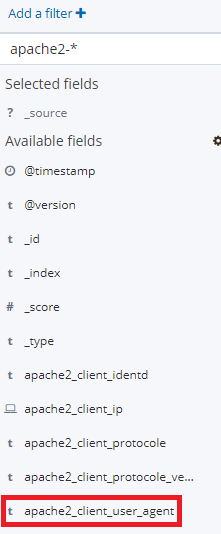

What am I missing?
Thanks for your help =)
---
### Author:  [@afharo](https://discuss.elastic.co/u/afharo)
#### Post date: [May 14, 2021, 3:46pm UTC](https://discuss.elastic.co/t/apache2-user-agent-not-avalaible-in-the-visualize-menu/273031/2 "2021-05-14T15:46:18Z")
Hi @dkdlv38,
I think that the cause could be the mappings: the terms aggregations can only be performed in `keyword` fields. My first guess is that the field `apache2_client_user_agent` is `type: "text"`.
If that's the case, you might be able to solve it by adding a multifield property `keyword`, so the mapping of your field looks like:
```auto
"apache2_client_user_agent": {
"type": "text",
"fields": {
"keyword": {
"type": "keyword",
"ignore_above" : 256
}
}
```
Once you've updated your mapping, you can refresh Kibana's Index Pattern to identify the new field, and you should see the field `apache2_client_user_agent.keyword` in the Field box now.
NOTE: For these mapping changes to take effect in previously indexed docs, you might need to run `POST apache2-*/_update_by_query` so Elasticsearch reprocesses all the documents again.
---
### Author:  [@dkdlv38](https://discuss.elastic.co/u/dkdlv38)
#### Post date: [May 17, 2021, 4:13pm UTC](https://discuss.elastic.co/t/apache2-user-agent-not-avalaible-in-the-visualize-menu/273031/3 "2021-05-17T16:13:09Z")
Thanks fr your answer.
Candid question: why it is not possible to simply put:
```
"apache2_client_user_agent" : {
"type" : "keyword"
},
```
And yes, your first guess was correct ^^
Your modification has to be done in the /etc/elasticsearch/templates/apache2.template.json
is that correct?
Thanks for the help!
---
### Author:  [@dkdlv38](https://discuss.elastic.co/u/dkdlv38)
#### Post date: [May 17, 2021, 5:45pm UTC](https://discuss.elastic.co/t/apache2-user-agent-not-avalaible-in-the-visualize-menu/273031/4 "2021-05-17T17:45:20Z")
Ok, self answer to my question: Changing an existing field could invalidate data that’s already indexed.
([Update mapping API | Elasticsearch Guide [7.12] | Elastic](https://www.elastic.co/guide/en/elasticsearch/reference/current/indices-put-mapping.html))
So I now have an issue of syntax, my file is written this way,
How should I insert your modifcation?:
```auto
"index_patterns" : [
"apache2-*"
],
"settings" : {
"index" : {
"number_of_shards" : "1",
"number_of_replicas" : "0"
}
},
"mappings" : {
"doc" : {
"properties" : {
"apache2_client_ip" : {
"type" : "ip"
},
"apache2_client_identd" : {
"type" : "keyword"
},
"apache2_client_protocole" : {
"type" : "keyword"
},
"apache2_client_protocole_version" : {
"type" : "keyword"
},
"apache2_client_user_agent" : {
"type" : "text"
},
```
---
### Author:  [@afharo](https://discuss.elastic.co/u/afharo)
#### Post date: [May 18, 2021, 4:28pm UTC](https://discuss.elastic.co/t/apache2-user-agent-not-avalaible-in-the-visualize-menu/273031/5 "2021-05-18T16:28:22Z")
Hi, sorry for the late response.
Your changes in the template will change it for any newly created indices (Elasticsearch uses the templates when creating new indices only).
For existing indices, you might need to call the Mapping updates API (`PUT apache2-*/_mapping`), as you previously stated in your comment.
The reason for not replacing `text` by `keyword` straight away, is because old index won't be able to convert/cast it. You'll need to reindex (aka create a new index with the new mappings and copy the info from the old indices).
My suggestion is additive, so there's no need for a full reindex 🙂
> [@dkdlv38](#):
>
> How should I insert your modifcation?:
With the Update Mappings API, you can call the request below to add the field to the existing indices:
```auto
PUT apache2-*/_mapping/_doc
{
"properties": {
"apache2_client_user_agent": {
"type": "text",
"fields": {
"keyword": {
"type": "keyword",
"ignore_above" : 256
}
}
}
}
}
```
Then, you'll need to run `POST apache2-*/_update_by_query` for the changes to get applied to the existing documents.
Then, to keep those changes to new indices when they rotate, you'll need to change the template as well. I believe that you can either do it via editing the `.json` file you mentioned or by using the templates API: [Index Templates | Elasticsearch Guide [6.8] | Elastic](https://www.elastic.co/guide/en/elasticsearch/reference/6.8/indices-templates.html)
---
### Author:  [@dkdlv38](https://discuss.elastic.co/u/dkdlv38)
#### Post date: [May 19, 2021, 9:01am UTC](https://discuss.elastic.co/t/apache2-user-agent-not-avalaible-in-the-visualize-menu/273031/6 "2021-05-19T09:01:35Z")
I'm facing this issue, and I don't really understand what is the meaning of the error:
{
"error": {
"root\_cause": [
{
"type": "illegal\_argument\_exception",
"reason": "Rejecting mapping update to [apache2-2021.04.09] as the final mapping would have more than 1 type: [\_doc, doc]"
}
],
"type": "illegal\_argument\_exception",
"reason": "Rejecting mapping update to [apache2-2021.04.09] as the final mapping would have more than 1 type: [\_doc, doc]"
},
"status": 400
}
---
### Author:  [@afharo](https://discuss.elastic.co/u/afharo)
#### Post date: [May 19, 2021, 11:48am UTC](https://discuss.elastic.co/t/apache2-user-agent-not-avalaible-in-the-visualize-menu/273031/7 "2021-05-19T11:48:29Z")
Right! Sorry, I made a typo: you are using the `type` `doc` instead of the `_doc`.
The actual request is:
```auto
PUT apache2-*/_mapping/doc
{
"properties": {
"apache2_client_user_agent": {
"type": "text",
"fields": {
"keyword": {
"type": "keyword",
"ignore_above" : 256
}
}
}
}
}
```
---
### Author:  [@system](https://discuss.elastic.co/u/system)
#### Post date: [June 16, 2021, 11:48am UTC](https://discuss.elastic.co/t/apache2-user-agent-not-avalaible-in-the-visualize-menu/273031/8 "2021-06-16T11:48:47Z")
This topic was automatically closed 28 days after the last reply. New replies are no longer allowed.