# Attribute Based Security
**URL:** https://discuss.elastic.co/t/attribute-based-security/280592
**Category:** Elasticsearch
**Tags:** elastic-stack-security
**Created:** [August 5, 2021, 7:54pm UTC](https://discuss.elastic.co/t/attribute-based-security/280592 "2021-08-05T19:54:23Z")
**Posts on this page:** 6
**Page:** 1
### Author:  [@workenehg](https://discuss.elastic.co/u/workenehg)
#### Post date: [August 5, 2021, 7:54pm UTC](https://discuss.elastic.co/t/attribute-based-security/280592/1 "2021-08-05T19:54:23Z")
I have a use case where I need to restrict access to documents in an Elasticsearch index based on the user executing the query ACL and the security attributes on the document. i was told to use Attribute based Security and it seems to work with "terms set" where the user ACL will have to match with the Document Security Attribute. But what we are interested in is the user could have an ACL equal to or/and greater than the Document ACL.
simple example.
DOC1= SEC\_ATTR[1, 2],
DOC2= SEC\_ATTR[1]
DOC3=SEC\_ATTR[1,2,3]
Users Info
USER1 = SEC\_ATTR[1]
USER2 = SEC\_ATTR[2,3]
USER3 = SEC\_ATTR[1,2]
USER4=SEC\_ATTR[1.2.3.4]
now when searching the expected results are
USER1 will see just DOC2
USER2 will see NO document
USER3 will see DOC1 and DOC2
USER4 will see all 3 docs.
but the observed results are
USER1 will see just DOC2
USER2 will see NO document
USER3 will see DOC1 and DOC2
USER4 will NOT SEE ANY DOCUMENT. (which is wrong for our use case).
---
### Author:  [@Yang\_Wang](https://discuss.elastic.co/u/Yang_Wang)
#### Post date: [August 9, 2021, 1:04am UTC](https://discuss.elastic.co/t/attribute-based-security/280592/2 "2021-08-09T01:04:13Z")
If I understand it correctly, what you need is to dynamically define `minimum_should_match` to be the length of `SEC_ATTR` from the document. You can achieve this with [minimum\_should\_match\_script](https://www.elastic.co/guide/en/elasticsearch/reference/current/query-dsl-terms-set-query.html#terms-set-query-script) and Document level security's [role query templating](https://www.elastic.co/guide/en/elasticsearch/reference/current/field-and-document-access-control.html#templating-role-query).
Assuming the document is something like the follows:
```auto
{
"sec_attr": ["1", "2", "3"],
...
}
```
and the user has metadata like the follows
```auto
{
"username": "user4",
"metadaeta": {
"sec_attr": ["1", "2", "3", "4"]
},
...
}
```
You can define the role query to be something like:
```auto
{
"terms_set": {
"attributes": {
"terms": {{#toJson}}_user.metadata.sec_attr{{/toJson}},
"minimum_should_match_script": {
"source": "doc['sec_attr'].size()"
}
}
}
}
```
Note you'll need escape the double quotes when composing the role as shown in the [documentation](https://www.elastic.co/guide/en/elasticsearch/reference/current/field-and-document-access-control.html#templating-role-query).
---
### Author:  [@TimV](https://discuss.elastic.co/u/TimV)
#### Post date: [August 9, 2021, 5:37am UTC](https://discuss.elastic.co/t/attribute-based-security/280592/3 "2021-08-09T05:37:22Z")
Please provide a minimal, working example of what you have tried so far that produced the "observed results" you reported.
---
### Author:  [@workenehg](https://discuss.elastic.co/u/workenehg)
#### Post date: [August 11, 2021, 9:12pm UTC](https://discuss.elastic.co/t/attribute-based-security/280592/4 "2021-08-11T21:12:03Z")
Here are the steps I have done
1. Created users as in the screenshot with relevant attributes for DLS as in Users – USER1, USER2, USER3, USER4 as in the attachment users.PNG
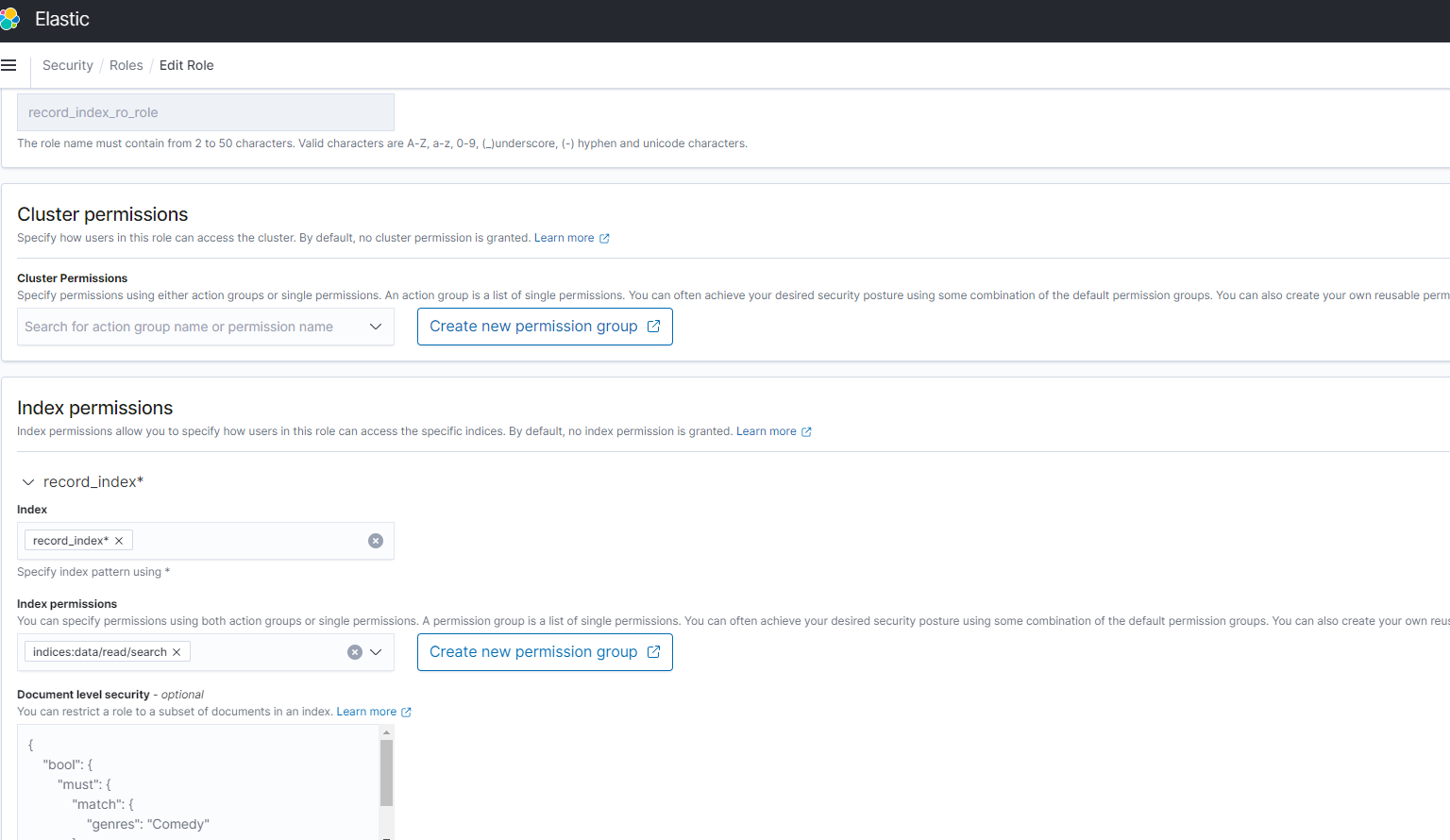
2. Created role record\_index\_ro\_role as in the screenshot roles.PNG
3. Record\_index\_ro\_role has permissions as in the screenshot Index\_permissions.PNG and index\_permissions1.PNG
4. I mapped users to the role as in the screenshot mapped\_users.PNG
5. record\_index\_acl\_test is the index I created for the documents
USER1
kibanauser
security\_attributes: "AUTHORIZED\_USERS, ACL\_001"
USER2
kibanauser
security\_attributes: "AUTHORIZED\_USERS,ACL\_001,ACL\_002"
USER3
kibanauser
security\_attributes: "ACL\_002,ACL\_003,ACL\_004"
USER4
kibanauser
security\_attributes: "ACL\_002,ACL\_003"
Document ids and corresponding security\_attributes for each document
24442682 - AUTHORIZED\_USERS
24442675 - AUTHORIZED\_USERS
7485251 - ACL\_001, ACL\_002
866739 - ACL\_003, ACL\_004, ACL\_002
23543526 - ACL\_001, ACL\_005, ACL\_002
**Problem** :
When I log in as USER1 and run the query GET /record\_index\_acl\_test/\_search, it returns all the documents not respecting the permissions on the documents. It is the same behavior for other users too.
**Expectation** :
USER1 search on record\_index\_acl\_test should return 24442682, 24442675
USER2 search on record\_index\_acl\_test should return 24442682, 24442675, 7485251
USER3 search on record\_index\_acl\_test should return 866739
USER4 search on record\_index\_acl\_test should return nothing
Here is the version of elastic search that we are using
{
"name" : "odfe-opendistro-es-client-55b5597759-7b8mp",
"cluster\_name" : "elasticsearch",
"cluster\_uuid" : "9k9XkFJ4QmuFAiT\_rzNdlw",
"version" : {
"number" : "7.10.2",
"build\_flavor" : "oss",
"build\_type" : "tar",
"build\_hash" : "747e1cc71def077253878a59143c1f785afa92b9",
"build\_date" : "2021-01-13T00:42:12.435326Z",
"build\_snapshot" : false,
"lucene\_version" : "8.7.0",
"minimum\_wire\_compatibility\_version" : "6.8.0",
"minimum\_index\_compatibility\_version" : "6.0.0-beta1"
},
"tagline" : "You Know, for Search"
}



---
### Author:  [@TimV](https://discuss.elastic.co/u/TimV)
#### Post date: [August 13, 2021, 1:46am UTC](https://discuss.elastic.co/t/attribute-based-security/280592/5 "2021-08-13T01:46:42Z")
In order to help you here we really need a self contained, step by step example of where you've gotten to.
For example:
* * *
I created these users:
```auto
PUT /_security/user/user1
{
"password": "password",
"roles": ["dls-test"],
"metadata": { "security_attributes": ["ACL_001"] }
}
```
```auto
PUT /_security/user/user2
{
"password": "password",
"roles": ["dls-test"],
"metadata": { "security_attributes": ["ACL_001", "ACL_002"] }
}
```
etc
And these documents:
```auto
PUT /dls-index/_doc/7485251
{
"name": "test doc 1",
"acl": ["ACL_001", "ACL_002"],
"acl_count": 2
}
```
...
Then I used this role ...
```auto
PUT /_security/role/dls-test
{
// ...
}
```
and I got these results ...
* * *
If you provide an worked example with details like that, then I can work through it and offer suggestions about where you're running into problems and how to resolve them.
Otherwise I need to build up a complete reproduction myself, guess all the details you haven't provided, and then guess where the problem might be.
We're very happy to help you out, but there's only so much time we have available to offer help on these forums - you can make it easy for us by giving us everything we need to quickly reproduce your issue.
---
### Author:  [@system](https://discuss.elastic.co/u/system)
#### Post date: [September 10, 2021, 1:47am UTC](https://discuss.elastic.co/t/attribute-based-security/280592/6 "2021-09-10T01:47:07Z")
This topic was automatically closed 28 days after the last reply. New replies are no longer allowed.