# Auto Sizing Visualization
**URL:** https://discuss.elastic.co/t/auto-sizing-visualization/261851
**Category:** Kibana
**Created:** [January 21, 2021, 8:13pm UTC](https://discuss.elastic.co/t/auto-sizing-visualization/261851 "2021-01-21T20:13:09Z")
**Posts on this page:** 4
**Page:** 1
### Author:  [@gerardo\_dutan](https://discuss.elastic.co/u/gerardo_dutan)
#### Post date: [January 21, 2021, 8:13pm UTC](https://discuss.elastic.co/t/auto-sizing-visualization/261851/1 "2021-01-21T20:13:09Z")
I'm having issues with visualizations auto scaling in a dashboard when using Vega visualizations.
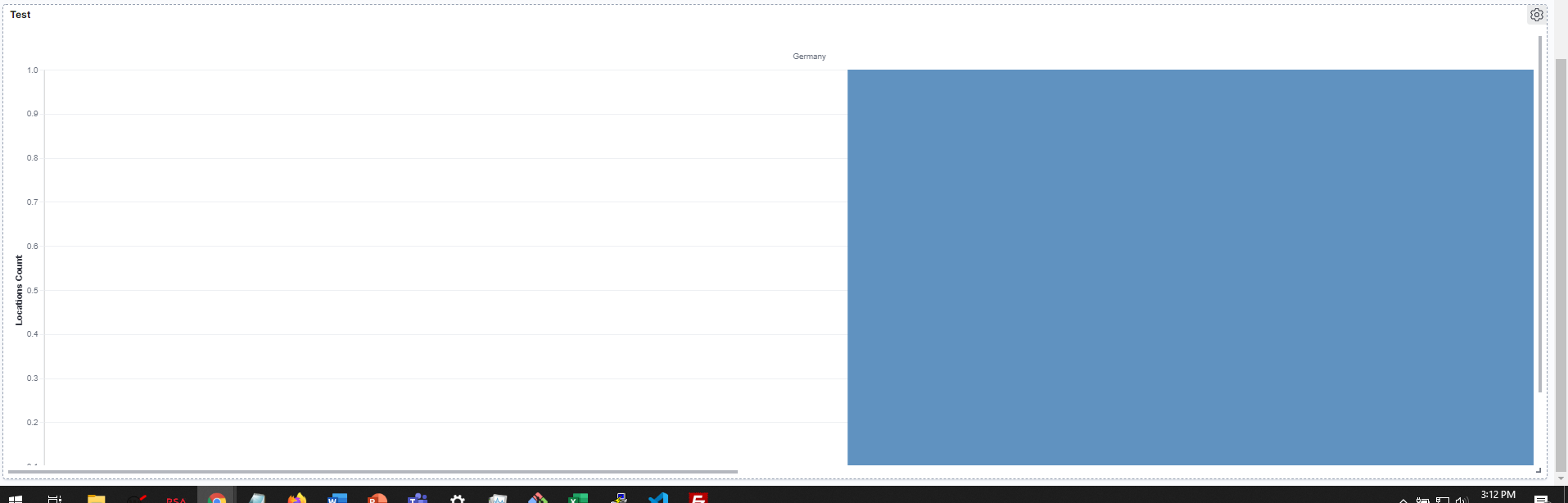
The issue occurs when using multiple the multi column functionality in Vega. The output of the Vega script is 2 plots but when I try to view the visualization on the dashboard only the first plot is shown immediately with the other having to be scrolled to. I'm looking to have all the plots show without having to scroll through them. Thanks
Target Visualization:

Current Dashboard Visualization: (Don't Mind the Color Assignments)
Vega Script
```auto
{
"$schema": "https://vega.github.io/schema/vega-lite/v4.json",
"data": {
"values": [
{
"key" : "224",
"doc_count" : 1,
"location" : {
"doc_count_error_upper_bound" : 0,
"sum_other_doc_count" : 0,
"buckets" : [
{
"key" : "NY",
"doc_count" : 1
}
]
}
},
{
"key" : "225",
"doc_count" : 2,
"location" : {
"doc_count_error_upper_bound" : 0,
"sum_other_doc_count" : 0,
"buckets" : [
{
"key" : "NY",
"doc_count" : 1
},
{
"key" : "Germany",
"doc_count" : 1
}
]
}
}
]
},
"transform": [
{"flatten": ["location.buckets"],"as": ["test"]}
],
"mark": "bar",
"encoding": {
"column":{
"field":"test.key",
"type":"ordinal",
"spacing":20
},
"x": {
"field": "key",
"type": "nominal",
"title": "Target ID"
},
"y": {
"aggregate": "count",
"type": "quantitative",
"title": "Locations Count",
"field": "test.doc_count"
},
"color": {
"field": "key",
"type": "nominal"
}
}
}
```
---
### Author:  [@wylie](https://discuss.elastic.co/u/wylie)
#### Post date: [January 21, 2021, 9:36pm UTC](https://discuss.elastic.co/t/auto-sizing-visualization/261851/2 "2021-01-21T21:36:24Z")
Thanks for providing a full spec with sample data, it was easy to reproduce your use case.
What I recommend is that you follow [this Vega-Lite doc](https://vega.github.io/vega-lite/docs/size.html#width-and-height-of-multi-view-displays) to set an absolute width for the columns. You can't set a responsive width when using facets. I've never tried using responsiveness in Vega (with more access to the signals), so this answer is for Vega-Lite only.
---
### Author:  [@gerardo\_dutan](https://discuss.elastic.co/u/gerardo_dutan)
#### Post date: [January 21, 2021, 11:50pm UTC](https://discuss.elastic.co/t/auto-sizing-visualization/261851/3 "2021-01-21T23:50:31Z")
Yeah I think I got it to work using absolute column widths in Vega lite using facets. For the data I intend to be utilizing I really don't know how many columns it'll require so I'll look into using Vega and post here if I find anything useful. Thanks again.
Vega lite script for reference that did the trick with absolute column widths:
```auto
{
"$schema": "https://vega.github.io/schema/vega-lite/v4.json",
"data": {
"values": [
{
"key" : "224",
"doc_count" : 1,
"location" : {
"doc_count_error_upper_bound" : 0,
"sum_other_doc_count" : 0,
"buckets" : [
{
"key" : "NY",
"doc_count" : 1
}
]
}
},
{
"key" : "225",
"doc_count" : 2,
"location" : {
"doc_count_error_upper_bound" : 0,
"sum_other_doc_count" : 0,
"buckets" : [
{
"key" : "NY",
"doc_count" : 1
},
{
"key" : "Germany",
"doc_count" : 1
}
]
}
}
]
},
"transform": [
{"flatten": ["location.buckets"],"as": ["test"]}
],
"facet":{
"column":{"field":"test.key"}
},
"spec":{
"width":300,
"height":600,
"mark": "bar",
"encoding": {
"x": {
"field": "key",
"type": "nominal",
"title": "Target ID"
},
"y": {
"aggregate": "count",
"type": "quantitative",
"title": "Count",
"field": "test.doc_count"
},
"color": {
"field": "key",
"type": "nominal",
"title":"type"
}
}
}
}
```
---
### Author:  [@system](https://discuss.elastic.co/u/system)
#### Post date: [February 18, 2021, 11:50pm UTC](https://discuss.elastic.co/t/auto-sizing-visualization/261851/4 "2021-02-18T23:50:38Z")
This topic was automatically closed 28 days after the last reply. New replies are no longer allowed.