# Can i filter '\_source' field using filtereditor or using '\_source.field' in 'Discover' tab of Kibana?
**URL:** https://discuss.elastic.co/t/can-i-filter-source-field-using-filtereditor-or-using-source-field-in-discover-tab-of-kibana/165141
**Category:** Kibana
**Created:** [January 22, 2019, 2:51am UTC](https://discuss.elastic.co/t/can-i-filter-source-field-using-filtereditor-or-using-source-field-in-discover-tab-of-kibana/165141 "2019-01-22T02:51:22Z")
**Posts on this page:** 5
**Page:** 1
### Author:  [@teemoGod](https://discuss.elastic.co/u/teemoGod)
#### Post date: [January 22, 2019, 2:51am UTC](https://discuss.elastic.co/t/can-i-filter-source-field-using-filtereditor-or-using-source-field-in-discover-tab-of-kibana/165141/1 "2019-01-22T02:51:22Z")
hi. im using Kibana 6.4.1.
i want to filter '\_source' field and sorted by '\_source.date' field in 'Discover' tab of Kibana
because, variable fields can be exist in each document.
this mean, each documents in one index can have variable fields.
i know that i can select multiple field (in Discover tab),
and set priority(in Advanced Settings),
and can select Default fields(in Advanced Settings).
but as i said, each docs have variable fields each other.
so, i don't care about index mapping and i cant select designated field.
i must show all of fields.
if field as 'a', 'b', 'c', 'date' incoming once in Aindex, and field as 'd', 'e', 'f', 'date' once in Aindex,
Aindex will have 2 docs.
and i want to show these 2 docs with \_source.
## Aindex
## doc1 : a, b, c, date doc2 : d, e, f, date
and i want to sorting these docs by 'date' field.
(date field is exist in all of docuements as 'date' type mapped.)
can i handle this? or any idea?
i tried this query in window filter like this.

as text,
```json
{
"query": {
"match_all": {}
},
"sort": [
{
"date": {
"order": "desc"
}
}
]
}
```
but this doesn't working.
i can show all of fields with '\_source' but not sorted by date.
in this reference
([https://www.elastic.co/guide/en/kibana/6.4/field-filter.html](https://www.elastic.co/guide/en/kibana/6.4/field-filter.html))
there is image that exist 'Time' and '\_source' as table header.
but when i selected 'date' field('\_source.date'), '\_source ' field was disappeared.
and i saw this topic.
([Sorting by keyword in Kibana Discover](https://discuss.elastic.co/t/sorting-by-keyword-in-kibana-discover/107336))
there is 'Time' and '\_source' header appeared again
but my discover doesn't include that header.
and i guess that above topic using '@timestamp' field.
but i don't want to use this field.
the reason is same with above topic's owner.
i want to use '\_source.date' field as date field
---
### Author:  [@lukas](https://discuss.elastic.co/u/lukas)
#### Post date: [January 22, 2019, 11:17pm UTC](https://discuss.elastic.co/t/can-i-filter-source-field-using-filtereditor-or-using-source-field-in-discover-tab-of-kibana/165141/2 "2019-01-22T23:17:23Z")
For some reason it appears that `_source` isn't able to be added after you have added other columns. As a workaround you can change a portion of the URL from something like
`columns:!(date)`
to
`columns:!(date,_source)`
And then you should be able to sort by `date` by clicking on the sort button in the header.
---
### Author:  [@teemoGod](https://discuss.elastic.co/u/teemoGod)
#### Post date: [January 23, 2019, 12:59am UTC](https://discuss.elastic.co/t/can-i-filter-source-field-using-filtereditor-or-using-source-field-in-discover-tab-of-kibana/165141/3 "2019-01-23T00:59:21Z")
thx for your response
but in Discover, 'columns' get parameter is nowhere in my url.
my url format is
```auto
http://ip:port/app/kibana#/discover/21d19380-1ea9-11e9-874b-eb2dc0f64944?_g=h@44136fa&_a=h@1d7ed07
```
and, when i save search object and i configed 'Management' -\> 'Saved Object' -\> saved Search Object -\> 'columns' property like this
```json
["date","_source"]
```
but nothing changed ( i checked that i saved Search Object button)
-------add
i found solution.
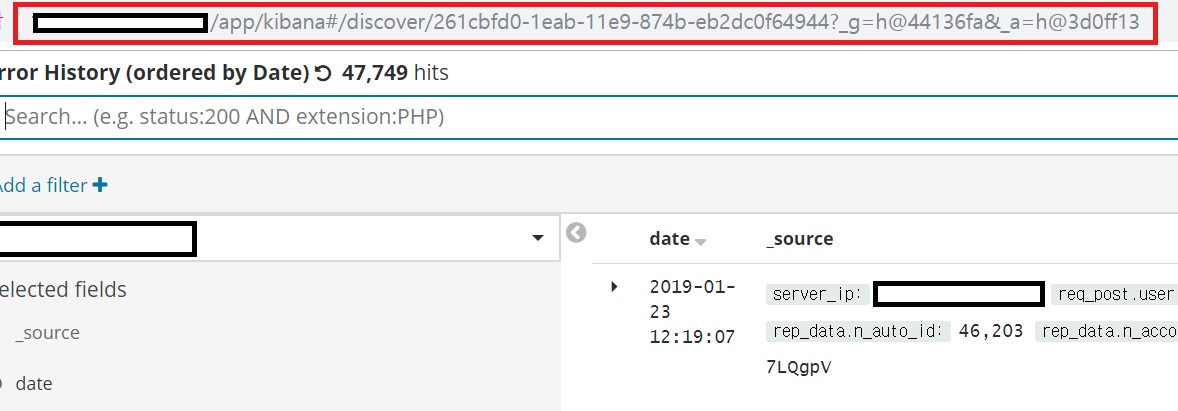
problem was 'Management' -\> 'advanced settings' -\> 'Store URLs in session storage'
if this option is on, kibana doesn't show 'get parameters'.
off this option. then, 'columns' get parameter appeared.
and change 'columns:!(date)' to 'columns:!(date,\_source)',
then kibana can show '\_source.date' and '\_source'.

and if we save this search object, we can see 'date' and '\_source' in dashboard always.
---- add
and, if save search object once like above, and config 'Store URLs in session storage' again (there are reasons for URL's length issue),
this feature is not changed like this both Discover and DashBoard that including saved search object.
like this, very useful.
thx 😃
---
### Author:  [@lukas](https://discuss.elastic.co/u/lukas)
#### Post date: [January 23, 2019, 9:53pm UTC](https://discuss.elastic.co/t/can-i-filter-source-field-using-filtereditor-or-using-source-field-in-discover-tab-of-kibana/165141/4 "2019-01-23T21:53:24Z")
Glad to help!
---
### Author:  [@system](https://discuss.elastic.co/u/system)
#### Post date: [February 20, 2019, 9:53pm UTC](https://discuss.elastic.co/t/can-i-filter-source-field-using-filtereditor-or-using-source-field-in-discover-tab-of-kibana/165141/5 "2019-02-20T21:53:32Z")
This topic was automatically closed 28 days after the last reply. New replies are no longer allowed.