# Can't connect hosts to the Fleet Server
**URL:** https://discuss.elastic.co/t/cant-connect-hosts-to-the-fleet-server/286450
**Category:** Beats
**Tags:** elastic-stack-security, fleet, filebeat, metricbeat, heartbeat
**Created:** [October 12, 2021, 8:32am UTC](https://discuss.elastic.co/t/cant-connect-hosts-to-the-fleet-server/286450 "2021-10-12T08:32:25Z")
**Posts on this page:** 19
**Page:** 1
### Author:  [@Dmitriy\_Esin](https://discuss.elastic.co/u/Dmitriy_Esin)
#### Post date: [October 12, 2021, 8:32am UTC](https://discuss.elastic.co/t/cant-connect-hosts-to-the-fleet-server/286450/1 "2021-10-12T08:32:25Z")
Hi all!
I need your help!
I have a self-hosted ELK (not cloud)
I've enrolled the Fleet Server for SIEM using [this manual](https://www.elastic.co/guide/en/fleet/current/fleet-server.html#add-fleet-server) for a self-managed server with default parameters in `elastic-agent.yml`
I need to connect hosts to my elk using elk agents.
It looks like Fleet Server works well (netstat and kibana screenshots)
It is healthy and has a connection to elastic.


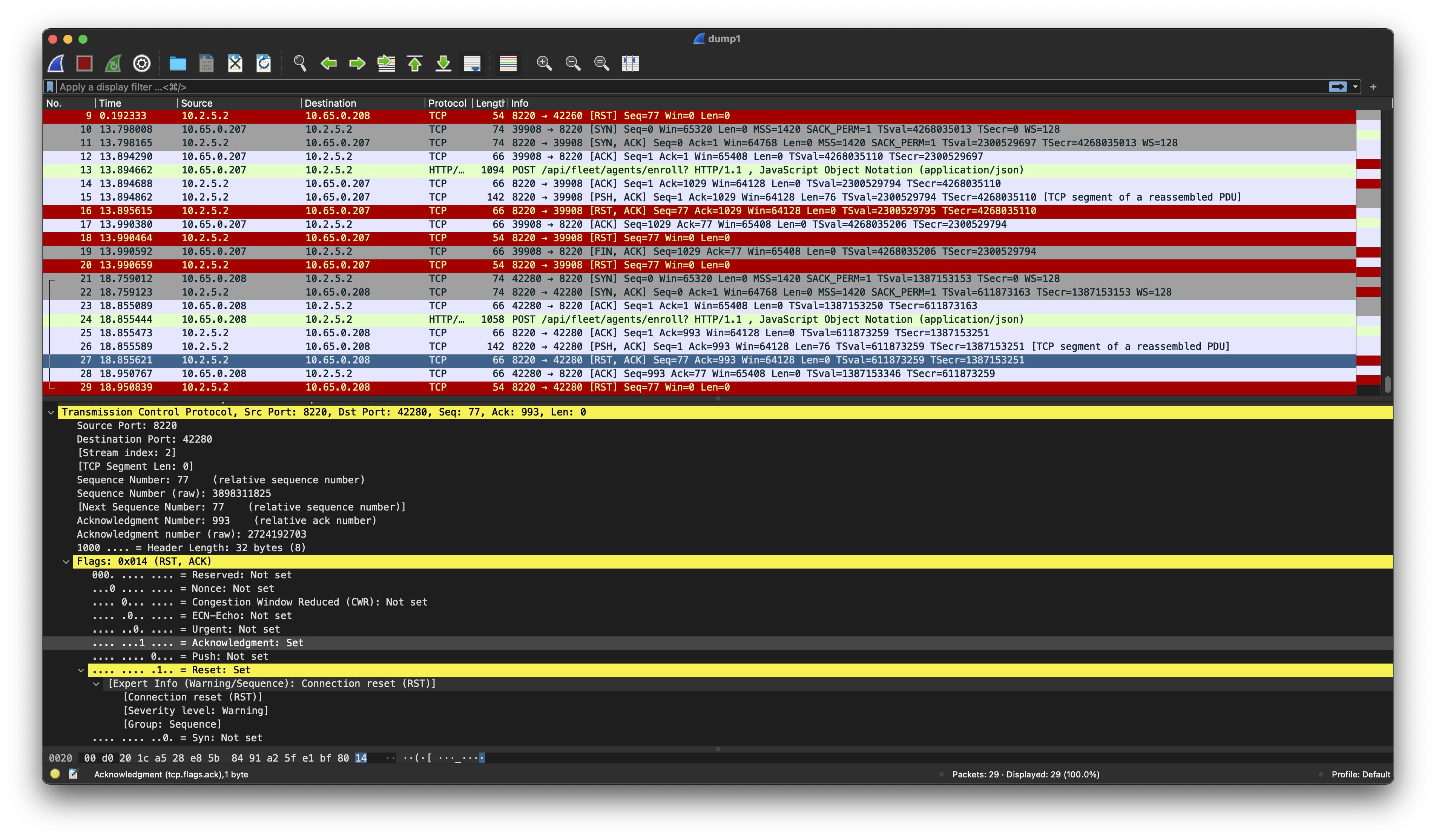
But when I'm trying to connect another ELK Agent, the Fleet server refuse it

Iptables is ok (not using it because of cloud infra), the port is open
My infra hosted in the GCP
The firewall has been configured to allow connections inside the local network from target hosts to the fleet server.
If I make `curl -k https://FLEET_SERVER:8220/api/status` from the target machine to fleet
I’ll get `{"name":"fleet-server","status":"HEALTHY"}`
So it has a connect to the fleet, I think, am I?
what is the problem? or maybe you have any advice?
Because now I have no idea at all.
Also I've made tcpdump from two different host. maybe it'll be useful (can't attach the dump file)

Thank you for any help!
---
### Author:  [@zx8086](https://discuss.elastic.co/u/zx8086)
#### Post date: [October 12, 2021, 8:37am UTC](https://discuss.elastic.co/t/cant-connect-hosts-to-the-fleet-server/286450/2 "2021-10-12T08:37:03Z")
Hi @Dmitriy_Esin
Have you tried https and / or enrolling with the --insecure flag ?
Also why are you running it standalone?
---
### Author:  [@Dmitriy\_Esin](https://discuss.elastic.co/u/Dmitriy_Esin)
#### Post date: [October 12, 2021, 8:56am UTC](https://discuss.elastic.co/t/cant-connect-hosts-to-the-fleet-server/286450/3 "2021-10-12T08:56:08Z")
Hi @zx8086!
Yes, I've used `--insecure flag` with this command:
`sudo ./elastic-agent install -f --url=http://FLEET_SERVER_HOST --enrollment-token=TOKEN --insecure`
It's how I've installed Fleet Server
`sudo ./elastic-agent install -f --url=http://FLEET_SERVER_HOST:8220 --fleet-server-es=https://ELK_SERVER_HOST:9200 --fleet-server-es-ca=/path_to/elastic.pem --fleet-server-service-token=TOKEN`
Why standalone? Hmm, it's enrolled in Kubernetes cluster with terraform before I came. It's not the cloud version provided by Elastic, I know.
---
### Author:  [@zx8086](https://discuss.elastic.co/u/zx8086)
#### Post date: [October 12, 2021, 9:01am UTC](https://discuss.elastic.co/t/cant-connect-hosts-to-the-fleet-server/286450/4 "2021-10-12T09:01:47Z")
I now see self-managed and thought it was standalone, misread.
What error are you getting ?
---
### Author:  [@Dmitriy\_Esin](https://discuss.elastic.co/u/Dmitriy_Esin)
#### Post date: [October 12, 2021, 9:34am UTC](https://discuss.elastic.co/t/cant-connect-hosts-to-the-fleet-server/286450/5 "2021-10-12T09:34:42Z")
@zx8086 As I said, I got this error when trying to enroll ELK Agent with Endpoint Security and System integrations.

But If I make `curl -k https://FLEET_SERVER:8220/api/status` from the target machine to Fleet Server I’ll get `{"name":"fleet-server","status":"HEALTHY"}`.
Fleet doesn't reject/reset my connection.
---
### Author:  [@zx8086](https://discuss.elastic.co/u/zx8086)
#### Post date: [October 12, 2021, 9:50am UTC](https://discuss.elastic.co/t/cant-connect-hosts-to-the-fleet-server/286450/6 "2021-10-12T09:50:47Z")
You are not enrolling with the correct protocol.
Use https instead of http.
Same as you are doing with the api check. HTTPS
---
### Author:  [@Dmitriy\_Esin](https://discuss.elastic.co/u/Dmitriy_Esin)
#### Post date: [October 12, 2021, 10:12am UTC](https://discuss.elastic.co/t/cant-connect-hosts-to-the-fleet-server/286450/7 "2021-10-12T10:12:57Z")
@zx8086 Oh, God!
Thank you so much!
My bad.
Now it works!
---
### Author:  [@Dmitriy\_Esin](https://discuss.elastic.co/u/Dmitriy_Esin)
#### Post date: [October 12, 2021, 10:25am UTC](https://discuss.elastic.co/t/cant-connect-hosts-to-the-fleet-server/286450/8 "2021-10-12T10:25:21Z")
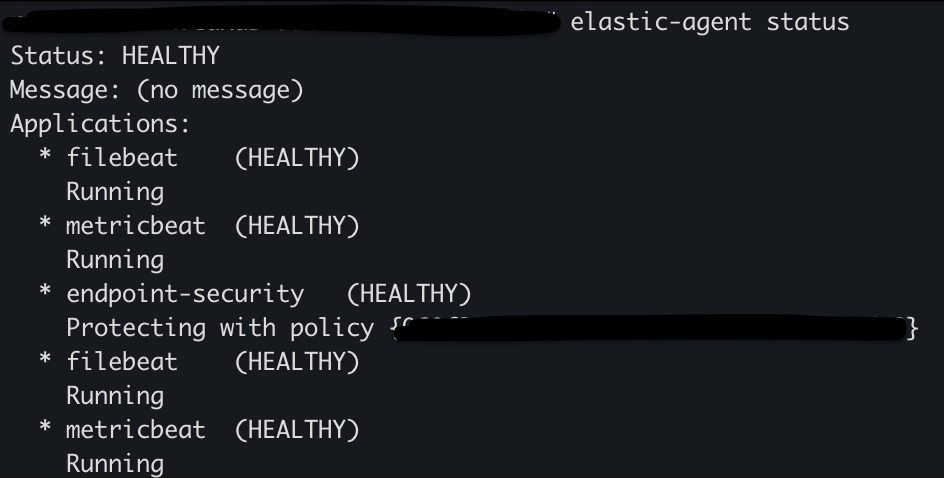
@zx8086 sorry, maybe you know why the elastic agent has gone offline after being successfully installed?

---
### Author:  [@Dmitriy\_Esin](https://discuss.elastic.co/u/Dmitriy_Esin)
#### Post date: [October 12, 2021, 10:30am UTC](https://discuss.elastic.co/t/cant-connect-hosts-to-the-fleet-server/286450/9 "2021-10-12T10:30:59Z")
I see this in logs
```auto
{"log.level":"error","@timestamp":"2021-10-12T10:22:39.984Z","log.origin":{"file.name":"fleet/fleet_gateway.go","file.line":205},"message":"Could not communicate with fleet-server Checking API will retry, error: fail to read original error: read tcp 10.65.0.207:45518->10.2.5.2:8220: read: connection reset by peer","ecs.version":"1.6.0"}
```
---
### Author:  [@Dmitriy\_Esin](https://discuss.elastic.co/u/Dmitriy_Esin)
#### Post date: [October 12, 2021, 10:32am UTC](https://discuss.elastic.co/t/cant-connect-hosts-to-the-fleet-server/286450/10 "2021-10-12T10:32:17Z")
But when I make `curl -k https://10.2.5.2:8220/api/status` I still get OK status `{"name":"fleet-server","status":"HEALTHY"}`
---
### Author:  [@zx8086](https://discuss.elastic.co/u/zx8086)
#### Post date: [October 12, 2021, 10:47am UTC](https://discuss.elastic.co/t/cant-connect-hosts-to-the-fleet-server/286450/11 "2021-10-12T10:47:06Z")
> [@Dmitriy\_Esin](#):
>
> @zx8086 sorry, maybe you know why the elastic agent has gone offline after being successfully installed?
Maybe communication between the Server and Host, did they all initialize and go Healthy before ?
---
### Author:  [@Dmitriy\_Esin](https://discuss.elastic.co/u/Dmitriy_Esin)
#### Post date: [October 12, 2021, 10:56am UTC](https://discuss.elastic.co/t/cant-connect-hosts-to-the-fleet-server/286450/12 "2021-10-12T10:56:06Z")
@zx8086 Yes, it was healthy before.
so, I've unenrolled all agents and the fleet server and want to start it from the beginning.
Earlier I've used this command to install a fleet server (with HTTP), which was successful.
```auto
sudo ./elastic-agent install -f --url=http://10.2.5.2:8220 --fleet-server-es=https://ELK_HOWT:9200 --fleet-server-es-ca=/root/ca/elastic.pem --fleet-server-service-token=TOKEN
```
but now I use this command (with HTTPS)
```auto
sudo ./elastic-agent install -f --url=https://10.2.5.2:8220 --fleet-server-es=https://ELK_HOWT:9200 --fleet-server-es-ca=/root/ca/elastic.pem --fleet-server-service-token=TOKEN
```
and got this message
```auto
2021-10-12T10:47:29.604Z INFO cmd/enroll_cmd.go:354 Generating self-signed certificate for Fleet Server
2021-10-12T10:47:32.036Z INFO cmd/enroll_cmd.go:668 Waiting for Elastic Agent to start Fleet Server
2021-10-12T10:47:33.037Z INFO cmd/enroll_cmd.go:651 Waiting for Elastic Agent to start
2021-10-12T10:47:35.101Z INFO cmd/enroll_cmd.go:701 Fleet Server - Starting
2021-10-12T10:47:37.104Z INFO cmd/enroll_cmd.go:682 Fleet Server - Running on default policy with Fleet Server integration; missing config fleet.agent.id (expected during bootstrap process)
2021-10-12T10:47:37.690Z INFO cmd/enroll_cmd.go:414 Starting enrollment to URL: https://jumphost:8220/
Error: fail to enroll: fail to execute request to fleet-server: fail to decode enrollment response: context canceled
Error: enroll command failed with exit code: 1
```
if use installation command with HTTP, it'll be successfully installed and being healthy
I think maybe my previous way of installation (with HTTP) was wrong and it is why agents have no API connection to the fleet.
---
### Author:  [@zx8086](https://discuss.elastic.co/u/zx8086)
#### Post date: [October 12, 2021, 11:07am UTC](https://discuss.elastic.co/t/cant-connect-hosts-to-the-fleet-server/286450/13 "2021-10-12T11:07:18Z")
I would start from scratch for the server and the agents all on https and make sure your fleet settings is correct as well, to the correct protocol HTTPS

---
### Author:  [@Dmitriy\_Esin](https://discuss.elastic.co/u/Dmitriy_Esin)
#### Post date: [October 12, 2021, 11:13am UTC](https://discuss.elastic.co/t/cant-connect-hosts-to-the-fleet-server/286450/14 "2021-10-12T11:13:20Z")
@zx8086 yes, all is correct

---
### Author:  [@zx8086](https://discuss.elastic.co/u/zx8086)
#### Post date: [October 12, 2021, 11:20am UTC](https://discuss.elastic.co/t/cant-connect-hosts-to-the-fleet-server/286450/15 "2021-10-12T11:20:33Z")
> [@Dmitriy\_Esin](#):
>
> ```auto
> 2021-10-12T10:47:37.690Z INFO cmd/enroll_cmd.go:414 Starting enrollment to URL: https://jumphost:8220/
>
> ```
Could be your DNS ? Is jumphost a reachable DNS address from the agents ?
---
### Author:  [@Dmitriy\_Esin](https://discuss.elastic.co/u/Dmitriy_Esin)
#### Post date: [October 12, 2021, 11:39am UTC](https://discuss.elastic.co/t/cant-connect-hosts-to-the-fleet-server/286450/17 "2021-10-12T11:39:19Z")
@zx8086 okay, my bad again, added it in /etc/hosts to agent instances.
but installation on the target instance still fail (fleet server)
---
### Author:  [@zx8086](https://discuss.elastic.co/u/zx8086)
#### Post date: [October 12, 2021, 11:43am UTC](https://discuss.elastic.co/t/cant-connect-hosts-to-the-fleet-server/286450/18 "2021-10-12T11:43:54Z")
i would recommend using the same IP Address or DNS for the Fleet setting, the enrollment URL and connecting to the hosts. They are mismatched right now and therefore you bring in the element of having to troubleshoot your own network layers.
Use the same url everywhere.
---
### Author:  [@Dmitriy\_Esin](https://discuss.elastic.co/u/Dmitriy_Esin)
#### Post date: [October 13, 2021, 11:26am UTC](https://discuss.elastic.co/t/cant-connect-hosts-to-the-fleet-server/286450/19 "2021-10-13T11:26:17Z")
@zx8086 okay, will try!
Thank you for your help!
You are awesome!
---
### Author:  [@system](https://discuss.elastic.co/u/system)
#### Post date: [November 10, 2021, 1:26pm UTC](https://discuss.elastic.co/t/cant-connect-hosts-to-the-fleet-server/286450/20 "2021-11-10T13:26:55Z")
This topic was automatically closed 28 days after the last reply. New replies are no longer allowed.