# Can't generate reports - Error: Unable to grant an API Key, request does not contain an authorization header
**URL:** https://discuss.elastic.co/t/cant-generate-reports-error-unable-to-grant-an-api-key-request-does-not-contain-an-authorization-header/383385
**Category:** Kibana
**Created:** [November 12, 2025, 10:12am UTC](https://discuss.elastic.co/t/cant-generate-reports-error-unable-to-grant-an-api-key-request-does-not-contain-an-authorization-header/383385 "2025-11-12T10:12:37Z")
**Posts on this page:** 2
**Page:** 1
### Author:  [@stmx38](https://discuss.elastic.co/u/stmx38)
#### Post date: [November 12, 2025, 10:12am UTC](https://discuss.elastic.co/t/cant-generate-reports-error-unable-to-grant-an-api-key-request-does-not-contain-an-authorization-header/383385/1 "2025-11-12T10:12:37Z")
Hello,
We recently observed that we can’t generate reports in Kibana and get the following error
> Unable to create report
>
> Unable to grant an API Key, request does not contain an authorization header

We are using ELK 9.2.1 and anonymous access behind Nginx Ingress
**Elasticsearch**
```yaml
config:
xpack.security.authc:
anonymous:
username: anonymous
# username: _es_anonymous_user
roles: superuser, kibana_admin
# roles: superuser, kibana_admin, kibana_system, watcher_admin
authz_exception: true
```
**Kibana**
```yaml
config:
xpack.security.authc.selector.enabled: false
xpack.security.authc.providers:
anonymous.anonymous1:
order: 0
credentials: elasticsearch_anonymous_user
```
We do not use that feature so often, but it worked when we were on ELK 8.x and probably didn't notice when it breaks.
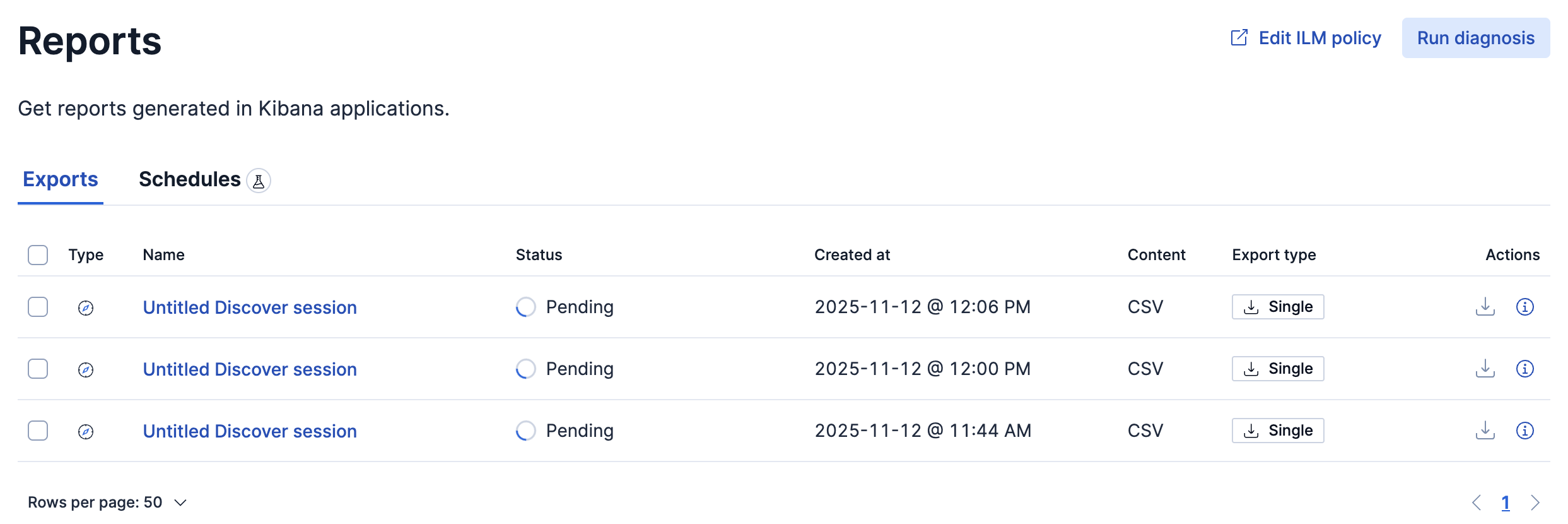
At the same time, something is created under the Reports, but newer finished
> **Kibana logs**
>
> ```auto
> [2025-11-12T10:28:26.326+00:00][ERROR][plugins.reporting] Error: Unable to grant an API Key, request does not contain an authorization header
> at APIKeys.grantAsInternalUser (/usr/share/kibana/node_modules/@kbn/security-plugin/server/authentication/api_keys/api_keys.js:212:13)
> at Object.grantAsInternalUser (/usr/share/kibana/node_modules/@kbn/security-plugin/server/build_delegate_apis.js:26:76)
> at createApiKey (/usr/share/kibana/node_modules/@kbn/task-manager-plugin/server/lib/api_key_utils.js:73:61)
> at processTicksAndRejections (node:internal/process/task_queues:105:5)
> at getApiKeyAndUserScope (/usr/share/kibana/node_modules/@kbn/task-manager-plugin/server/lib/api_key_utils.js:106:29)
> at TaskStore.getApiKeyFromRequest (/usr/share/kibana/node_modules/@kbn/task-manager-plugin/server/task_store.js:125:28)
> at TaskStore.schedule (/usr/share/kibana/node_modules/@kbn/task-manager-plugin/server/task_store.js:194:36)
> at TaskScheduling.schedule (/usr/share/kibana/node_modules/@kbn/task-manager-plugin/server/task_scheduling.js:60:12)
> at RunSingleReportTask.scheduleTask (/usr/share/kibana/node_modules/@kbn/reporting-plugin/server/lib/tasks/run_single_report.js:121:39)
> at ReportingCore.scheduleTask (/usr/share/kibana/node_modules/@kbn/reporting-plugin/server/core.js:294:12)
> at GenerateRequestHandler.enqueueJob (/usr/share/kibana/node_modules/@kbn/reporting-plugin/server/routes/common/request_handler/generate_request_handler.js:95:18)
> at GenerateRequestHandler.handleRequest (/usr/share/kibana/node_modules/@kbn/reporting-plugin/server/routes/common/request_handler/generate_request_handler.js:120:16)
> at /usr/share/kibana/node_modules/@kbn/reporting-plugin/server/routes/internal/generate/generate_from_jobparams.js:53:16
> at handle (/usr/share/kibana/node_modules/@kbn/core-http-router-server-internal/src/route.js:126:26)
> at handler (/usr/share/kibana/node_modules/@kbn/core-http-router-server-internal/src/route.js:47:14)
> at Router.handle (/usr/share/kibana/node_modules/@kbn/core-http-router-server-internal/src/router.js:141:30)
> at /usr/share/kibana/node_modules/@kbn/core-http-router-server-internal/src/router.js:123:51
> at exports.Manager.execute (/usr/share/kibana/node_modules/@hapi/hapi/lib/toolkit.js:60:28)
> at Object.internals.handler (/usr/share/kibana/node_modules/@hapi/hapi/lib/handler.js:46:20)
> at exports.execute (/usr/share/kibana/node_modules/@hapi/hapi/lib/handler.js:31:20)
> at Request._lifecycle (/usr/share/kibana/node_modules/@hapi/hapi/lib/request.js:370:32)
> at Request._execute (/usr/share/kibana/node_modules/@hapi/hapi/lib/request.js:280:9)
>
> ```
## Related docs
- [Anonymous access | Elastic Docs](https://www.elastic.co/docs/deploy-manage/users-roles/cluster-or-deployment-auth/anonymous-access)
- [Authentication in Kibana | Elastic Docs](https://www.elastic.co/docs/deploy-manage/users-roles/cluster-or-deployment-auth/kibana-authentication#anonymous-authentication)
## Similar questions
- [Unable to grant an API Key, request does not contain an authorization header](https://discuss.elastic.co/t/unable-to-grant-an-api-key-request-does-not-contain-an-authorization-header/274956/1)
- [Unable to grant an API Key, request does not contain an authorization header · Issue #101448 · elastic/kibana · GitHub](https://github.com/elastic/kibana/issues/101448)
---
### Author:  [@stmx38](https://discuss.elastic.co/u/stmx38)
#### Post date: [November 12, 2025, 11:31am UTC](https://discuss.elastic.co/t/cant-generate-reports-error-unable-to-grant-an-api-key-request-does-not-contain-an-authorization-header/383385/2 "2025-11-12T11:31:50Z")
The issue could be solved in the following way, based on [Authentication in Kibana/Anonymous authentication](https://www.elastic.co/docs/deploy-manage/users-roles/cluster-or-deployment-auth/kibana-authentication#anonymous-authentication) documentation
1. Create a user in Kibana: `Stack Management --> Users --> Create user`
- Privileges: `kibana_admin, superuser`
2. Update `kibana.yaml`
```yaml
xpack.security.authc.providers:
anonymous.anonymous1:
order: 0
credentials:
username: "created_anonymous_service_account"
password: "created_anonymous_service_account_password"
```
But the question is still relevant
> How to make reporting working using a default enabled anonymous access?