# Canvas kibana
**URL:** https://discuss.elastic.co/t/canvas-kibana/259230
**Category:** Kibana
**Created:** [December 21, 2020, 8:04am UTC](https://discuss.elastic.co/t/canvas-kibana/259230 "2020-12-21T08:04:18Z")
**Posts on this page:** 6
**Page:** 1
### Author:  [@salma\_widiarti](https://discuss.elastic.co/u/salma_widiarti)
#### Post date: [December 21, 2020, 8:04am UTC](https://discuss.elastic.co/t/canvas-kibana/259230/1 "2020-12-21T08:04:18Z")
Hi all,
I want to create data like this in canvas kibana

And this is my query essql
```auto
SELECT (labels.money::int) as a FROM "apm-*" WHERE labels.status = 'PAID'
```
When I preview the result the data type is already numeric

I have made the display value according to the alias
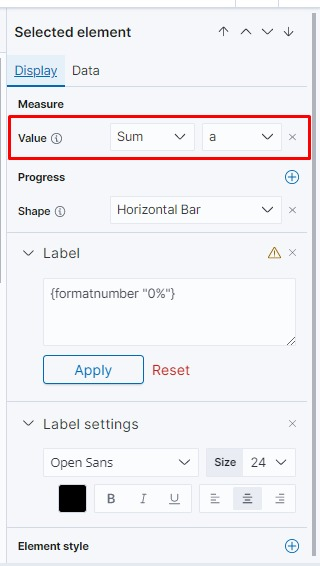
but why the result like this

Any one can help me?
---
### Author:  [@flash1293](https://discuss.elastic.co/u/flash1293)
#### Post date: [December 21, 2020, 9:29am UTC](https://discuss.elastic.co/t/canvas-kibana/259230/2 "2020-12-21T09:29:05Z")
This element requires a value between 0 and 1 to show a percentage, but as you can see in your table screenshot, your data is way bigger than 1. For the values shown in the table, what percentage would you expect to show?
---
### Author:  [@salma\_widiarti](https://discuss.elastic.co/u/salma_widiarti)
#### Post date: [December 21, 2020, 12:21pm UTC](https://discuss.elastic.co/t/canvas-kibana/259230/3 "2020-12-21T12:21:42Z")
Actually I don't want to show data with percentage, I want to show the sum data table screnshoot (641,140,000)
---
### Author:  [@flash1293](https://discuss.elastic.co/u/flash1293)
#### Post date: [December 21, 2020, 12:52pm UTC](https://discuss.elastic.co/t/canvas-kibana/259230/4 "2020-12-21T12:52:51Z")
If you select the element, on the right side you can click the "add" icon in the "Progress" section, then select "Maximum value". There you can set the maximum value to something besides 1:
 
---
### Author:  [@salma\_widiarti](https://discuss.elastic.co/u/salma_widiarti)
#### Post date: [December 22, 2020, 5:52am UTC](https://discuss.elastic.co/t/canvas-kibana/259230/5 "2020-12-22T05:52:25Z")
Thanks flash1293, your solution is worked..
---
### Author:  [@system](https://discuss.elastic.co/u/system)
#### Post date: [January 19, 2021, 5:52am UTC](https://discuss.elastic.co/t/canvas-kibana/259230/6 "2021-01-19T05:52:44Z")
This topic was automatically closed 28 days after the last reply. New replies are no longer allowed.