# Character encoding problem in output
**URL:** https://discuss.elastic.co/t/character-encoding-problem-in-output/381072
**Category:** Logstash
**Created:** [August 15, 2025, 12:30pm UTC](https://discuss.elastic.co/t/character-encoding-problem-in-output/381072 "2025-08-15T12:30:49Z")
**Posts on this page:** 4
**Page:** 1
### Author:  [@elainesoucy](https://discuss.elastic.co/u/elainesoucy)
#### Post date: [August 15, 2025, 12:30pm UTC](https://discuss.elastic.co/t/character-encoding-problem-in-output/381072/1 "2025-08-15T12:30:49Z")
Hello,
I'm having a character encoding problem. I have a .ndjson file in UTF-8 encoding. For some reason I can't understand, even though I explicitly specify UTF-8 encoding in the input file, the output contains misinterpreted characters. Here's my logstash configuration:
```auto
input {
file {
path => ["/etc/logstash/conf.d/qoreultima/events/events.ndjson"]
start_position => "beginning"
sincedb_path => "/dev/null"
codec => json {
target => "evenement"
charset => "UTF-8"
}
}
}
filter {
mutate {
gsub => ["[evenement][EventDate]", '(\d{4}-\d{2}-\d{2})T.*', '\1']
remove_field => ["event", "log"]
}
date {
match => ["[evenement][EventDateAndTime]", "yyyy-MM-dd HH:mm:ss" ]
timezone => "America/Montreal"
target => "@timestamp"
}
}
output {
elasticsearch {
hosts => ['https://someserver:9200']
data_stream => "true"
data_stream_type => "logs"
data_stream_dataset => "logstash.qoreultima"
user => "user"
password => "password"
ssl_certificate_authorities => ["/some/path/cert.crt"]
ssl_verification_mode => "full"
ecs_compatibility => v8
}
}
```
Here is a preview of the input file ( :
```auto
{"EventID":1,"EventDate":"2023-11-22T00:00:00","EventTime":"08:33:30","EventLoggedBy":"Unknow User","EventAction":"Accès refusé","EventEntityID":null,"EventDescription":"Accès refusé","EventQueries":"Accès refusé","EventLang":"FR","EventIpAddress":null,"EventDateAndTime":"2023-11-22 08:33:30"}
{"EventID":2,"EventDate":"2023-11-22T00:00:00","EventTime":"08:33:30","EventLoggedBy":"Unknow User","EventAction":"Accès refusé","EventEntityID":null,"EventDescription":"Accès refusé","EventQueries":"Accès refusé","EventLang":"FR","EventIpAddress":null,"EventDateAndTime":"2023-11-22 08:33:30"}
{"EventID":3,"EventDate":"2023-11-22T00:00:00","EventTime":"08:33:31","EventLoggedBy":"Administrateur (ADMIN)","EventAction":"Connexion réussie à l'application","EventEntityID":null,"EventDescription":"Connexion réussie à l'application","EventQueries":"Connexion réussie à l'application","EventLang":"FR","EventIpAddress":null,"EventDateAndTime":"2023-11-22 08:33:31"}
```
Here’s the output of the command _file -bi /some/path/events/events.ndjson_ on my file :
text/plain; charset=utf-8
When querying in Kibana, _Accès refusé_ become

The other character (é à …) also have problem to be displayed correctly.
Do someone have an idea of what could be the problem ?
Thanks a lot
---
### Author:  [@Tortoise](https://discuss.elastic.co/u/Tortoise)
#### Post date: [August 16, 2025, 4:29am UTC](https://discuss.elastic.co/t/character-encoding-problem-in-output/381072/2 "2025-08-16T04:29:39Z")
Hello @elainesoucy
Welcome to the Community!!
I have tried the input lines /conf file provided by you & do not see any issue :
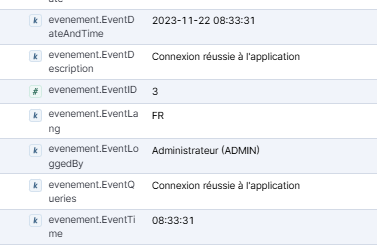
This means the issue is with the input file type at your end.
While searching found below method to review the input file :
hexdump -C test.log | grep 'c3 a9'
```auto
hexdump -C test.log | grep 'c3 a9'
000000b0 a8 73 20 72 65 66 75 73 c3 a9 22 2c 22 45 76 65 |.s refus..","Eve|
000000d0 a8 73 20 72 65 66 75 73 c3 a9 22 2c 22 45 76 65 |.s refus..","Eve|
000001a0 22 41 63 63 c3 a8 73 20 72 65 66 75 73 c3 a9 22 |"Acc..s refus.."|
000001e0 20 72 65 66 75 73 c3 a9 22 2c 22 45 76 65 6e 74 | refus..","Event|
00000200 20 72 65 66 75 73 c3 a9 22 2c 22 45 76 65 6e 74 | refus..","Event|
000002e0 69 6f 6e 20 72 c3 a9 75 73 73 69 65 20 c3 a0 20 |ion r..ussie .. |
00000330 6e 20 72 c3 a9 75 73 73 69 65 20 c3 a0 20 6c 27 |n r..ussie .. l'|
00000360 6e 65 78 69 6f 6e 20 72 c3 a9 75 73 73 69 65 20 |nexion r..ussie |
00000450 3a 22 43 6f 6e 6e 65 78 69 6f 6e 20 72 c3 a9 75 |:"Connexion r..u|
000004a0 43 6f 6e 6e 65 78 69 6f 6e 20 72 c3 a9 75 73 73 |Connexion r..uss|
000004e0 c3 a9 75 73 73 69 65 20 c3 a0 20 6c 27 61 70 70 |..ussie .. l'app|
```
this proves the `test.log` **is UTF-8 encoded** :
- `é` appears as `c3 a9`
- `à` appears as `c3 a0`
- `è` appears as `c3 a8`
Difference between file :
UTF-8 é → c3 a9
Latin-1/CP1252 é → e9
Thanks!!
---
### Author:  [@Badger](https://discuss.elastic.co/u/Badger)
#### Post date: [August 17, 2025, 2:27pm UTC](https://discuss.elastic.co/t/character-encoding-problem-in-output/381072/3 "2025-08-17T14:27:35Z")
> [@Tortoise](#):
>
> UTF-8 é → c3 a9
> Latin-1/CP1252 é → e9
Indeed. The two bytes c3 a9 encode é in UTF-8, but they encode é in CP1252. Likewise, c3 a8 (è in UTF-8) represents Ô in CP1252.
---
### Author:  [@elainesoucy](https://discuss.elastic.co/u/elainesoucy)
#### Post date: [August 19, 2025, 8:05pm UTC](https://discuss.elastic.co/t/character-encoding-problem-in-output/381072/4 "2025-08-19T20:05:20Z")
Thank you very much for your replies!
I took the time to analyze what you told me, and after further investigation, I realized that my input file had exactly the correct encoding (using the hexdump command).
However, the output file contained additional bytes, and therefore some characters were encoded twice.
This is my original file :
```auto
hexdump -C events.ndjson | grep "72 c3 a9 75"
000002e0 6e 20 72 c3 a9 75 73 73 69 65 20 c3 a0 20 6c 27 |n r..ussie .. l'|
```
I add a file ouput plugin in my logstash configuration to output everything in a file _output.log_
This is my output file :
```auto
[root@server3 events]# hexdump -C output.log | grep "72 c3 83 c2 a9 75"
00000030 6e 6e 65 78 69 6f 6e 20 72 c3 83 c2 a9 75 73 73 |nnexion r....uss|
```
As you can see, two byte (83 c2) are added between _72 c3_ and _a9 75_.
My current version of logstash is 8.15.4
I found this issue : [Character encoding issues with refactored `BufferedTokenizerExt` · Issue #16694 · elastic/logstash](https://github.com/elastic/logstash/issues/16694)
So I installed a newer version of Logstash (8.17.10), and tried my setup again. Now everything works and I don’t have any issue with encoding anymore.