# Compute ctr with more than one doc in Kibana
**URL:** https://discuss.elastic.co/t/compute-ctr-with-more-than-one-doc-in-kibana/116202
**Category:** Kibana
**Created:** [January 19, 2018, 9:45am UTC](https://discuss.elastic.co/t/compute-ctr-with-more-than-one-doc-in-kibana/116202 "2018-01-19T09:45:56Z")
**Posts on this page:** 13
**Page:** 1
### Author:  [@Jens\_Fliege](https://discuss.elastic.co/u/Jens_Fliege)
#### Post date: [January 19, 2018, 9:45am UTC](https://discuss.elastic.co/t/compute-ctr-with-more-than-one-doc-in-kibana/116202/1 "2018-01-19T09:45:56Z")
Hi there,
I've got an es-index with metrics (like sessions, clicks and so on) and would like to compute a clickthrough rate in different date ranges.
I have seen that Kibana has a feature called scripted fields. But they are doing formula stuff like
`doc['clicks'].sum() / doc['pageviews'].sum() * 100`
only inside a single doc.
Is there a way to compute metrics in a range of docs? I've heard that timelion has got a feature like this but I would like to get a table as a visualisation result.
---
### Author:  [@Bargs](https://discuss.elastic.co/u/Bargs)
#### Post date: [January 19, 2018, 3:51pm UTC](https://discuss.elastic.co/t/compute-ctr-with-more-than-one-doc-in-kibana/116202/2 "2018-01-19T15:51:03Z")
Not possible in core Kibana at the moment. You would need support for the [bucket script aggregation](https://github.com/elastic/kibana/issues/4707). You might be able to achieve what you want with [TSVB](https://www.elastic.co/guide/en/kibana/current/time-series-visual-builder.html). A [table visualization](https://github.com/elastic/kibana/pull/12813) was added to it in version 6.1 of Kibana.
---
### Author:  [@Jens\_Fliege](https://discuss.elastic.co/u/Jens_Fliege)
#### Post date: [January 19, 2018, 4:43pm UTC](https://discuss.elastic.co/t/compute-ctr-with-more-than-one-doc-in-kibana/116202/3 "2018-01-19T16:43:49Z")
Thanks @Bargs I thought so all along.
---
### Author:  [@Jens\_Fliege](https://discuss.elastic.co/u/Jens_Fliege)
#### Post date: [January 22, 2018, 10:45am UTC](https://discuss.elastic.co/t/compute-ctr-with-more-than-one-doc-in-kibana/116202/4 "2018-01-22T10:45:52Z")
Hi @Bargs,
I'm a little bit confused, Is the „Bucket Script Aggregation“ just part of the Time Series Visual Builder or can I use it in 6.1 with a standard table visualization? If I can do it only in Time Series maybe you have an example how to declare a formula like this one?
`doc['clicks'].sum() / doc['pageviews'].sum() * 100`
Cheers
Jens
---
### Author:  [@Bargs](https://discuss.elastic.co/u/Bargs)
#### Post date: [January 22, 2018, 4:13pm UTC](https://discuss.elastic.co/t/compute-ctr-with-more-than-one-doc-in-kibana/116202/5 "2018-01-22T16:13:26Z")
It's only available in Time Series Visual Builder. Here's an example of how you can set up the metric you're looking for:

Unfortunately I discovered a bug in the way dates are displayed in TSVB's table vis, so I've created a ticket for that here: [https://github.com/elastic/kibana/issues/16202](https://github.com/elastic/kibana/issues/16202)
---
### Author:  [@Jens\_Fliege](https://discuss.elastic.co/u/Jens_Fliege)
#### Post date: [January 22, 2018, 5:22pm UTC](https://discuss.elastic.co/t/compute-ctr-with-more-than-one-doc-in-kibana/116202/6 "2018-01-22T17:22:45Z")
Thank you, @Bargs, very usefull screenshot for a start in Time Series Visual Builder.
---
### Author:  [@Jens\_Fliege](https://discuss.elastic.co/u/Jens_Fliege)
#### Post date: [January 28, 2018, 7:22pm UTC](https://discuss.elastic.co/t/compute-ctr-with-more-than-one-doc-in-kibana/116202/7 "2018-01-28T19:22:12Z")
Hi @Bargs
I'm now on 6.1.2 in a local instance of Elasticsearch/Kibana and was able to post some test data via curl into an index. Then I was trying to reproduce your screenshot, but I couldn't find a „Calculation“ Aggregation. Can you tell me where to find it? Is it in Parent Aggregation?

Cheers
Jens
---
### Author:  [@Bargs](https://discuss.elastic.co/u/Bargs)
#### Post date: [January 29, 2018, 3:17pm UTC](https://discuss.elastic.co/t/compute-ctr-with-more-than-one-doc-in-kibana/116202/8 "2018-01-29T15:17:05Z")
Sorry, that screenshot was from a build of master where the name has changed. You're looking for the `Bucket Script` aggregation.
---
### Author:  [@Jens\_Fliege](https://discuss.elastic.co/u/Jens_Fliege)
#### Post date: [January 29, 2018, 5:19pm UTC](https://discuss.elastic.co/t/compute-ctr-with-more-than-one-doc-in-kibana/116202/9 "2018-01-29T17:19:20Z")
Got it, thanks @Bargs
Visualisation now looks like this, but without a painless calculated sum, it's just zero:

When i create a „normal“ table, all values are shown:
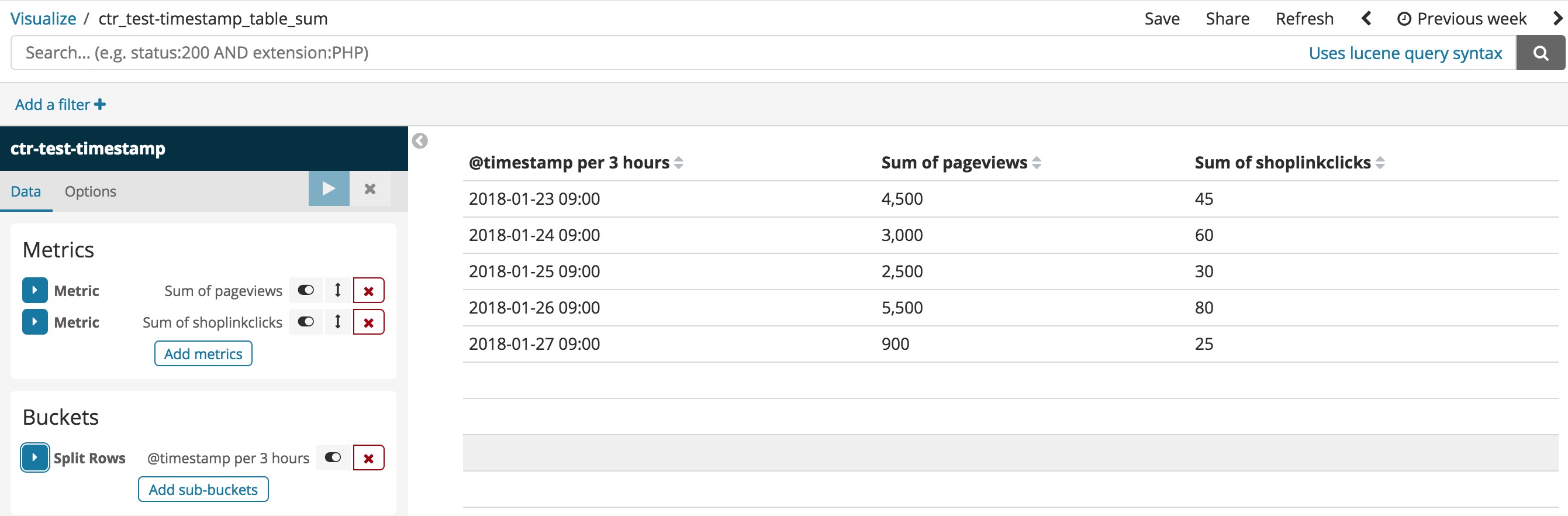
Do you know why?
---
### Author:  [@Bargs](https://discuss.elastic.co/u/Bargs)
#### Post date: [January 29, 2018, 5:35pm UTC](https://discuss.elastic.co/t/compute-ctr-with-more-than-one-doc-in-kibana/116202/10 "2018-01-29T17:35:20Z")
The TSVB table is showing you the "latest value" (the value from the last bucket of the date histogram for your given time range) whereas the core table vis is showing you the totals for the entire time range (in this case, the "Previous week" selected in the timepicker). In TSVB if you want to sum up all the values for the last week, you can go into the Panel Options tab and change the time interval to be one week (you might also have to switch the "Drop Last Bucket" option to "No").
---
### Author:  [@Jens\_Fliege](https://discuss.elastic.co/u/Jens_Fliege)
#### Post date: [January 29, 2018, 6:10pm UTC](https://discuss.elastic.co/t/compute-ctr-with-more-than-one-doc-in-kibana/116202/11 "2018-01-29T18:10:22Z")
It works, @Bargs Great!

The thing with the time interval is a little bit strange. Why do I have to enter a parameter like 10d in „Interval“ to get the time range I already have defined in the time picker? „auto“ in this field should do the trick.
---
### Author:  [@Bargs](https://discuss.elastic.co/u/Bargs)
#### Post date: [January 29, 2018, 7:18pm UTC](https://discuss.elastic.co/t/compute-ctr-with-more-than-one-doc-in-kibana/116202/12 "2018-01-29T19:18:07Z")
Nice!
I agree that TSVB's interaction with the timepicker is a bit confusing, at the very least it should explain what's happening a bit better. There's an [open GH ticket](https://github.com/elastic/kibana/issues/13730) for that if you want to give it a 👍 or add your own thoughts.
---
### Author:  [@system](https://discuss.elastic.co/u/system)
#### Post date: [February 26, 2018, 7:18pm UTC](https://discuss.elastic.co/t/compute-ctr-with-more-than-one-doc-in-kibana/116202/13 "2018-02-26T19:18:09Z")
This topic was automatically closed 28 days after the last reply. New replies are no longer allowed.