# Confused by --fleet-server-es-cert\* flags
**URL:** https://discuss.elastic.co/t/confused-by-fleet-server-es-cert-flags/383546
**Category:** Elastic Agent
**Tags:** fleet
**Created:** [November 20, 2025, 4:24am UTC](https://discuss.elastic.co/t/confused-by-fleet-server-es-cert-flags/383546 "2025-11-20T04:24:22Z")
**Posts on this page:** 4
**Page:** 1
### Author:  [@learningelastic](https://discuss.elastic.co/u/learningelastic)
#### Post date: [November 20, 2025, 4:24am UTC](https://discuss.elastic.co/t/confused-by-fleet-server-es-cert-flags/383546/1 "2025-11-20T04:24:22Z")
So can someone clarify for me how these flags are used: `--fleet-server-es-cert*, --fleet-server-es-ca, --fleet-server-client-auth` ?
For example, let’s say I ran this command on my linux server 192.168.0.2 to turn it into a fleet server:
```auto
cd elastic-agent-9.2.1-linux-x86_64
sudo ./elastic-agent install --url=https://192.168.0.2:8220 \
--fleet-server-es=https://192.168.0.1:9200 \
--fleet-server-service-token=AAEAAWVsYXN0aWMvZmxlZXQtc2VydmVyL3Rva2VuLTE3NjM0NDE4MjI5MzY6OGxPUkx5QmxRajZDUXhhS3BvbzZaUQ \
--fleet-server-policy=fleet-server-policy \
--fleet-server-es-ca-trusted-fingerprint=dbf11b0d07bcdec60e2a5e80e221f13b4cbf04656de14a98c9c4776de0bf9bbf \
--fleet-server-es-cert='/etc/certs/fleet-es/fleet-es.crt' \
--fleet-server-es-cert-key='/etc/certs/fleet-es/fleet-es.key' \
--fleet-server-es-ca='/etc/certs/es-ca/http_ca.crt' \
--fleet-server-client-auth='required' \
--certificate-authorities='/etc/certs/es-ca/http_ca.crt' \
--fleet-server-cert='/etc/certs/fleet-es/fleet-es.crt' \
--fleet-server-cert-key='/etc/certs/fleet-es/fleet-es.key' \
--fleet-server-port=8220 \
--install-servers
```
This command just gets stuck with this error:
```auto
{"log.level":"warn","@timestamp":"2025-11-20T04:08:26.464Z","log.origin":{"function":"github.com/elastic/elastic-agent/internal/pkg/agent/application/enroll.retryEnroll","file.name":"enroll/enroll.go","file.line":121},"message":"Error detected: fail to execute request to fleet-server: remote error: tls: certificate required, will retry in a moment.","ecs.version":"1.6.0"}
```
So i get around it by removing the flags for `--fleet-server-es-cert*, --fleet-server-es-ca, --fleet-server-client-auth` like this:
```auto
cd elastic-agent-9.2.1-linux-x86_64
sudo ./elastic-agent install --url=https://192.168.0.2:8220 \
--fleet-server-es=https://192.168.0.1:9200 \
--fleet-server-service-token=AAEAAWVsYXN0aWMvZmxlZXQtc2VydmVyL3Rva2VuLTE3NjM0NDE4MjI5MzY6OGxPUkx5QmxRajZDUXhhS3BvbzZaUQ \
--fleet-server-policy=fleet-server-policy \
--fleet-server-es-ca-trusted-fingerprint=dbf11b0d07bcdec60e2a5e80e221f13b4cbf04656de14a98c9c4776de0bf9bbf \
--certificate-authorities='/etc/certs/es-ca/http_ca.crt' \
--fleet-server-cert='/etc/certs/fleet-es/fleet-es.crt' \
--fleet-server-cert-key='/etc/certs/fleet-es/fleet-es.key' \
--fleet-server-port=8220 \
--install-servers
```
Note: The `fleet-es.crt/key` are signed by the `http_ca.crt` that came with the original installation elasticsearch.
So can someone clarify for me how these flags are used: `--fleet-server-es-cert*, --fleet-server-es-ca, --fleet-server-client-auth` ?
---
### Author:  [@carly.richmond](https://discuss.elastic.co/u/carly.richmond)
#### Post date: [November 20, 2025, 10:16am UTC](https://discuss.elastic.co/t/confused-by-fleet-server-es-cert-flags/383546/2 "2025-11-20T10:16:44Z")
Hi @learningelastic,
Have you checked the documentation for configuring secure connections located [here](https://www.elastic.co/docs/reference/fleet/secure-connections)? It does describe what these options refer to:
> `fleet-server-es-cert`
> The path to the client certificate that Fleet Server will use when connecting to Elasticsearch.
> `fleet-server-es-ca`
> CA certificate that the current Fleet Server uses to connect to Elasticsearch.
> `fleet-server-client-auth`
> One of `none`, `optional`, or `required`. Defaults to `none`. Fleet Server's client\_authentication option for client mTLS connections. If `optional` or `required` is specified, client certificates are verified using CAs specified in the `--certificate-authorities` flag.
Let us know if that answers your question.
---
### Author:  [@learningelastic](https://discuss.elastic.co/u/learningelastic)
#### Post date: [November 20, 2025, 1:42pm UTC](https://discuss.elastic.co/t/confused-by-fleet-server-es-cert-flags/383546/3 "2025-11-20T13:42:30Z")
Thanks!
Actually, I think I have the wrong conceptual understanding of “what” is the fleet server. Even after reading: [What is Fleet Server? | Elastic Docs](https://www.elastic.co/docs/reference/fleet/fleet-server) and [One-way and mutual TLS certifications flow | Elastic Docs](https://www.elastic.co/docs/reference/fleet/tls-overview) , I think I’m not understanding something.
”Where” exactly is the fleet server being served from? Let’s say on the server `192.0.2.1`, I run this command:
`sudo ./elastic-agent install \`
` --url=https://192.0.2.1:8220 \`
` --fleet-server-es=https://192.0.2.0:9200 \`
` --fleet-server-policy=POLICY_ID \`
` --fleet-server-port=8220 \`
` --install-servers`
In this situation, isn’t the fleet server and the elastic agent that made the fleet server the same thing, which is `192.0.2.1`? And if so, then i don’t understand why tls certificate is needed to encrypt the traffic between two services on the same machine as shown in this diagram:
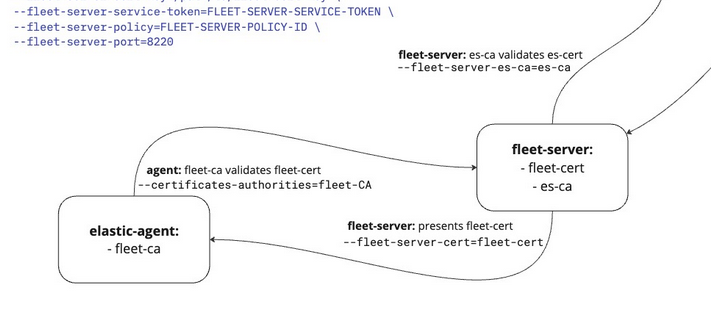
I know I’m misinterpreting the documentaiton or just have thing conceptually wrong in my head
---
### Author:  [@carly.richmond](https://discuss.elastic.co/u/carly.richmond)
#### Post date: [November 20, 2025, 3:48pm UTC](https://discuss.elastic.co/t/confused-by-fleet-server-es-cert-flags/383546/4 "2025-11-20T15:48:10Z")
Architecturally it's a subprocess of Elastic Agent, as listed in the [What is Fleet Server? documentation](https://www.elastic.co/docs/reference/fleet/fleet-server).
> Fleet Server is a subprocess that runs inside a deployed Elastic Agent. This means the deployment steps are similar to any Elastic Agent, except that you enroll the agent in a special Fleet Server policy. Typically—especially in large-scale deployments—this agent is dedicated to running Fleet Server as an Elastic Agent communication host and is not configured for data collection.
I may be wrong as I'm not a Fleet server expert, but given the documentation also refers to communication with Elasticsearch (see [here](https://www.elastic.co/docs/reference/fleet/fleet-server#:~:text=Fleet%20Server%20monitors%20Fleet%20indices%2C%20picks%20up%20the%20new%20agent%20policy%20from%20Elasticsearch%2C%20then%20ships%20the%20policy%20to%20all%20Elastic%20Agents%20enrolled%20in%20that%20policy.%20Fleet%20Server%20may%20also%20write%20updated%20policies%20to%20the%20Fleet%20index%20to%20manage%20coordination%20between%20agents.)) and the above auth options also refer to communication with Elasticsearch, it suggests to me that it's the Fleet -\> Elasticsearch communication that the certificates are for:
> 1. Fleet Server monitors Fleet indices, picks up the new agent policy from Elasticsearch, then ships the policy to all Elastic Agents enrolled in that policy. Fleet Server may also write updated policies to the Fleet index to manage coordination between agents.
Hope that makes sense!