# Customization in Data table
**URL:** https://discuss.elastic.co/t/customization-in-data-table/281162
**Category:** Kibana
**Tags:** vega
**Created:** [August 12, 2021, 7:38am UTC](https://discuss.elastic.co/t/customization-in-data-table/281162 "2021-08-12T07:38:21Z")
**Posts on this page:** 4
**Page:** 1
### Author:  [@Mathu](https://discuss.elastic.co/u/Mathu)
#### Post date: [August 12, 2021, 7:38am UTC](https://discuss.elastic.co/t/customization-in-data-table/281162/1 "2021-08-12T07:38:22Z")
Hi,
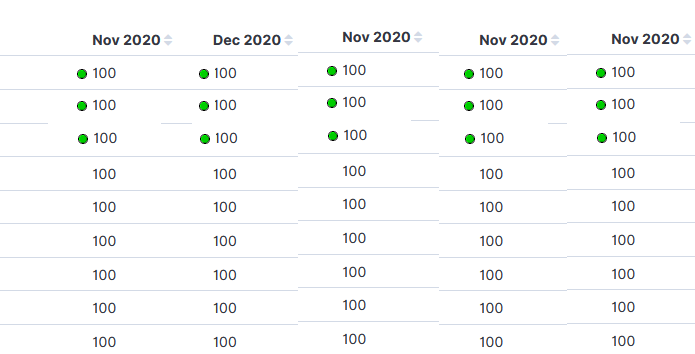
Is it possible to achieve these dots in table based on a condition (eg:\>50 -green, \<50 -Red) through vega or any other feature?
---
### Author:  [@aaron-nimocks](https://discuss.elastic.co/u/aaron-nimocks)
#### Post date: [August 12, 2021, 9:44am UTC](https://discuss.elastic.co/t/customization-in-data-table/281162/2 "2021-08-12T09:44:51Z")
I would use a [scripted field](https://www.elastic.co/guide/en/kibana/current/managing-index-patterns.html) or runtime field and use the color formatter. You can color the background of a field based on values. So your `100` would have a green background in a table.
If it has to be a circle you can create this in Vega but the table portion would be the most challenging part to recreate. This would be a very difficult path to go down.
---
### Author:  [@Midas](https://discuss.elastic.co/u/Midas)
#### Post date: [August 19, 2021, 4:28pm UTC](https://discuss.elastic.co/t/customization-in-data-table/281162/3 "2021-08-19T16:28:10Z")
Mathu,
With something simple like this table, you can do it in Vega pretty easily by making it with an x axis (columns) with labels, and a y axis (no title, no labels). That will handle the positioning. Then for the display, it's just text on a scale. The circle you would use a unix character for (i.e. U+26AB) and then fill that character for green (U+1F7E2) or red (U+1F534) or whatever other color you want based on conditions. The hard part is the column sorting which would be really rough to do with scales. If you were willing to make each line a new mark in a group, then you could make a header mark that does the sorting via signals to the data for you. Let me know if that helps or need a better explanation there.
---
### Author:  [@system](https://discuss.elastic.co/u/system)
#### Post date: [September 16, 2021, 4:28pm UTC](https://discuss.elastic.co/t/customization-in-data-table/281162/4 "2021-09-16T16:28:48Z")
This topic was automatically closed 28 days after the last reply. New replies are no longer allowed.