# Customizing Stack Management Page in Kibana
**URL:** https://discuss.elastic.co/t/customizing-stack-management-page-in-kibana/258493
**Category:** Kibana
**Created:** [December 12, 2020, 9:11pm UTC](https://discuss.elastic.co/t/customizing-stack-management-page-in-kibana/258493 "2020-12-12T21:11:09Z")
**Posts on this page:** 13
**Page:** 1
### Author:  [@Amphagory](https://discuss.elastic.co/u/Amphagory)
#### Post date: [December 12, 2020, 9:11pm UTC](https://discuss.elastic.co/t/customizing-stack-management-page-in-kibana/258493/1 "2020-12-12T21:11:10Z")
I would like to customize the stack management page as we only require access to the reporting link. I want to remove the other links since 99% of the user accessing this page will not have access to it.
I would like to remove the options (shown in the RED rectangle) in depicted the following image:

I would like to be left with the following (removing `Machine Learning Jobs` and `Watcher` would be a plus):

I think I found the source file (/usr/share/kibana/src/plugins/management/public/management\_sections\_service.js) to remove the unwanted register sections as follows:
Before Snippet:
```auto
// Note on adding sections - sections can be defined in a plugin and exported as a contract
// It is not necessary to define all sections here, although we've chose to do it for discovery reasons.
this.definedSections = {
ingest: this.registerSection(IngestSection),
data: this.registerSection(DataSection),
insightsAndAlerting: this.registerSection(InsightsAndAlertingSection),
security: this.registerSection(SecuritySection),
kibana: this.registerSection(KibanaSection),
stack: this.registerSection(StackSection)
};
```
After Snippet:
```auto
// Note on adding sections - sections can be defined in a plugin and exported as a contract
// It is not necessary to define all sections here, although we've chose to do it for discovery reasons.
this.definedSections = {
insightsAndAlerting: this.registerSection(InsightsAndAlertingSection)
};
```
But when I restart Kibana (after installing or uninstalling a plugin), nothing has changed on the Stack Management page.
Note: In past Kibana versions, one needed to to install or uninstall a plugin, to effect updates on the pages.
Thanks in advance for any insight on can shed on my issue.
Mike
---
### Author:  [@lukeelmers](https://discuss.elastic.co/u/lukeelmers)
#### Post date: [December 18, 2020, 4:23pm UTC](https://discuss.elastic.co/t/customizing-stack-management-page-in-kibana/258493/2 "2020-12-18T16:23:33Z")
Based on your screengrab, it looks like you are running 7.9.3... Starting in 7.10, Kibana will decide what to display in the management menu based on a user's cluster & index privileges. You can find more details [in the PR](https://github.com/elastic/kibana/pull/67791) or [the original issue](https://github.com/elastic/kibana/issues/35965).
So the most reliable path forward would be upgrading to 7.10. If that's not feasible for you right now and you must modify the source, then I would expect the snippets you show above to work.
Since I'm assuming you aren't running Kibana in dev mode, have you rebuilt the plugins after making changes? Plugins all get built into a `target` directory which lives at the top level of each plugin, and that's what's actually served when you run Kibana in production.
You can rebuild the plugins by running the `build_kibana_platform_plugins` script:
```auto
> node scripts/build_kibana_platform_plugins.js
Runs a dev task
Options:
--watch run the optimizer in watch mode
--workers max number of workers to use
--oss only build oss plugins
--profile profile the webpack builds and write stats.json files to build outputs
--no-core disable generating the core bundle
--no-cache disable the cache
--focus just like --filter, except dependencies are automatically included, --filter applies to result
--filter comma-separated list of bundle id filters, results from multiple flags are merged, * and ! are supported
--no-examples don't build the example plugins
--dist create bundles that are suitable for inclusion in the Kibana distributable, enabled when running with --update-limits
--scan-dir add a directory to the list of directories scanned for plugins (specify as many times as necessary)
--no-inspect-workers when inspecting the parent process, don't inspect the workers
--report-stats attempt to report stats about this execution of the build to the kibana-ci-stats service using this name
--validate-limits validate the limits.yml config to ensure that there are limits defined for every bundle
--update-limits run a build and rewrite the limits file to include the current bundle sizes +5kb
--verbose, -v Log verbosely
--debug Log debug messages (less than verbose)
--quiet Only log errors
--silent Don't log anything
--help Show this message
```
---
### Author:  [@Amphagory](https://discuss.elastic.co/u/Amphagory)
#### Post date: [December 22, 2020, 1:25am UTC](https://discuss.elastic.co/t/customizing-stack-management-page-in-kibana/258493/3 "2020-12-22T01:25:02Z")
Hello Luke,
I was running in Dev mode using the latest pull from GitHub.
The version it said it was V8.0.0.
Mike
---
### Author:  [@lukeelmers](https://discuss.elastic.co/u/lukeelmers)
#### Post date: [December 29, 2020, 4:24pm UTC](https://discuss.elastic.co/t/customizing-stack-management-page-in-kibana/258493/4 "2020-12-29T16:24:01Z")
If you are running 8.0 from the latest `master` branch, then you shouldn't need to edit the source code at all -- you'd just need to [create roles that only have permissions to the sections you want users to see](https://www.elastic.co/guide/en/kibana/current/kibana-role-management.html) and assign them to users. Then Kibana filters out the sections users lack permissions for.
More is explained in the PR description: [https://github.com/elastic/kibana/pull/67791](https://github.com/elastic/kibana/pull/67791)
In your case, if you only want to show the Reporting section, you'd just need to:
1. create a role with the relevant Kibana permissions (e.g. access to Discover and Dashboard for a particular space)
2. create a user and assign that role to it
3. also assign the built-in `reporting_user` role to that user
Then when the user logs in, they'll only see the Reporting link under the stack management section.
I just tested this on the latest master branch, and created a `kbn` role for testing purposes, which has read access to Discover/Dashboards in all spaces:

Then I assigned this role to a new `reporting` user, and also assigned the `reporting_user` role:
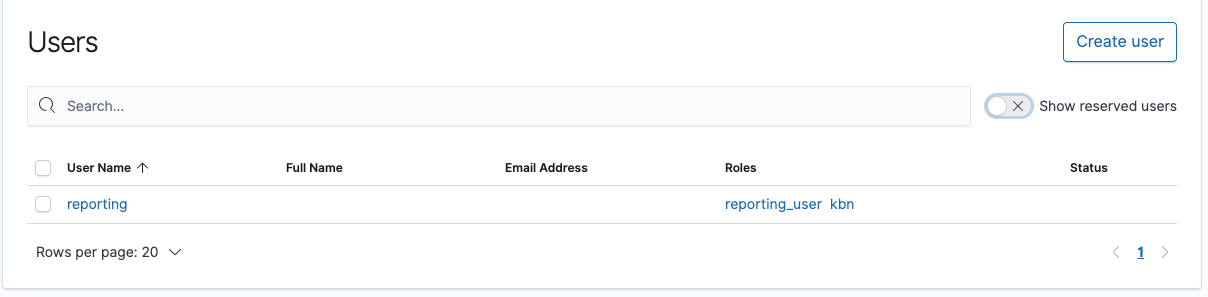
And this is how the stack management section looks when logged in as that user:

---
### Author:  [@Amphagory](https://discuss.elastic.co/u/Amphagory)
#### Post date: [January 4, 2021, 5:11am UTC](https://discuss.elastic.co/t/customizing-stack-management-page-in-kibana/258493/5 "2021-01-04T05:11:34Z")
Hi,
I was hoping this would work in the version I'm working in (7.9.3), but I guess it will only work in version 8.0 and higher?
Thanks for point this out.
Mike
---
### Author:  [@lukeelmers](https://discuss.elastic.co/u/lukeelmers)
#### Post date: [January 4, 2021, 3:32pm UTC](https://discuss.elastic.co/t/customizing-stack-management-page-in-kibana/258493/6 "2021-01-04T15:32:12Z")
> [@Amphagory](#):
>
> I was hoping this would work in the version I'm working in (7.9.3), but I guess it will only work in version 8.0 and higher?
The PR I linked to was released in 7.10.0, so it should work in any version 7.10 or higher.
Before 7.10, there isn't an officially supported way to do this -- it would require manually modifying the source code as you mentioned above.
---
### Author:  [@Amphagory](https://discuss.elastic.co/u/Amphagory)
#### Post date: [January 5, 2021, 4:58am UTC](https://discuss.elastic.co/t/customizing-stack-management-page-in-kibana/258493/7 "2021-01-05T04:58:55Z")
Hello,
I got the ok to upgrade to 7.10.1 and followed your steps in the previous message.
Created a new role:

Created a user with this role and reporting\_user role only.
Unfortunately, my the stack management page is a bit different from yours where I have the additional Ingest header and Beats Central Management link:

Also, I was wondering in the navigation panel, could the Overview link be removed?

For for all your and your coworkers help!
Mike
---
### Author:  [@lukeelmers](https://discuss.elastic.co/u/lukeelmers)
#### Post date: [January 6, 2021, 4:01pm UTC](https://discuss.elastic.co/t/customizing-stack-management-page-in-kibana/258493/8 "2021-01-06T16:01:19Z")
Hey @Amphagory -- The Beats Central Management link _should_ only be displaying if the `beats_admin` role is assigned to the user. You may want to double check to confirm that the user doesn't have that role.
As for the Overview link, unfortunately there isn't really a way to disable that at the moment. As it's the entry-point for each of the nav sections (Kibana, Observability, Security), it is always shown if you have access to at least one item in that section. However in the case of the Kibana overview page at least, the overview should only link out to apps the user has access to.
It feels like it could be a useful enhancement though, so feel free to open a [feature request in Github](https://github.com/elastic/kibana/issues/new?template=Feature_request.md) if you'd like to see it added!
---
### Author:  [@Amphagory](https://discuss.elastic.co/u/Amphagory)
#### Post date: [January 6, 2021, 6:27pm UTC](https://discuss.elastic.co/t/customizing-stack-management-page-in-kibana/258493/9 "2021-01-06T18:27:28Z")
Hello,
Here is an image (I blacked out sensitive customer information) of the user. There is only TWO roles that are assigned.
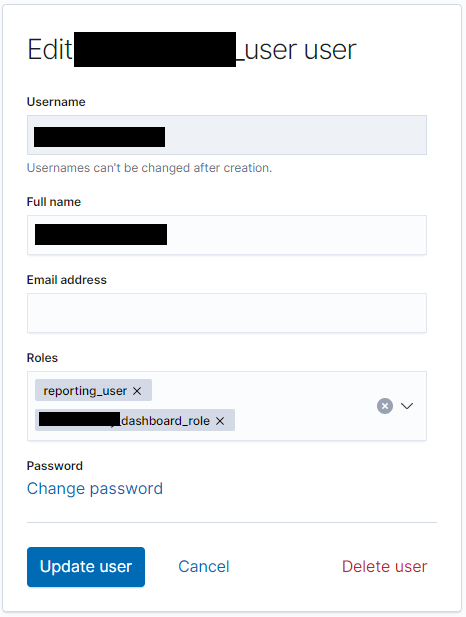
After, I've added and remove the `beats_admin` role sensing something funky happening, the `Beats Central Management link` disappeared.
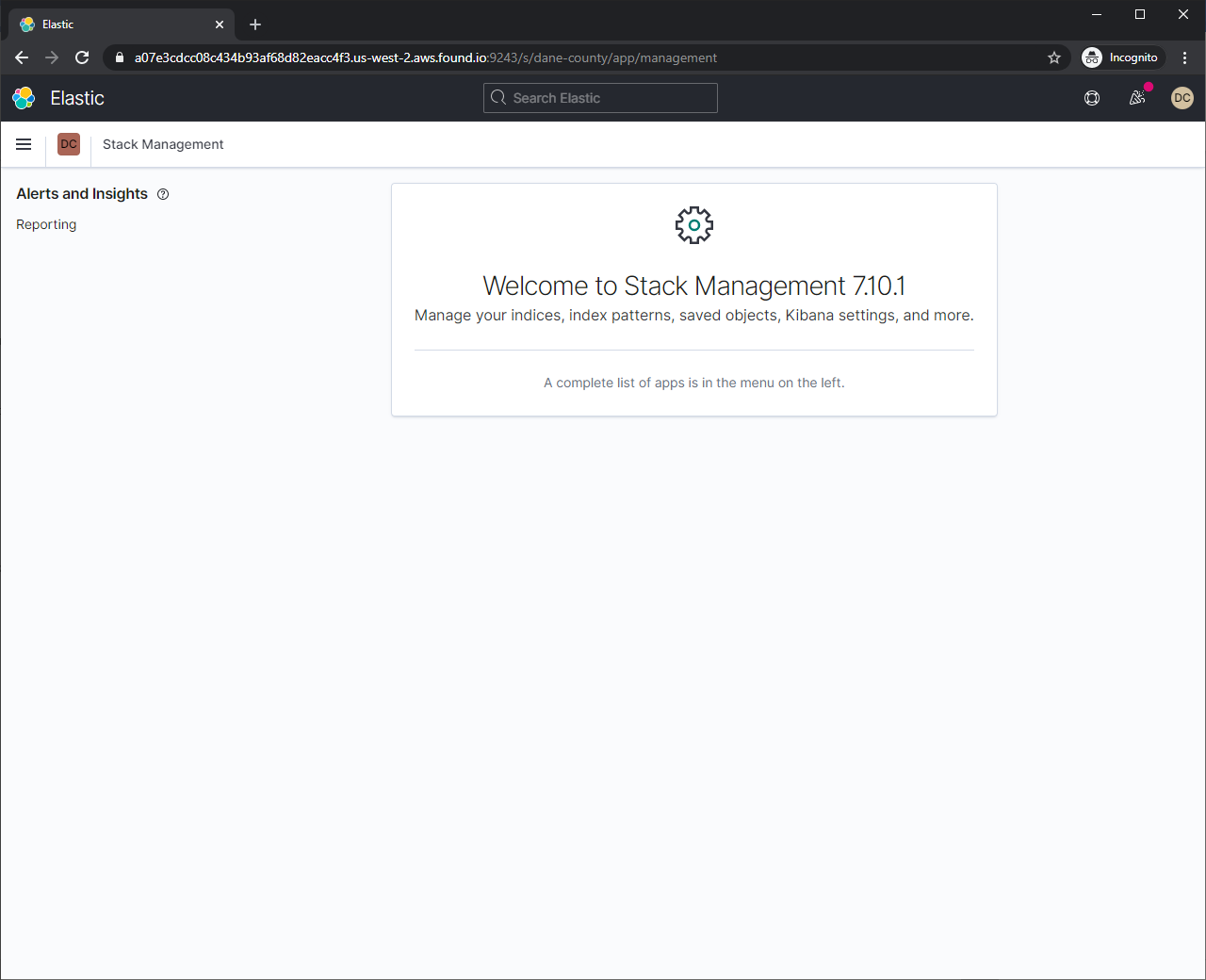
As for the Overview link, when I click it, the following page appears:

The only concern I have is that the user should not have access to add data. Either the sample data or our own, should these link be shown in this page? Could they be removed in some fashion?
I'll open an issue in Github as requested to remove the Overview link.
Thanks for your help again!
Mike

> [@lukeelmers](#):
>
> `beats_admin`
---
### Author:  [@lukeelmers](https://discuss.elastic.co/u/lukeelmers)
#### Post date: [January 6, 2021, 7:27pm UTC](https://discuss.elastic.co/t/customizing-stack-management-page-in-kibana/258493/10 "2021-01-06T19:27:31Z")
Ah interesting, glad that worked!
> The only concern I have is that the user should not have access to add data. Either the sample data or our own, should these link be shown in this page? Could they be removed in some fashion?
Right now the "add data" link isn't removed because I don't believe it is specifically tracked with our feature privileges system, which is mostly focused around application-level access. But that's definitely an area for improvement and worth mentioning in your feature request!
---
### Author:  [@Amphagory](https://discuss.elastic.co/u/Amphagory)
#### Post date: [January 8, 2021, 3:35am UTC](https://discuss.elastic.co/t/customizing-stack-management-page-in-kibana/258493/11 "2021-01-08T03:35:37Z")
I was thinking and I really want to idiot proof the UI for the users.
I was wondering if it is just possible to hack it out? What I mean is to find the file and remove the link and then I would need to rebuild Kibana.
Thoughts?
Mike
> [@lukeelmers](#):
>
> Overview link,
---
### Author:  [@system](https://discuss.elastic.co/u/system)
#### Post date: [February 5, 2021, 3:35am UTC](https://discuss.elastic.co/t/customizing-stack-management-page-in-kibana/258493/12 "2021-02-05T03:35:46Z")
This topic was automatically closed 28 days after the last reply. New replies are no longer allowed.
---
### Author:  [@lukeelmers](https://discuss.elastic.co/u/lukeelmers)
#### Post date: [February 26, 2021, 3:18pm UTC](https://discuss.elastic.co/t/customizing-stack-management-page-in-kibana/258493/13 "2021-02-26T15:18:37Z")
Hey @Amphagory -- Sorry I lost this thread.
If you are still looking to modify this in the source code, the relevant file (looking at the current `master` branch) is `src/plugins/home/public/application/components/home.js`. In particular the `AddData` component which renders the "Ingest your data" section, and also the `OverviewPageHeader` which takes an optional `hideToolbar={true}` prop that will hide the `Add Data` link from the upper right.
Of course, keep in mind that modifying these will modify this page for _everyone_ using your Kibana deployment, which is why I typically do not recommend directly modifying the source.
This issue of showing info on the overview page that users cannot take action on is something that's being actively discussed on the Kibana team, and plans are being made to address this in the future: [Home page - Only display features that a user has access to · Issue #92414 · elastic/kibana · GitHub](https://github.com/elastic/kibana/issues/92414)