# DataTable
**URL:** https://discuss.elastic.co/t/datatable/196785
**Category:** Kibana
**Tags:** canvas
**Created:** [August 26, 2019, 1:56pm UTC](https://discuss.elastic.co/t/datatable/196785 "2019-08-26T13:56:57Z")
**Posts on this page:** 12
**Page:** 1
### Author:  [@wadhah](https://discuss.elastic.co/u/wadhah)
#### Post date: [August 26, 2019, 1:56pm UTC](https://discuss.elastic.co/t/datatable/196785/1 "2019-08-26T13:56:58Z")
Hello,
How Can I get this table :

FROM:

---
### Author:  [@markov00](https://discuss.elastic.co/u/markov00)
#### Post date: [August 26, 2019, 2:10pm UTC](https://discuss.elastic.co/t/datatable/196785/2 "2019-08-26T14:10:20Z")
Hi @wadhah
I think you can create a data table, specify Sum as metric aggregation on the count field.
Then add a split row on Time (I'm not sure what is the time field format in that case, but I've build an example with a string field using terms agg). Then add another split row bucket on Category (terms aggregation)
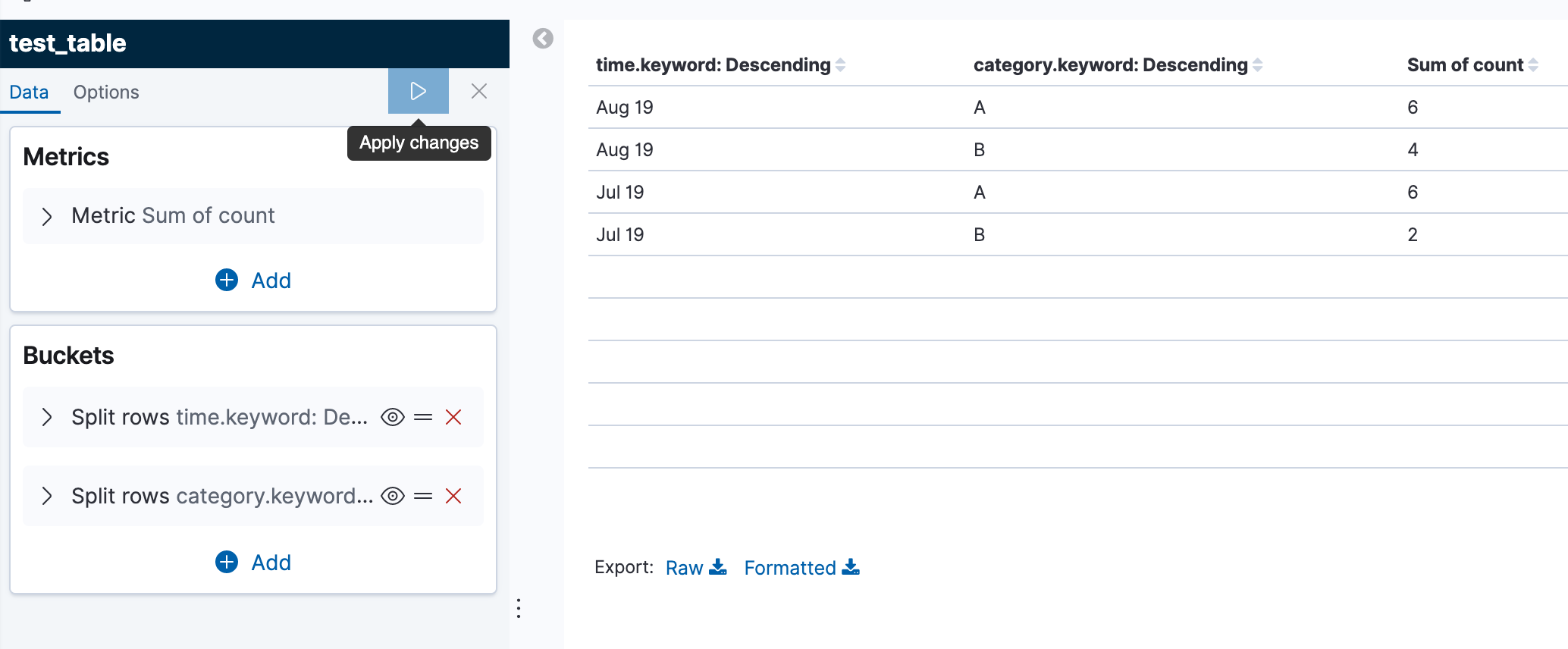
with this demo data set
```auto
PUT test_table/_doc/1
{
"time": "Jul 19",
"count": 1,
"category": "A"
}
PUT test_table/_doc/2
{
"time": "Jul 19",
"count": 5,
"category": "A"
}
PUT test_table/_doc/3
{
"time": "Jul 19",
"count": 2,
"category": "B"
}
PUT test_table/_doc/4
{
"time": "Aug 19",
"count": 6,
"category": "A"
}
PUT test_table/_doc/4
{
"time": "Aug 19",
"count": 6,
"category": "A"
}
PUT test_table/_doc/5
{
"time": "Aug 19",
"count": 3,
"category": "B"
}
PUT test_table/_doc/6
{
"time": "Aug 19",
"count": 1,
"category": "B"
}
```
---
### Author:  [@markov00](https://discuss.elastic.co/u/markov00)
#### Post date: [August 26, 2019, 2:11pm UTC](https://discuss.elastic.co/t/datatable/196785/3 "2019-08-26T14:11:09Z")
oh, maybe I miss understand the question, was that related to build the table in Canvas?
---
### Author:  [@wadhah](https://discuss.elastic.co/u/wadhah)
#### Post date: [August 26, 2019, 2:16pm UTC](https://discuss.elastic.co/t/datatable/196785/4 "2019-08-26T14:16:38Z")
Thank you @markov00 for the quick update.
Yap I am trying to build in Canvas
---
### Author:  [@wadhah](https://discuss.elastic.co/u/wadhah)
#### Post date: [August 26, 2019, 2:18pm UTC](https://discuss.elastic.co/t/datatable/196785/5 "2019-08-26T14:18:29Z")
And concerning the date I am depending on "timestamp" And I used "mapColumn "time" expression={getCell "time" | formatdate format="MMM YYYY"}" to get in that way
---
### Author:  [@wadhah](https://discuss.elastic.co/u/wadhah)
#### Post date: [August 28, 2019, 8:06am UTC](https://discuss.elastic.co/t/datatable/196785/6 "2019-08-28T08:06:35Z")
@markov00 Hello again ... I was wondering if there are any updates concerning this topic.
Thank you in advance
---
### Author:  [@markov00](https://discuss.elastic.co/u/markov00)
#### Post date: [August 28, 2019, 3:04pm UTC](https://discuss.elastic.co/t/datatable/196785/7 "2019-08-28T15:04:02Z")
@Catherine_Liu can you help us here?
---
### Author:  [@Catherine\_Liu](https://discuss.elastic.co/u/Catherine_Liu)
#### Post date: [August 28, 2019, 4:34pm UTC](https://discuss.elastic.co/t/datatable/196785/8 "2019-08-28T16:34:31Z")
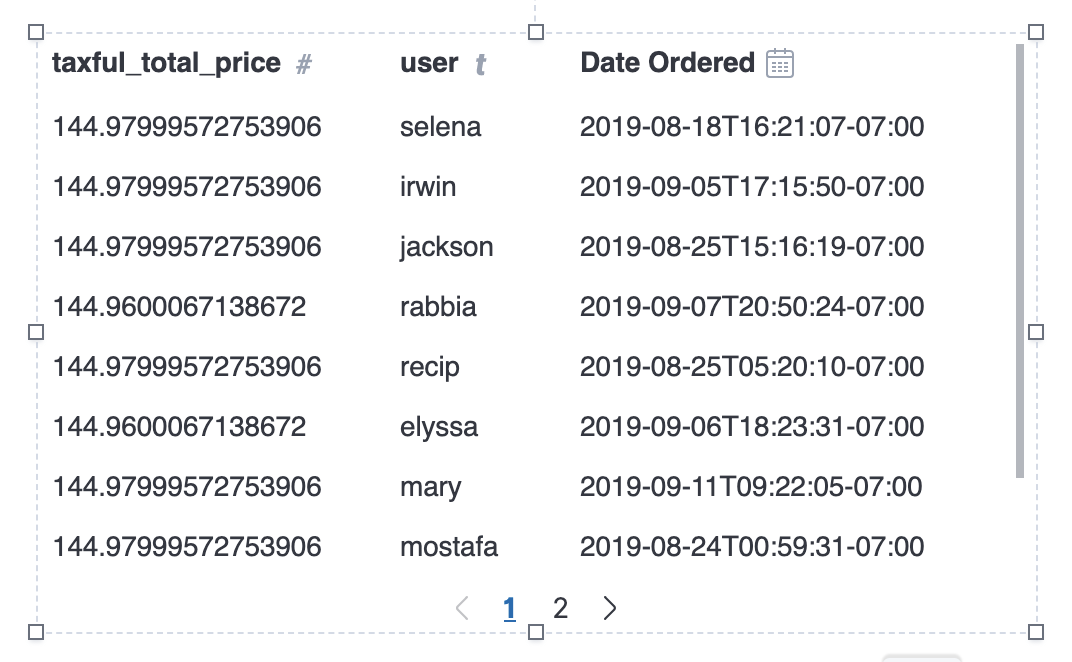
@wadhah The table will display the column names as the table headers. You can style these table headers with CSS to capitalize your column names like this:

If you need more than just a simple text transform, you can rename your columns using [`alterColumn`](https://www.elastic.co/guide/en/kibana/current/canvas-function-reference.html#alterColumn_fn) to display the header you desire.
Here's an example expression:
```auto
filters
| esdocs index="cluster_ONE:kibana_sample_data_ecommerce" fields="taxful_total_price, user, order_date"
| alterColumn "order_date" name="Date Ordered"
| table
| render
```
Note: if you change the name using `alterColumn`, you'll need to also update any references to this column with the new name in a math expression or plot configuration.
---
### Author:  [@wadhah](https://discuss.elastic.co/u/wadhah)
#### Post date: [August 28, 2019, 5:51pm UTC](https://discuss.elastic.co/t/datatable/196785/9 "2019-08-28T17:51:22Z")
Hello @markov00 and @Catherine_Liu : Thank you so much for the update. However, I think I was not clear about the real issue : In fact I am not looking forward to change "category" to "Category".
So, I have an index which includes : "time", "category" among its fields . And I am trying to build a table as shown in the first picture

But I am getting this table:

I am using these commands:
```
"SELECT category, COUNT(category) AS Count, \"@timestamp\" AS Time
FROM "index"
GROUP BY Time, category
ORDER BY Time ASC"
```
And in the expression editor I changed the date to the format "MMM YYYY"
Ps: If I get rid of "time" or "category" from the "GROUP BY" section I get an error.
Thank you for your cooperation in advance
---
### Author:  [@Catherine\_Liu](https://discuss.elastic.co/u/Catherine_Liu)
#### Post date: [August 28, 2019, 8:49pm UTC](https://discuss.elastic.co/t/datatable/196785/10 "2019-08-28T20:49:05Z")
Ah sorry, I misunderstood the issue.
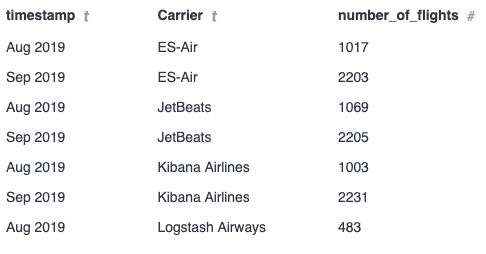
You can use the `ply` function to handle the grouping and aggregation.
Here's an example using the Ecommerce sample data set:
```auto
filters
| essql
query="SELECT timestamp, Carrier, count(*) as number_of_flights FROM \"kibana_sample_data_flights\" GROUP BY Carrier, timestamp"
count=10000
| mapColumn "timestamp" fn={getCell "timestamp" | formatdate "MMM YYYY"}
| ply by="timestamp" by="Carrier" fn={math "sum(number_of_flights)"}
| table
| render
```
The `ply` function here splits up the data into unique sub-datatables per combination of month/year `timestamp` and `Carrier` and calculates the sum of the `number_of_flights` in each sub-datatable. Then it merges the results back into a single datatable with one row per result.
---
### Author:  [@Catherine\_Liu](https://discuss.elastic.co/u/Catherine_Liu)
#### Post date: [August 29, 2019, 12:03am UTC](https://discuss.elastic.co/t/datatable/196785/11 "2019-08-29T00:03:30Z")
An alternative is to have Elasticsearch handle rounding the date to the month using the [`HISTOGRAM`](https://www.elastic.co/guide/en/elasticsearch/reference/current/sql-functions-grouping.html#sql-functions-grouping-histogram) aggregation, which results in a faster query and possibly more accurate one since the aggregation isn't limited to aggregation only the first 10000 documents like in the expression above. Here's the same example above with a different SQL query with slightly different results:

```auto
filters
| essql
query="SELECT HISTOGRAM(timestamp, INTERVAL 1 MONTH) as month, Carrier, count(*) as number_of_flights FROM \"kibana_sample_data_flights\" GROUP BY Carrier,month" count=10000
| table
| render
```
---
### Author:  [@system](https://discuss.elastic.co/u/system)
#### Post date: [September 26, 2019, 12:03am UTC](https://discuss.elastic.co/t/datatable/196785/12 "2019-09-26T00:03:35Z")
This topic was automatically closed 28 days after the last reply. New replies are no longer allowed.