# Dealing with array data
**URL:** https://discuss.elastic.co/t/dealing-with-array-data/32703
**Category:** Kibana
**Created:** [October 21, 2015, 5:17pm UTC](https://discuss.elastic.co/t/dealing-with-array-data/32703 "2015-10-21T17:17:48Z")
**Posts on this page:** 5
**Page:** 1
### Author:  [@ktwo](https://discuss.elastic.co/u/ktwo)
#### Post date: [October 21, 2015, 5:17pm UTC](https://discuss.elastic.co/t/dealing-with-array-data/32703/1 "2015-10-21T17:17:48Z")
I'm new to Kibana and have an issue I'm trying to resolve.
I have some JSON that is similiar to the following:
```
"service": {
{
"protocol": "tcp",
"port": "80",
"address": "127.0.0.1"
},
{
"protocol": "tcp",
"port": "80",
"address": "192.168.0.1"
},
{
"protocol": "tcp",
"port": "80",
"address": "172.16.0.1"
}
}
```
It's my understanding that Kibana 4 doesn't support arrays so that data is displayed in Kibana as one big string value under the "service" key. I need to be able to use the "address" field for visualizations and other analytics so I modified the script that parses the source data to add an index field for each instance. For example:
```
"service": {
"0": {
"protocol": "tcp",
"port": "80",
"address": "127.0.0.1"
},
"1": {
"protocol": "tcp",
"port": "80",
"address": "192.168.0.1"
},
"2": {
"protocol": "tcp",
"port": "80",
"address": "172.16.0.1"
}
}
```
Now I have unique fields like "service.0.address" which is good, but I want to visualize in a data table. Is there anyway to use wildcards in a filter or something that would effectively merge the values into one table? For example, I'd like to display the top 10 addresses found in ANY "service.\*.address" field given that the same address value could be located in any one of the address keys.
---
### Author:  [@Bargs](https://discuss.elastic.co/u/Bargs)
#### Post date: [October 27, 2015, 5:23pm UTC](https://discuss.elastic.co/t/dealing-with-array-data/32703/2 "2015-10-27T17:23:31Z")
First off, the value for the "service" key in your example is an object, not an array. I'm assuming that's a typo, but if not it might change things a bit.
That said, you should be able to do a terms aggregation on the inner objects. For example, I have some documents here with inner objects under a "relatedContent" key:

I can see the top 10 values for relatedContent.url by creating a data table with a terms aggregation on that sub-field:
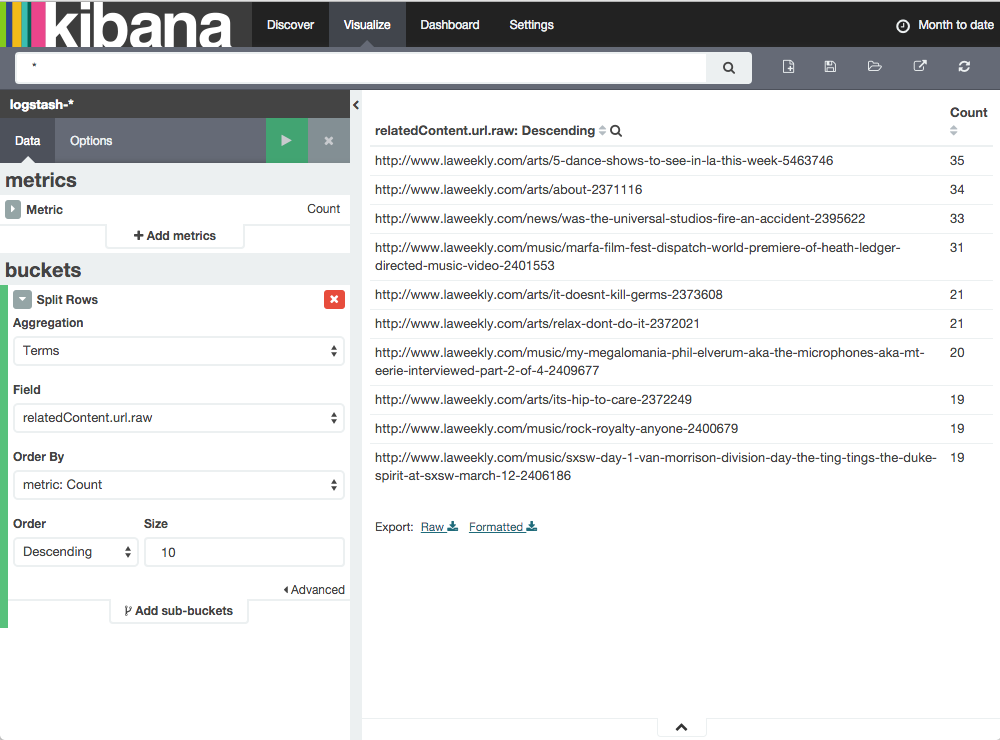
Let me know how that works for you.
---
### Author:  [@ktwo](https://discuss.elastic.co/u/ktwo)
#### Post date: [October 28, 2015, 1:47pm UTC](https://discuss.elastic.co/t/dealing-with-array-data/32703/3 "2015-10-28T13:47:34Z")
Thanks! I was able to get that to work. I could have sworn I tried that numerous times but was only getting the Count column and not the count of individual values.
Thanks again,
ktwo
---
### Author:  [@Bargs](https://discuss.elastic.co/u/Bargs)
#### Post date: [October 28, 2015, 2:11pm UTC](https://discuss.elastic.co/t/dealing-with-array-data/32703/4 "2015-10-28T14:11:19Z")
Awesome, glad it worked!
---
### Author:  [@system](https://discuss.elastic.co/u/system)
#### Post date: [July 6, 2017, 2:10pm UTC](https://discuss.elastic.co/t/dealing-with-array-data/32703/5 "2017-07-06T14:10:32Z")