# Duplicate logs
**URL:** https://discuss.elastic.co/t/duplicate-logs/134610
**Category:** Elasticsearch
**Created:** [June 5, 2018, 12:08pm UTC](https://discuss.elastic.co/t/duplicate-logs/134610 "2018-06-05T12:08:20Z")
**Posts on this page:** 15
**Page:** 1
### Author:  [@Honda\_fred\_elk](https://discuss.elastic.co/u/Honda_fred_elk)
#### Post date: [June 5, 2018, 12:08pm UTC](https://discuss.elastic.co/t/duplicate-logs/134610/1 "2018-06-05T12:08:20Z")
Hello,
I have ELK version 6.2.2. Configured and working..
I have installed ELK in two nodes.
I observed that Kibana started showing duplicate logs... as in the picture..

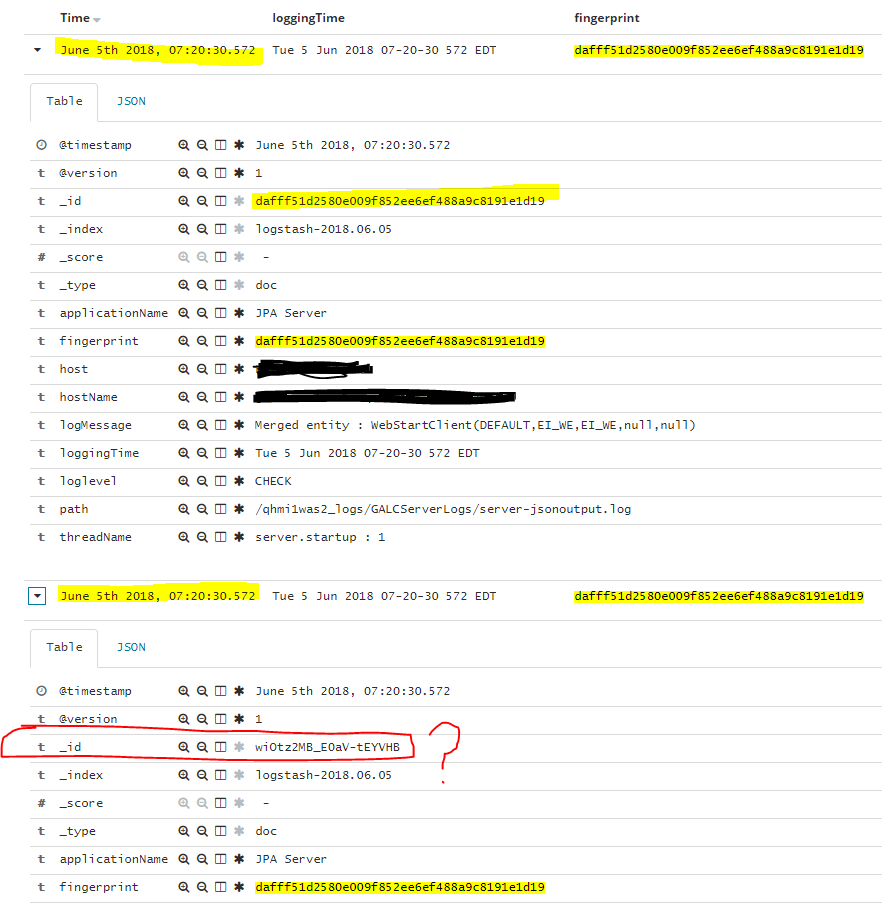
Below is my Logstash configuration
```
input {
file{
path => ["<-- file path --> "]
start_position => "beginning"
sincedb_path => "/appl/log/sincedbloc/sincedbfile.txt"
codec => json
}
}
filter {
date{
locale => "en"
match => ["loggingTime","EEE d MMM yyyy HH-mm-ss SSS z"]
target => "@timestamp"
}
fingerprint {
source => ["@timestamp","logMessage"]
target => "fingerprint"
key => "78787878"
method => "SHA1"
concatenate_sources => true
}
}
output {
elasticsearch {
hosts => ["HOST1-DNS-NAME:9200","HOST2-DNS-NAME:9200"]
document_id => "%{fingerprint}"
index => "logstash-%{+YYYY.MM.dd}"
}
}
```
Could you help whats wrong.. ?
---
### Author:  [@Honda\_fred\_elk](https://discuss.elastic.co/u/Honda_fred_elk)
#### Post date: [June 11, 2018, 2:24pm UTC](https://discuss.elastic.co/t/duplicate-logs/134610/2 "2018-06-11T14:24:03Z")
I have given
document\_id =\> "%{fingerprint}" in the output plugin..
But still elasticsearch produces an new \_id value and duplicates logs.. as I have marked in the attached picture.
Which I don't understand ..Why ?
Am I missing anything?
---
### Author:  [@Christian\_Dahlqvist](https://discuss.elastic.co/u/Christian_Dahlqvist)
#### Post date: [June 12, 2018, 9:05am UTC](https://discuss.elastic.co/t/duplicate-logs/134610/3 "2018-06-12T09:05:44Z")
Do you have any other configuration files that could get picked up and does not set the document id? If you search for a sample fingerprint in the fingerprint field, do you get more than one hit?
---
### Author:  [@Honda\_fred\_elk](https://discuss.elastic.co/u/Honda_fred_elk)
#### Post date: [June 12, 2018, 12:20pm UTC](https://discuss.elastic.co/t/duplicate-logs/134610/4 "2018-06-12T12:20:00Z")
Thanks for the response Christian.
I don't have any other configuration to pickup the same log message.
I'm facing duplicate logs only in my QA ELK servers.. I have Prod ELK server with exact same configuration but I'm not facing any duplicate logs problem.. The only difference is, in QA I have ver 6.2.2 in Prod I have ver 2.4.0. I'm planning to upgrade Prod from 2.4.0 to 6.2.2.. But stopped by this duplicate message issue.
again I have attached screen shots for more information to you from few logs
.
Expanded view of a duplicate

---
### Author:  [@Christian\_Dahlqvist](https://discuss.elastic.co/u/Christian_Dahlqvist)
#### Post date: [June 12, 2018, 12:36pm UTC](https://discuss.elastic.co/t/duplicate-logs/134610/5 "2018-06-12T12:36:54Z")
Given that you have duplicates, it still sounds like you have multiple configuration files. Did you install Logstash as a service? If so, what is the full content of its config directory?
---
### Author:  [@Honda\_fred\_elk](https://discuss.elastic.co/u/Honda_fred_elk)
#### Post date: [June 12, 2018, 1:56pm UTC](https://discuss.elastic.co/t/duplicate-logs/134610/6 "2018-06-12T13:56:03Z")
Yes I have installed Logstash as Service.. here is the configuration file that I have for logstash
```
input {
file{
path => ["/dhmi1was1_logs/GALCServerLogs/server-jsonoutput.log","/dhmi1was2_logs/GALCServerLogs/server-jsonoutput.log","/qhmi1was1_logs/GALCServerLogs/server-jsonoutput.log","/qhmi1was2_logs/GALCServerLogs/server-jsonoutput.log","/qhmi1was3_logs/GALCServerLogs/server-jsonoutput.log","/qhmi1was4_logs/GALCServerLogs/server-jsonoutput.log"]
start_position => "beginning"
sincedb_path => "/appl/log/sincedbloc/sincedbfile.txt"
codec => json
}
}
filter {
date{
locale => "en"
match => ["loggingTime","EEE d MMM yyyy HH-mm-ss SSS z"]
target => "@timestamp"
}
fingerprint {
id => "ApplicationLogs"
source => ["@timestamp","logMessage"]
target => "[fingerprint]"
key => "78787878"
method => "SHA1"
concatenate_sources => true
}
}
output {
elasticsearch {
hosts => ["HOST1:9200"]
document_id => "%{[fingerprint]}"
index => "logstash-%{+YYYY.MM.dd}"
}
file{
path => "/log/logstash/Logstash_Output.log"
}
}
```
---
### Author:  [@Christian\_Dahlqvist](https://discuss.elastic.co/u/Christian_Dahlqvist)
#### Post date: [June 12, 2018, 2:05pm UTC](https://discuss.elastic.co/t/duplicate-logs/134610/7 "2018-06-12T14:05:56Z")
Are there ANY other files in the directory where this config file resides?
---
### Author:  [@Honda\_fred\_elk](https://discuss.elastic.co/u/Honda_fred_elk)
#### Post date: [June 12, 2018, 2:24pm UTC](https://discuss.elastic.co/t/duplicate-logs/134610/8 "2018-06-12T14:24:02Z")
There are 2 more files along with logstash.conf in its conf.d directory..
1. logstash.conf.orig .. Has the exact same as logstash.conf ( .orig are getting created by logstash itself?)
2. logstash-simple.conf.. has following plugin content in it..
---
### Author:  [@Christian\_Dahlqvist](https://discuss.elastic.co/u/Christian_Dahlqvist)
#### Post date: [June 12, 2018, 2:37pm UTC](https://discuss.elastic.co/t/duplicate-logs/134610/9 "2018-06-12T14:37:54Z")
Those files will all get concatenated so could explain your duplicates.
Does `logstash.conf.orig` also have document id set to the fingerprint field?
---
### Author:  [@Honda\_fred\_elk](https://discuss.elastic.co/u/Honda_fred_elk)
#### Post date: [June 12, 2018, 2:42pm UTC](https://discuss.elastic.co/t/duplicate-logs/134610/10 "2018-06-12T14:42:39Z")
Yes. Logstash.conf.orig is exact copy of Logstash.conf
---
### Author:  [@Christian\_Dahlqvist](https://discuss.elastic.co/u/Christian_Dahlqvist)
#### Post date: [June 12, 2018, 2:45pm UTC](https://discuss.elastic.co/t/duplicate-logs/134610/11 "2018-06-12T14:45:00Z")
Do you have a local Elasticsearch node on the host where Logstash runs?
I would recommend removing these two other files from that directory and see if that causes duplicates to stop being produced.
---
### Author:  [@Honda\_fred\_elk](https://discuss.elastic.co/u/Honda_fred_elk)
#### Post date: [June 12, 2018, 2:47pm UTC](https://discuss.elastic.co/t/duplicate-logs/134610/12 "2018-06-12T14:47:43Z")
Yes.. I have ..
I have a server.. where one instance of Logstash , Elasticsearch and Kibana is running..
Okay.. I will remove it and check again..
---
### Author:  [@Christian\_Dahlqvist](https://discuss.elastic.co/u/Christian_Dahlqvist)
#### Post date: [June 12, 2018, 2:48pm UTC](https://discuss.elastic.co/t/duplicate-logs/134610/13 "2018-06-12T14:48:48Z")
Then it is the `logstash-simple.conf` file that is causing the duplicates as it does not set document id.
---
### Author:  [@Honda\_fred\_elk](https://discuss.elastic.co/u/Honda_fred_elk)
#### Post date: [June 12, 2018, 4:41pm UTC](https://discuss.elastic.co/t/duplicate-logs/134610/14 "2018-06-12T16:41:12Z")
Yes.. that fixed the problem.. I have only logstash.conf under conf.d directory..
Now no more duplicates.
Thank you so much.. problem solved.
---
### Author:  [@system](https://discuss.elastic.co/u/system)
#### Post date: [July 10, 2018, 4:41pm UTC](https://discuss.elastic.co/t/duplicate-logs/134610/15 "2018-07-10T16:41:13Z")
This topic was automatically closed 28 days after the last reply. New replies are no longer allowed.