### Author:  [@ilia19945](https://discuss.elastic.co/u/ilia19945)
#### Post date: [June 5, 2022, 9:34pm UTC](https://discuss.elastic.co/t/error-fleet-server-failed-context-canceled-error-dial-tcp-172-18-0-2-i-o-timeout/306411/1 "2022-06-05T21:34:14Z")
**Kibana version** :
v 8.2.2
**Elasticsearch version** :
v 8.2.2
**APM Server version** :
v 8.2.2
**APM Agent language and version** :
Python 3.10.0
**Browser version** :
Google Chrome
Version 102.0.5005.63 (Official Build) (64-bit)
**Original install method (e.g. download page, yum, deb, from source, etc.) and version**:
Kibana and Elasticsearch are installed as docker containers
**Fresh install or upgraded from other version?**
Fresh install
**Is there anything special in your setup?**
No, I only followed the official documentation:
1. [Quick start | Elasticsearch Guide [8.2] | Elastic](https://www.elastic.co/guide/en/elasticsearch/reference/current/getting-started.html)
2. [Add a Fleet Server | Fleet and Elastic Agent Guide [8.2] | Elastic](https://www.elastic.co/guide/en/fleet/8.2/add-a-fleet-server.html)
3. [Install Fleet-managed Elastic Agents | Fleet and Elastic Agent Guide [8.2] | Elastic](https://www.elastic.co/guide/en/fleet/8.2/install-fleet-managed-elastic-agent.html)
4. [Starlette/FastAPI Support | APM Python Agent Reference [6.x] | Elastic](https://www.elastic.co/guide/en/apm/agent/python/6.x/starlette-support.html)
**Description of the problem including expected versus actual behavior. Please include screenshots (if relevant)**:
I'm trying to integrate my FastAPI server with ELK to be able to see server logs here [http://localhost:5601/app/discover#/](http://localhost:5601/app/discover#/)
I managed to find this instruction: [Starlette/FastAPI Support | APM Python Agent Reference [6.x] | Elastic](https://www.elastic.co/guide/en/apm/agent/python/6.x/starlette-support.html)
But it never worked due to this error:
```auto
(venv) PS C:\PythonProjects\Fastapi> uvicorn mainfastapi:app --reload --port 80
INFO: Will watch for changes in these directories: ['C:\\PythonProjects\\Fastapi']
INFO: Uvicorn running on http://127.0.0.1:80 (Press CTRL+C to quit)
INFO: Started reloader process [20476] using statreload
WARNING: The --reload flag should not be used in production on Windows.
2022-06-06 00:30:38,906 - INFO - elastic_transport.transport - _transport:perform_request:336 - POST https://localhost:9200/my_index/_doc [status:201 duration:0.053s] # < -- as you can see I can send singe entries to ELK
2022-06-06 00:31:07,712 - WARNING - elasticapm.transport.http - http:fetch_server_info:202 - HTTP error while fetching server information: HTTPConnectionPool(host='localhost', port=8200): Max retries exceeded with url: / (Ca
used by NewConnectionError(': Failed to establish a new connection: [WinError 10061] No connection could be made because the target machine actively refused it'))
```
but generally it doesn't work, probably that's the first issue,
So I decided to try another solution: I installed Fleet on elastic and I'm trying to add an agent on my local machine, but I always end up with the following error:

and it seems
**fleet agent can't connect to fleet server and I can't understand why...**
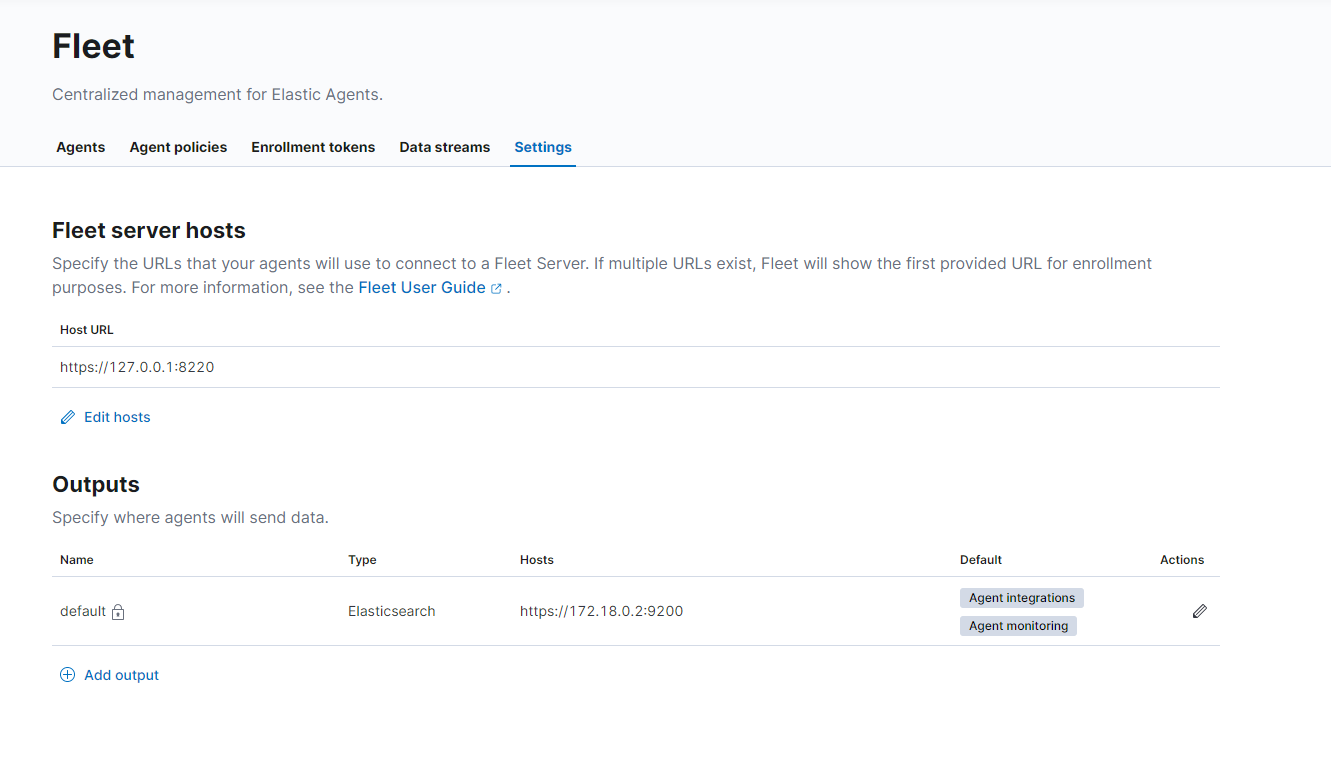
I have set the following settings on Server hosts page:
```auto
PS C:\Users\ilia1\Desktop\elastic-agent-8.2.2-windows-x86_64> .\elastic-agent.exe install `
>> --fleet-server-es=https://172.18.0.2:9200 `
>> --fleet-server-service-token=token `
>> --fleet-server-policy=fleet-server-policy `
>> --fleet-server-es-ca-trusted-fingerprint=fingerprint
Elastic Agent will be installed at C:\Program Files\Elastic\Agent and will run as a service. Do you want to continue? [Y/n]:Y
{"log.level":"info","@timestamp":"2022-06-05T23:06:57.412+0300","log.origin":{"file.name":"cmd/enroll_cmd.go","file.line":393},"message":"Generating self-signed certificate for Fleet Server","ecs.version":"1.6.0"}
{"log.level":"info","@timestamp":"2022-06-05T23:06:59.699+0300","log.origin":{"file.name":"cmd/enroll_cmd.go","file.line":750},"message":"Waiting for Elastic Agent to start Fleet Server","ecs.version":"1.6.0"}
{"log.level":"info","@timestamp":"2022-06-05T23:07:29.734+0300","log.origin":{"file.name":"cmd/enroll_cmd.go","file.line":783},"message":"Fleet Server - Error - dial tcp 172.18.0.2:9200: i/o timeout","ecs.version":"1.6.0"}
{"log.level":"info","@timestamp":"2022-06-05T23:08:01.750+0300","log.origin":{"file.name":"cmd/enroll_cmd.go","file.line":783},"message":"Fleet Server - Starting","ecs.version":"1.6.0"}
Error: fleet-server failed: context canceled
For help, please see our troubleshooting guide at https://www.elastic.co/guide/en/fleet/8.2/fleet-troubleshooting.html
Error: enroll command failed with exit code: 1
For help, please see our troubleshooting guide at https://www.elastic.co/guide/en/fleet/8.2/fleet-troubleshooting.html
```
In Fleet agent logs:
```auto
{"log.level":"info","@timestamp":"2022-06-05T23:08:42.449+0300","log.origin":{"file.name":"log/reporter.go","file.line":40},"message":"2022-06-05T23:08:42+03:00 - message: Application: fleet-server--8.2.2[]: State changed to STARTING: Starting - type: 'STATE' - sub_type: 'STARTING'","ecs.version":"1.6.0"}
{"log.level":"error","@timestamp":"2022-06-05T23:08:52.680+0300","log.origin":{"file.name":"status/reporter.go","file.line":236},"message":"Elastic Agent status changed to: 'error'","ecs.version":"1.6.0"}
{"log.level":"error","@timestamp":"2022-06-05T23:08:52.680+0300","log.origin":{"file.name":"log/reporter.go","file.line":36},"message":"2022-06-05T23:08:52+03:00 - message: Application: fleet-server--8.2.2[]: State changed to FAILED: Error - dial tcp 172.18.0.2:9200: i/o timeout - type: 'ERROR' - sub_type: 'FAILED'","ecs.version":"1.6.0"}
{"log.level":"info","@timestamp":"2022-06-05T23:08:54.734+0300","log.origin":{"file.name":"status/reporter.go","file.line":236},"message":"Elastic Agent status changed to: 'online'","ecs.version":"1.6.0"}
```
Can you please help understand why I keep getting this error?
---
### Author:  [@stuart.nelson](https://discuss.elastic.co/u/stuart.nelson)
#### Post date: [June 8, 2022, 6:54am UTC](https://discuss.elastic.co/t/error-fleet-server-failed-context-canceled-error-dial-tcp-172-18-0-2-i-o-timeout/306411/2 "2022-06-08T06:54:54Z")
Can you post the docker commands you're using to start the individual containers?
Regarding being able to connect to `localhost:9200` but not `localhost:8200`: I'm wondering if the elastic-agent container doesn't have this port exposed on the local machine.
Regarding agents not being able to connect to fleet-server:
```auto
PS C:\Users\ilia1\Desktop\elastic-agent-8.2.2-windows-x86_64> .\elastic-agent.exe install `
>> --fleet-server-es=https://172.18.0.2:9200 `
>> --fleet-server-service-token=token `
>> --fleet-server-policy=fleet-server-policy `
>> --fleet-server-es-ca-trusted-fingerprint=fingerprint
```
It appears you're running `elastic-agent` on your local machine, but trying to connect to the `elasticsearch` via its docker network ip `172.18.0.2`. I'm not familiar with windows, but on \*nix machines these are separate from each other. You either need to run your containers in the same docker network, link your containers, or expose that container's port 9200 on the local machine and connect via the loopback address + port.
---
### Author:  [@ilia19945](https://discuss.elastic.co/u/ilia19945)
#### Post date: [June 8, 2022, 7:42pm UTC](https://discuss.elastic.co/t/error-fleet-server-failed-context-canceled-error-dial-tcp-172-18-0-2-i-o-timeout/306411/3 "2022-06-08T19:42:00Z")
Hi Stuart!
Thanks for getting into my issue.
I followed these command from the [documentation](https://www.elastic.co/guide/en/elasticsearch/reference/current/getting-started.html):
for Elastic:
```auto
docker network create elastic
docker pull docker.elastic.co/elasticsearch/elasticsearch:8.2.2
docker run --name es01 --net elastic -p 9200:9200 -p 9300:9300 -it docker.elastic.co/elasticsearch/elasticsearch:8.2.2
```
and for Kibana:
```auto
docker pull docker.elastic.co/kibana/kibana:8.2.2
docker run --name kibana --net elastic -p 5601:5601 docker.elastic.co/kibana/kibana:8.2.2
```
So after that I have:
```auto
C:\Users\ilia1> docker ps -a
CONTAINER ID IMAGE COMMAND CREATED STATUS PORTS NAMES
05833b8e71f9 docker.elastic.co/kibana/kibana:8.2.2 "/bin/tini -- /usr/l…" 5 days ago Exited (255) 32 hours ago 0.0.0.0:5601->5601/tcp kib-01
def740eb5293 docker.elastic.co/elasticsearch/elasticsearch:8.2.2 "/bin/tini -- /usr/l…" 5 days ago Exited (255) 32 hours ago 0.0.0.0:9200->9200/tcp, 0.0.0.0:9300->9300/tcp es-node01
```
Actually I'm using docker desktop app to start containers so I presume it should be just
something like this:
```auto
C:\Users\ilia1>docker container start kib-01
kib-01
C:\Users\ilia1>docker container start es-node01
es-node01
```
Also here are my docker network settings:
```auto
C:\Users\ilia1>docker network inspect elastic
[
{
"Name": "elastic",
"Id": "324deb04bbcc55e4c76de46da399da2bda8a896ce767e6985212dac89459ceaa",
"Created": "2022-06-02T10:48:56.0936205Z",
"Scope": "local",
"Driver": "bridge",
"EnableIPv6": false,
"IPAM": {
"Driver": "default",
"Options": {},
"Config": [
{
"Subnet": "172.18.0.0/16",
"Gateway": "172.18.0.1"
}
]
},
"Internal": false,
"Attachable": false,
"Ingress": false,
"ConfigFrom": {
"Network": ""
},
"ConfigOnly": false,
"Containers": {},
"Options": {},
"Labels": {}
}
]
```
Weird that after launching containers I'm able to
open [https://localhost:9200/](https://localhost:9200/) from my browser:

I also presume that the solution for me would be something simple, but I don't know where to dig...
I clearly see that fleet agent can't connect to the fleet server in docker container on (172.18.0.2:9200) according to the error:
> Error - dial tcp 172.18.0.2:9200: i/o timeout
So:
1. Am I correct that the fleet server (added on elk in container through fleet integration) and a fleet agent are everything I need?
2. Shouldn't I additionally install fleet server and somehow additionally configure it to my current setup, should I?
If not could you please let me know is there an article somewhere on elastic showing how to tweak the standard docker network I created, so that I can connect my local fleet-agent with an elk fleet-server on the docker container?
Highly appreciate any suggestions!
---
### Author:  [@ilia19945](https://discuss.elastic.co/u/ilia19945)
#### Post date: [June 13, 2022, 10:53am UTC](https://discuss.elastic.co/t/error-fleet-server-failed-context-canceled-error-dial-tcp-172-18-0-2-i-o-timeout/306411/4 "2022-06-13T10:53:08Z")
Still relevant, please help.
---
### Author:  [@redrise](https://discuss.elastic.co/u/redrise)
#### Post date: [June 29, 2022, 8:33pm UTC](https://discuss.elastic.co/t/error-fleet-server-failed-context-canceled-error-dial-tcp-172-18-0-2-i-o-timeout/306411/5 "2022-06-29T20:33:42Z")
Just update your enrolment command so that the fleet-server-es value is pointing to localhost (127.0.0.1) and that should sort it out 😉
e.g.
```auto
PS C:\Users\ilia1\Desktop\elastic-agent-8.2.2-windows-x86_64> .\elastic-agent.exe install `
>> --fleet-server-es=https://127.0.0.1:9200 `
>> --fleet-server-service-token=token `
>> --fleet-server-policy=fleet-server-policy `
>> --fleet-server-es-ca-trusted-fingerprint=fingerprint
```
---
### Author:  [@ilia19945](https://discuss.elastic.co/u/ilia19945)
#### Post date: [July 10, 2022, 4:57pm UTC](https://discuss.elastic.co/t/error-fleet-server-failed-context-canceled-error-dial-tcp-172-18-0-2-i-o-timeout/306411/6 "2022-07-10T16:57:18Z")
thanks, your suggestion helped me to finish enrolment,
So Now I have kibana and elk running on docker containers, and an enrolled agent on my windows computer,
(I can see Elastic Agent service running:
 )
But it still doesn't send any logs to kibana - when I press "continue" nothing happens.
If close this window and go to Fleet integration -\> agents tab, I'll see a healthy agent:

but when I click on this agent (under Host column) there is no logs on my agent's dashboard:

Am really confused... can you please help me to understand why is this happening?
---
### Author:  [@system](https://discuss.elastic.co/u/system)
#### Post date: [July 31, 2022, 12:58pm UTC](https://discuss.elastic.co/t/error-fleet-server-failed-context-canceled-error-dial-tcp-172-18-0-2-i-o-timeout/306411/7 "2022-07-31T12:58:15Z")
This topic was automatically closed 20 days after the last reply. New replies are no longer allowed.