# EuiTable and In memory table doesn't have scroll
**URL:** https://discuss.elastic.co/t/euitable-and-in-memory-table-doesnt-have-scroll/329622
**Category:** Kibana
**Tags:** kibana-plugin-development
**Created:** [April 9, 2023, 12:31pm UTC](https://discuss.elastic.co/t/euitable-and-in-memory-table-doesnt-have-scroll/329622 "2023-04-09T12:31:51Z")
**Posts on this page:** 13
**Page:** 1
### Author:  [@Sheereen](https://discuss.elastic.co/u/Sheereen)
#### Post date: [April 9, 2023, 12:31pm UTC](https://discuss.elastic.co/t/euitable-and-in-memory-table-doesnt-have-scroll/329622/1 "2023-04-09T12:31:51Z")
Hi,
I am using both EuiTable and in-memory tables
Is there a scroll functionally for the same? I couldn't find any.
When the no of columns is like 10-15, the table just keeps getting compressed, rather than having a horizontal scroll bar.
Thanks
---
### Author:  [@Trevor\_Pierce](https://discuss.elastic.co/u/Trevor_Pierce)
#### Post date: [April 17, 2023, 3:23pm UTC](https://discuss.elastic.co/t/euitable-and-in-memory-table-doesnt-have-scroll/329622/2 "2023-04-17T15:23:54Z")
Hi Sheereen,
Yes, you can make an EuiTable scroll horizontally. You'll need to add a few props and CSS specific to your use case. This [CodeSandbox](https://codesandbox.io/s/runtime-haze-kxbicx?file=/demo.tsx:2055-2524) shows an example with the needed code highlighted. Please feel free to respond to this thread if you have additional questions.
---
### Author:  [@Sheereen](https://discuss.elastic.co/u/Sheereen)
#### Post date: [April 18, 2023, 8:09am UTC](https://discuss.elastic.co/t/euitable-and-in-memory-table-doesnt-have-scroll/329622/3 "2023-04-18T08:09:20Z")
Hi Trevor,
Thanks for the reply.
I had done something similar. I wasn't sure if it was fine to access the css (div-first child, etc..) of eui components and modify the same.
Thanks
---
### Author:  [@Sheereen](https://discuss.elastic.co/u/Sheereen)
#### Post date: [April 18, 2023, 9:08am UTC](https://discuss.elastic.co/t/euitable-and-in-memory-table-doesnt-have-scroll/329622/4 "2023-04-18T09:08:58Z")
What should be done similarly for vertical scrollbar?
I want the header cells (thead) and footer cells (tfoot) to be sticky (freezed). Only the body part should be scrollable.
---
### Author:  [@Sheereen](https://discuss.elastic.co/u/Sheereen)
#### Post date: [April 18, 2023, 11:05am UTC](https://discuss.elastic.co/t/euitable-and-in-memory-table-doesnt-have-scroll/329622/5 "2023-04-18T11:05:04Z")
And I have also found this bug (not sure whether it's really a bug)... in EuiTable, let's say we have pagination and selection also
Then, when I select the select-box in header, ideally it should all the rows in table. But actually, it selects only the ones in the current page
---
### Author:  [@Trevor\_Pierce](https://discuss.elastic.co/u/Trevor_Pierce)
#### Post date: [April 18, 2023, 6:51pm UTC](https://discuss.elastic.co/t/euitable-and-in-memory-table-doesnt-have-scroll/329622/6 "2023-04-18T18:51:08Z")
This can be done, but from what I've experimented, will require you to use individual EUI table components to build your structure and HTML. It also requires you to put in pixel or rem values for your column widths, so it loses a lot of the responsiveness that's baked into the EuiTable component.
I mocked up an example quickly: [confident-danilo-40dwin - CodeSandbox](https://codesandbox.io/s/confident-danilo-40dwin?file=/demo.tsx)
---
### Author:  [@Trevor\_Pierce](https://discuss.elastic.co/u/Trevor_Pierce)
#### Post date: [April 18, 2023, 6:52pm UTC](https://discuss.elastic.co/t/euitable-and-in-memory-table-doesnt-have-scroll/329622/7 "2023-04-18T18:52:20Z")
Paginated tables will always show results by the selected number of rows. If you have made a selection that has 23 rows for instance and your pagination is set to 10, I'd expect there to have 3 pages of rows to select from.
---
### Author:  [@Sheereen](https://discuss.elastic.co/u/Sheereen)
#### Post date: [April 19, 2023, 9:36am UTC](https://discuss.elastic.co/t/euitable-and-in-memory-table-doesnt-have-scroll/329622/8 "2023-04-19T09:36:04Z")
Did not get your point here
> **[Elastic UI](https://eui.elastic.co/#/tabular-content/tables%23adding-selection-to-a-table:~:text=Props-,Adding%20selection%20to%20a%20table,-The%20following%20example)**
>
> The Elastic UI framework (EUI) is a design library in use at Elastic to build internal products that need to share our aesthetics. It distributes UI React components and static assets for use in building web layouts.
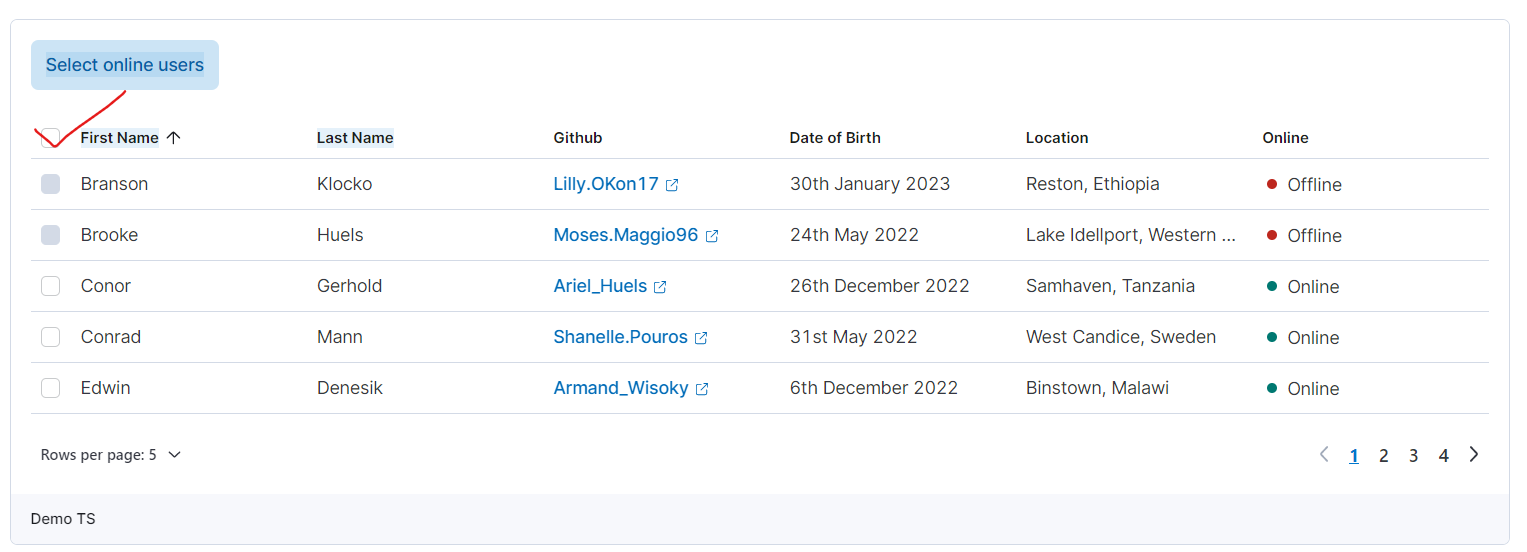
Let's say in the above example, I check the selection-box in header. Then ideally it should select all the 20 entries in table (5 entries per page, 4 pages =\> 20 entries in total). But in reality, it will select only the 5 in the current page. I have tested it out with a button click to print out the selected rows. And also, if u check the table in the link, if the selection-box in header is checked and then you move to a different page in table, it clears the selection; which doesn't happen with datagrids, for your reference ([Elastic UI](https://eui.elastic.co/#/tabular-content/data-grid-schema-columns:~:text=Props-,Control%20columns,-Control%20columns%20can))
---
### Author:  [@Sheereen](https://discuss.elastic.co/u/Sheereen)
#### Post date: [April 19, 2023, 12:13pm UTC](https://discuss.elastic.co/t/euitable-and-in-memory-table-doesnt-have-scroll/329622/9 "2023-04-19T12:13:10Z")
I also want to have some of the functionalities that datagrid has in the tables, like column selector, full screen, etc..
Can I use **useDataGridColumnSelector** or anything similar to extend the table functionalities? Meanwhile, I was trying the create the same myself
---
### Author:  [@Trevor\_Pierce](https://discuss.elastic.co/u/Trevor_Pierce)
#### Post date: [April 19, 2023, 7:59pm UTC](https://discuss.elastic.co/t/euitable-and-in-memory-table-doesnt-have-scroll/329622/10 "2023-04-19T19:59:00Z")
`EuiBasicTables` have a smaller set of features than `EuiDataGrid`. [EuiBasicTables](https://eui.elastic.co/#/tabular-content/tables) can add pagination, column sorting (all or limited columns), selections, footers, expanding rows, and row actions.
If you feel that the `EuiBasicTable` component would benefit from features like a column selector or full screen, please [file a feature request issue](https://github.com/elastic/eui/issues/new/choose) with the EUI team.
---
### Author:  [@Trevor\_Pierce](https://discuss.elastic.co/u/Trevor_Pierce)
#### Post date: [April 19, 2023, 9:52pm UTC](https://discuss.elastic.co/t/euitable-and-in-memory-table-doesnt-have-scroll/329622/11 "2023-04-19T21:52:47Z")
Unfortunately no, **useDataGridColumnSelector** will not work to extend table functionalities.
---
### Author:  [@Trevor\_Pierce](https://discuss.elastic.co/u/Trevor_Pierce)
#### Post date: [April 19, 2023, 9:59pm UTC](https://discuss.elastic.co/t/euitable-and-in-memory-table-doesnt-have-scroll/329622/12 "2023-04-19T21:59:56Z")
The EUI team opted not to preserve selection when changes pages in `EuiInMemoryTable`. The reasoning for this decision is explained in [issue #4090](https://github.com/elastic/eui/issues/4090).
The `EuiDataGrid` example you call out is using a consumer-written function + React Context to select all rows across paginated views. If you click **"Demo JS"** under the `EuiDataGrid` [Control columns heading](https://eui.elastic.co/#/tabular-content/data-grid-schema-columns#control-columns) and search for "const SelectionHeaderCell" you can review how it behaves.
---
### Author:  [@system](https://discuss.elastic.co/u/system)
#### Post date: [May 17, 2023, 10:00pm UTC](https://discuss.elastic.co/t/euitable-and-in-memory-table-doesnt-have-scroll/329622/13 "2023-05-17T22:00:36Z")
This topic was automatically closed 28 days after the last reply. New replies are no longer allowed.