# Failed to find geo\_point field
**URL:** https://discuss.elastic.co/t/failed-to-find-geo-point-field/26475
**Category:** Kibana
**Created:** [July 29, 2015, 10:17am UTC](https://discuss.elastic.co/t/failed-to-find-geo-point-field/26475 "2015-07-29T10:17:02Z")
**Posts on this page:** 9
**Page:** 1
### Author:  [@jcapde87](https://discuss.elastic.co/u/jcapde87)
#### Post date: [July 29, 2015, 10:17am UTC](https://discuss.elastic.co/t/failed-to-find-geo-point-field/26475/1 "2015-07-29T10:17:02Z")
Hi there,
I am trying to perform a search with geo\_distance in Kibana 4 and I get the following exception:
"org.elasticsearch.index.query.QueryParsingException: [.kibana] failed to find geo\_point field [geolocation]"
I use the following syntax in the search area under discovery tab:
{"filtered":{"query":{"match":{"lang":"en"}},"filter":{"geo\_distance":{"distance":"200km","geolocation":[2,41]}}}}
I assume it sth with the syntax or kibana since I can perfectly query elastic search from my console getting the expected results.
Thanks in advance,
Joan
---
### Author:  [@warkolm](https://discuss.elastic.co/u/warkolm)
#### Post date: [July 29, 2015, 10:50am UTC](https://discuss.elastic.co/t/failed-to-find-geo-point-field/26475/2 "2015-07-29T10:50:45Z")
Is the field you are querying mapped correctly as a geopoint?
---
### Author:  [@jcapde87](https://discuss.elastic.co/u/jcapde87)
#### Post date: [July 29, 2015, 11:06am UTC](https://discuss.elastic.co/t/failed-to-find-geo-point-field/26475/3 "2015-07-29T11:06:20Z")
I think so.
```
"geolocation": {
"type": "geo_point"
},
```
Moreover, I can display geo\_point in a tile map in Kibana.
Thanks Mark
---
### Author:  [@tbragin](https://discuss.elastic.co/u/tbragin)
#### Post date: [July 30, 2015, 4:06pm UTC](https://discuss.elastic.co/t/failed-to-find-geo-point-field/26475/4 "2015-07-30T16:06:56Z")
I confirmed that the geo distance filter query DSL doesn't currently work in Kibana search bar. There is a future enhancement to the current validator that will address the problem: [https://github.com/elastic/kibana/issues/2555#issuecomment-126384135](https://github.com/elastic/kibana/issues/2555#issuecomment-126384135)
---
### Author:  [@jcapde87](https://discuss.elastic.co/u/jcapde87)
#### Post date: [July 30, 2015, 4:20pm UTC](https://discuss.elastic.co/t/failed-to-find-geo-point-field/26475/5 "2015-07-30T16:20:54Z")
Many thanks Tanya. Looking forward this enhancement. Do you know how to perform this geo\_distance search with Lucene? Will that work in Kibana?
---
### Author:  [@tbragin](https://discuss.elastic.co/u/tbragin)
#### Post date: [July 30, 2015, 4:41pm UTC](https://discuss.elastic.co/t/failed-to-find-geo-point-field/26475/6 "2015-07-30T16:41:32Z")
I don't think geo-distance query is possible with [Lucene query syntax](https://lucene.apache.org/core/2_9_4/queryparsersyntax.html), it's quite limited.
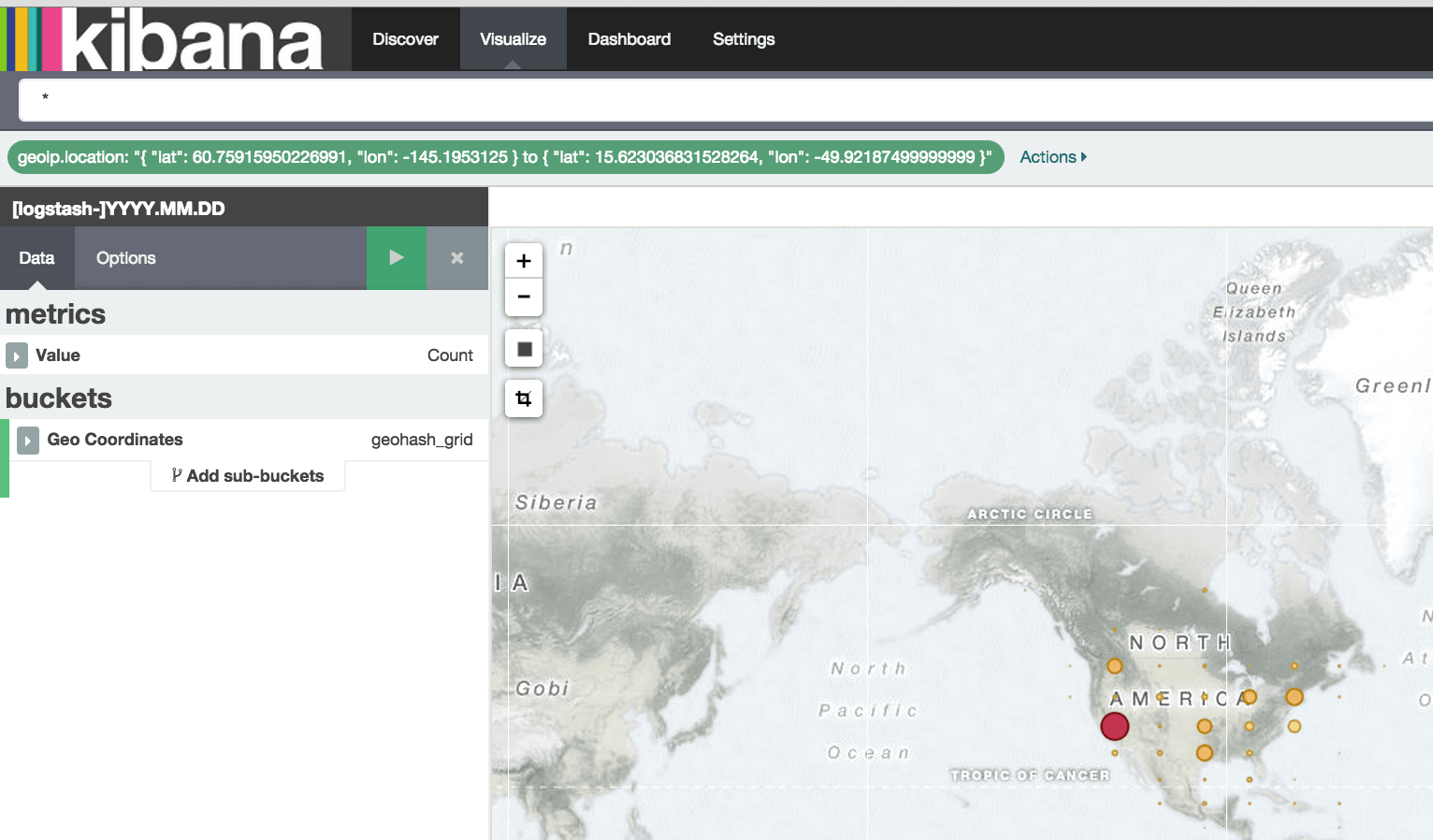
Kibana Tile Map visualization supports geo bounding box filter, driven by a selector in the UI.. perhaps that could be of help?

---
### Author:  [@jcapde87](https://discuss.elastic.co/u/jcapde87)
#### Post date: [July 30, 2015, 4:51pm UTC](https://discuss.elastic.co/t/failed-to-find-geo-point-field/26475/7 "2015-07-30T16:51:37Z")
Many thks Tanya. I have used the geo bounding box filter in Tile map, but the same filter it is not useful to filter documents in the discover tap. I guess I will have to wait for the enhancements.
---
### Author:  [@tbragin](https://discuss.elastic.co/u/tbragin)
#### Post date: [July 31, 2015, 3:09pm UTC](https://discuss.elastic.co/t/failed-to-find-geo-point-field/26475/8 "2015-07-31T15:09:18Z")
In Kibana 4.1 you can use Pinned Filters to carry over a filter from one tab to another. Just mouse over a filter and click on the little thumbtack looking icon.
Unpinned

Pinned

---
### Author:  [@system](https://discuss.elastic.co/u/system)
#### Post date: [July 6, 2017, 2:15pm UTC](https://discuss.elastic.co/t/failed-to-find-geo-point-field/26475/9 "2017-07-06T14:15:30Z")