# Fleet Server No Data Stream
**URL:** https://discuss.elastic.co/t/fleet-server-no-data-stream/324753
**Category:** Elastic Agent
**Tags:** fleet
**Created:** [February 6, 2023, 3:56am UTC](https://discuss.elastic.co/t/fleet-server-no-data-stream/324753 "2023-02-06T03:56:33Z")
**Posts on this page:** 7
**Page:** 1
### Author:  [@NathanLau](https://discuss.elastic.co/u/NathanLau)
#### Post date: [February 6, 2023, 3:56am UTC](https://discuss.elastic.co/t/fleet-server-no-data-stream/324753/1 "2023-02-06T03:56:33Z")
Hi All ,
When installed Fleet server with quick start.
the fleet server cannot receive any data themselves , same as system.
install command :
```auto
sudo ./elastic-agent install \
--fleet-server-es=https://172.16. **.** :9200 \
--fleet-server-service-token= *****
--fleet-server-policy=fleet-server-policy \
--fleet-server-es-ca-trusted-fingerprint= *****
```
Please help. Thanks.


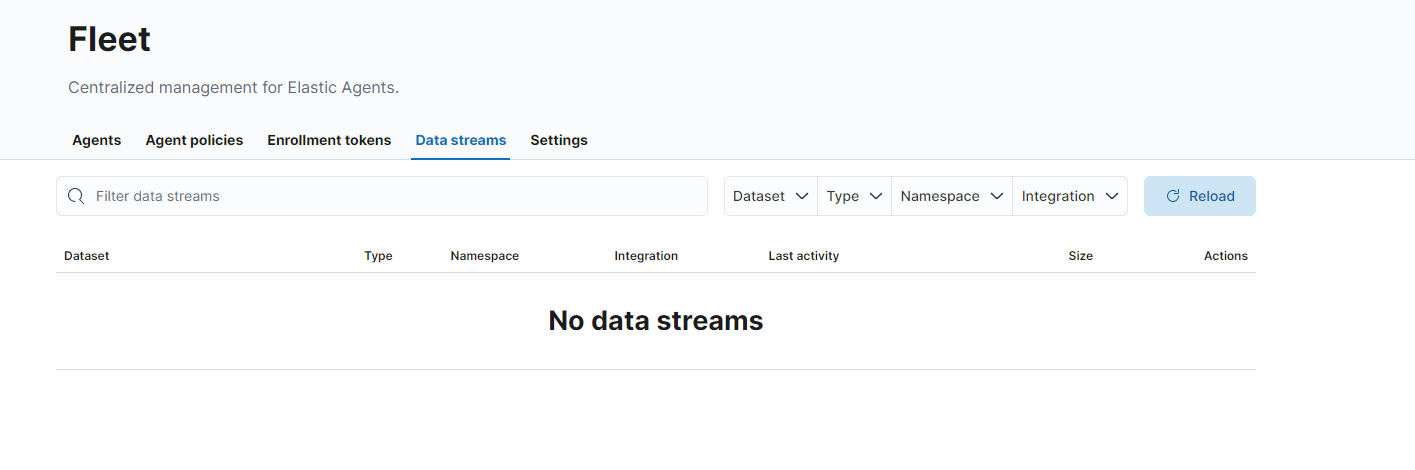
---
### Author:  [@Cristina\_Amico](https://discuss.elastic.co/u/Cristina_Amico)
#### Post date: [February 7, 2023, 2:14pm UTC](https://discuss.elastic.co/t/fleet-server-no-data-stream/324753/2 "2023-02-07T14:14:10Z")
Hi @NathanLau,
Could you share the command used to enroll the fleet server and some logs of the elastic agent?
It would be very helpful to understand what's going on in your config.
Thanks,
Cristina
---
### Author:  [@NathanLau](https://discuss.elastic.co/u/NathanLau)
#### Post date: [February 9, 2023, 6:55am UTC](https://discuss.elastic.co/t/fleet-server-no-data-stream/324753/3 "2023-02-09T06:55:37Z")
Hi Cristina ,
Here is install code.
```auto
sudo ./elastic-agent install \
--fleet-server-es=https://172.16. **.** :9200 \
--fleet-server-service-token=AAEAAWVsYXN0aWMvZmxlZX ********************************** dIRVZUUk9aWEIzeFJGa0NvZw \
--fleet-server-policy=fleet-server-policy \
--fleet-server-es-ca-trusted-fingerprint=2ed3b3fa33079a7446 ******************************
```
Because I am using docker to build it , I think the yml file point to my docker ip address (172.18.0.2:9200) but it's may fault.

What should I do ? edit the yml file to point the correct ip address?
---
### Author:  [@NathanLau](https://discuss.elastic.co/u/NathanLau)
#### Post date: [February 10, 2023, 7:11am UTC](https://discuss.elastic.co/t/fleet-server-no-data-stream/324753/4 "2023-02-10T07:11:36Z")
Hi @Cristina_Amico
Any Suggestions?
Thanks!
---
### Author:  [@Cristina\_Amico](https://discuss.elastic.co/u/Cristina_Amico)
#### Post date: [February 10, 2023, 10:37am UTC](https://discuss.elastic.co/t/fleet-server-no-data-stream/324753/5 "2023-02-10T10:37:15Z")
Hi Nathan,
`--fleet-server-es` should point to the Elasticsearch URL and should also be configured in Fleet `Settings` tab.
Under `Outputs`, click on `Add output` and select a new ES output, the host URL should be the same passed that is then passed to the enroll command:

By looking at the provided logs it seems that the fleet server is not able to reach Elasticsearch, so you can check if you can reach it with this command:
```auto
curl -k -u USERNAME:PASSWORD ELASTICSEARCH_HOST:9200
```
Could you check again your configuration, check that you can reach ES and then try again?
Thanks,
Cristina
---
### Author:  [@NathanLau](https://discuss.elastic.co/u/NathanLau)
#### Post date: [February 10, 2023, 11:03am UTC](https://discuss.elastic.co/t/fleet-server-no-data-stream/324753/6 "2023-02-10T11:03:55Z")
Hi @Cristina_Amico ,
I already direct change the ip address from docker IP to my VM.
Thanks. it's work. But in your way , it's cannot set it to default Agent.
---
### Author:  [@system](https://discuss.elastic.co/u/system)
#### Post date: [March 10, 2023, 11:04am UTC](https://discuss.elastic.co/t/fleet-server-no-data-stream/324753/7 "2023-03-10T11:04:19Z")
This topic was automatically closed 28 days after the last reply. New replies are no longer allowed.