# Group values of specific field into some categories
**URL:** https://discuss.elastic.co/t/group-values-of-specific-field-into-some-categories/227108
**Category:** Kibana
**Created:** [April 8, 2020, 11:13am UTC](https://discuss.elastic.co/t/group-values-of-specific-field-into-some-categories/227108 "2020-04-08T11:13:32Z")
**Posts on this page:** 20
**Page:** 1
### Author:  [@sai\_16](https://discuss.elastic.co/u/sai_16)
#### Post date: [April 8, 2020, 11:13am UTC](https://discuss.elastic.co/t/group-values-of-specific-field-into-some-categories/227108/1 "2020-04-08T11:13:32Z")
I'm using area chart for visualization of process names to the total cpu pct,but i want name some of the process to one group and some other process to another group ,is there a way to do it?
like :java,app -process names should be in the name of 'Application'
:metricbeat process should be as 'System'.
As of now it displays process names,instead can i display them by grouping ?
---
### Author:  [@flash1293](https://discuss.elastic.co/u/flash1293)
#### Post date: [April 9, 2020, 7:21am UTC](https://discuss.elastic.co/t/group-values-of-specific-field-into-some-categories/227108/2 "2020-04-09T07:21:12Z")
You can use the `Filters` aggregation:

---
### Author:  [@sai\_16](https://discuss.elastic.co/u/sai_16)
#### Post date: [April 9, 2020, 7:26am UTC](https://discuss.elastic.co/t/group-values-of-specific-field-into-some-categories/227108/3 "2020-04-09T07:26:00Z")
Yeah i tried it,it is actually filtering it , i'm not getting entire data ,getting only filters whichever created are displayed in the graph, rest data isn't
---
### Author:  [@flash1293](https://discuss.elastic.co/u/flash1293)
#### Post date: [April 9, 2020, 7:27am UTC](https://discuss.elastic.co/t/group-values-of-specific-field-into-some-categories/227108/4 "2020-04-09T07:27:11Z")
You can also add a "catch all" group by the end, negating the other filters: `NOT DestCityName : "Zurich" and NOT DestCityName : "Shanghai" and NOT DestCityName : "Tokyo" and NOT DestCityName : "Vienna" `
---
### Author:  [@sai\_16](https://discuss.elastic.co/u/sai_16)
#### Post date: [April 9, 2020, 9:16am UTC](https://discuss.elastic.co/t/group-values-of-specific-field-into-some-categories/227108/5 "2020-04-09T09:16:42Z")
Is there any other way?json or anything else?,i do have so many filters to be created
---
### Author:  [@flash1293](https://discuss.elastic.co/u/flash1293)
#### Post date: [April 9, 2020, 9:33am UTC](https://discuss.elastic.co/t/group-values-of-specific-field-into-some-categories/227108/6 "2020-04-09T09:33:31Z")
You could also do this up front before ingesting, e.g. in your logstash pipeline using the `translate` filter: [https://www.elastic.co/guide/en/logstash/current/plugins-filters-translate.html](https://www.elastic.co/guide/en/logstash/current/plugins-filters-translate.html)
---
### Author:  [@sai\_16](https://discuss.elastic.co/u/sai_16)
#### Post date: [April 9, 2020, 9:51am UTC](https://discuss.elastic.co/t/group-values-of-specific-field-into-some-categories/227108/7 "2020-04-09T09:51:34Z")
Ok, and are there any plugins for the snapshot option under Share tab . Bcz url isn't static ,it gets changed if we change any params in the url,is there a pluign for that ?
---
### Author:  [@flash1293](https://discuss.elastic.co/u/flash1293)
#### Post date: [April 9, 2020, 12:39pm UTC](https://discuss.elastic.co/t/group-values-of-specific-field-into-some-categories/227108/8 "2020-04-09T12:39:15Z")
If you have other questions that are not related to the topic of the post, please open a new post. Otherwise it will be very difficult for other users to find it.
---
### Author:  [@sai\_16](https://discuss.elastic.co/u/sai_16)
#### Post date: [April 9, 2020, 1:56pm UTC](https://discuss.elastic.co/t/group-values-of-specific-field-into-some-categories/227108/9 "2020-04-09T13:56:54Z")
sure, adding a catch all group and other filters is working but it is messing up the labels ..how can that be solved
---
### Author:  [@flash1293](https://discuss.elastic.co/u/flash1293)
#### Post date: [April 9, 2020, 1:58pm UTC](https://discuss.elastic.co/t/group-values-of-specific-field-into-some-categories/227108/10 "2020-04-09T13:58:36Z")
You can specify custom labels for each filter by clicking the little tag icon next to the trash icon to the right of the individual filter bars.
---
### Author:  [@sai\_16](https://discuss.elastic.co/u/sai_16)
#### Post date: [April 13, 2020, 3:16pm UTC](https://discuss.elastic.co/t/group-values-of-specific-field-into-some-categories/227108/11 "2020-04-13T15:16:28Z")
Does it not allow wild characters?, filtering? Like Toky\* or shang\*
---
### Author:  [@flash1293](https://discuss.elastic.co/u/flash1293)
#### Post date: [April 13, 2020, 8:19pm UTC](https://discuss.elastic.co/t/group-values-of-specific-field-into-some-categories/227108/12 "2020-04-13T20:19:16Z")
You can specify the filters using KQL or Lucerne, so you can do everything there you can do in the search bar of Discover/Visualize/Dashboar, including wildcard queries.
---
### Author:  [@sai\_16](https://discuss.elastic.co/u/sai_16)
#### Post date: [April 15, 2020, 8:06am UTC](https://discuss.elastic.co/t/group-values-of-specific-field-into-some-categories/227108/13 "2020-04-15T08:06:05Z")
ya but that is more messy to pass in the search bar (it affects other visualizations in the dashboard too ) as i have around 10-15 filters and a catch all filter too.
That's the reason i'm trying it out with Filter option under Buckets.but it isn't allowing wildcards in it.
---
### Author:  [@flash1293](https://discuss.elastic.co/u/flash1293)
#### Post date: [April 15, 2020, 8:11am UTC](https://discuss.elastic.co/t/group-values-of-specific-field-into-some-categories/227108/14 "2020-04-15T08:11:27Z")
You can use wildcard queries in the individual filters of the filters aggregation, just like you can in the search bar. It's the same query language.
---
### Author:  [@sai\_16](https://discuss.elastic.co/u/sai_16)
#### Post date: [April 15, 2020, 10:42am UTC](https://discuss.elastic.co/t/group-values-of-specific-field-into-some-categories/227108/15 "2020-04-15T10:42:42Z")
Can you give me an example..i tried it ,didn't work..getting error.
---
### Author:  [@flash1293](https://discuss.elastic.co/u/flash1293)
#### Post date: [April 15, 2020, 11:36am UTC](https://discuss.elastic.co/t/group-values-of-specific-field-into-some-categories/227108/16 "2020-04-15T11:36:49Z")
Can you post what you tried?
---
### Author:  [@sai\_16](https://discuss.elastic.co/u/sai_16)
#### Post date: [April 15, 2020, 12:47pm UTC](https://discuss.elastic.co/t/group-values-of-specific-field-into-some-categories/227108/17 "2020-04-15T12:47:59Z")
"query": {"wildcard": {"system.process.username": {"value": "oracl\*","boost": 1.0,"rewrite": "constant\_score"}}}
---
### Author:  [@flash1293](https://discuss.elastic.co/u/flash1293)
#### Post date: [April 15, 2020, 12:50pm UTC](https://discuss.elastic.co/t/group-values-of-specific-field-into-some-categories/227108/18 "2020-04-15T12:50:10Z")
When you are using KQL, just `system.process.username: oracl*` should do the trick
---
### Author:  [@sai\_16](https://discuss.elastic.co/u/sai_16)
#### Post date: [April 15, 2020, 12:56pm UTC](https://discuss.elastic.co/t/group-values-of-specific-field-into-some-categories/227108/19 "2020-04-15T12:56:56Z")
it isnt working
---
### Author:  [@flash1293](https://discuss.elastic.co/u/flash1293)
#### Post date: [April 20, 2020, 7:48am UTC](https://discuss.elastic.co/t/group-values-of-specific-field-into-some-categories/227108/20 "2020-04-20T07:48:51Z")
If want to receive help here, it helps to post a little more context
> it isnt working
is in general not a good starting point - what exactly did you try? What exactly does show up and how does it differ from what you want to achieve? What's your context (e.g. mapping of your index)?
This is an example:
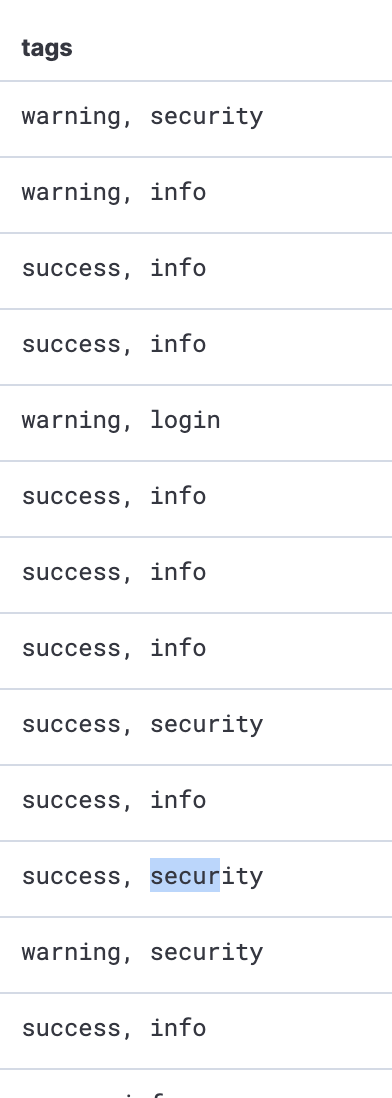
My data contains a field `tags.keyword` filled with stuff like this:
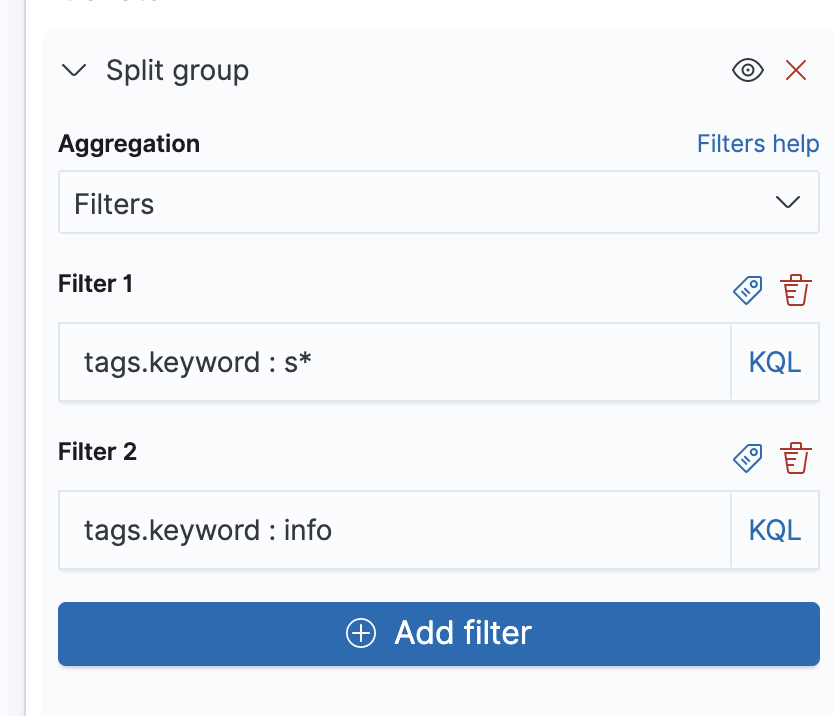
This is how I can match both `success` and `security` in a single "group":
[Next page](https://discuss.elastic.co/t/group-values-of-specific-field-into-some-categories/227108.md?page=2)