# How can ı drawing ip based map
**URL:** https://discuss.elastic.co/t/how-can-i-drawing-ip-based-map/174252
**Category:** Kibana
**Created:** [March 28, 2019, 7:06am UTC](https://discuss.elastic.co/t/how-can-i-drawing-ip-based-map/174252 "2019-03-28T07:06:08Z")
**Posts on this page:** 13
**Page:** 1
### Author:  [@khergner](https://discuss.elastic.co/u/khergner)
#### Post date: [March 28, 2019, 7:06am UTC](https://discuss.elastic.co/t/how-can-i-drawing-ip-based-map/174252/1 "2019-03-28T07:06:08Z")
Hi everyone
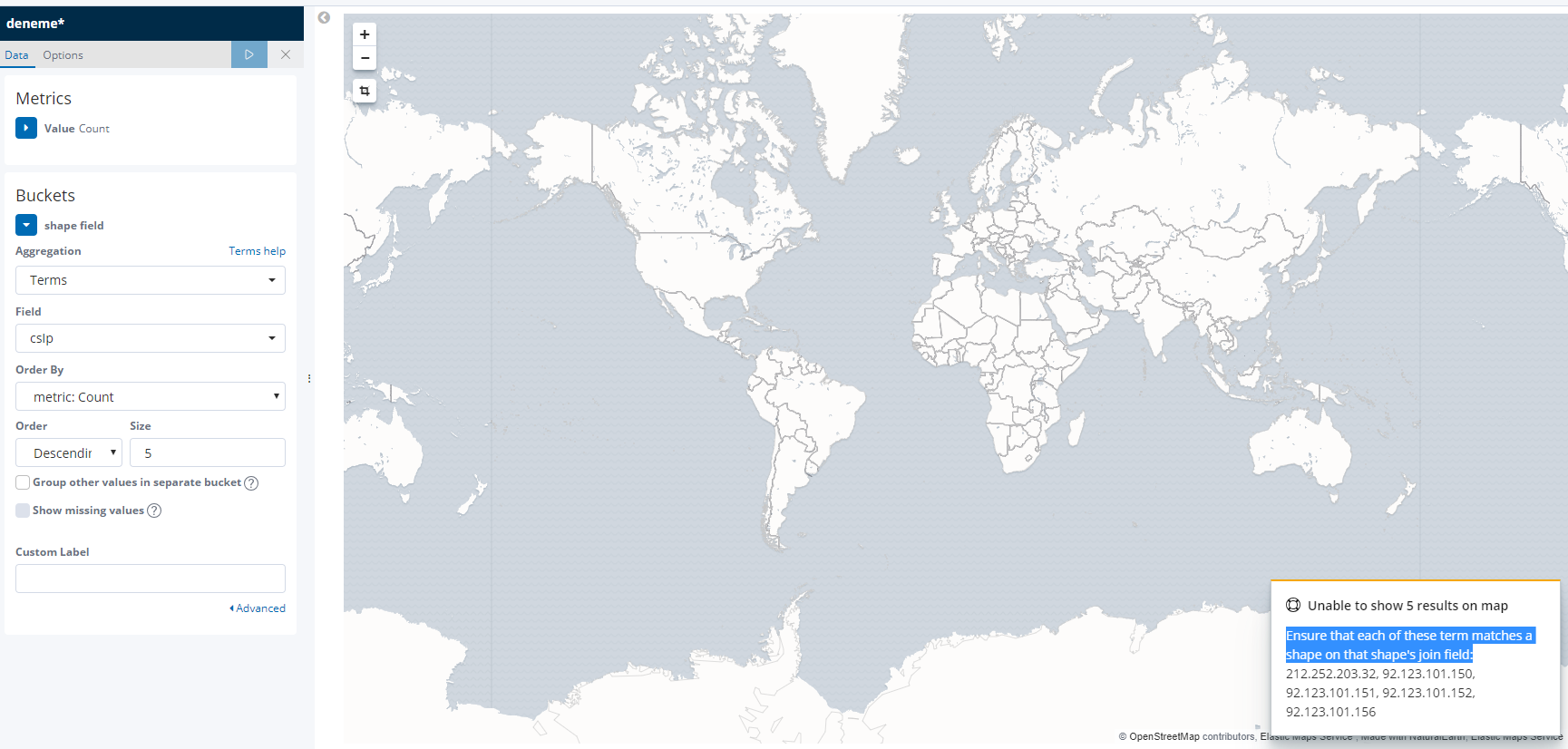
I want to draw ip map but it gives an error. I use model ip type for srcIp.
```
"csIp": {
"type": "ip"
}
```
The error I received is as follows.
---
### Author:  [@Christian\_Dahlqvist](https://discuss.elastic.co/u/Christian_Dahlqvist)
#### Post date: [March 28, 2019, 7:11am UTC](https://discuss.elastic.co/t/how-can-i-drawing-ip-based-map/174252/2 "2019-03-28T07:11:12Z")
IPs do not contain location information so you need to enrich the events with this information when indexing the data, e.g. through the [Logstash Geoip plugin](https://www.elastic.co/guide/en/logstash/current/plugins-filters-geoip.html) or an [ingest node processor](https://www.elastic.co/guide/en/elasticsearch/plugins/current/ingest-geoip.html).
---
### Author:  [@khergner](https://discuss.elastic.co/u/khergner)
#### Post date: [March 28, 2019, 7:26am UTC](https://discuss.elastic.co/t/how-can-i-drawing-ip-based-map/174252/3 "2019-03-28T07:26:19Z")
Hi Christian
I installed ingest geo\_ip for elasticsearch plugin. I use filter as follows.
```
filter {
if [fileset][module] == "nginx" {
if [fileset][name] == "access" {
grok {
match => { "message" => ["%{IPORHOST:[nginx][access][remote_ip]} - %{DATA:[nginx][access][user_name]} \[%{HTTPDATE:[nginx][access][time]}\] \"%{WORD:[nginx][access][method]} %{DATA:[nginx][access][url]} HTTP/%{NUMBER:[nginx][access][http_version]}\" %{NUMBER:[nginx][access][response_code]} %{NUMBER:[nginx][access][body_sent][bytes]} \"%{DATA:[nginx][access][referrer]}\" \"%{DATA:[nginx][access][agent]}\""] }
remove_field => "message"
}
mutate {
add_field => { "read_timestamp" => "%{@timestamp}" }
}
date {
match => ["[nginx][access][time]", "dd/MMM/YYYY:H:m:s Z" ]
remove_field => "[nginx][access][time]"
}
useragent {
source => "[nginx][access][agent]"
target => "[nginx][access][user_agent]"
remove_field => "[nginx][access][agent]"
}
geoip {
source => "[nginx][access][remote_ip]"
target => "[nginx][access][geoip]"
}
}
else if [fileset][name] == "error" {
grok {
match => { "message" => ["%{DATA:[nginx][error][time]} \[%{DATA:[nginx][error][level]}\] %{NUMBER:[nginx][error][pid]}#%{NUMBER:[nginx][error][tid]}: (\*%{NUMBER:[nginx][error][connection_id]} )?%{GREEDYDATA:[nginx][error][message]}"] }
remove_field => "message"
}
mutate {
rename => { "@timestamp" => "read_timestamp" }
}
date {
match => ["[nginx][error][time]", "YYYY/MM/dd H:m:s" ]
remove_field => "[nginx][error][time]"
}
}
}
}
```
I don't understand any progress ☹
---
### Author:  [@khergner](https://discuss.elastic.co/u/khergner)
#### Post date: [March 28, 2019, 7:42am UTC](https://discuss.elastic.co/t/how-can-i-drawing-ip-based-map/174252/4 "2019-03-28T07:42:05Z")
I use json model
```
{
"csIp": "92.123.105.156",
}
```
---
### Author:  [@Christian\_Dahlqvist](https://discuss.elastic.co/u/Christian_Dahlqvist)
#### Post date: [March 28, 2019, 8:26am UTC](https://discuss.elastic.co/t/how-can-i-drawing-ip-based-map/174252/5 "2019-03-28T08:26:44Z")
None of the configuration you posted enrich IP based on the `csIp` field in your data. As your field is not what is assumed by the config you posted you need to change it.
---
### Author:  [@khergner](https://discuss.elastic.co/u/khergner)
#### Post date: [March 28, 2019, 8:33am UTC](https://discuss.elastic.co/t/how-can-i-drawing-ip-based-map/174252/6 "2019-03-28T08:33:31Z")
> [@Christian\_Dahlqvist](#):
>
> As your field is not what is assumed by the config you posted you need to change it.
How can ı any progress your idea? Can you help me ? ı need to use logstash when you first sent
---
### Author:  [@Christian\_Dahlqvist](https://discuss.elastic.co/u/Christian_Dahlqvist)
#### Post date: [March 28, 2019, 8:37am UTC](https://discuss.elastic.co/t/how-can-i-drawing-ip-based-map/174252/7 "2019-03-28T08:37:46Z")
> [@khergner](#):
>
> geoip { source =\> "[nginx][access][remote\_ip]" target =\> "[nginx][access][geoip]" }
Try something like this:
```auto
geoip {
source => "[csIp]"
}
```
---
### Author:  [@khergner](https://discuss.elastic.co/u/khergner)
#### Post date: [March 28, 2019, 9:32am UTC](https://discuss.elastic.co/t/how-can-i-drawing-ip-based-map/174252/8 "2019-03-28T09:32:34Z")
Hi Christian
I can't. I don't know problem where is it. I can tell you approach
1. I have created my model, it is name akamai
2. I send data post to http://....:9092/akaami { json exmpler}
3. IMy model csIp: ip but system can't find ip area for visualization
4. I want to design ip map for my model
Can you help me?
---
### Author:  [@Christian\_Dahlqvist](https://discuss.elastic.co/u/Christian_Dahlqvist)
#### Post date: [March 28, 2019, 9:51am UTC](https://discuss.elastic.co/t/how-can-i-drawing-ip-based-map/174252/9 "2019-03-28T09:51:33Z")
You need to enrich and add geo location (see my example) fields to your event at indexing time and plot based on these added fields.
Have a look at this blog post:
> **[GeoIP in the Elastic Stack - Elasticsearch, Logstash, Ingest API](https://www.elastic.co/blog/geoip-in-the-elastic-stack)**
>
> Discover what browsers access your site. See where your end users are logging in from. Put your IP addresses or hostnames to work with geoip filtering.
---
### Author:  [@khergner](https://discuss.elastic.co/u/khergner)
#### Post date: [March 28, 2019, 1:51pm UTC](https://discuss.elastic.co/t/how-can-i-drawing-ip-based-map/174252/10 "2019-03-28T13:51:22Z")
I don't find correct solution. I don't know where ı made a mistake. ı use bellow model
```
PUT :9092/xxx
{
"mappings": {
"dtakamai": {
"properties": {
"csCookie": {
"type": "text"
},
"csIp": {
"type": "ip"
},
"csMethod": {
"type": "keyword"
},
"csReferer": {
"type": "text"
}
}
}
}
}
```
**I use data**
```
POST akamai/dtakamai
{
"dateTime": "2019-03-27T15:06:50",
"csIp": "104.194.203.69",
"csMethod": "DELETE",
"csUri": "/bxxx.com",
"scStatus": 200,
}
```
Log stash conf
```
filter {
geoip {
source => "[csIp]"
}
}
```
I direct send data to elasticsearch:9092/akamai. Now I think where is the error?
---
### Author:  [@khergner](https://discuss.elastic.co/u/khergner)
#### Post date: [March 29, 2019, 6:48am UTC](https://discuss.elastic.co/t/how-can-i-drawing-ip-based-map/174252/11 "2019-03-29T06:48:55Z")
Hi
found as a below exampler mapping
```
PUT _ingest/pipeline/geoip
{
"description" : "Add geoip info",
"processors" : [
{
"geoip" : {
"field" : "ip"
}
}
]
}
PUT my_index/my_type/my_id?pipeline=geoip
{
"ip": "8.8.8.8"
}
GET my_index/my_type/my_id
```
But ı want to designe my own mapping. How Can I do similary mapping? I'd like to use field csUseragent, csReferer vb...
---
### Author:  [@Christian\_Dahlqvist](https://discuss.elastic.co/u/Christian_Dahlqvist)
#### Post date: [March 29, 2019, 7:00am UTC](https://discuss.elastic.co/t/how-can-i-drawing-ip-based-map/174252/12 "2019-03-29T07:00:13Z")
Transforming data can be done in Logstash, so I would recommend you have a look at [this blog post](https://www.elastic.co/blog/a-practical-introduction-to-logstash) which describes the process. Once you have understood how this works, you should be able to transform this into a more complete ingest node pipeline if you want to as a lot of the filters are similar (although the configuration does differ).
---
### Author:  [@system](https://discuss.elastic.co/u/system)
#### Post date: [April 26, 2019, 7:05am UTC](https://discuss.elastic.co/t/how-can-i-drawing-ip-based-map/174252/13 "2019-04-26T07:05:43Z")
This topic was automatically closed 28 days after the last reply. New replies are no longer allowed.