# How to add certs to hearbeat
**URL:** https://discuss.elastic.co/t/how-to-add-certs-to-hearbeat/303554
**Category:** Beats
**Tags:** docker, heartbeat
**Created:** [April 28, 2022, 8:38pm UTC](https://discuss.elastic.co/t/how-to-add-certs-to-hearbeat/303554 "2022-04-28T20:38:53Z")
**Posts on this page:** 11
**Page:** 1
### Author:  [@Francisco\_Yanez](https://discuss.elastic.co/u/Francisco_Yanez)
#### Post date: [April 28, 2022, 8:38pm UTC](https://discuss.elastic.co/t/how-to-add-certs-to-hearbeat/303554/1 "2022-04-28T20:38:54Z")
Hello Community,
I am trying to add to heartbeat (all our infra is running in kubernetes) all our pods that have certs so we can monitor those via https and alert when is time to renew them. To access those via http I need to import certs to the hearbet yaml config. I saw that on the elastic documentation:
`https://www.elastic.co/guide/en/beats/heartbeat/7.16/monitor-http-options.html#monitor-http-tls-ssl`
- type: http
id: my-http-service
name: My HTTP Service
hosts: ["[https://myhost:443](https://myhost:443)"]
schedule: '@every 5s'
ssl:
certificate\_authorities: ['/etc/ca.crt']
supported\_protocols: ["TLSv1.0", "TLSv1.1", "TLSv1.2"]
What I do not find is how to add those certs to the pod? So it can point at the location. I have the secrets of the certs but I am not sure if I should create a secret for heatbeat? or if I should modify the existing one that I see in the kube-system:
`heartbeat-token-lk8sl kubernetes.io/service-account-token 3 2d1h`
if I have to create one do you have a process on how by creation it will be called by hearbeat? do I have to use any apiVersion? and if it is done by modifying the heartbeat token do I need to replace the ca.crt that I see there?
Thanks
---
### Author:  [@Alberto\_Delgado](https://discuss.elastic.co/u/Alberto_Delgado)
#### Post date: [April 29, 2022, 8:26am UTC](https://discuss.elastic.co/t/how-to-add-certs-to-hearbeat/303554/2 "2022-04-29T08:26:27Z")
Hi @Francisco_Yanez ,
Thanks for reaching out!
When it comes to add those certs to the pod, there are useful tools such as [GitHub - cert-manager/cert-manager: Automatically provision and manage TLS certificates in Kubernetes](https://github.com/cert-manager/cert-manager)
This [article](https://github.com/framsouza/eck-ready-for-production) can be helpful for you. For instance, you will see examples of how configure things such as:
- heartbeat monitor SSL certificate expiration,
- reference to cert-manager
Let me know if this helps you
Thanks,
Alberto
---
### Author:  [@Francisco\_Yanez](https://discuss.elastic.co/u/Francisco_Yanez)
#### Post date: [April 29, 2022, 5:21pm UTC](https://discuss.elastic.co/t/how-to-add-certs-to-hearbeat/303554/3 "2022-04-29T17:21:36Z")
Hello Alberto,
Thanks for the help. One thing that I forgot to mentioned is that I already have the certificate in a secret. I did use cert-manager to create that secret. Now, my question is how do I point the pod to use that secret? Do I have to create a user and then a secret for the user using a particular apiVersion in kubernetes? (that is the way I did it for other system but I have to follow their documentation). Or is there a particular way to just point at that secret within the yaml of heartbeat?
thanks
Francisco
---
### Author:  [@Alberto\_Delgado](https://discuss.elastic.co/u/Alberto_Delgado)
#### Post date: [May 3, 2022, 9:33am UTC](https://discuss.elastic.co/t/how-to-add-certs-to-hearbeat/303554/4 "2022-05-03T09:33:48Z")
Hi @Francisco_Yanez ,
[Here](https://github.com/framsouza/eck-ready-for-production/blob/main/heartbeat.yaml#L26) you can see an example of Heartbeat configuration for kubernetes.
On the other hand, this [link](https://www.elastic.co/guide/en/cloud-on-k8s/2.1/k8s-orchestrating-elastic-stack-applications.html) points to the documentation for orchestrating elastic stack applications in Kubernetes (e.g. Beats).
Let me know if this helps you
Thanks,
Alberto
---
### Author:  [@Francisco\_Yanez](https://discuss.elastic.co/u/Francisco_Yanez)
#### Post date: [May 3, 2022, 4:39pm UTC](https://discuss.elastic.co/t/how-to-add-certs-to-hearbeat/303554/5 "2022-05-03T16:39:33Z")
Hello Alberto,
Sorry but those did not really help. I have already hearbeat configured and working. Also I have a secret that I created and has the certificate. Now how do I point to that secret?
Thanks
Francisco
---
### Author:  [@emilioalvap](https://discuss.elastic.co/u/emilioalvap)
#### Post date: [May 4, 2022, 9:31am UTC](https://discuss.elastic.co/t/how-to-add-certs-to-hearbeat/303554/6 "2022-05-04T09:31:11Z")
Hi @Francisco_Yanez,
If you're trying to validate self-signed certificates on pods' HTTPS endpoints, you'll only need to make all root CA certs available to heartbeat pods.
If you already have you CA cert as a K8s secret, you can mount it into the pod filesystem by creating a [volume mapping](https://kubernetes.io/docs/concepts/configuration/secret/#using-secrets-as-files-from-a-pod). Eg:
```auto
spec:
containers:
- name: mypod
image: heartbeat
volumeMounts:
- name: ca-cert
mountPath: "/etc/my-ca.crt"
readOnly: true
volumes:
- name: ca-cert
secret:
secretName: mycacert
optional: false # default setting; "mysecret" must exist
```
Once mounted in the pod, you can add it to heartbeat's SSL validation pool adding it to `certificate_authorities` setting:
```auto
certificate_authorities: ['/etc/ca.crt', '/etc/my-ca.crt' --> Your custom CAs]
```
Let me know if this is what you're looking for.
---
### Author:  [@Francisco\_Yanez](https://discuss.elastic.co/u/Francisco_Yanez)
#### Post date: [May 5, 2022, 3:12pm UTC](https://discuss.elastic.co/t/how-to-add-certs-to-hearbeat/303554/7 "2022-05-05T15:12:43Z")
Thanks Emilioalvap
ok this clears a lot how I can import my ca. I just need to make sure that my CA is under the secret. Quick questions. I was reading and I saw that it could be like this:
volumes:
```auto
-
secret:
secretName: NAME
defaultMode: 0400
name: cert
```
would that change anything and lastly I am trying to do it with tls.crt. Would that work?
thanks
Francisco
---
### Author:  [@emilioalvap](https://discuss.elastic.co/u/emilioalvap)
#### Post date: [May 6, 2022, 11:42am UTC](https://discuss.elastic.co/t/how-to-add-certs-to-hearbeat/303554/8 "2022-05-06T11:42:04Z")
Hi @Francisco_Yanez ,
As long as you are using the CA certificate, file name should not have any impact other than how it's referenced from inside config file.
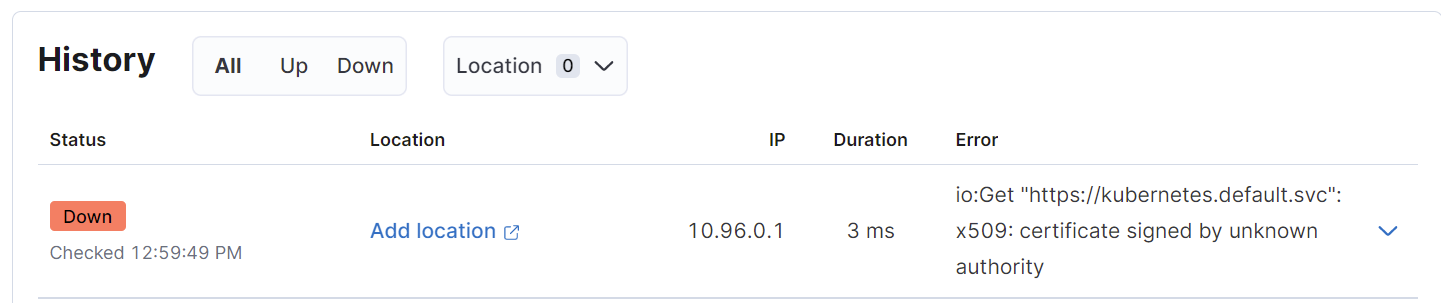
I've built an example using one of my private kubernetes endpoint to showcase the flow. Here's my initial monitor configuration:
```auto
- type: http
urls: ["https://kubernetes.default.svc"]
schedule: "@every 10s"
```
K8s monitor appears as down and the error indicates that certificate cannot be validated:
So I created a K8s secret containing CA certificate deployed on my personal minikube:
```auto
kubectl create secret generic my-ca --from-file=ca.crt=$HOME/.minikube/ca.crt
```
After that, update pod configuration to mount secret volume:
```auto
spec:
serviceAccountName: heartbeat
hostNetwork: true
dnsPolicy: ClusterFirstWithHostNet
containers:
- name: heartbeat
image: docker.elastic.co/beats/heartbeat:8.2.0
args: [
"-c", "/etc/heartbeat.yml",
"-e",
]
securityContext:
runAsUser: 0
volumeMounts:
- name: my-ca
mountPath: "/etc/my-ca"
readOnly: true
volumes:
- name: my-ca
secret:
secretName: my-ca
optional: false # default setting; "mysecret" must exist
```
And point the monitor to certificate file:
```auto
- type: http
urls: ["https://kubernetes.default.svc"]
schedule: "@every 10s"
ssl:
certificate_authorities: ['/etc/my-ca/ca.crt']
```
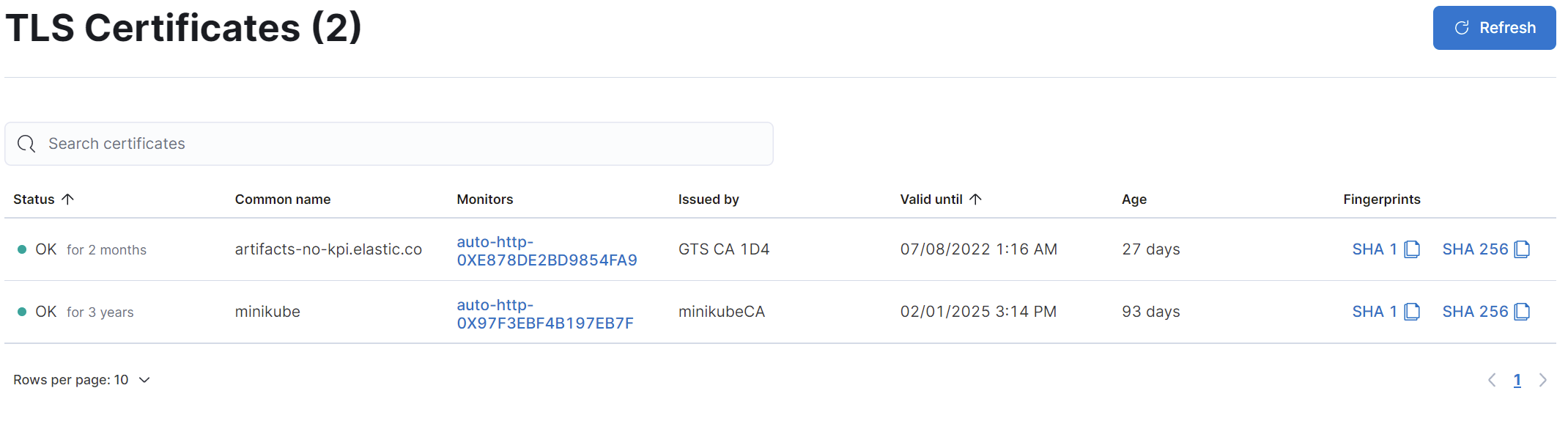
With that, it should be available in TLS monitor list:
Hope that helps.
---
### Author:  [@Francisco\_Yanez](https://discuss.elastic.co/u/Francisco_Yanez)
#### Post date: [May 6, 2022, 4:55pm UTC](https://discuss.elastic.co/t/how-to-add-certs-to-hearbeat/303554/9 "2022-05-06T16:55:33Z")
This is really helping Emilioalvap! thanks. I think I got the whole concept but I do not have the ca.crt I just have the tls.crt and does not seem to work. I have the tls from Godaddy. Do you know if I can request the CA from them because when I requested it, they do not know what I am asking and I just got a name.pem file.
thanks
Francisco
---
### Author:  [@emilioalvap](https://discuss.elastic.co/u/emilioalvap)
#### Post date: [May 9, 2022, 8:48am UTC](https://discuss.elastic.co/t/how-to-add-certs-to-hearbeat/303554/10 "2022-05-09T08:48:45Z")
Hi @Francisco_Yanez ,
I'm sorry, I think I have initially mistaken what the problem here might be. The solution I described previously was considering using self-signed SSL certificates which are not trusted out-of-the-box by any OS.
That should not be the case if you using signed certificates provided by GoDaddy, their CA should be widely trusted by default.
Let me retrace a bit the, what error/s do you receive when setting up heartbeat monitors for these SSL endpoints that you mention?
If you don't specify `ssl:` options, Heartbeat should try to validate using the system's default cert pool, which should include GoDaddy's CA.
---
### Author:  [@system](https://discuss.elastic.co/u/system)
#### Post date: [June 6, 2022, 10:49am UTC](https://discuss.elastic.co/t/how-to-add-certs-to-hearbeat/303554/11 "2022-06-06T10:49:42Z")
This topic was automatically closed 28 days after the last reply. New replies are no longer allowed.