# How to compare data to find missing one
**URL:** https://discuss.elastic.co/t/how-to-compare-data-to-find-missing-one/308924
**Category:** Elasticsearch
**Tags:** elastic-stack-alerting
**Created:** [July 5, 2022, 2:13pm UTC](https://discuss.elastic.co/t/how-to-compare-data-to-find-missing-one/308924 "2022-07-05T14:13:20Z")
**Posts on this page:** 17
**Page:** 1
### Author:  [@josephLiu](https://discuss.elastic.co/u/josephLiu)
#### Post date: [July 5, 2022, 2:13pm UTC](https://discuss.elastic.co/t/how-to-compare-data-to-find-missing-one/308924/1 "2022-07-05T14:13:20Z")
I need to use ES to realize an automatic function of detecting lost logs,Company don't want to write extra code
The method is as follows:
Through filebeat, log is continuously sent to two indexes from different source, one of which is generated when the business process is started, and the other is generated when the business process is completed,then set a alerting query in Kibana,while query return Hits it will trigger alerting action
mock data below is the log generated while process is started,
The data here is complete!
{“UniqueID”:“C001”,“timestamp”:“2022-06-01-T00:00:01”,"src":"start"}
{“UniqueID”:“C002”,“timestamp”:“2022-06-01-T00:00:02”,"src":"start"}
{“UniqueID”:“C003”,“timestamp”:“2022-06-01-T00:00:03”,"src":"start"}
{“UniqueID”:“C004”,“timestamp”:“2022-06-01-T00:00:04”,"src":"start"}
And data generated while process is end
There may be missing data here
{“UniqueID”:“C001”,“timestamp”:“2022-06-01-T00:00:01”,"src":"end"}
{“UniqueID”:“C003”,“timestamp”:“2022-06-01-T00:00:03”,"src":"end"}
Data format is above,Filed UniqueID is a key value ,timestamp means when this log was generated in system
we can see that if we compare 2 parts of them,there are no logs which UniqueID is C002 & C004 in “end index”
But there is a practical problem ,The log which UniqueID is C004 maybe still runing in system,
so we can't consider it as a missing one,In this case we can only care about the C002 one as a missing log
In other words ,I need to find the max timestamp value in “end index”,and the logs in “start index” which timestamp is below the max timestamp is the search range
In SQL SERVER ,I can put 2 parts of data into one table and query by the sql below
```auto
select UniqueID from dbo.kibanaLog GROUP BY UniqueID HAVING COUNT(*) = 1
and max(timestamp) <(select max(timestamp)from dbo.kibanaLog WHERE SRC='END' )
```
It will get correct records,but ES-SQL can not supprot complex sub-select
who can give me some ideas?
Thank you
---
### Author:  [@richcollier](https://discuss.elastic.co/u/richcollier)
#### Post date: [July 5, 2022, 3:43pm UTC](https://discuss.elastic.co/t/how-to-compare-data-to-find-missing-one/308924/2 "2022-07-05T15:43:57Z")
Your use case is likely solved via [Transforms](https://www.elastic.co/guide/en/elasticsearch/reference/current/transforms.html), which allows you to pivot and aggregate the data by `UniqueID` and do things like look for `max(timestamp`) or [calculate durations](https://www.elastic.co/guide/en/elasticsearch/reference/current/transform-painless-examples.html#painless-bucket-script), but I'm not clear as to how you determine that `C004` may be still running, but `C002` is missing. Is it because these things have to run sequentially? In other words, because you know `C003` started must mean that `C002` must have finished?
---
### Author:  [@Tomo\_M](https://discuss.elastic.co/u/Tomo_M)
#### Post date: [July 5, 2022, 3:57pm UTC](https://discuss.elastic.co/t/how-to-compare-data-to-find-missing-one/308924/3 "2022-07-05T15:57:40Z")
As there is no sub query in elasticsearch, IMHO, it is better to query two times. First ask the maximum timestamp for end, and next create the second query using the maximum value on the client side.
If you need consistent result, you can use PIT to get result of two queries on the same timepoint.
---
### Author:  [@josephLiu](https://discuss.elastic.co/u/josephLiu)
#### Post date: [July 5, 2022, 4:17pm UTC](https://discuss.elastic.co/t/how-to-compare-data-to-find-missing-one/308924/4 "2022-07-05T16:17:02Z")
yes,C002 & C003 will be sent to ES sequentially,
I‘ve tried Transformers ,but I don't know how to get max(timestamp)of "end index" logs after I aggregated the data by UniqueID
should I aggregate them twice by UniqueID and SRC ?
---
### Author:  [@josephLiu](https://discuss.elastic.co/u/josephLiu)
#### Post date: [July 5, 2022, 4:21pm UTC](https://discuss.elastic.co/t/how-to-compare-data-to-find-missing-one/308924/5 "2022-07-05T16:21:28Z")
But how I deliver the max timestamp after first query ,I need automatic implementation 。。
---
### Author:  [@richcollier](https://discuss.elastic.co/u/richcollier)
#### Post date: [July 5, 2022, 4:37pm UTC](https://discuss.elastic.co/t/how-to-compare-data-to-find-missing-one/308924/6 "2022-07-05T16:37:20Z")
> [@josephLiu](#):
>
> but I don't know how to get max(timestamp)of "end index" logs after I aggregated the data by UniqueID
I already pointed you to an example here: [Painless examples for transforms | Elasticsearch Guide [8.11] | Elastic](https://www.elastic.co/guide/en/elasticsearch/reference/current/transform-painless-examples.html#painless-bucket-script)
---
### Author:  [@Tomo\_M](https://discuss.elastic.co/u/Tomo_M)
#### Post date: [July 6, 2022, 6:51am UTC](https://discuss.elastic.co/t/how-to-compare-data-to-find-missing-one/308924/7 "2022-07-06T06:51:23Z")
> [@josephLiu](#):
>
> I need automatic implementation 。。
You can do that using any favorit [clients](https://www.elastic.co/guide/en/elasticsearch/client/index.html).
---
### Author:  [@josephLiu](https://discuss.elastic.co/u/josephLiu)
#### Post date: [July 6, 2022, 2:49pm UTC](https://discuss.elastic.co/t/how-to-compare-data-to-find-missing-one/308924/8 "2022-07-06T14:49:30Z")
I have tried samples in this docementation
I can get max timestamp via the code in sample "[Painless examples for transforms | Elasticsearch Guide [8.3] | Elastic](https://www.elastic.co/guide/en/elasticsearch/reference/current/transform-painless-examples.html#painless-top-hits) "
and I can compare 2 indexes to check the difference via the sample in "[Painless examples for transforms | Elasticsearch Guide [8.3] | Elastic](https://www.elastic.co/guide/en/elasticsearch/reference/current/transform-painless-examples.html#painless-compare)"
But How can I accomplish these two things at the same transform?
If I want to create a transform ,I need to set "group by" in "pivot",
when i set " group by uniqueID",I can just compare timestamps which have same uniqueID
Should i create 2 transforms ?
Here's the mock data i use
```auto
post index_test_startlog/_bulk
{"index":{"_id":1}}
{"UniqueAuditRecord":"0035969ECC142BF0C00001687C3001","timestamp":"2022-06-21T00:00:01","src":"start","TransactionId":"0035969ECC13AE1201"}
{"index":{"_id":2}}
{"UniqueAuditRecord":"0035969ECC142BF0C00001687C3002","timestamp":"2022-06-21T00:00:02","src":"start","TransactionId":"0035969ECC13AE1201"}
{"index":{"_id":3}}
{"UniqueAuditRecord":"0035969ECC142BF0C00001687C3003","timestamp":"2022-06-21T00:00:03","src":"start","TransactionId":"0035969ECC13AE1201"}
{"index":{"_id":4}}
{"UniqueAuditRecord":"0035969ECC142BF0C00001687C3004","timestamp":"2022-06-21T00:00:04","src":"start","TransactionId":"0035969ECC13AE1201"}
post index_test_endlog/_bulk
{"index":{"_id":1}}
{"UniqueAuditRecord":"0035969ECC142BF0C00001687C3001","timestamp":"2022-06-21T00:00:01","src":"END","TransactionId":"0035969ECC13AE1201"}
{"index":{"_id":2}}
{"UniqueAuditRecord":"0035969ECC142BF0C00001687C3003","timestamp":"2022-06-21T00:00:03","src":"END","TransactionId":"0035969ECC13AE1201"}
```
Here's the transform i have tried
```auto
Put _transform/index_comparetest
{
"source": {
"index": [
"index_test_startlog",
"index_test_endlog"
],
"query": {
"match_all": {}
}
},
"dest": {
"index": "compare"
},
"pivot": {
"group_by": {
"uniqueid": {
"terms": {
"field": "src.keyword"
}
}
},
"aggregations": {
"latest_doc": {
"scripted_metric": {
"init_script": "state.timestamp_latest = 0L; state.last_doc = ''",
"map_script": """
def current_date = doc['timestamp'].getValue().toInstant().toEpochMilli();
if (current_date > state.timestamp_latest)
{state.timestamp_latest = current_date;
state.last_doc = new HashMap(params['_source']);}
""",
"combine_script": "return state",
"reduce_script": """
def last_doc = '';
def timestamp_latest = 0L;
for (s in states) {if (s.timestamp_latest > (timestamp_latest))
{timestamp_latest = s.timestamp_latest; last_doc = s.last_doc;}}
return last_doc
"""
}
}
}
}
Put _transform/index_comparetest
{
"source": {
"index": [
"index_test_startlog",
"index_test_endlog"
],
"query": {
"match_all": {}
}
},
"dest": {
"index": "compare"
},
"pivot": {
"group_by": {
"uniqueid": {
"terms": {
"field": "UniqueAuditRecord"
}
}
},
"aggregations" : {
"compare" : {
"scripted_metric" : {
"map_script" : "state.doc = new HashMap(params['_source'])",
"combine_script" : "return state",
"reduce_script" : """
if (states.size() != 2) {
return "count_mismatch"
}
if (states.get(0).equals(states.get(1))) {
return "match"
} else {
return "mismatch"
}
"""
}
}
}
}
}
```
---
### Author:  [@richcollier](https://discuss.elastic.co/u/richcollier)
#### Post date: [July 11, 2022, 7:10pm UTC](https://discuss.elastic.co/t/how-to-compare-data-to-find-missing-one/308924/9 "2022-07-11T19:10:33Z")
You could do something like this:
```auto
POST _transform/_preview
{
"source": {
"index": [
"index_test_startlog",
"index_test_endlog"
]
},
"pivot": {
"group_by": {
"UniqueAuditRecord": {
"terms": {
"field": "UniqueAuditRecord"
}
}
},
"aggregations": {
"num_results": {
"value_count": {
"field": "src"
}
},
"combined_doc_info": {
"scripted_metric": {
"init_script": "state.docs = []",
"map_script": """
Map entry = [
'timestamp':doc['timestamp'].value,
'UniqueAuditRecord':doc['UniqueAuditRecord'].value,
'src':doc['src'].value
];
state.docs.add(entry)
""",
"combine_script": "return state.docs;",
"reduce_script": """
def all_docs = [];
for (s in states) {
for (entry in s) {
all_docs.add(entry);
}
}
all_docs.sort((HashMap o1, HashMap o2)->o1['timestamp'].toEpochMilli().compareTo(o2['timestamp'].toEpochMilli()));
def size = all_docs.size();
def min_time = all_docs[0]['timestamp'];
def max_time = all_docs[size-1]['timestamp'];
def duration = max_time.toEpochMilli() - min_time.toEpochMilli();
def ret = new HashMap();
ret['first_time'] = min_time;
ret['last_time'] = max_time;
ret['duration_seconds'] = duration/1000;
return ret;
"""
}
}
}
}
}
```
Then, the output (which you could index) would look like:
```auto
{
"combined_doc_info": {
"duration_seconds": 1,
"first_time": "2022-06-21T00:00:01.000Z",
"last_time": "2022-06-21T00:00:02.000Z"
},
"UniqueAuditRecord": "0035969ECC142BF0C00001687C3001",
"num_results": 2
},
{
"combined_doc_info": {
"duration_seconds": 0,
"first_time": "2022-06-21T00:00:02.000Z",
"last_time": "2022-06-21T00:00:02.000Z"
},
"UniqueAuditRecord": "0035969ECC142BF0C00001687C3002",
"num_results": 1
},
{
"combined_doc_info": {
"duration_seconds": 2,
"first_time": "2022-06-21T00:00:03.000Z",
"last_time": "2022-06-21T00:00:05.000Z"
},
"UniqueAuditRecord": "0035969ECC142BF0C00001687C3003",
"num_results": 2
},
{
"combined_doc_info": {
"duration_seconds": 0,
"first_time": "2022-06-21T00:00:04.000Z",
"last_time": "2022-06-21T00:00:04.000Z"
},
"UniqueAuditRecord": "0035969ECC142BF0C00001687C3004",
"num_results": 1
}
```
Then, you could search (or alert) on those `UniqueAuditRecord` where `num_results` is `<2` and/or where the `duration_seconds` equals `0`.
---
### Author:  [@josephLiu](https://discuss.elastic.co/u/josephLiu)
#### Post date: [July 12, 2022, 3:15am UTC](https://discuss.elastic.co/t/how-to-compare-data-to-find-missing-one/308924/10 "2022-07-12T03:15:46Z")
Thanks for your patient help, but something confusing me
I use your code _POST \_transform/\_preview_
The transform can be created and start success ,but there's no results in the dest index
Another question, the output you show me which `UniqueAuditRecord` C3004 & C3002 have same
`num_results` &` duration_seconds`.How to distinguish them?
`last_time` in `UniqueAuditRecord` C3003 is "2022-06-21T00:00:05.000Z" was also strange, my mock data's max timestamp is just "2022-06-21T00:00:04.000Z"
---
### Author:  [@josephLiu](https://discuss.elastic.co/u/josephLiu)
#### Post date: [July 12, 2022, 9:55am UTC](https://discuss.elastic.co/t/how-to-compare-data-to-find-missing-one/308924/11 "2022-07-12T09:55:39Z")
I tried to modify your code but it still not work.
I have a question that if we set `group_by` first, script in `combined_doc_info` will work in different
`UniqueAuditRecord` parts right? so How can we compare max timestamp from `end` part to each one in `start` part..
---
### Author:  [@richcollier](https://discuss.elastic.co/u/richcollier)
#### Post date: [July 12, 2022, 2:05pm UTC](https://discuss.elastic.co/t/how-to-compare-data-to-find-missing-one/308924/12 "2022-07-12T14:05:20Z")
> [@josephLiu](#):
>
> I use your code _POST \_transform/\_preview_
> The transform can be created and start success ,but there's no results in the dest index
Yes, the `_preview` endpoint allows you to test/debug the functionality of the `transform` you're working with without worrying about creating a destination index yet. When you're ready, just change your POST to a PUT and remove the `_preview` and add a transform name and destination index clause in the configuration.
> Another question, the output you show me which `UniqueAuditRecord` C3004 & C3002 have same
> `num_results` &` duration_seconds` .How to distinguish them?
You distinguish them by the fact that in the results, the each entry is keyed off of the `UniqueAuditRecord`. Yes, in this case in your data, the C3004 & C3002 habe the same `num_results` &` duration_seconds` because that's the way the mock data was. There was no 2nd entry in `index_test_endlog` for those so therefore `num_results` =1 and the `duration_seconds`=0 because there's no stop time (I suppose you could force `duration_seconds` to something else, like:
```auto
if (duration==0){duration=Double.MAX_VALUE;}
```
but whatever - I would think you'd really just want to report on cases where `num_results` is `<2` and/or where the `duration_seconds` equals `0` or whatever, no?
> C3003 is "2022-06-21T00:00:05.000Z" was also strange, my mock data's max timestamp is just "2022-06-21T00:00:04.000Z"
Yes, I changed that value in my version because I was trying some different values. Sorry for the confusion there.
---
### Author:  [@richcollier](https://discuss.elastic.co/u/richcollier)
#### Post date: [July 12, 2022, 2:10pm UTC](https://discuss.elastic.co/t/how-to-compare-data-to-find-missing-one/308924/13 "2022-07-12T14:10:38Z")
> [@josephLiu](#):
>
> I have a question that if we set `group_by` first, script in `combined_doc_info` will work in different
> `UniqueAuditRecord` parts right?
Yes.
> [@josephLiu](#):
>
> How can we compare max timestamp from `end` part to each one in `start` part..
The script sorts the records for every `UniqueAuditRecord` in time order. That's what this line does:
```auto
all_docs.sort((HashMap o1, HashMap o2)->o1['timestamp'].toEpochMilli().compareTo(o2['timestamp'].toEpochMilli()));
```
I presume it is physically impossible for a timestamp for a `UniqueAuditRecord` in `index_test_startlog` to be greater than the timestamp for the same `UniqueAuditRecord` in `index_test_endlog ` because something cannot finish before it is started. I assume that they could finish in the same second (have the same timestamp) if the execution was only a few milliseconds - then the `duration` would be `0`.
---
### Author:  [@josephLiu](https://discuss.elastic.co/u/josephLiu)
#### Post date: [July 12, 2022, 3:18pm UTC](https://discuss.elastic.co/t/how-to-compare-data-to-find-missing-one/308924/14 "2022-07-12T15:18:13Z")
Sorry,I have added transform name,destination index,also use PUT .But destination index still empty.Could you know what wrong with my steps?
**1st: create index**
```auto
PUT compare
{
"mappings": {
"_meta": {
"_transform": {
"transform": "index_compare",
"version": {
"created": "8.2.2"
},
"creation_date_in_millis": 1656279927899
},
"created_by": "transform"
},
"properties": {
"unique-id": {
"type": "keyword"
}
}
},
"settings": {
"index": {
"number_of_shards": "1",
"auto_expand_replicas": "0-1"
}
},
"aliases": {}
}
```
**2nd : create transform**
```auto
PUT_transform/index_compare
{
"source": {
"index": [
"index_test_startlog",
"index_test_endlog"
],
"query": {
"match_all": {}
}
},
"dest": {
"index": "compare"
},
"pivot": {
"group_by": {
"UniqueAuditRecord": {
"terms": {
"field": "UniqueAuditRecord"
}
}
},
"aggregations": {
"num_results": {
"value_count": {
"field": "src"
}
},
"combined_doc_info": {
"scripted_metric": {
"init_script": "state.docs = []",
"map_script": """
Map entry = [
'timestamp':doc['timestamp'].value,
'UniqueAuditRecord':doc['UniqueAuditRecord'].value,
'src':doc['src'].value
];
state.docs.add(entry)
""",
"combine_script": "return state.docs;",
"reduce_script": """
def all_docs = [];
for (s in states) {
for (entry in s) {
all_docs.add(entry);
}
}
all_docs.sort((HashMap o1, HashMap o2)->o1['timestamp'].toEpochMilli().compareTo(o2['timestamp'].toEpochMilli()));
def size = all_docs.size();
def min_time = all_docs[0]['timestamp'];
def max_time = all_docs[size-1]['timestamp'];
def duration = max_time.toEpochMilli() - min_time.toEpochMilli();
def ret = new HashMap();
ret['first_time'] = min_time;
ret['last_time'] = max_time;
ret['duration_seconds'] = duration/1000;
return ret;
"""
}
}
}
}
}
```
3rd: start transform
`POST _transform/index_compare/_start`
all the 3 steps can run success
but ` GET compare/_search` hits 0 records,
---
### Author:  [@richcollier](https://discuss.elastic.co/u/richcollier)
#### Post date: [July 12, 2022, 3:47pm UTC](https://discuss.elastic.co/t/how-to-compare-data-to-find-missing-one/308924/15 "2022-07-12T15:47:44Z")
You don't need step 1 (creating the index called `compare`). The transform, when executed, creates it for you.
Delete the `compare` index, delete the transform, and redo steps 2 and 3
---
### Author:  [@josephLiu](https://discuss.elastic.co/u/josephLiu)
#### Post date: [July 13, 2022, 6:37am UTC](https://discuss.elastic.co/t/how-to-compare-data-to-find-missing-one/308924/16 "2022-07-13T06:37:31Z")
I'm truly grateful for your help.
I can got results now
```auto
"hits" : [
{
"_index" : "comparelog",
"_id" : "MKf5YfHmILtvxB9looOLA9UAAAAAAAAA",
"_score" : 1.0,
"_source" : {
"combined_doc_info" : {
"duration_seconds" : 0,
"first_time" : "2022-06-21T00:00:01.000Z",
"last_time" : "2022-06-21T00:00:01.000Z"
},
"UniqueAuditRecord" : "0035969ECC142BF0C00001687C3001",
"num_results" : 2
}
},
{
"_index" : "comparelog",
"_id" : "MLZcQnr-u3tLD_I6tt2zzYUAAAAAAAAA",
"_score" : 1.0,
"_source" : {
"combined_doc_info" : {
"duration_seconds" : 0,
"first_time" : "2022-06-21T00:00:02.000Z",
"last_time" : "2022-06-21T00:00:02.000Z"
},
"UniqueAuditRecord" : "0035969ECC142BF0C00001687C3002",
"num_results" : 1
}
},
{
"_index" : "comparelog",
"_id" : "MPyynE7ZUz_K58RZFiByzk4AAAAAAAAA",
"_score" : 1.0,
"_source" : {
"combined_doc_info" : {
"duration_seconds" : 0,
"first_time" : "2022-06-21T00:00:03.000Z",
"last_time" : "2022-06-21T00:00:03.000Z"
},
"UniqueAuditRecord" : "0035969ECC142BF0C00001687C3003",
"num_results" : 2
}
},
{
"_index" : "comparelog",
"_id" : "MPXi4ZaBQ17j0cRbQ1Mmq6gAAAAAAAAA",
"_score" : 1.0,
"_source" : {
"combined_doc_info" : {
"duration_seconds" : 0,
"first_time" : "2022-06-21T00:00:04.000Z",
"last_time" : "2022-06-21T00:00:04.000Z"
},
"UniqueAuditRecord" : "0035969ECC142BF0C00001687C3004",
"num_results" : 1
}
}
]
```
But maybe the name I used was a little confusing so allow me to explain my scenario
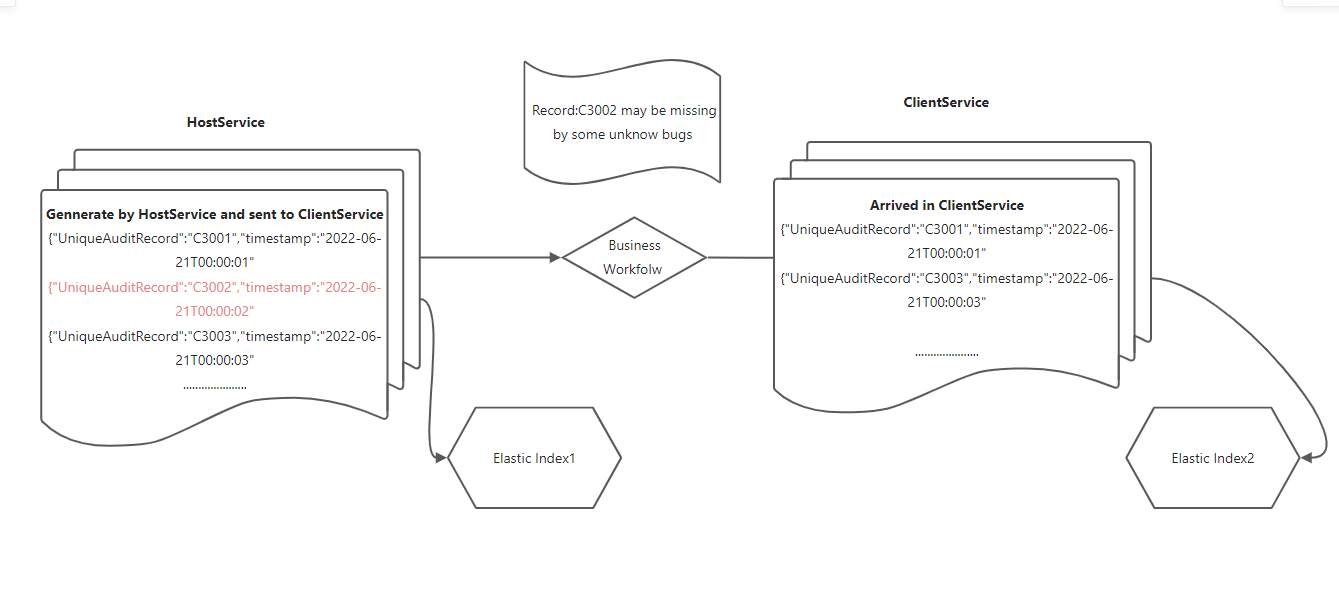
so in fact. The field named **timestamp** represent when this log generated by **HostService** ,The value will not change again. Then all the Records will be sent to running
in my business workflow and also be sent to Elastic index1( **start index** ) sequential. We can see records in index1 are unabridged .When those records running in system .someone may be
lost by unknow reason .Other records will arrived in **ClientService** and sent to Elastic index2( **ENd index** ). During the flow path . **Timestamp** will not change. I added field `src` to mark where records from .
So if we configure the `group_by` as `UniqueAuditRecord`,and `num_results` is 2. Those 2 records
will have the same `timestamp` value .
In script , I need get the max timestamp in **index2** as `maxtimestamp` then aggregate data and check `num_results` was not 2 and `timestamp` less than `maxtimestamp`
I'm so sorry that name **startlog** , **endlog** mislead you . I hope I made a clearly explanation.
Via my test. I found script can just get value from its aggregated part .Perhaps it
can't fulfill my needs
---
### Author:  [@system](https://discuss.elastic.co/u/system)
#### Post date: [August 10, 2022, 6:38am UTC](https://discuss.elastic.co/t/how-to-compare-data-to-find-missing-one/308924/17 "2022-08-10T06:38:17Z")
This topic was automatically closed 28 days after the last reply. New replies are no longer allowed.