# How to do a select on every objects in Elasticsearch
**URL:** https://discuss.elastic.co/t/how-to-do-a-select-on-every-objects-in-elasticsearch/184106
**Category:** Elasticsearch
**Tags:** elastic-stack-sql
**Created:** [June 4, 2019, 7:44am UTC](https://discuss.elastic.co/t/how-to-do-a-select-on-every-objects-in-elasticsearch/184106 "2019-06-04T07:44:27Z")
**Posts on this page:** 8
**Page:** 1
### Author:  [@franco.federico](https://discuss.elastic.co/u/franco.federico)
#### Post date: [June 4, 2019, 7:44am UTC](https://discuss.elastic.co/t/how-to-do-a-select-on-every-objects-in-elasticsearch/184106/1 "2019-06-04T07:44:27Z")
Hi all
I'm exploring the ES SQL and I need more information. I only read the getting start on the documentation about SQL.
Is it possible to do a select on logstash or other index present in elastic?
I read examples on flights, but I don't understand where I could find the information about this table in the index pattern.
Thank you
Franco
---
### Author:  [@Andrei\_Stefan](https://discuss.elastic.co/u/Andrei_Stefan)
#### Post date: [June 4, 2019, 5:54pm UTC](https://discuss.elastic.co/t/how-to-do-a-select-on-every-objects-in-elasticsearch/184106/2 "2019-06-04T17:54:16Z")
Hi @franco.federico,
It's not entirely clear for me what you are looking for.
If I got your question right, you can find more information about tables using [SHOW TABLES](https://www.elastic.co/guide/en/elasticsearch/reference/7.x/sql-syntax-show-tables.html) command or [DESCRIBE TABLE](https://www.elastic.co/guide/en/elasticsearch/reference/7.x/sql-syntax-describe-table.html).
Also, you can use a [pattern](https://www.elastic.co/guide/en/elasticsearch/reference/7.x/sql-syntax-select.html#sql-syntax-from) if you want to query multiple tables.
---
### Author:  [@franco.federico](https://discuss.elastic.co/u/franco.federico)
#### Post date: [June 4, 2019, 8:17pm UTC](https://discuss.elastic.co/t/how-to-do-a-select-on-every-objects-in-elasticsearch/184106/3 "2019-06-04T20:17:56Z")
If I want to do an ES SQL query on logstash index, what is the name of the table or the schema that implement logstash index?
And if I want to do an ES SQL query on other index what is the name of the table or the schema that show that implement a generic index?
Thank you
Franco
---
### Author:  [@franco.federico](https://discuss.elastic.co/u/franco.federico)
#### Post date: [June 5, 2019, 8:41am UTC](https://discuss.elastic.co/t/how-to-do-a-select-on-every-objects-in-elasticsearch/184106/4 "2019-06-05T08:41:25Z")
I am on the [demo.elastic.com](http://demo.elastic.com)
I see filebeat index.
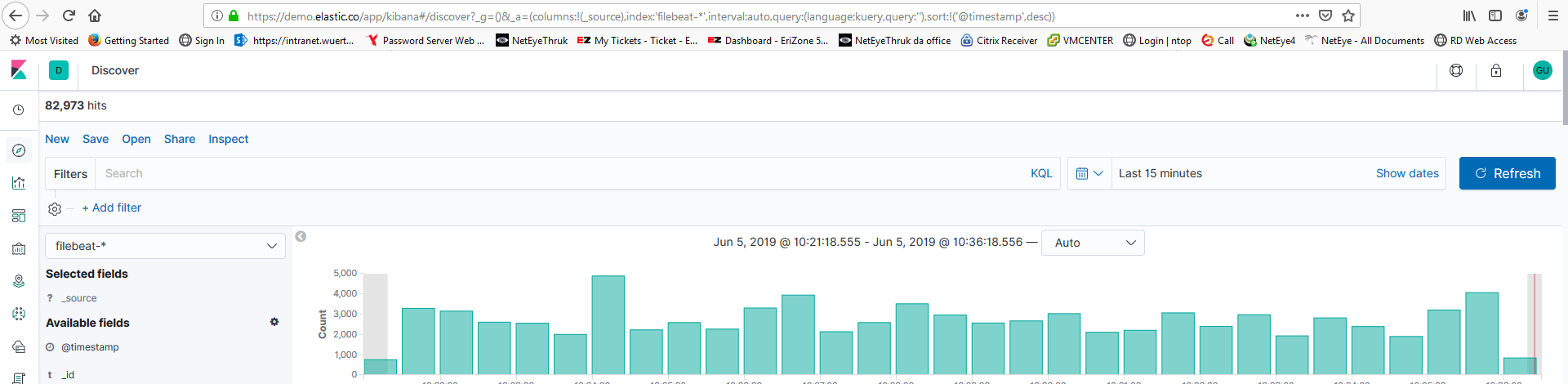
Now I'm trying to do a describe of filebeat in the dev tool and I have no response

Why?
I try with other index but I have the same result. Only for flights it's done.
Thank you
Franco
---
### Author:  [@franco.federico](https://discuss.elastic.co/u/franco.federico)
#### Post date: [June 5, 2019, 10:13am UTC](https://discuss.elastic.co/t/how-to-do-a-select-on-every-objects-in-elasticsearch/184106/5 "2019-06-05T10:13:47Z")
I'm reading in the documentation that the table is the index.
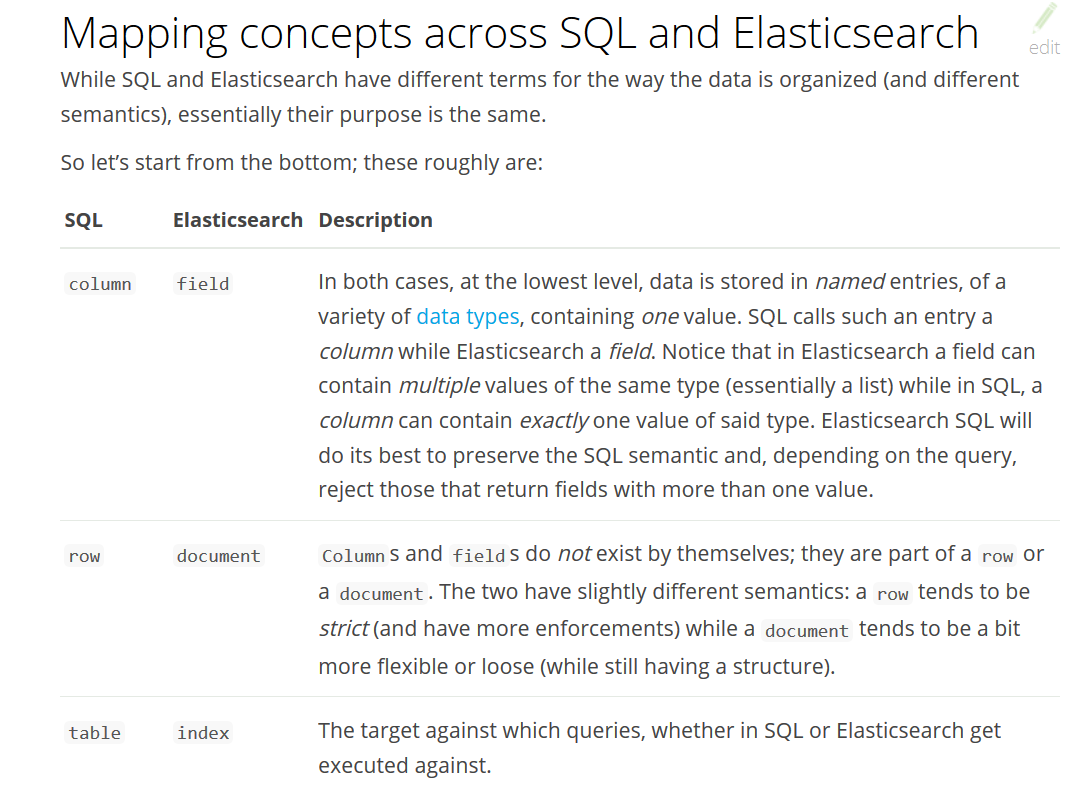
In this case it doen't work? Why? I tried to my system with the X Pack active on the versione 6.7 but I have the same problem.
Is there other configuration to do?
Thank you
Franco
---
### Author:  [@Andrei\_Stefan](https://discuss.elastic.co/u/Andrei_Stefan)
#### Post date: [June 6, 2019, 10:14am UTC](https://discuss.elastic.co/t/how-to-do-a-select-on-every-objects-in-elasticsearch/184106/6 "2019-06-06T10:14:38Z")
Because `filebeat` is not a table/index. By default, Filebeat writes events to multiple indices (daily) named `filebeat-[Filebeat_version]-yyyy.MM.dd`, where `yyyy.MM.dd` is the date when the events were indexed.
In [demo.elastic.co](http://demo.elastic.co), you should use
```auto
POST _sql?pretty&format=txt
{
"query":"SHOW TABLES LIKE 'filebeat%'"
}
```
to see the list of filebeat indices and then have a look at one of them with `DESCRIBE` sql command. For example:
```auto
POST _sql?pretty&format=txt
{
"query":"DESCRIBE \"filebeat-7.0.0-2019.05.07-000050\""
}
```
---
### Author:  [@franco.federico](https://discuss.elastic.co/u/franco.federico)
#### Post date: [June 6, 2019, 5:01pm UTC](https://discuss.elastic.co/t/how-to-do-a-select-on-every-objects-in-elasticsearch/184106/7 "2019-06-06T17:01:52Z")
Thank you for information @Andrei_Stefan.
I suggest to add this example in the documentation because a basic user when found the SQL the first step is to try to exist index.
Bye
Franco
---
### Author:  [@system](https://discuss.elastic.co/u/system)
#### Post date: [July 4, 2019, 5:01pm UTC](https://discuss.elastic.co/t/how-to-do-a-select-on-every-objects-in-elasticsearch/184106/8 "2019-07-04T17:01:55Z")
This topic was automatically closed 28 days after the last reply. New replies are no longer allowed.