# HTTP Poller \[API\] input in Logstash - Does it support "Request\_data" on top of "Headers"?
**URL:** https://discuss.elastic.co/t/http-poller-api-input-in-logstash-does-it-support-request-data-on-top-of-headers/316327
**Category:** Logstash
**Created:** [October 11, 2022, 12:23pm UTC](https://discuss.elastic.co/t/http-poller-api-input-in-logstash-does-it-support-request-data-on-top-of-headers/316327 "2022-10-11T12:23:53Z")
**Posts on this page:** 20
**Page:** 1
### Author:  [@Roger\_Huang](https://discuss.elastic.co/u/Roger_Huang)
#### Post date: [October 11, 2022, 12:23pm UTC](https://discuss.elastic.co/t/http-poller-api-input-in-logstash-does-it-support-request-data-on-top-of-headers/316327/1 "2022-10-11T12:23:53Z")
Hi everyone,
I am new to ELK and I am trying to pull JSON data from Palo Alto platform into Logstash for processing. Some info redacted as xxxx.
API DOCS: [Get Alerts](https://docs.paloaltonetworks.com/cortex/cortex-xdr/cortex-xdr-api/cortex-xdr-apis/incident-management/get-alerts)
Does Logstash support such http headers?

```auto
input {
http_poller {
urls => {
someAPIsystem => {
method => "POST"
url => "https://api-xxxxx.paloaltonetworks.com/public_api/v1/alerts/get_alerts_multi_events/"
headers => {
x-xdr-auth-id => "6". # this is a mandatory api id
Authorization => "xxxxx APIkey XXXX"
Content-Type => "application/json"
}
}
}
request_timeout => 30
interval => 60
codec => "json"
metadata_target => "http_poller_metadata"
}
}
output {
elasticsearch {
hosts => "elasticsearch:9200"
user => "logstash_internal"
password => "${LOGSTASH_INTERNAL_PASSWORD}"
index => "ecs-logstash-getalerts"
}
file {
path => "/usr/share/logstash/elogs/output/getalert_logs.txt"
}
stdout{
codec => rubydebug
}
}
```
---
### Author:  [@Rios](https://discuss.elastic.co/u/Rios)
#### Post date: [October 11, 2022, 12:56pm UTC](https://discuss.elastic.co/t/http-poller-api-input-in-logstash-does-it-support-request-data-on-top-of-headers/316327/2 "2022-10-11T12:56:02Z")
You have - which not allowed.
_The given configuration is invalid. Reason: Expected one of [A-Za-z0-9\_], [\t\r\n], "#", "=\>" at line 8_
And it's not interval, it's _schedule_
```auto
input {
http_poller {
urls => {
someAPIsystem => {
method => "POST"
url => "https://api-xxxxx.paloaltonetworks.com/public_api/v1/alerts/get_alerts_multi_events/"
headers => {
xxdrauthid => "6"
Authorization => "xxxxx APIkey XXXX"
ContentType => "application/json"
}
}
}
request_timeout => 30
schedule => { cron => "* * * * * UTC"}
codec => "json"
metadata_target => "http_poller_metadata"
}
}
```
---
### Author:  [@Roger\_Huang](https://discuss.elastic.co/u/Roger_Huang)
#### Post date: [October 12, 2022, 4:57am UTC](https://discuss.elastic.co/t/http-poller-api-input-in-logstash-does-it-support-request-data-on-top-of-headers/316327/3 "2022-10-12T04:57:02Z")
Hi Rios,
Thanks for the input.
No more errors in logstash and I managed to see the "one" record in the index populated in Kibana.
However, I still facing the 401 request error in logstash. ID and api key and settings are the same as in API Software called Postman. No issues with postman!
401: Unauthorized access. An issue occurred during authentication. This can indicate an incorrect key, id, or other invalid authentication parameters.
I was thinking if the authentication parameters which is the headers in logstash support Palo Alto requirement.
Appreciate if any other views on this!


Postman success with return code 200!

---
### Author:  [@Rios](https://discuss.elastic.co/u/Rios)
#### Post date: [October 12, 2022, 5:55am UTC](https://discuss.elastic.co/t/http-poller-api-input-in-logstash-does-it-support-request-data-on-top-of-headers/316327/4 "2022-10-12T05:55:34Z")
Are you using the same headers without the hyphens in Postman?
There is a better solution for the headers names, put under quotes it will support hyphens, check _[this](https://github.com/logstash-plugins/logstash-input-http_poller/issues/44)_
Also try to add ecs\_compatibility =\> "disabled" ,
```auto
codec => "json"
ecs_compatibility => "disabled"
metadata_target => "http_poller_metadata"
}
}
```
---
### Author:  [@Roger\_Huang](https://discuss.elastic.co/u/Roger_Huang)
#### Post date: [October 12, 2022, 7:09am UTC](https://discuss.elastic.co/t/http-poller-api-input-in-logstash-does-it-support-request-data-on-top-of-headers/316327/5 "2022-10-12T07:09:59Z")
> **[Get Started with APIs](https://docs.paloaltonetworks.com/cortex/cortex-xdr/cortex-xdr-api/cortex-xdr-api-overview/get-started-with-cortex-xdr-apis)**
>
> What you need to run Cortex XDR APIs.
Based on Palo Alto documents, I just need to put in the api\_id and api\_key. Based on the document above.

Error message I get from Logstash ☹
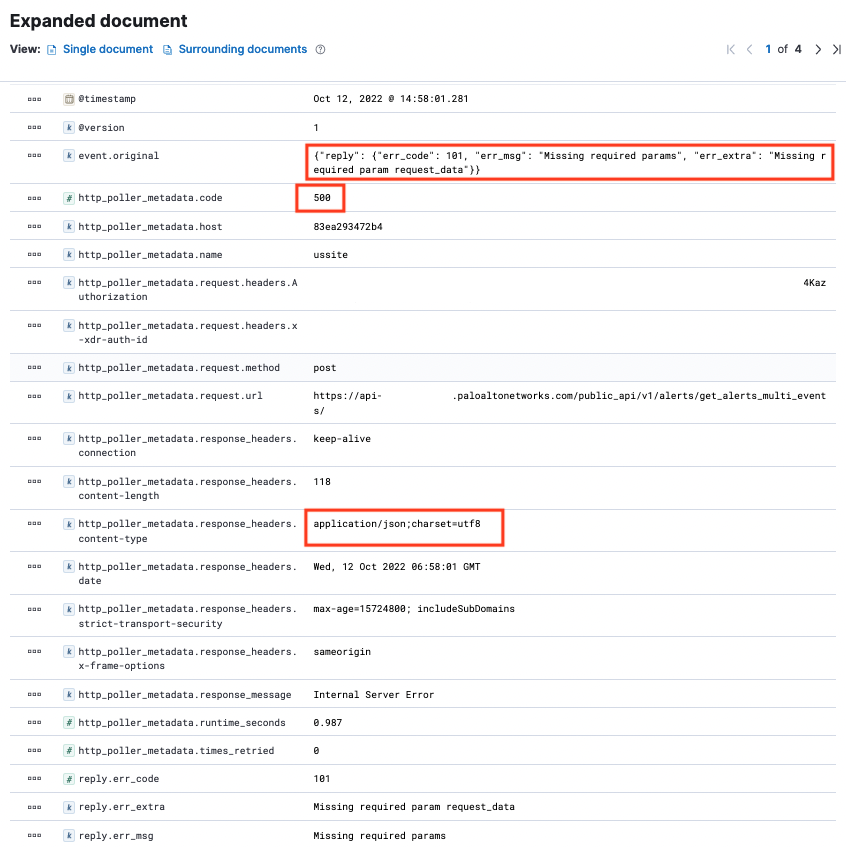
Error msg in Logstash! ☹
```auto
{"reply": {"err_code": 101, "err_msg": "Missing required params", "err_extra": "Missing required param request_data"}}
```
Updated .conf file below
```auto
input {
http_poller {
urls => {
ussite => {
method => "POST"
url => "https://api-XXXXX.xdr.us.paloaltonetworks.com/public_api/v1/alerts/get_alerts_multi_events/"
headers => {
"x-xdr-auth-id" => "7"
"Authorization" => "xxxxredactedxxxx"
"Content-Type" => "application/json" #with or without this line also same error
}
}
}
tags => "us_site"
request_timeout => 30
schedule => {cron => "* * * * * UTC"}
codec => "json"
ecs_compatibility => "disabled" #with or without this line still same error
metadata_target => "http_poller_metadata"
}
}
filter{
json{
source => "message"
}
}
output {
elasticsearch {
hosts => "elasticsearch:9200"
user => "logstash_internal"
password => "${LOGSTASH_INTERNAL_PASSWORD}"
index => "ecs-logstash-alerts"
}
http {
url => "http://localhost:9000"
http_method => "post"
}
file {
path => "/usr/share/logstash/elogs/output/getalert_logs.txt"
}
stdout{
codec => rubydebug
}
}
```
---
### Author:  [@Rios](https://discuss.elastic.co/u/Rios)
#### Post date: [October 12, 2022, 7:16am UTC](https://discuss.elastic.co/t/http-poller-api-input-in-logstash-does-it-support-request-data-on-top-of-headers/316327/6 "2022-10-12T07:16:01Z")
request\_data is missing in the JSON object. Check [documentation](https://docs.paloaltonetworks.com/cortex/cortex-xdr/cortex-xdr-api/cortex-xdr-apis/incident-management/get-alerts)
---
### Author:  [@Roger\_Huang](https://discuss.elastic.co/u/Roger_Huang)
#### Post date: [October 12, 2022, 7:37am UTC](https://discuss.elastic.co/t/http-poller-api-input-in-logstash-does-it-support-request-data-on-top-of-headers/316327/7 "2022-10-12T07:37:47Z")
Thanks Rios. I didn't know about the "request\_data" portion!
But does Logstash http poller support "request\_data"?
Edited .conf file below:
```auto
input {
http_poller {
urls => {
ussite => {
method => "POST"
url => "https://apiXXXXX.xdr.us.paloaltonetworks.com/public_api/v1/alerts/get_alerts_multi_events/"
headers => {
"x-xdr-auth-id => "XX"
"Authorization" => "XXXXXX"
}
data => {
"request_data" => "" # blank means retrieve all records. It should be a json object here
}
}
}
tags => "us_site"
request_timeout => 30
schedule => {cron => "* * * * * UTC"}
codec => "json"
metadata_target => "http_poller_metadata"
}
}
filter{
json{
source => "message"
}
}
```
Still getting a 500 internal server error (Missing required param request\_data) reply 😢
Suspect the request\_data not pass in correctly
---
### Author:  [@Roger\_Huang](https://discuss.elastic.co/u/Roger_Huang)
#### Post date: [October 12, 2022, 7:51am UTC](https://discuss.elastic.co/t/http-poller-api-input-in-logstash-does-it-support-request-data-on-top-of-headers/316327/8 "2022-10-12T07:51:20Z")
Tried this to pass in the request\_data. Still getting the error (Missing required param request\_data)
'''
```auto
input {
http_poller {
urls => {
ussite => {
method => "POST"
url => "https://apiXXXXX.xdr.us.paloaltonetworks.com/public_api/v1/alerts/get_alerts_multi_events/"
headers => {
"x-xdr-auth-id => "XX"
"Authorization" => "XXXXXX"
}
request_data => "{"request_data":{}}" # means return all results. Is this the correct format?
}
}
}
tags => "us_site"
request_timeout => 30
schedule => {cron => "* * * * * UTC"}
codec => "json"
metadata_target => "http_poller_metadata"
}
}
```
'''
---
### Author:  [@Roger\_Huang](https://discuss.elastic.co/u/Roger_Huang)
#### Post date: [October 12, 2022, 8:04am UTC](https://discuss.elastic.co/t/http-poller-api-input-in-logstash-does-it-support-request-data-on-top-of-headers/316327/9 "2022-10-12T08:04:28Z")
```auto
headers => {
"x-xdr-auth-id" => "xx"
"Authorization" => "xxxx"
}
data => "{ "request_data":{}}" #means return all result
```
Just giving it a try. Will this work with the http poller? 😆 Still having the error (Missing required param request\_data)
In python script, using "data" works though
```auto
response = requests.request("POST", APIurl, headers=headers, data=payload)
```
---
### Author:  [@Roger\_Huang](https://discuss.elastic.co/u/Roger_Huang)
#### Post date: [October 12, 2022, 9:08am UTC](https://discuss.elastic.co/t/http-poller-api-input-in-logstash-does-it-support-request-data-on-top-of-headers/316327/10 "2022-10-12T09:08:17Z")
Screenshot of Palo Alto requirement below.
It requires "headers" and "request\_data". Thanks to Rios for discovering this!
Question is does "http poller" support "request\_data"?
Cannot seems to find any examples or documentation on this

---
### Author:  [@Roger\_Huang](https://discuss.elastic.co/u/Roger_Huang)
#### Post date: [October 12, 2022, 9:35am UTC](https://discuss.elastic.co/t/http-poller-api-input-in-logstash-does-it-support-request-data-on-top-of-headers/316327/11 "2022-10-12T09:35:46Z")

Error message points to this line of code
```auto
data => "{"request_data": {}}"
```
---
### Author:  [@Rios](https://discuss.elastic.co/u/Rios)
#### Post date: [October 12, 2022, 10:47am UTC](https://discuss.elastic.co/t/http-poller-api-input-in-logstash-does-it-support-request-data-on-top-of-headers/316327/12 "2022-10-12T10:47:55Z")
Try with body:
```auto
input {
http_poller {
urls => {
ussite => {
method => "POST"
url => "https://apiXXXXX.xdr.us.paloaltonetworks.com/public_api/v1/alerts/get_alerts_multi_events/"
headers => {
"x-xdr-auth-id => "XX"
"Authorization" => "XXXXXX"
}
body=> '{ "request_data":{} }'
}
}
}
tags => "us_site"
request_timeout => 30
schedule => {cron => "* * * * * UTC"}
codec => "json"
metadata_target => "http_poller_metadata"
}
}
```
The values in urls can be either:
- a string url (which will be issued as an HTTP GET).
- a sub-hash containing many useful keys provided by the Manticore backend:
---
### Author:  [@Roger\_Huang](https://discuss.elastic.co/u/Roger_Huang)
#### Post date: [October 12, 2022, 12:15pm UTC](https://discuss.elastic.co/t/http-poller-api-input-in-logstash-does-it-support-request-data-on-top-of-headers/316327/13 "2022-10-12T12:15:38Z")
Yea! The "body" with single quotes works!
But i still cannot get kibana to display the data.

```auto
.....
.....
body => '{ "request_data":{} }'
}
}
tags => "us_site"
request_timeout => 30
schedule => {cron => "* * * * * UTC"}
codec => "json"
metadata_target => "http_poller_metadata"
}
}
filter{
json{
source => "message"
}
}
output {
elasticsearch {
hosts => "elasticsearch:9200"
user => "logstash_internal"
password => "${LOGSTASH_INTERNAL_PASSWORD}"
index => "ecs-logstash-xdrusalerts"
}
file {
path => "/usr/share/logstash/elogs/output/getalert_logs.txt"
}
stdout{
codec => rubydebug
}
}
```
troubleshooting now...
At least want to test and basic parse the json or greedydata into Elasticsearch before working on the filter portion.
---
### Author:  [@Rios](https://discuss.elastic.co/u/Rios)
#### Post date: [October 12, 2022, 12:58pm UTC](https://discuss.elastic.co/t/http-poller-api-input-in-logstash-does-it-support-request-data-on-top-of-headers/316327/14 "2022-10-12T12:58:58Z")
Check does logstash\_internal have rights on ecs-logstash-xdrusalerts index
---
### Author:  [@Roger\_Huang](https://discuss.elastic.co/u/Roger_Huang)
#### Post date: [October 13, 2022, 3:09am UTC](https://discuss.elastic.co/t/http-poller-api-input-in-logstash-does-it-support-request-data-on-top-of-headers/316327/15 "2022-10-13T03:09:27Z")
I am able to see data after removed the "index =\>ecs-logstash-xdrusalerts", reboot and used the default logstash index.
Q1: 13 char date should be "UNIX\_MS"? What's the difference with "UNIX"?
Q2: I need to get the field "detection\_timestamp" to fit into "@timestamp". Exploring the "target =\>" option
Q3: The difference between Data stream and Indices. In this case of HTTP Poller API post request, I should be using "Data Stream"? If yes, how do I specify a target data Stream in logstash Output{}?

Next I need to work on parsing the json object nicely~

---
### Author:  [@Roger\_Huang](https://discuss.elastic.co/u/Roger_Huang)
#### Post date: [October 13, 2022, 6:06am UTC](https://discuss.elastic.co/t/http-poller-api-input-in-logstash-does-it-support-request-data-on-top-of-headers/316327/16 "2022-10-13T06:06:49Z")
Need some guide how to parse the json object
Layer 1: All key events are inside alerts[0] to [4]. This first layer is "By host".

Layer 2: Those in red to put into ES fields. Box in green is another layer. This second layer is "By Alert"

This json object is grouped in the way shown above.
Objective is to get all "alerts" broken down into each object with its corresponding host found in Layer 1 and send to Elasticsearch.
---
### Author:  [@Rios](https://discuss.elastic.co/u/Rios)
#### Post date: [October 13, 2022, 7:47am UTC](https://discuss.elastic.co/t/http-poller-api-input-in-logstash-does-it-support-request-data-on-top-of-headers/316327/17 "2022-10-13T07:47:17Z")
There is no reason for a blockade to insert data in any index if you have proper rights.
UNIX time is epoch time. If you have readable, you have to convert with the date plugin.
Your time is 1665629477915 in milliseconds -10/13/2022, 4:51:17 AM, should use UNIX\_MS
```auto
date {
match => ["detection_timestamp", "yyyy-MM-dd HH:mm:ss"] # change to your format
target=> "@timestamp"
timezone => "Europe/Berlin" # this is optional
}
```
Data streams are more for logs or data in general which will not be updated - append-only. Here is a [sample](https://github.com/elastic/logstash/issues/12178).
_Need some guide how to parse the json object_
You will access inside LS as [replay][alers][0] ...
Create fields as you wish inside LS with mutate add\_field
```auto
mutate {
add_field => {
"[alert][layer1]" => "%{[reply][alerts][0]}"
"[alert][layer2][hostname]" => "%{hostname}"
}
}
```
Fields which you do want, just delete
` mutate { remove_field => ["resolution_comment", "mac"] }`
---
### Author:  [@Roger\_Huang](https://discuss.elastic.co/u/Roger_Huang)
#### Post date: [October 14, 2022, 3:11am UTC](https://discuss.elastic.co/t/http-poller-api-input-in-logstash-does-it-support-request-data-on-top-of-headers/316327/18 "2022-10-14T03:11:33Z")
i was thinking to split the json first before mapping the fields. Reasons is there are many sub json objects nested. Is this correctly done?
```auto
filter{
split { field => "[reply][alerts][0]" }
split { field => "[reply][alerts][1]" }
split { field => "[reply][alerts][2]" }
split { field => "[reply][alerts][3]" }
split { field => "[reply][alerts][4]" }
}
```

Able to load into ES but having this tag error: \_split\_type\_failure
---
### Author:  [@Roger\_Huang](https://discuss.elastic.co/u/Roger_Huang)
#### Post date: [October 14, 2022, 3:30am UTC](https://discuss.elastic.co/t/http-poller-api-input-in-logstash-does-it-support-request-data-on-top-of-headers/316327/19 "2022-10-14T03:30:02Z")

Looks like the split function is critical to remove [0-4]
Oh my 😢
---
### Author:  [@leandrojmp](https://discuss.elastic.co/u/leandrojmp)
#### Post date: [October 14, 2022, 3:42am UTC](https://discuss.elastic.co/t/http-poller-api-input-in-logstash-does-it-support-request-data-on-top-of-headers/316327/20 "2022-10-14T03:42:45Z")
Can you share the plain text response you get from your HTTP request?
It is pretty hard to understand what is your issue with all those screenshots, some of them are pretty hard to read, avoid sharing screenshots if your issue is not related to any visual feature of the stack.
From what I was able to get it seems that you make a request to some API and your response is a json where you have a field named `reply.alerts` which is an array.
It looks like that each element in this array is a different alert, if so, a simple `split` filter in the field `reply.alerts` would work as it would create one new document for each element in the array.
Something like this:
```auto
filter {
split {
field => "[reply][alerts]"
}
}
```
But as I said, it is hard to understand what is the issue with all those screenshots, if you share an example of the result you are getting as a plain text using the preformatted button would be easier.
[Next page](https://discuss.elastic.co/t/http-poller-api-input-in-logstash-does-it-support-request-data-on-top-of-headers/316327.md?page=2)