# Ignoring 0 counts in Coordinate Map
**URL:** https://discuss.elastic.co/t/ignoring-0-counts-in-coordinate-map/204080
**Category:** Kibana
**Tags:** maps
**Created:** [October 17, 2019, 2:58pm UTC](https://discuss.elastic.co/t/ignoring-0-counts-in-coordinate-map/204080 "2019-10-17T14:58:49Z")
**Posts on this page:** 8
**Page:** 1
### Author:  [@IGChris](https://discuss.elastic.co/u/IGChris)
#### Post date: [October 17, 2019, 2:58pm UTC](https://discuss.elastic.co/t/ignoring-0-counts-in-coordinate-map/204080/1 "2019-10-17T14:58:49Z")
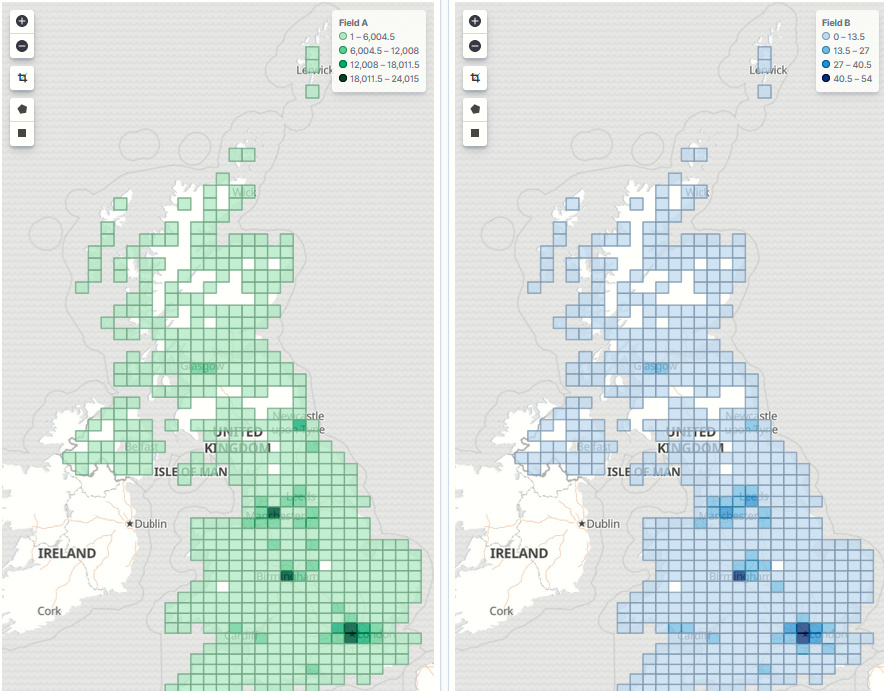
I have several Coordinate Maps to try to identify certain things in my data, and I have these together in a dashboard. However, all the maps show the same areas, with all their ranges starting at 0, and this is making it harder to locate useful data, especially if the information is in the lower quarter. The metric aggergator I am on the map is SUM. For each document I am interested in has a field either set to 1, or doesn't exist.
Is there a way to get the coordinate map to not show the 0 values, or to at least start the ranges from 1?
Previously, I had success by using a separate index pattern for each map, but this is now resulting in close to 30 separate index patterns, and several cloned index entries (with differently named indexes), but this is quickly becoming untannable. As I go along, I can see this easily approaching 100 separate maps.
---
### Author:  [@lukas](https://discuss.elastic.co/u/lukas)
#### Post date: [October 17, 2019, 10:22pm UTC](https://discuss.elastic.co/t/ignoring-0-counts-in-coordinate-map/204080/2 "2019-10-17T22:22:50Z")
I'm not sure I fully understand, could you provide an example document, and a screenshot of your dashboard?
---
### Author:  [@IGChris](https://discuss.elastic.co/u/IGChris)
#### Post date: [October 18, 2019, 8:10am UTC](https://discuss.elastic.co/t/ignoring-0-counts-in-coordinate-map/204080/3 "2019-10-18T08:10:30Z")
Here you go. Most of the blue ones on the right are 0
---
### Author:  [@lukas](https://discuss.elastic.co/u/lukas)
#### Post date: [October 18, 2019, 8:42pm UTC](https://discuss.elastic.co/t/ignoring-0-counts-in-coordinate-map/204080/4 "2019-10-18T20:42:41Z")
Could you add a filter where the field exists?
---
### Author:  [@IGChris](https://discuss.elastic.co/u/IGChris)
#### Post date: [October 21, 2019, 8:35am UTC](https://discuss.elastic.co/t/ignoring-0-counts-in-coordinate-map/204080/5 "2019-10-21T08:35:03Z")
> [@lukas](#):
>
> Could you add a filter where the field exists?
Possibly, but I am not sure how to do this on a Visualization when its in a Dashboard. If it was just using that standard filter at the top, then it would undermine the nature of the Dashboard
---
### Author:  [@IGChris](https://discuss.elastic.co/u/IGChris)
#### Post date: [October 21, 2019, 12:51pm UTC](https://discuss.elastic.co/t/ignoring-0-counts-in-coordinate-map/204080/6 "2019-10-21T12:51:28Z")
Ah, success! Instead of using Coordinate Map Visualizations, I used the Maps application to create the views, which does include a Filter option.
---
### Author:  [@lukas](https://discuss.elastic.co/u/lukas)
#### Post date: [October 21, 2019, 9:15pm UTC](https://discuss.elastic.co/t/ignoring-0-counts-in-coordinate-map/204080/7 "2019-10-21T21:15:14Z")
Glad you found a solution!
Just for future reference, filters you add when creating a visualization are not applied to all visualizations on a dashboard; they are only applied to the visualization itself.
---
### Author:  [@system](https://discuss.elastic.co/u/system)
#### Post date: [November 18, 2019, 9:25pm UTC](https://discuss.elastic.co/t/ignoring-0-counts-in-coordinate-map/204080/8 "2019-11-18T21:25:49Z")
This topic was automatically closed 28 days after the last reply. New replies are no longer allowed.