# ILM not reclaiming back space in ELK Host server
**URL:** https://discuss.elastic.co/t/ilm-not-reclaiming-back-space-in-elk-host-server/290218
**Category:** Elastic Observability
**Tags:** ilm-index-lifecycle-management
**Created:** [November 25, 2021, 9:03pm UTC](https://discuss.elastic.co/t/ilm-not-reclaiming-back-space-in-elk-host-server/290218 "2021-11-25T21:03:27Z")
**Posts on this page:** 20
**Page:** 1
### Author:  [@Anagha\_nambiar](https://discuss.elastic.co/u/Anagha_nambiar)
#### Post date: [November 25, 2021, 9:03pm UTC](https://discuss.elastic.co/t/ilm-not-reclaiming-back-space-in-elk-host-server/290218/1 "2021-11-25T21:03:27Z")
We have a ELK cluster with single node having 50gb disk space. We are sending metricbeat data from 200 servers to Elasticsearch.
Created an ILM policy for metricbeat index to do a rollover and delete the index after it crosses 5GB.
ILM is doing the index rollover and deletion but still we are not able to get back the disk space back.
Eventually disk percent used is increasing each day and after few days, disk is completely filled up.
Why ILM policy is not deleting the data and reclaiming space?
Could you please help us with this?
---
### Author:  [@stephenb](https://discuss.elastic.co/u/stephenb)
#### Post date: [November 25, 2021, 9:15pm UTC](https://discuss.elastic.co/t/ilm-not-reclaiming-back-space-in-elk-host-server/290218/2 "2021-11-25T21:15:51Z")
Hi @Anagha_nambiar Welcome to the community.
Please show your exact policy.
> **[Get lifecycle policy API | Elasticsearch Guide \[7.15\] | Elastic](https://www.elastic.co/guide/en/elasticsearch/reference/current/ilm-get-lifecycle.html)**
---
### Author:  [@Anagha\_nambiar](https://discuss.elastic.co/u/Anagha_nambiar)
#### Post date: [November 29, 2021, 6:20pm UTC](https://discuss.elastic.co/t/ilm-not-reclaiming-back-space-in-elk-host-server/290218/3 "2021-11-29T18:20:32Z")
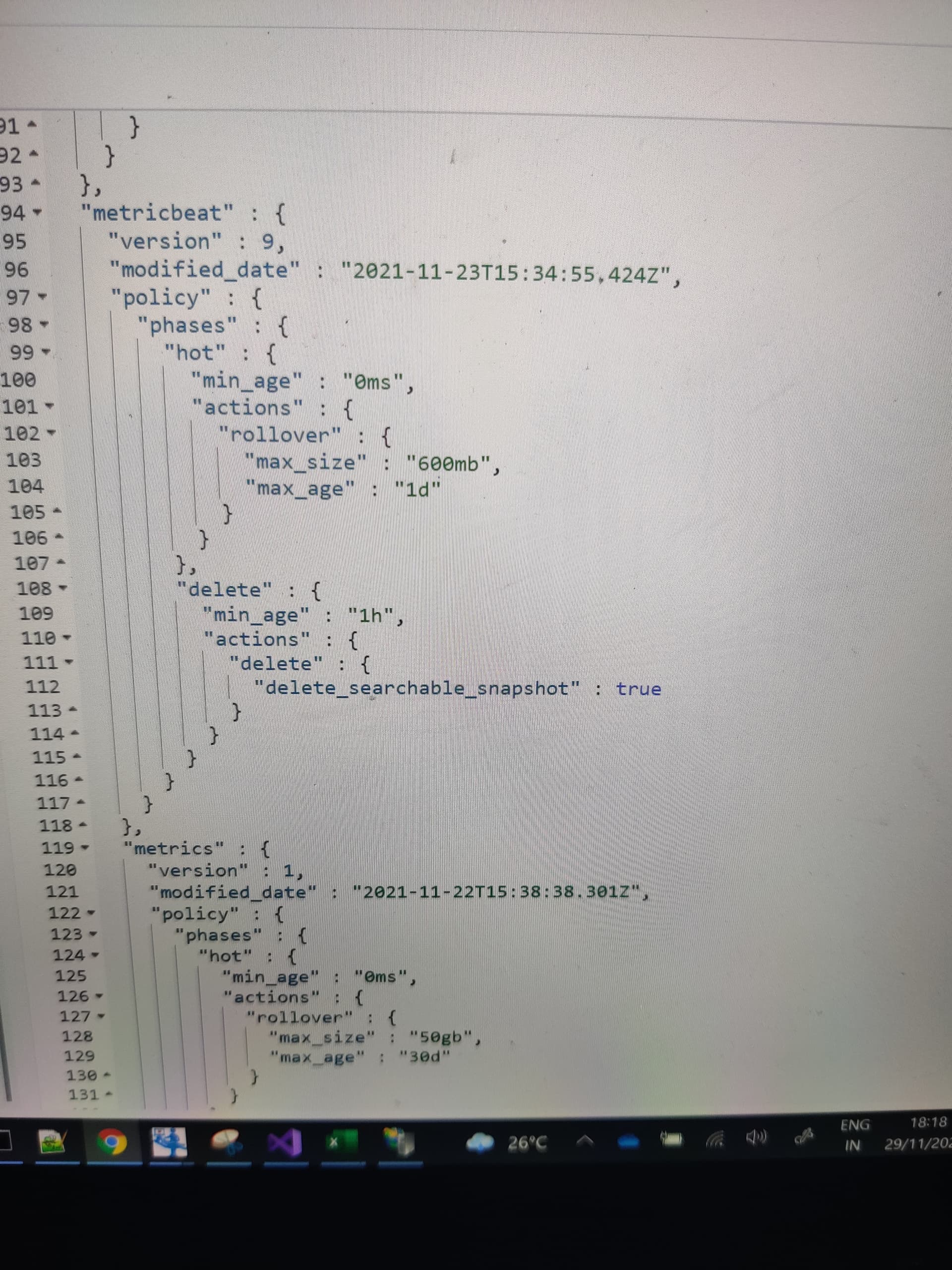
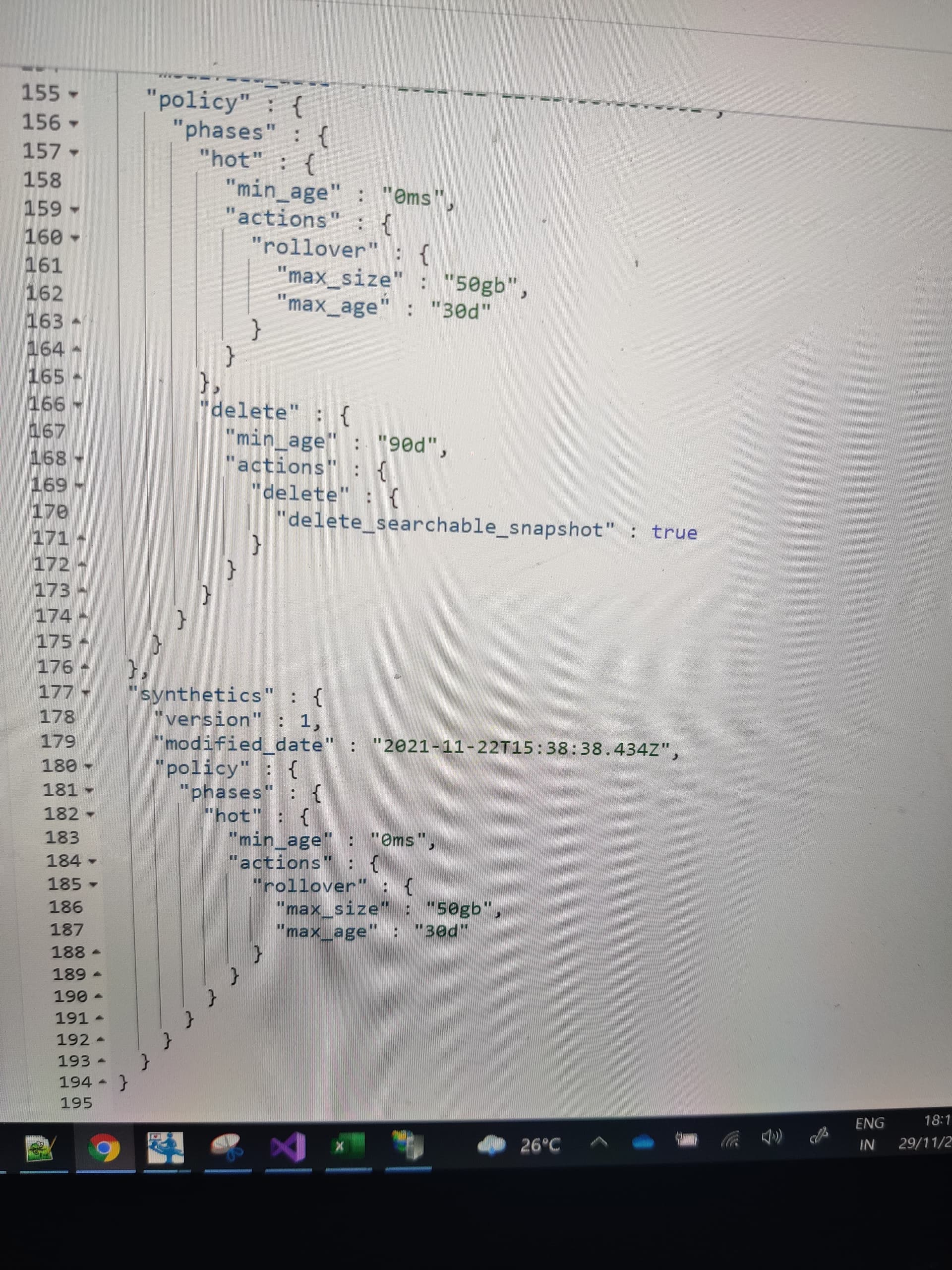
HI @stephenb Please find the below ILM policies

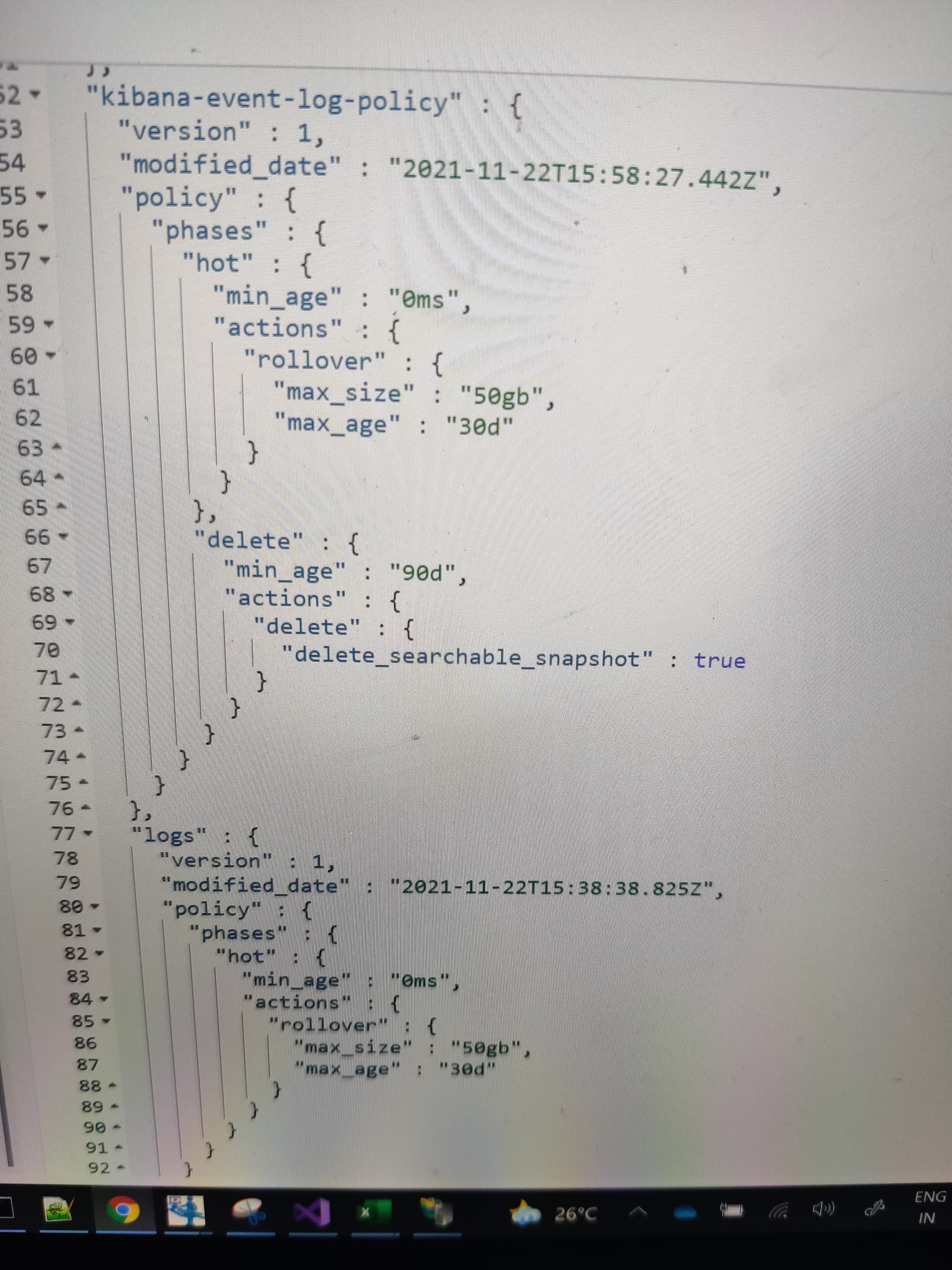

---
### Author:  [@Anagha\_nambiar](https://discuss.elastic.co/u/Anagha_nambiar)
#### Post date: [November 29, 2021, 6:26pm UTC](https://discuss.elastic.co/t/ilm-not-reclaiming-back-space-in-elk-host-server/290218/4 "2021-11-29T18:26:19Z")
@stephenb Do we need to update something in metricbeat.yml file regarding this ILM policy?
---
### Author:  [@stephenb](https://discuss.elastic.co/u/stephenb)
#### Post date: [November 29, 2021, 6:27pm UTC](https://discuss.elastic.co/t/ilm-not-reclaiming-back-space-in-elk-host-server/290218/5 "2021-11-29T18:27:39Z")
Please do not share screenshots / images. They are very hard to read, can not even be read by others can not be searched or debugged...
Also I can not tell from all the screenshots which ILM you are having trouble with.
Please post the code in formatted text of the exact ILM policy you are having trouble with.
---
### Author:  [@Anagha\_nambiar](https://discuss.elastic.co/u/Anagha_nambiar)
#### Post date: [November 29, 2021, 6:38pm UTC](https://discuss.elastic.co/t/ilm-not-reclaiming-back-space-in-elk-host-server/290218/6 "2021-11-29T18:38:05Z")
@stephenb I am having issue with metricbeat and heartbeat indexes.
Those two indexes are rolled over to new index but still the disk space is not reclaimed back.
Please excuse me as I am not getting to copy paste the code directly so I am sending the snap.
Please find the policy details below:

---
### Author:  [@stephenb](https://discuss.elastic.co/u/stephenb)
#### Post date: [November 29, 2021, 7:19pm UTC](https://discuss.elastic.co/t/ilm-not-reclaiming-back-space-in-elk-host-server/290218/7 "2021-11-29T19:19:52Z")
> [@Anagha\_nambiar](#):
>
> ILM is doing the index rollover **and deletion** but still we are not able to get back the disk space back.
So you can see the indices are actually getting deleted?
How did you confirm that?
When an index is deleted the disk space is almost immediately recovered.
If so then the disk continually rising is probably not from the index data.
Perhaps the disk is being consumed by something else... like the elasticsearch logs or something else.
---
### Author:  [@Anagha\_nambiar](https://discuss.elastic.co/u/Anagha_nambiar)
#### Post date: [November 29, 2021, 8:39pm UTC](https://discuss.elastic.co/t/ilm-not-reclaiming-back-space-in-elk-host-server/290218/8 "2021-11-29T20:39:50Z")
@stephenb yes, I can see the indexes getting deleted from Index management in Kibana UI.
When you say, it might be because of Elasticsearch logs, how can we automate that deletion? And how can we find and delete the logs/others?
Could you please suggest?
---
### Author:  [@stephenb](https://discuss.elastic.co/u/stephenb)
#### Post date: [November 29, 2021, 8:58pm UTC](https://discuss.elastic.co/t/ilm-not-reclaiming-back-space-in-elk-host-server/290218/9 "2021-11-29T20:58:42Z")
I do not know what is actually taking the space, it could be any number of things.
I can say that when an index is deleted the disk space is reclaimed almost immediately so the source of your rising disk usage is probably something else.
Logging configuration, rotation, deletion etc..etc..
> **[Logging | Elasticsearch Guide \[7.15\] | Elastic](https://www.elastic.co/guide/en/elasticsearch/reference/current/logging.html)**
Your Linux admin should able help you find the sources of the directories taking up space.
---
### Author:  [@Anagha\_nambiar](https://discuss.elastic.co/u/Anagha_nambiar)
#### Post date: [November 29, 2021, 9:03pm UTC](https://discuss.elastic.co/t/ilm-not-reclaiming-back-space-in-elk-host-server/290218/10 "2021-11-29T21:03:45Z")
Thank you @stephenb
I will try to check what you mentioned and clear the space.
---
### Author:  [@Anagha\_nambiar](https://discuss.elastic.co/u/Anagha_nambiar)
#### Post date: [December 1, 2021, 9:48am UTC](https://discuss.elastic.co/t/ilm-not-reclaiming-back-space-in-elk-host-server/290218/11 "2021-12-01T09:48:35Z")
@stephenb I got the disk space back when I used the command :
docker system prune --volumes -f
Could you please suggest what might be the reason behind it?
---
### Author:  [@stephenb](https://discuss.elastic.co/u/stephenb)
#### Post date: [December 1, 2021, 5:25pm UTC](https://discuss.elastic.co/t/ilm-not-reclaiming-back-space-in-elk-host-server/290218/12 "2021-12-01T17:25:50Z")
Well That explains it.. you did not say you are running inside docker. 🙂
As you found out Docker manages the Docker container Volume size not Elasticsearch.
Also it is not best use the internal docker container volume for the elasticsearch data. best practice is to mount the elastic data path to a volume on the host.
See Here
> **[Install Elasticsearch with Docker | Elasticsearch Guide \[8.11\] | Elastic](https://www.elastic.co/guide/en/elasticsearch/reference/current/docker.html)**
> #### Always bind data volumes
>
> You should use a volume bound on `/usr/share/elasticsearch/data` for the following reasons:
>
> 1. The data of your Elasticsearch node won’t be lost if the container is killed
> 2. Elasticsearch is I/O sensitive and the Docker storage driver is not ideal for fast I/O
> 3. It allows the use of advanced [Docker volume plugins](https://docs.docker.com/engine/extend/plugins/#volume-plugins)
Example
```auto
volumes:
- data01:/usr/share/elasticsearch/data
```
Also look at some good advice here
> [@Elasticsearch Node Running on docker only shows Disk Available 50 GB](https://discuss.elastic.co/t/elasticsearch-node-running-on-docker-only-shows-disk-available-50-gb/290704/3):
>
> @stephenb is correct. The one thing I would add is that the Elasticsearch docker image will run as user ID and group ID 1000. So make sure that this user owns the path. For example: mkdir /mnt/data0/elasticsearch && chown -R 1000:1000 /mnt/data0/elasticsearch Then bind mount this path to the Elasticsearch container. The following example is from one of our docker compose files (you can also see how we mounted the path to certificates)... volumes: - /mnt/data0/elasticsearch:/usr/sha…
---
### Author:  [@Anagha\_nambiar](https://discuss.elastic.co/u/Anagha_nambiar)
#### Post date: [December 3, 2021, 1:49pm UTC](https://discuss.elastic.co/t/ilm-not-reclaiming-back-space-in-elk-host-server/290218/13 "2021-12-03T13:49:43Z")
@stephenb Thanks a lot!
I will definitely look into the options which you provided and will try to implement what you suggested. Hope that will resolve this issue.
For your reference, I am providing my docker compose file below:

---
### Author:  [@Anagha\_nambiar](https://discuss.elastic.co/u/Anagha_nambiar)
#### Post date: [December 3, 2021, 6:31pm UTC](https://discuss.elastic.co/t/ilm-not-reclaiming-back-space-in-elk-host-server/290218/14 "2021-12-03T18:31:29Z")
@stephenb I believe the docker compose file which I shared is already using a mount for the volume. We basically don't want to store this data at all.
Could you please suggest?
---
### Author:  [@stephenb](https://discuss.elastic.co/u/stephenb)
#### Post date: [December 3, 2021, 8:46pm UTC](https://discuss.elastic.co/t/ilm-not-reclaiming-back-space-in-elk-host-server/290218/15 "2021-12-03T20:46:46Z")
This is because you are using a named volume mount with docker and elastic so elastic data is still within the docker environment and the volume (space) is managed by docker
As opposed a bind mount where the data is external to a docker volume i.e. mounted on the local host.
I think you need to read up on the difference
On the Docker Docs : [Manage data in Docker | Docker Documentation](https://docs.docker.com/storage/)
And our Docs [here](https://www.elastic.co/guide/en/elasticsearch/reference/current/docker.html#_configuration_files_must_be_readable_by_the_elasticsearch_user)
[Here](https://devopsheaven.com/docker/docker-compose/volumes/2018/01/16/volumes-in-docker-compose.html) is a nice article showing how...
What I did to test
1. create and external volume
`docker volume create --driver local --opt type=none --opt device=/path/to/data/on/host/data --opt o=bind data`
1. Then my compose
```auto
---
version: '3'
services:
elasticsearch:
container_name: es01
image: docker.elastic.co/elasticsearch/elasticsearch:${TAG}
environment: ['ES_JAVA_OPTS=-Xms2g -Xmx2g','bootstrap.memory_lock=true','discovery.type=single-node', 'xpack.security.enabled=false']
volumes:
- data:/usr/share/elasticsearch/data
ports:
- 9200:9200
networks:
- elastic
ulimits:
memlock:
soft: -1
hard: -1
nofile:
soft: 65536
hard: 65536
kibana:
image: docker.elastic.co/kibana/kibana:${TAG}
container_name: kib01
environment:
XPACK_APM_SERVICEMAPENABLED: "true"
XPACK_ENCRYPTEDSAVEDOBJECTS_ENCRYPTIONKEY: d1a66dfd-c4d3-4a0a-8290-2abcb83ab3aa
ports:
- 5601:5601
networks:
- elastic
networks:
elastic:
volumes:
data:
external: true
```
1. Then when I run the docker-compose the Elasticsearch data is written to
`/path/to/data/on/host/data`
2. Then when I delete / clean up indices that space is reclaimed.
---
### Author:  [@Anagha\_nambiar](https://discuss.elastic.co/u/Anagha_nambiar)
#### Post date: [December 5, 2021, 1:20pm UTC](https://discuss.elastic.co/t/ilm-not-reclaiming-back-space-in-elk-host-server/290218/16 "2021-12-05T13:20:46Z")
@stephenb Thank you!!
I will try as you mentioned and let you know how it goes.
---
### Author:  [@Anagha\_nambiar](https://discuss.elastic.co/u/Anagha_nambiar)
#### Post date: [December 9, 2021, 2:30pm UTC](https://discuss.elastic.co/t/ilm-not-reclaiming-back-space-in-elk-host-server/290218/17 "2021-12-09T14:30:12Z")
Hi @stephenb I created the external volume as you suggested earlier. Also updated the docker compose file with the details.
Still I am facing the same disk space issue.
Suppose the host path is : /usr/share/Elasticsearch/data.
If I run the remove command:
rm -rf /usr/share/Elasticsearch/data
Then I am able to delete the data and spin up the containers again. Otherwise ILM even after doing the rollover and delete, it is not reclaiming the disk space back. Please find the below snaps:


---
### Author:  [@stephenb](https://discuss.elastic.co/u/stephenb)
#### Post date: [December 9, 2021, 2:42pm UTC](https://discuss.elastic.co/t/ilm-not-reclaiming-back-space-in-elk-host-server/290218/18 "2021-12-09T14:42:07Z")
Hi @Anagha_nambiar
What was the command run for the first picture?
What command did you run to mount the volume?
I suspect the volume is still not mounted correctly.
Keep working on it ... this is most likely a configuration of a docker issue not elastic issues
---
### Author:  [@Anagha\_nambiar](https://discuss.elastic.co/u/Anagha_nambiar)
#### Post date: [December 9, 2021, 3:31pm UTC](https://discuss.elastic.co/t/ilm-not-reclaiming-back-space-in-elk-host-server/290218/19 "2021-12-09T15:31:19Z")
@stephenb
1. Command is :
Curl -X GET [http://localhost:9200/\_cat/allocation?v](http://localhost:9200/_cat/allocation?v)
2. Command for volume mount is :
docker volume create --driver local --opt type=none --opt device=/usr/share/Elasticsearch/data --opt o=bind data
3. In docker-compose file:
version: '3.7'
services:
Elasticsearch:
container\_name: Elasticsearch
image: [docker.elastic.co/elasticsearch/elasticsearch:${TAG}](http://docker.elastic.co/elasticsearch/elasticsearch:%24%7BTAG%7D)
environment:
- xpack.secirity.enabled=true
- bootstrap.memory\_lock=true
- discovery.type=single-node
volumes:
- data:/usr/share/Elasticsearch/data
ports:
- 9200:9200
networks:
- elastic
ulimits:
memlock:
soft: -1
hard: -1
nofile:
soft: 65536
hard: 65536
---
### Author:  [@stephenb](https://discuss.elastic.co/u/stephenb)
#### Post date: [December 9, 2021, 6:55pm UTC](https://discuss.elastic.co/t/ilm-not-reclaiming-back-space-in-elk-host-server/290218/20 "2021-12-09T18:55:11Z")
Actually I think you are configured correctly but You are still confusing Disk managed by Docker vs Local Host Disk Elasticsearch
It gets a little tricky with Docker and Elasticsearch
Example
I run
```auto
curl "http://localhost:9200/_cat/nodes/?v&h=name,du,dt,dup"
name du dt dup
53609d9b5c5f 7.7gb 58.4gb 13.25
```
It looks like my indices are using 8.8GB
But then I look at my indices...
```auto
curl "http://localhost:9200/_cat/allocation?v"
shards disk.indices disk.used disk.avail disk.total disk.percent host ip node
21 57mb 7.6gb 50.7gb 58.4gb 13 172.27.0.4 172.27.0.4 53609d9b5c5f
12 UNASSIGNED UNASSIGNED
```
They are tiny 57mb... certainly not 7.6GB... .what is going on ....
Ahhh the 7.6GB disk usage being reported by Elasticsearch Cat Nodes / Allocation reports on the Docker Disk Container Filesystem that Elasticsearch is running in NOT the Host local disk...
So you will never see the Local Host Disk usage from Within Elasticsearch Running inside Docker... **It can...not...see... it.**
Elasticsearch only see the "local" filesystem which is docker owned... nothing Elasticsearch can do about that.
```auto
disk.used disk.avail disk.total disk.percent host ip node
7.6gb 50.7gb 58.4gb 13 172.27.0.4 172.27.0.4 53609d9b5c5f
```
These are all Docker Related...
That 7.6gb GB is what is being by Docker (probably multiple containers etc) not your indices... assuming you have them mounted correctly...
If you want Docker to take up less space reduce the disk it is allowed to consume...

[Next page](https://discuss.elastic.co/t/ilm-not-reclaiming-back-space-in-elk-host-server/290218.md?page=2)