# Index doesn't show up in the dashboard although the status of the index is green
**URL:** https://discuss.elastic.co/t/index-doesnt-show-up-in-the-dashboard-although-the-status-of-the-index-is-green/344604
**Category:** Kibana
**Tags:** elastic-stack-monitoring
**Created:** [October 8, 2023, 5:09pm UTC](https://discuss.elastic.co/t/index-doesnt-show-up-in-the-dashboard-although-the-status-of-the-index-is-green/344604 "2023-10-08T17:09:10Z")
**Posts on this page:** 6
**Page:** 1
### Author:  [@Manula\_Manjitha](https://discuss.elastic.co/u/Manula_Manjitha)
#### Post date: [October 8, 2023, 5:09pm UTC](https://discuss.elastic.co/t/index-doesnt-show-up-in-the-dashboard-although-the-status-of-the-index-is-green/344604/1 "2023-10-08T17:09:10Z")
I have setup a filebeat input as follows to read the logs from an application that we are running on the server. The name of the input is the **filebeat-2023.10.277**.
```auto
filebeat.inputs:
- type: log
id: gateway-elk
enabled: true
paths:
- /home/directfn/app/ntp_gateway/gateway-elk.log
```
This was done removing the previous input which was a **filestream** type input. The name of that input was **filebeat-2023.10.276**.
But in the kibana dashboard, it only shows the deleted index but gives prompt that it can't find that.
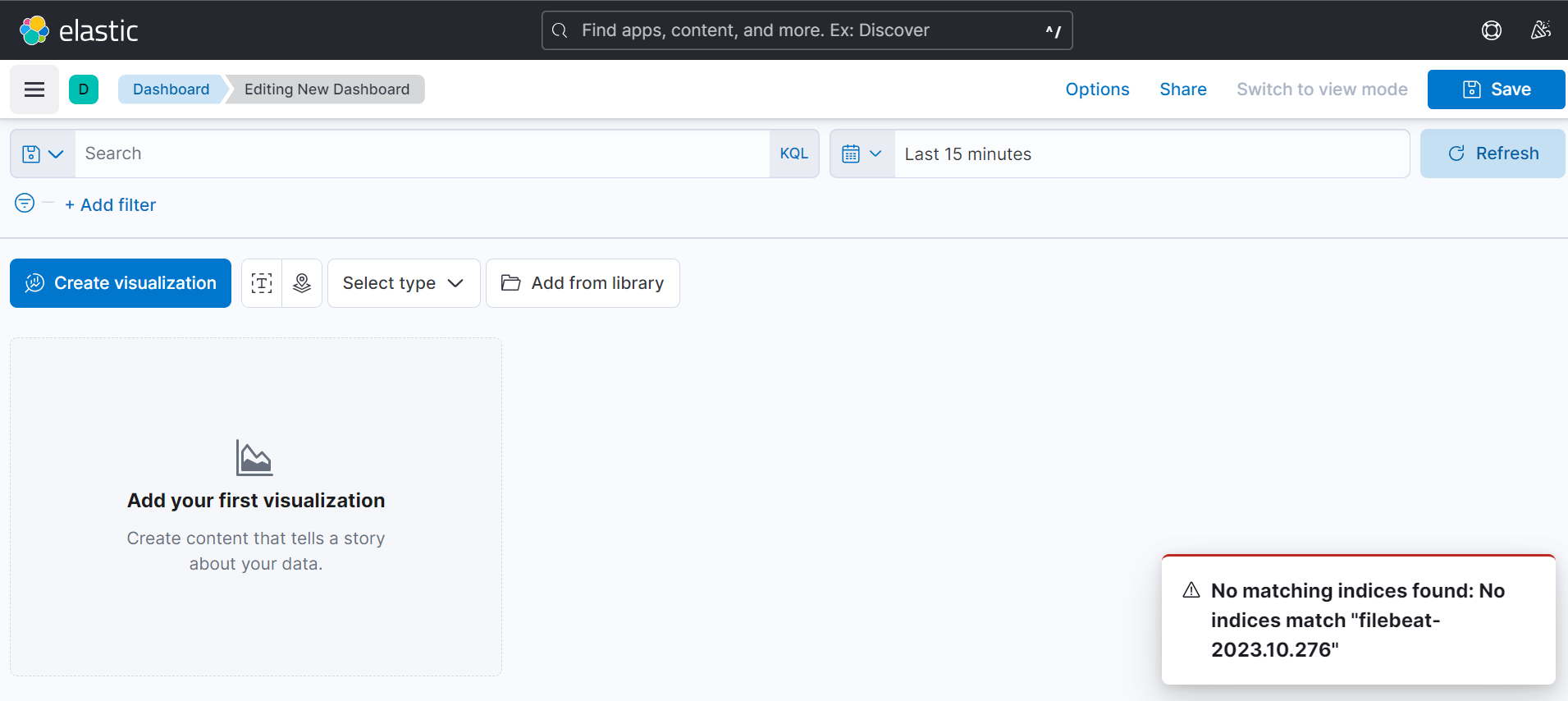

And even in the dashboard it doesn't show the current index which is **filebeat-2023.10.277** although the status of the index is green.

Please suggest me any solution to rectify this.
---
### Author:  [@stephenb](https://discuss.elastic.co/u/stephenb)
#### Post date: [October 8, 2023, 5:34pm UTC](https://discuss.elastic.co/t/index-doesnt-show-up-in-the-dashboard-although-the-status-of-the-index-is-green/344604/2 "2023-10-08T17:34:18Z")
As suggested on the 2nd view try extending the time picker range to from tomorrow to last 30 days.
By default it's only the last 15 minutes, so if your data falls outside that it will not show up.
Also, that is an unusual index naming scheme. Not sure if you're doing that on purpose.
When you create the data view you should not create it the exact name of the index you should do something like pattern
`filebeat-*`
And just a point of clarification, the name of the input is not directly related to the name of the index the data is written to.
> [@Manula\_Manjitha](#):
>
> `- type: log`
The log type is deprecatef as well.
---
### Author:  [@Manula\_Manjitha](https://discuss.elastic.co/u/Manula_Manjitha)
#### Post date: [October 9, 2023, 7:17am UTC](https://discuss.elastic.co/t/index-doesnt-show-up-in-the-dashboard-although-the-status-of-the-index-is-green/344604/3 "2023-10-09T07:17:21Z")
The second screenshot that I have provided is showing the **deleted index** which ends from **276**. And the dashboard is still picking that deleted index without picking the current index which ends from **277** which is the **only manually created index that exists**. The second screenshot shows the evidence for that. I want the index in the last screenshot which is **277** to be in the dashboard instead of the one in the second screenshot which is **266**. And for the name, I didn't pick it and it was automatically assigned.
---
### Author:  [@Stratoula\_Kalafateli](https://discuss.elastic.co/u/Stratoula_Kalafateli)
#### Post date: [October 9, 2023, 10:08am UTC](https://discuss.elastic.co/t/index-doesnt-show-up-in-the-dashboard-although-the-status-of-the-index-is-green/344604/4 "2023-10-09T10:08:11Z")
Have you created a dataview for this index? Lens doesn't display indices but dataviews. To create a dataview you have to navigate to Stack Management --\> Dataviews page.
---
### Author:  [@Manula\_Manjitha](https://discuss.elastic.co/u/Manula_Manjitha)
#### Post date: [October 10, 2023, 5:02am UTC](https://discuss.elastic.co/t/index-doesnt-show-up-in-the-dashboard-although-the-status-of-the-index-is-green/344604/5 "2023-10-10T05:02:07Z")
Thanks for the comment. It worked
---
### Author:  [@system](https://discuss.elastic.co/u/system)
#### Post date: [November 7, 2023, 5:02am UTC](https://discuss.elastic.co/t/index-doesnt-show-up-in-the-dashboard-although-the-status-of-the-index-is-green/344604/6 "2023-11-07T05:02:40Z")
This topic was automatically closed 28 days after the last reply. New replies are no longer allowed.