# Keeping only latest "Date Histogram" aggregation in a datatable
**URL:** https://discuss.elastic.co/t/keeping-only-latest-date-histogram-aggregation-in-a-datatable/117842
**Category:** Kibana
**Created:** [January 31, 2018, 3:10pm UTC](https://discuss.elastic.co/t/keeping-only-latest-date-histogram-aggregation-in-a-datatable/117842 "2018-01-31T15:10:46Z")
**Posts on this page:** 6
**Page:** 1
### Author:  [@anthony-o](https://discuss.elastic.co/u/anthony-o)
#### Post date: [January 31, 2018, 3:10pm UTC](https://discuss.elastic.co/t/keeping-only-latest-date-histogram-aggregation-in-a-datatable/117842/1 "2018-01-31T15:10:47Z")
Here is my index structure: `type`, `times`.
The `type` field can be either "error" or "valid".
I would like to have the following datatable:
```
+--------------------+--------------------------+--------------+
| @timestamp per day | type.keyword: Descending | Sum of times |
+--------------------+--------------------------+--------------+
| data... | data... | data... |
+--------------------+--------------------------+--------------+
```
But I would like to have **only 2 lines** in that datatable: the `error` and the `valid` lines for the **latest day of the Date Histogram aggregation over @timestamp field with a Daily Interval**.
Here is my current Data configuration.
_Metrics:_
- Aggregation: Sum
- Field: times
_Buckets:_
- Split Rows
- Aggregation: Date Histogram
- Field: @timestamp
- Interval: Daily
- JSON Input: {"order": {"\_key": "desc"}}
- Split Rows
- Sub Aggregation: Terms
- Field: type.keyword
- Order By: Term
- Order: Descending / Size: 5
Actually, I would like something like `"size": 1` to be added to the `JSON Input` of the `Date Histogram`... How could I do that?
---
### Author:  [@Joe\_Fleming](https://discuss.elastic.co/u/Joe_Fleming)
#### Post date: [January 31, 2018, 7:25pm UTC](https://discuss.elastic.co/t/keeping-only-latest-date-histogram-aggregation-in-a-datatable/117842/2 "2018-01-31T19:25:44Z")
The [Date histogram aggregation](https://www.elastic.co/guide/en/elasticsearch/reference/current/search-aggregations-bucket-datehistogram-aggregation.html) in Elasticsearch doesn't support size the way the Terms agg does, instead you have to filter the range you are querying.
To do this in Kibana, you'll want to use the time filter at the top right of Kibana to control the time range being displayed.
---
### Author:  [@anthony-o](https://discuss.elastic.co/u/anthony-o)
#### Post date: [February 1, 2018, 3:53pm UTC](https://discuss.elastic.co/t/keeping-only-latest-date-histogram-aggregation-in-a-datatable/117842/3 "2018-02-01T15:53:43Z")
The problem with this workaround is that as I don't know the last `@timestamp per day` that will be available in my data in advance, I'm not able to pre-select such date in the top right Kibana time filter when displaying my dashboard...
Can't I do that in another way with another Buckets configurations?
---
### Author:  [@Joe\_Fleming](https://discuss.elastic.co/u/Joe_Fleming)
#### Post date: [February 1, 2018, 5:19pm UTC](https://discuss.elastic.co/t/keeping-only-latest-date-histogram-aggregation-in-a-datatable/117842/4 "2018-02-01T17:19:37Z")
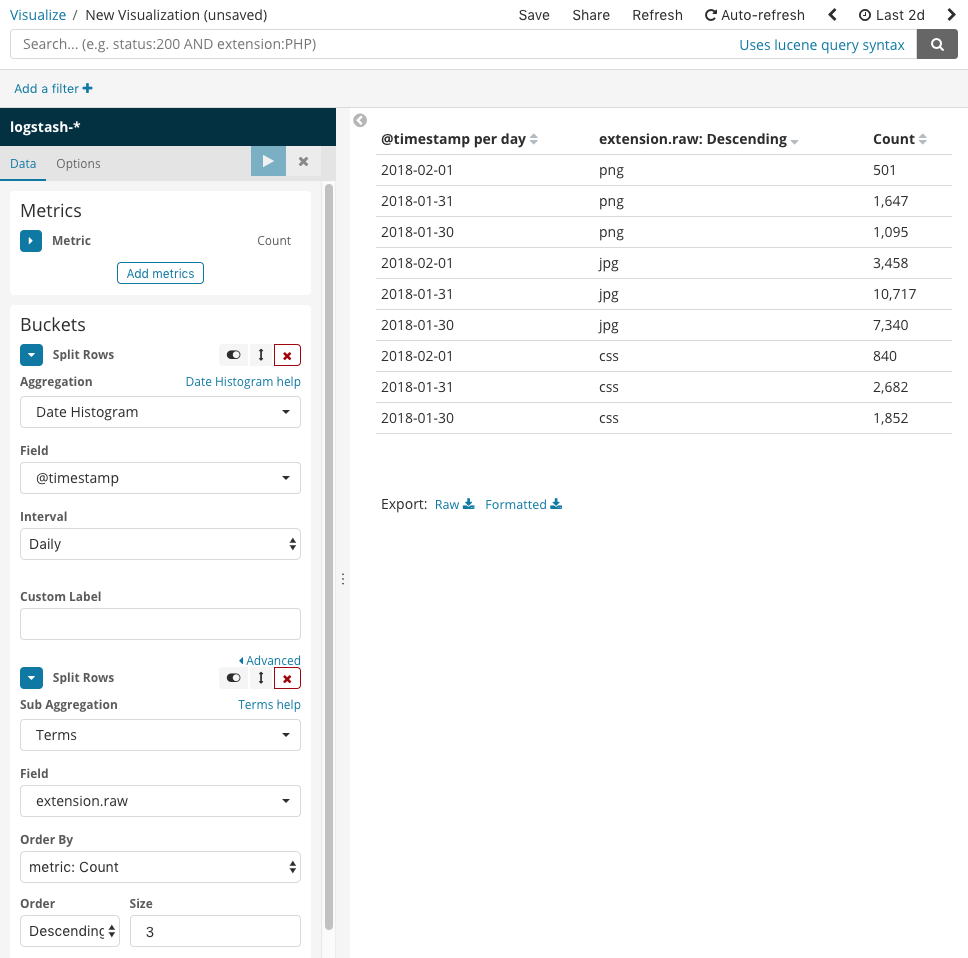
If you know the start, you can use the [Date Math](https://www.elastic.co/guide/en/elasticsearch/reference/master/common-options.html#date-math) aggregation instead of the Date Histogram, and do something like this:

This will give you the last 2 days, and only the last 2 days, rounded to the nearest day. The problem with that is then you can't control the range, so if you look at it at 12:01am, it'll show the current, new day, with almost no data, and the data will change depending on when you look at it/run the query. But that will give you the grouping you want, at least for the immediate 2 day range.
> I don't know the last @timestamp per day that will be available in my data in advance
I don't understand what you mean by that. Even if the data is coming in after the fact, seeng the historical data seems like it would smooth over that problem. I probably just don't fully understand your data and what you're trying to do with it. It sounds like this is more or less what you want though:
---
### Author:  [@anthony-o](https://discuss.elastic.co/u/anthony-o)
#### Post date: [February 9, 2018, 10:22am UTC](https://discuss.elastic.co/t/keeping-only-latest-date-histogram-aggregation-in-a-datatable/117842/5 "2018-02-09T10:22:29Z")
> [@Joe\_Fleming](#):
>
> I don't understand what you mean by that. Even if the data is coming in after the fact, seeng the historical data seems like it would smooth over that problem. I probably just don't fully understand your data and what you're trying to do with it.
Actually, I've asked [another question](https://discuss.elastic.co/t/split-and-use-the-term-in-sub-operation-in-timelion/117083) to compute a % ratio between the `valid` data and `error` ones and first wanted to display it in a Datatable before seeing in that forum that this was impossible (to create a column with computed information).
So I've created this graph and as you can see in the following monthly graph (aggregated on days), I don't have data every days:

So for the moment, the workaround I've found in order to have the values displayed in a table, is to do the following Data configuration:
- Aggregation: Sum
- Field: times
_Buckets:_
- Split Rows
- Aggregation: Terms
- Field: from\_host.keyword
- Order By: Term
- Order: Descending / Size: 30
- Custom Label: From Host
- Split Table (Rows)
- Aggregation: Date Histogram
- Field: @timestamp
- Interval: Daily
- JSON Input: {"order": {"\_key": "desc"}}
- Custom Label: Day
- Split Table (Columns)
- Sub Aggregation: Filters
- Filter 1 - Valids: type.keyword:valid
- Filter 2 - Errors: type.keyword:error
- Order: Descending / Size: 5
I now have the following table:
```
+-----------------------------------------------------+
| 2018-02-07: Day |
+--------------------------+--------------------------+
| Valids: filters | Errors: filters |
+-----------+--------------+-----------+--------------+
| From Host | Sum of times | From Host | Sum of times |
+-----------+--------------+-----------+--------------+
| host1 | 54 | host1 | 1 |
| host2 | 72 | host1 | 8 |
| ... | ... | ... | ... |
+-----------+--------------+-----------+--------------+
| 2018-02-06: Day |
+--------------------------+--------------------------+
| Valids: filters | Errors: filters |
+-----------+--------------+-----------+--------------+
| From Host | Sum of times | From Host | Sum of times |
+-----------+--------------+-----------+--------------+
| ... | ... | ... | ... |
```
My ideal would be to simply display a % ratio between valids and errors and only display the data for the latest day for which I have data... it seems impossible for the ratio, but perhaps it is for the "keep only latest day for which we have data" requirement?
---
### Author:  [@system](https://discuss.elastic.co/u/system)
#### Post date: [March 9, 2018, 10:23am UTC](https://discuss.elastic.co/t/keeping-only-latest-date-histogram-aggregation-in-a-datatable/117842/6 "2018-03-09T10:23:08Z")
This topic was automatically closed 28 days after the last reply. New replies are no longer allowed.