# Kibana CSV Export – Large Stacktraces Splitting into Multiple Records
**URL:** https://discuss.elastic.co/t/kibana-csv-export-large-stacktraces-splitting-into-multiple-records/380978
**Category:** Kibana
**Tags:** elastic-stack-reporting
**Created:** [August 12, 2025, 7:32pm UTC](https://discuss.elastic.co/t/kibana-csv-export-large-stacktraces-splitting-into-multiple-records/380978 "2025-08-12T19:32:47Z")
**Posts on this page:** 8
**Page:** 1
### Author:  [@nkf\_123](https://discuss.elastic.co/u/nkf_123)
#### Post date: [August 12, 2025, 7:32pm UTC](https://discuss.elastic.co/t/kibana-csv-export-large-stacktraces-splitting-into-multiple-records/380978/1 "2025-08-12T19:32:48Z")
I’m facing an issue while exporting records from Kibana (v8.8.2) via CSV.
I have a field, `os.log.message`, that contains large stacktraces — sometimes over 1,000 words, including new lines, spaces, etc. In some cases, these stacktraces export correctly, with the entire content contained in a single cell for that record.
In Kibana, the stacktrace/message is properly ingested in the field.
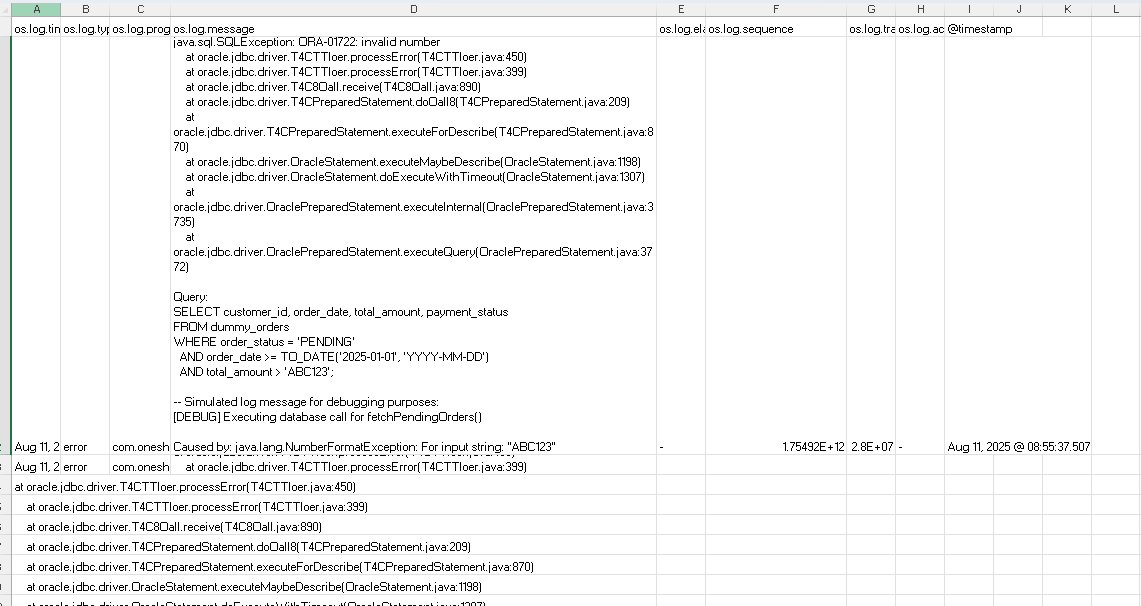
However, in certain scenarios — especially when exporting a large dataset — the same stacktraces get truncated, and each newline within the message is treated as a separate record.
Why would this happen only in specific cases? Could this be related to log ingestion or is it a limitation/bug in Kibana’s reporting/export feature? What’s the best approach to handle or work around this? @stephenb @carly.richmond
```auto
os.log.message:
java.sql.SQLException: ORA-01722: invalid numberat oracle.jdbc.driver.T4CTTIoer.processError(T4CTTIoer.java:450)at oracle.jdbc.driver.T4CTTIoer.processError(T4CTTIoer.java:399)at oracle.jdbc.driver.T4C8Oall.receive(T4C8Oall.java:890)at oracle.jdbc.driver.T4CPreparedStatement.doOall8(T4CPreparedStatement.java:209)at oracle.jdbc.driver.T4CPreparedStatement.executeForDescribe(T4CPreparedStatement.java:870)at oracle.jdbc.driver.OracleStatement.executeMaybeDescribe(OracleStatement.java:1198)at oracle.jdbc.driver.OracleStatement.doExecuteWithTimeout(OracleStatement.java:1307)at oracle.jdbc.driver.OraclePreparedStatement.executeInternal(OraclePreparedStatement.java:3735)at oracle.jdbc.driver.OraclePreparedStatement.executeQuery(OraclePreparedStatement.java:3772)
Query:SELECT customer_id, order_date, total_amount, payment_statusFROM dummy_ordersWHERE order_status = 'PENDING'AND order_date >= TO_DATE('2025-01-01', 'YYYY-MM-DD')AND total_amount > 'ABC123';
-- Simulated log message for debugging purposes:[DEBUG] Executing database call for fetchPendingOrders()
Caused by: java.lang.NumberFormatException: For input string: "ABC123"at java.base/java.lang.NumberFormatException.forInputString(NumberFormatException.java:67)at java.base/java.lang.Integer.parseInt(Integer.java:668)at com.example.db.OrderRepository.mapRowToOrder(OrderRepository.java:142)at com.example.db.OrderRepository.getOrders(OrderRepository.java:110)at com.example.service.OrderService.fetchPendingOrders(OrderService.java:98)at com.example.controller.OrderController.listPendingOrders(OrderController.java:57)... 42 more
Caused by: java.lang.NullPointerException: Cannot invoke "Session.getAttribute(String)" because "session" is nullat com.example.auth.AuthManager.validateSession(AuthManager.java:61)at com.example.filter.AuthFilter.doFilter(AuthFilter.java:45)at org.apache.catalina.core.ApplicationFilterChain.internalDoFilter(ApplicationFilterChain.java:193)at org.apache.catalina.core.ApplicationFilterChain.doFilter(ApplicationFilterChain.java:166)
[INFO] End of simulated stacktrace for testing CSV export handling.at oracle.jdbc.driver.T4CTTIoer.processError(T4CTTIoer.java:450)at
oracle.jdbc.driver.T4CTTIoer.processError(T4CTTIoer.java:399)at
oracle.jdbc.driver.T4C8Oall.receive(T4C8Oall.java:890)at
oracle.jdbc.driver.T4CPreparedStatement.doOall8(T4CPreparedStatement.java:209)at oracle.jdbc.driver.T4CPreparedStatement.executeForDescribe(T4CPreparedStatement.java:870)at
oracle.jdbc.driver.OracleStatement.executeMaybeDescribe(OracleStatement.java:1198)at
oracle.jdbc.driver.OracleStatement.doExecuteWithTimeout(OracleStatement.java:1307)at
oracle.jdbc.driver.OraclePreparedStatement.executeInternal(OraclePreparedStatement.java:3735)at
oracle.jdbc.driver.OraclePreparedStatement.executeQuery(OraclePreparedStatement.java:3772)at oracle.jdbc.driver.T4CTTIoer.processError(T4CTTIoer.java:450)at oracle.jdbc.driver.T4CTTIoer.processError(T4CTTIoer.java:399)at
oracle.jdbc.driver.T4C8Oall.receive(T4C8Oall.java:890)at
oracle.jdbc.driver.T4CPreparedStatement.doOall8(T4CPreparedStatement.java:209)at
oracle.jdbc.driver.T4CPreparedStatement.executeForDescribe(T4CPreparedStatement.java:870)at
oracle.jdbc.driver.OracleStatement.executeMaybeDescribe(OracleStatement.java:1198)at
oracle.jdbc.driver.OracleStatement.doExecuteWithTimeout(OracleStatement.java:1307)at
oracle.jdbc.driver.OraclePreparedStatement.executeInternal(OraclePreparedStatement.java:3735)at
oracle.jdbc.driver.OraclePreparedStatement.executeQuery(OraclePreparedStatement.java:3772)
```
---
### Author:  [@dadoonet](https://discuss.elastic.co/u/dadoonet)
#### Post date: [August 13, 2025, 4:31am UTC](https://discuss.elastic.co/t/kibana-csv-export-large-stacktraces-splitting-into-multiple-records/380978/2 "2025-08-13T04:31:34Z")
> [@nkf\_123](#):
>
> What’s the best approach to handle or work around this? @stephenb @carly.richmond
Please be patient in waiting for responses to your question and refrain from pinging multiple times asking for a response or opening multiple topics for the same question. This is a community forum, it may take time for someone to reply to your question. For more information please refer to the [Community Code of Conduct](https://www.elastic.co/community/codeofconduct) specifically the section "Be patient". **Also, please refrain from pinging folks directly** , this is a forum and anyone that participates might be able to assist you.
If you are in need of a service with an SLA that covers response times for questions then you may want to consider talking to us about a [subscription](https://www.elastic.co/subscriptions).
It's fine to answer on your own thread after 2 or 3 days (not including weekends) if you don't have an answer.
---
### Author:  [@Tortoise](https://discuss.elastic.co/u/Tortoise)
#### Post date: [August 14, 2025, 6:41am UTC](https://discuss.elastic.co/t/kibana-csv-export-large-stacktraces-splitting-into-multiple-records/380978/3 "2025-08-14T06:41:57Z")
Hello @nkf_123
In this scenario if the export is working correctly for some scenarios without any issue which means we need to check below :
1. Compare the field content between successful and failed exports to identify any anomalies.
2. Try exporting just the problematic record to isolate whether the issue is record-specific or volume-related.
3. If the data is simply wrapped to the next line in CSV, it may be a formatting issue rather than data loss.
Thanks!!
---
### Author:  [@nkf\_123](https://discuss.elastic.co/u/nkf_123)
#### Post date: [August 18, 2025, 4:52am UTC](https://discuss.elastic.co/t/kibana-csv-export-large-stacktraces-splitting-into-multiple-records/380978/4 "2025-08-18T04:52:35Z")
Hello @Tortoise
1 & 2. When I try to export just that single record, the CSV format is proper, but if I export that same record with other records (Small bulk export), the format is messed up
1. So does that mean it is a CSV issue and not an ELK stack issue??
I am still confused about the root cause.
---
### Author:  [@Tortoise](https://discuss.elastic.co/u/Tortoise)
#### Post date: [August 18, 2025, 5:16am UTC](https://discuss.elastic.co/t/kibana-csv-export-large-stacktraces-splitting-into-multiple-records/380978/5 "2025-08-18T05:16:17Z")
Hello @nkf_123
1. This means the issue is not related to the record & it is exported without any issues (single record)
2. When you say (small bulk export) , could you please share record count?
3. Maybe can try to open the downloaded csv file in another machine to see if it is related to format?
Thanks!!
---
### Author:  [@nkf\_123](https://discuss.elastic.co/u/nkf_123)
#### Post date: [August 18, 2025, 5:24am UTC](https://discuss.elastic.co/t/kibana-csv-export-large-stacktraces-splitting-into-multiple-records/380978/6 "2025-08-18T05:24:55Z")
Hi @Tortoise
2. Small as in 3 records only. With just 3 records the format got disrupted.
1. The issue is also seen by other users.
FYI, I have tried downloading from the Discover panel (Share → CSV Reports → Generate CSV)
Also, I have tried downloading the CSV from a dashboard which has a Discover panel ( 3dots: More → Download CSV)
And the issue arises for both scenarios
---
### Author:  [@Tortoise](https://discuss.elastic.co/u/Tortoise)
#### Post date: [August 18, 2025, 8:21am UTC](https://discuss.elastic.co/t/kibana-csv-export-large-stacktraces-splitting-into-multiple-records/380978/7 "2025-08-18T08:21:02Z")
Hello @nkf_123
Could you please share the JSON record to see why it is causing the issue , as confirmed by you single export of this record works fine. When we try to export this same record with 2-3+records it breaks & writes new line in different cell, right?
I tried for 5 records of below type & export was fine (Kibana 9.1.0). If you can share 1 test record in similar format with all the fields as below than can see what could be the issue.
```auto
"timestamp": "2025-08-18T07:10:00Z","os.log.message": "java.sql.SQLException: ORA-01722: invalid number\n\tat oracle.jdbc.driver.T4CTTIoer.processError(T4CTTIoer.java:450)\n\tat oracle.jdbc.driver.T4CTTIoer.processError(T4CTTIoer.java:399)\n\tat oracle.jdbc.driver.T4C8Oall.receive(T4C8Oall.java:890)\n\tat oracle.jdbc.driver.T4CPreparedStatement.doOall8(T4CPreparedStatement.java:209)\n\tat oracle.jdbc.driver.T4CPreparedStatement.executeForDescribe(T4CPreparedStatement.java:870)\n\tQuery: SELECT customer_id, order_date, total_amount, payment_status FROM dummy_orders WHERE order_status = 'PENDING' AND order_date >= TO_DATE('2025-01-01', 'YYYY-MM-DD') AND total_amount > 'ABC123';\n-- Simulated log message for debugging purposes:\n[DEBUG] Executing database call for fetchPendingOrders()\nCaused by: java.lang.NumberFormatException: For input string: "ABC123"\n\tat java.base/java.lang.NumberFormatException.forInputString(NumberFormatException.java:67)\n\tat java.base/java.lang.Integer.parseInt(Integer.java:668)\n\tat com.example.db.OrderRepository.mapRowToOrder(OrderRepository.java:142)\n\tat com.example.db.OrderRepository.getOrders(OrderRepository.java:110)\n\tat com.example.service.OrderService.fetchPendingOrders(OrderService.java:98)\n\tat com.example.controller.OrderController.listPendingOrders(OrderController.java:57)\n... 42 more\nCaused by: java.lang.NullPointerException: Cannot invoke "Session.getAttribute(String)" because "session" is null\n\tat com.example.auth.AuthManager.validateSession(AuthManager.java:61)\n\tat com.example.filter.AuthFilter.doFilter(AuthFilter.java:45)\n\tat org.apache.catalina.core.ApplicationFilterChain.internalDoFilter(ApplicationFilterChain.java:193)\n\tat org.apache.catalina.core.ApplicationFilterChain.doFilter(ApplicationFilterChain.java:166)\n[INFO] End of simulated stacktrace for testing CSV export handling."
```
Thanks!!
---
### Author:  [@nkf\_123](https://discuss.elastic.co/u/nkf_123)
#### Post date: [August 18, 2025, 10:19am UTC](https://discuss.elastic.co/t/kibana-csv-export-large-stacktraces-splitting-into-multiple-records/380978/8 "2025-08-18T10:19:35Z")
@Tortoise
When we try to export this same record with 2-3+records, it breaks & writes new line in a different cell, right?
- Yes, it takes some data (Maybe 100chars) in 1 cell of 1 row, but then the rest as a new records. Refer to the Screenshot provided at the beginning.
I have shared the sample JSON.
FYI, I’m using v8.8.2