# Logstash doesn't apply my ES Template when I upload data
**URL:** https://discuss.elastic.co/t/logstash-doesnt-apply-my-es-template-when-i-upload-data/153813
**Category:** Logstash
**Created:** [October 24, 2018, 1:37pm UTC](https://discuss.elastic.co/t/logstash-doesnt-apply-my-es-template-when-i-upload-data/153813 "2018-10-24T13:37:04Z")
**Posts on this page:** 17
**Page:** 1
### Author:  [@romainrom](https://discuss.elastic.co/u/romainrom)
#### Post date: [October 24, 2018, 1:37pm UTC](https://discuss.elastic.co/t/logstash-doesnt-apply-my-es-template-when-i-upload-data/153813/1 "2018-10-24T13:37:04Z")
Hello,
I'm trying to use Logstash to load Oracle data to ES applying a specific template.
logstash version : 6.4.2
Here are the steps followed:
Step 1: retrieve data from Oracle and send them to ES without any template

Step 2 : retrieve existing mapping in one file with cURL
curl –XGET [http://localhost:9200/index9/\_mapping?pretty](http://localhost:9200/index9/_mapping?pretty) \> template9.json
Step 3 : adapt the mapping to do my template (red circled = what I’ve changed)

Step 4: load the template with cURL
Curl –XPUT –H “Content-type: application/json” [http://localhost:9200/\_template/index9?pretty](http://localhost:9200/_template/index9?pretty) –d @template9.json
Acknowledged = true
Step 5: drop existing ES index with cURL
curl –XDELETE [http://localhost:9200/index9?pretty](http://localhost:9200/index9?pretty)
ack = true
Step 6: Modify my logstash-config.conf file

Step 7 : launch logstash to load ES data
Logstash –f logstash.config.conf
No error detected within Logstash logs.
Step 8: results
Template looks good:

However I don’t get my “new object”,
all data are on the same level:

And the mapping seems different:
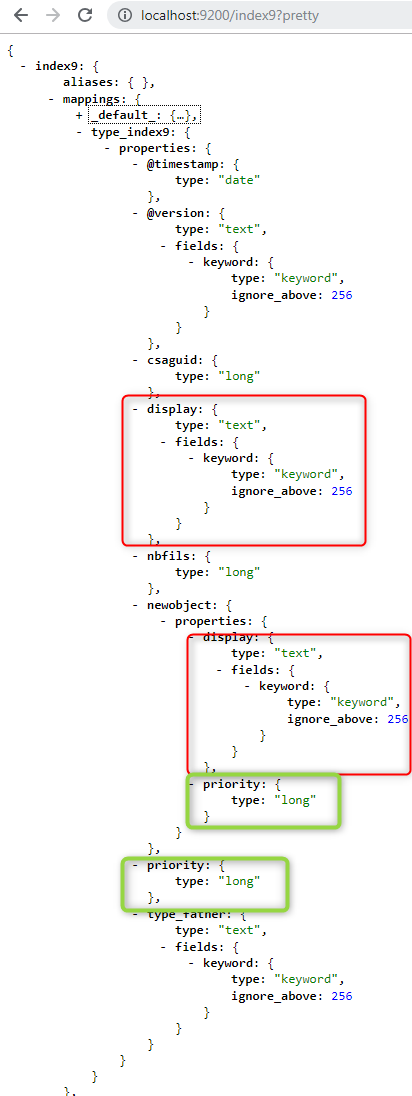
Anyone know what I’m missing ?
---
### Author:  [@balumurari1](https://discuss.elastic.co/u/balumurari1)
#### Post date: [October 25, 2018, 7:14am UTC](https://discuss.elastic.co/t/logstash-doesnt-apply-my-es-template-when-i-upload-data/153813/2 "2018-10-25T07:14:29Z")
Hello,
can you provide your input code, which helps to give you solution
---
### Author:  [@romainrom](https://discuss.elastic.co/u/romainrom)
#### Post date: [October 25, 2018, 7:24am UTC](https://discuss.elastic.co/t/logstash-doesnt-apply-my-es-template-when-i-upload-data/153813/3 "2018-10-25T07:24:07Z")
Hello !
Thank you for your help!
Here's the input part of my logstash-config.conf:

---
### Author:  [@romainrom](https://discuss.elastic.co/u/romainrom)
#### Post date: [October 25, 2018, 7:25am UTC](https://discuss.elastic.co/t/logstash-doesnt-apply-my-es-template-when-i-upload-data/153813/4 "2018-10-25T07:25:05Z")
# file: logstash-config.conf
input {
jdbc {
# Postgres jdbc connection string to our database, mydb
jdbc\_connection\_string =\> "jdbc:oracle:thin:@localhost:1521:DATABASE"
```
# The user we wish to execute our statement as
jdbc_user => "ROMAINROM"
jdbc_password => "ROMAINROM"
# The path to our jdbc driver for Oracle
jdbc_driver_library => "xxxx\oracle-10g\ojdbc14.jar"
# The name of the driver class for Oracle
jdbc_driver_class => "Java::oracle.jdbc.driver.OracleDriver"
# our query
statement_filepath => "query.sql"
}
```
}
#filter {
# json {
# source =\> "message"
# }
#}
---
### Author:  [@romainrom](https://discuss.elastic.co/u/romainrom)
#### Post date: [October 25, 2018, 7:27am UTC](https://discuss.elastic.co/t/logstash-doesnt-apply-my-es-template-when-i-upload-data/153813/5 "2018-10-25T07:27:42Z")
Sorry about the presentation 🙂 ,
no filter applied.
---
### Author:  [@balumurari1](https://discuss.elastic.co/u/balumurari1)
#### Post date: [October 25, 2018, 7:30am UTC](https://discuss.elastic.co/t/logstash-doesnt-apply-my-es-template-when-i-upload-data/153813/6 "2018-10-25T07:30:56Z")
The input code is fine, in the output did you mention elasticsearch to get the result,
Try this,
input {
jdbc {
jdbc\_driver\_library =\> "xxxx\oracle-10g\ojdbc14.jar"
jdbc\_driver\_class =\> "oracle.jdbc.driver.OracleDriver"
jdbc\_connection\_string =\> "jdbc:oracle:thin:@localhost:1521:DATABASE"
jdbc\_user =\> "ROMAINROM"
jdbc\_password =\> "ROMAINROM"
statement =\> "SELECT TOP 10 \* FROM TABLE"
jdbc\_paging\_enabled =\> "true"
jdbc\_page\_size =\> "50000"
}
}
output{
elasticsearch { codec =\> json hosts =\> ["localhost:9200"] index =\> "index9" }
stdout { codec =\> rubydebug }
}
---
### Author:  [@romainrom](https://discuss.elastic.co/u/romainrom)
#### Post date: [October 25, 2018, 8:26am UTC](https://discuss.elastic.co/t/logstash-doesnt-apply-my-es-template-when-i-upload-data/153813/7 "2018-10-25T08:26:51Z")
Well actually I got the output in ES
but ES data are not mapped according to my template...
I add like you said:
jdbc\_paging\_enabled =\> "true"
jdbc\_page\_size =\> "50000"
I haven't modified my query as it's an inner join that worked so far.
And tried both output (I deleted index9 before each test):


I have still the same issue:

Template is not applied...
---
### Author:  [@balumurari1](https://discuss.elastic.co/u/balumurari1)
#### Post date: [October 25, 2018, 10:52am UTC](https://discuss.elastic.co/t/logstash-doesnt-apply-my-es-template-when-i-upload-data/153813/8 "2018-10-25T10:52:05Z")
You need to check with the query whether it is retrieving correct data from database or not. Please verify once.
---
### Author:  [@romainrom](https://discuss.elastic.co/u/romainrom)
#### Post date: [October 25, 2018, 12:16pm UTC](https://discuss.elastic.co/t/logstash-doesnt-apply-my-es-template-when-i-upload-data/153813/9 "2018-10-25T12:16:42Z")
My query looks like:
SELECT
TABLE1.CSAGUID,TABLE1.TYPE\_FATHER,TABLE1.NBFILS,
TABLE2.PRIORITY,TABLE2.DISPLAY
FROM TABLE1
INNER JOIN TABLE2
ON TABLE1.FATHER\_GUID=TABLE2.CSAGUID
This query gives 96 lines in Oracle DB and I also retrieve these 96 hits in ES DB,
all values seem correct so far.
So I think this query is correct.
---
### Author:  [@balumurari1](https://discuss.elastic.co/u/balumurari1)
#### Post date: [October 25, 2018, 12:21pm UTC](https://discuss.elastic.co/t/logstash-doesnt-apply-my-es-template-when-i-upload-data/153813/10 "2018-10-25T12:21:27Z")
can you display the output of this query,
[http://localhost:9200/index9/\_search](http://localhost:9200/index9/_search)
---
### Author:  [@romainrom](https://discuss.elastic.co/u/romainrom)
#### Post date: [October 25, 2018, 12:32pm UTC](https://discuss.elastic.co/t/logstash-doesnt-apply-my-es-template-when-i-upload-data/153813/11 "2018-10-25T12:32:34Z")
yes, I get:

---
### Author:  [@balumurari1](https://discuss.elastic.co/u/balumurari1)
#### Post date: [October 25, 2018, 12:36pm UTC](https://discuss.elastic.co/t/logstash-doesnt-apply-my-es-template-when-i-upload-data/153813/12 "2018-10-25T12:36:32Z")
ok now can you please tell me what is the output you were expecting to be displayed
---
### Author:  [@romainrom](https://discuss.elastic.co/u/romainrom)
#### Post date: [October 25, 2018, 2:00pm UTC](https://discuss.elastic.co/t/logstash-doesnt-apply-my-es-template-when-i-upload-data/153813/13 "2018-10-25T14:00:12Z")
yes, like described in step 3 and step 8 above, I want to get the following template applied :

Unfortunately I do not get the "newobject" level...
---
### Author:  [@romainrom](https://discuss.elastic.co/u/romainrom)
#### Post date: [October 26, 2018, 1:51pm UTC](https://discuss.elastic.co/t/logstash-doesnt-apply-my-es-template-when-i-upload-data/153813/14 "2018-10-26T13:51:32Z")
Any ideas?
---
### Author:  [@romainrom](https://discuss.elastic.co/u/romainrom)
#### Post date: [October 30, 2018, 7:49am UTC](https://discuss.elastic.co/t/logstash-doesnt-apply-my-es-template-when-i-upload-data/153813/15 "2018-10-30T07:49:29Z")
Ok, I finally found a collleague of mine who told me that he had the same issue 2 years ago, so I give up templates with a logstash loading in ES...
I'm going to use the mutate option then.
---
### Author:  [@romainrom](https://discuss.elastic.co/u/romainrom)
#### Post date: [October 30, 2018, 7:50am UTC](https://discuss.elastic.co/t/logstash-doesnt-apply-my-es-template-when-i-upload-data/153813/16 "2018-10-30T07:50:05Z")
And a script to read the data.
---
### Author:  [@system](https://discuss.elastic.co/u/system)
#### Post date: [November 27, 2018, 7:50am UTC](https://discuss.elastic.co/t/logstash-doesnt-apply-my-es-template-when-i-upload-data/153813/17 "2018-11-27T07:50:10Z")
This topic was automatically closed 28 days after the last reply. New replies are no longer allowed.