# Logstash Email Config
**URL:** https://discuss.elastic.co/t/logstash-email-config/157703
**Category:** Logstash
**Created:** [November 21, 2018, 12:07pm UTC](https://discuss.elastic.co/t/logstash-email-config/157703 "2018-11-21T12:07:32Z")
**Posts on this page:** 20
**Page:** 1
### Author:  [@Nikhil\_Singh1](https://discuss.elastic.co/u/Nikhil_Singh1)
#### Post date: [November 21, 2018, 12:07pm UTC](https://discuss.elastic.co/t/logstash-email-config/157703/1 "2018-11-21T12:07:33Z")
This is my config file for logstash email plugin
if "ERROR" in [message] {
email {
to =\> 'email'
codec =\> "plain"
from =\> 'email2'
subject =\> 'Central logstash alert'
via =\> 'smtp'
body =\> 'Here is the event line that occured'
#domain =\> 'localhost'
address =\> '[smtp.office365.com](http://smtp.office365.com)'
port =\> 587
use\_tls =\> true
username =\> 'email'
debug =\> true
password =\> 'password'
authentication =\> 'login'
}
}
and I'm still getting an error for as in the screen shot 
Would appreciate any help
---
### Author:  [@Eniqmatic](https://discuss.elastic.co/u/Eniqmatic)
#### Post date: [November 21, 2018, 12:55pm UTC](https://discuss.elastic.co/t/logstash-email-config/157703/2 "2018-11-21T12:55:00Z")
This is a permission error on exchange/Office 365, does this user have permission to do this? This is not a logstash error, you can confirm this with the error you are getting: "535 5.7.3 Authentication Unsuccessful" is generated on the email server and not logstash.
---
### Author:  [@Nikhil\_Singh1](https://discuss.elastic.co/u/Nikhil_Singh1)
#### Post date: [November 22, 2018, 7:31am UTC](https://discuss.elastic.co/t/logstash-email-config/157703/3 "2018-11-22T07:31:02Z")
Thanks Lewis got it already
---
### Author:  [@Nikhil\_Singh1](https://discuss.elastic.co/u/Nikhil_Singh1)
#### Post date: [November 22, 2018, 7:33am UTC](https://discuss.elastic.co/t/logstash-email-config/157703/4 "2018-11-22T07:33:27Z")
Also does ELK has inbuilt plugin or an application to monitor the health of third party server whether its up or down?
---
### Author:  [@Eniqmatic](https://discuss.elastic.co/u/Eniqmatic)
#### Post date: [November 22, 2018, 8:01am UTC](https://discuss.elastic.co/t/logstash-email-config/157703/5 "2018-11-22T08:01:40Z")
It has many many plugins and solutions, what is the server you want to monitor?
---
### Author:  [@Nikhil\_Singh1](https://discuss.elastic.co/u/Nikhil_Singh1)
#### Post date: [November 22, 2018, 10:17am UTC](https://discuss.elastic.co/t/logstash-email-config/157703/6 "2018-11-22T10:17:59Z")
I need to monitor DataServer And EngineServer for Calypso Application its a banking application
---
### Author:  [@Eniqmatic](https://discuss.elastic.co/u/Eniqmatic)
#### Post date: [November 22, 2018, 10:19am UTC](https://discuss.elastic.co/t/logstash-email-config/157703/7 "2018-11-22T10:19:14Z")
Yes but do you want to monitor the actual server itself or the application? We need much more information. What kind of server is it and what metrics do you want to monitor?
---
### Author:  [@Nikhil\_Singh1](https://discuss.elastic.co/u/Nikhil_Singh1)
#### Post date: [November 22, 2018, 10:21am UTC](https://discuss.elastic.co/t/logstash-email-config/157703/8 "2018-11-22T10:21:44Z")
The application functions on various levels dataserver and engineserver helps in supporting the application we just need to monitor the servers and notify us if it goes down by mail or so.
---
### Author:  [@Eniqmatic](https://discuss.elastic.co/u/Eniqmatic)
#### Post date: [November 22, 2018, 10:25am UTC](https://discuss.elastic.co/t/logstash-email-config/157703/9 "2018-11-22T10:25:45Z")
Then you can use heartbeat to achieve this, there are many options you could choose.
[https://www.elastic.co/products/beats/heartbeat](https://www.elastic.co/products/beats/heartbeat)
---
### Author:  [@Nikhil\_Singh1](https://discuss.elastic.co/u/Nikhil_Singh1)
#### Post date: [November 22, 2018, 10:30am UTC](https://discuss.elastic.co/t/logstash-email-config/157703/10 "2018-11-22T10:30:30Z")
Thanks Lewis I'll try that
---
### Author:  [@Eniqmatic](https://discuss.elastic.co/u/Eniqmatic)
#### Post date: [November 22, 2018, 10:33am UTC](https://discuss.elastic.co/t/logstash-email-config/157703/11 "2018-11-22T10:33:14Z")
Metricbeat can also provide metrics about the machine, RAM usage, Disk usage, CPU usage etc etc.
---
### Author:  [@Nikhil\_Singh1](https://discuss.elastic.co/u/Nikhil_Singh1)
#### Post date: [November 27, 2018, 7:09am UTC](https://discuss.elastic.co/t/logstash-email-config/157703/12 "2018-11-27T07:09:34Z")
Also can we configure to disable Dev Tools in Kibana Dashboard
---
### Author:  [@Eniqmatic](https://discuss.elastic.co/u/Eniqmatic)
#### Post date: [November 27, 2018, 8:06am UTC](https://discuss.elastic.co/t/logstash-email-config/157703/13 "2018-11-27T08:06:00Z")
Not sure if you can natively, although if you have paid subscription then you can.
---
### Author:  [@Nikhil\_Singh1](https://discuss.elastic.co/u/Nikhil_Singh1)
#### Post date: [November 30, 2018, 5:58am UTC](https://discuss.elastic.co/t/logstash-email-config/157703/14 "2018-11-30T05:58:53Z")
Hi,
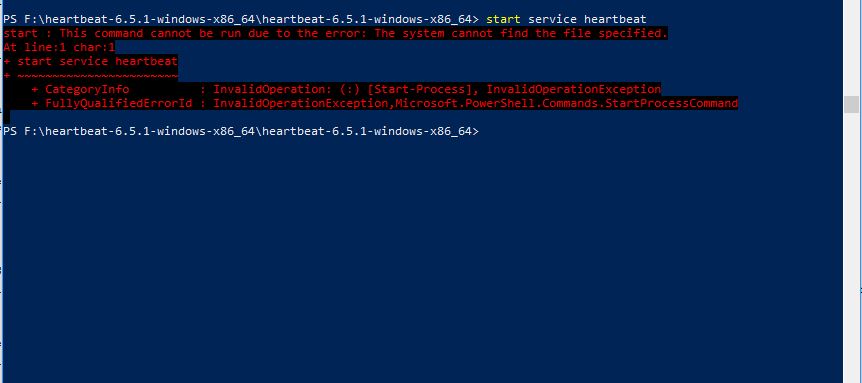
I started installing Heartbeat but the PS is not able to find the service file to complete the last process to install.
---
### Author:  [@Eniqmatic](https://discuss.elastic.co/u/Eniqmatic)
#### Post date: [November 30, 2018, 8:12am UTC](https://discuss.elastic.co/t/logstash-email-config/157703/15 "2018-11-30T08:12:48Z")
You used the install script correct?
---
### Author:  [@Nikhil\_Singh1](https://discuss.elastic.co/u/Nikhil_Singh1)
#### Post date: [November 30, 2018, 9:39am UTC](https://discuss.elastic.co/t/logstash-email-config/157703/16 "2018-11-30T09:39:27Z")
Yes all the steps executed correctly except the last one
---
### Author:  [@Eniqmatic](https://discuss.elastic.co/u/Eniqmatic)
#### Post date: [November 30, 2018, 9:42am UTC](https://discuss.elastic.co/t/logstash-email-config/157703/17 "2018-11-30T09:42:39Z")
You ran the install as admin? Can you show that?
---
### Author:  [@Nikhil\_Singh1](https://discuss.elastic.co/u/Nikhil_Singh1)
#### Post date: [December 3, 2018, 9:19am UTC](https://discuss.elastic.co/t/logstash-email-config/157703/18 "2018-12-03T09:19:03Z")
I'm trying to update the yml file of heartbeat with new url but there is no changes in response as it is taking the older url
---
### Author:  [@Eniqmatic](https://discuss.elastic.co/u/Eniqmatic)
#### Post date: [December 3, 2018, 9:37am UTC](https://discuss.elastic.co/t/logstash-email-config/157703/19 "2018-12-03T09:37:37Z")
If you ignore what I'm asking you to try then I cannot help you, I can't see what your doing so I don't know why its failing hence why I asked you to show you installing it.
---
### Author:  [@Nikhil\_Singh1](https://discuss.elastic.co/u/Nikhil_Singh1)
#### Post date: [December 3, 2018, 10:15am UTC](https://discuss.elastic.co/t/logstash-email-config/157703/20 "2018-12-03T10:15:25Z")
Installation is done successfully I figured it out I'm able to gather the response for a specific url but after updating yml file with a new url I'm not getting response for the updated url
[Next page](https://discuss.elastic.co/t/logstash-email-config/157703.md?page=2)