# Multiple Fields Authorization
**URL:** https://discuss.elastic.co/t/multiple-fields-authorization/89912
**Category:** Elasticsearch
**Created:** [June 19, 2017, 10:08am UTC](https://discuss.elastic.co/t/multiple-fields-authorization/89912 "2017-06-19T10:08:59Z")
**Posts on this page:** 10
**Page:** 1
### Author:  [@hfakar](https://discuss.elastic.co/u/hfakar)
#### Post date: [June 19, 2017, 10:09am UTC](https://discuss.elastic.co/t/multiple-fields-authorization/89912/1 "2017-06-19T10:09:00Z")
On the authorization about document level security we use the query:
"match\_phrase": {"component":"BİLGİ GÜVENLİĞİ MÜDÜRLÜĞÜ"}
How do I get the response for like multiple components? I tried:
"match\_phrase": {"component":"BİLGİ GÜVENLİĞİ MÜDÜRLÜĞÜ" or "ORTAK ÇÖZÜMLER MÜDÜRLÜĞÜ"}
AND
"match\_phrase": {"component":"BİLGİ GÜVENLİĞİ MÜDÜRLÜĞÜ"},
"match\_phrase": {"component":"ORTAK ÇÖZÜMLER MÜDÜRLÜĞÜ"}
But no success. How do I make an or statement to get both components in the same dashboard?
---
### Author:  [@LeeDr](https://discuss.elastic.co/u/LeeDr)
#### Post date: [June 19, 2017, 2:00pm UTC](https://discuss.elastic.co/t/multiple-fields-authorization/89912/2 "2017-06-19T14:00:37Z")
Hi Hüseyin,
Can you try something like this (but replace your strings of course);
```auto
{
"bool": {
"should": [
{
"match_phrase": {
"metricset.name": "process"
}
},
{
"match_phrase": {
"metricset.name": "filesystem"
}
}
],
"minimum_should_match": 1
}
}
```

Regards,
Lee
---
### Author:  [@hfakar](https://discuss.elastic.co/u/hfakar)
#### Post date: [June 20, 2017, 10:55am UTC](https://discuss.elastic.co/t/multiple-fields-authorization/89912/3 "2017-06-20T10:55:24Z")
Returns zero results. BTW are you sure this is the correct syntax for active directory realm?
Thank You.
---
### Author:  [@LeeDr](https://discuss.elastic.co/u/LeeDr)
#### Post date: [June 20, 2017, 3:35pm UTC](https://discuss.elastic.co/t/multiple-fields-authorization/89912/4 "2017-06-20T15:35:22Z")
Your active directory authentication doesn't have anything to do with the document level security. This is just a query against elasticsearch. It's more of authorization once you're authenticated.
If you do your query in Discover tab like below, and then click the little `^` arrow to get to the "spy panel";
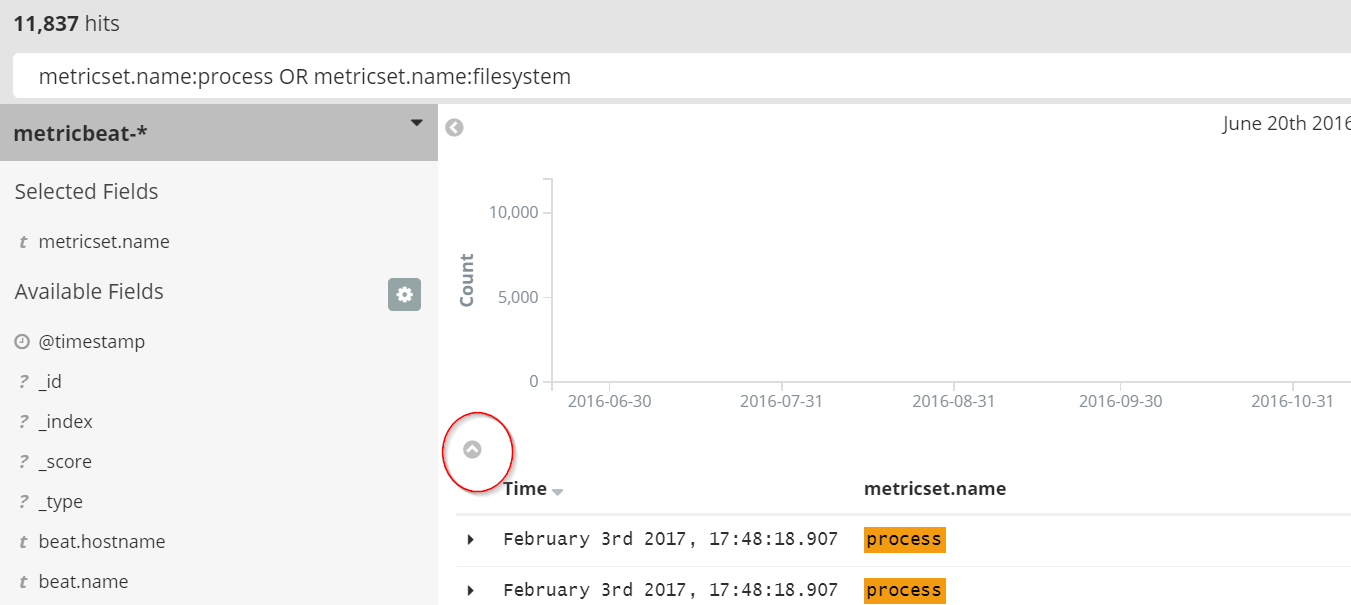
Then click the `Request` button;

Then you can see the exact query that Kibana ran;
```auto
"query": {
"bool": {
"must": [
{
"query_string": {
"query": "metricset.name:process OR metricset.name:filesystem",
"analyze_wildcard": true
}
},
{
"range": {
"@timestamp": {
"gte": 1466436294193,
"lte": 1497972294193,
"format": "epoch_millis"
}
}
}
],
"must_not": []
}
},
```
You should be able to remove the time "range" block and the empty "must\_not" block and get to something like this;
```auto
"query": {
"bool": {
"must": [
{
"query_string": {
"query": "metricset.name:process OR metricset.name:filesystem",
"analyze_wildcard": true
}
}
]
}
},
```
May not need the `"analyze_wildcard": true` part either.
So this is a little different than my previous screenshot which used a `bool should`, with 2 separate match\_phrase blocks and a `minimum_should_match: 1`
This one generated by Kibana Discover is a `bool must` with a single query containing the OR
In the Role Granted Documents Query you need the `query` block so you start at the first `{` after `query:`.
---
### Author:  [@hfakar](https://discuss.elastic.co/u/hfakar)
#### Post date: [June 21, 2017, 1:00pm UTC](https://discuss.elastic.co/t/multiple-fields-authorization/89912/5 "2017-06-21T13:00:06Z")
Hello there.
I tried this but no luck:

It returns nothing. Any idea?
---
### Author:  [@LeeDr](https://discuss.elastic.co/u/LeeDr)
#### Post date: [June 21, 2017, 5:15pm UTC](https://discuss.elastic.co/t/multiple-fields-authorization/89912/6 "2017-06-21T17:15:07Z")
I'm not clear on exactly what you're trying. What happens in Discover? Can you do the OR query and does that return your expected results? Try each half of the OR separately and note the Hit count returned and the OR query Hit count should add up to both of those. Does that work?
---
### Author:  [@hfakar](https://discuss.elastic.co/u/hfakar)
#### Post date: [June 23, 2017, 5:32am UTC](https://discuss.elastic.co/t/multiple-fields-authorization/89912/7 "2017-06-23T05:32:04Z")
In discover I can do the "OR" search. It works just as I wanted. Now I need to map that to a role in active directory realm. But I cant do it. The above mapping doesn't work for me. I wonder where am I doing wrong.
---
### Author:  [@TimV](https://discuss.elastic.co/u/TimV)
#### Post date: [June 23, 2017, 6:11am UTC](https://discuss.elastic.co/t/multiple-fields-authorization/89912/8 "2017-06-23T06:11:00Z")
I'm afraid you're not really giving us enough information to help solve your problem.
Try to start at the beginning:
- What exactly are you trying to achieve?
- What steps did you try?
- How you know it's not working?
Also:
> I need to map that to a role in active directory realm.
The way you're describing isn't quite in alignment with how X-Pack security operates. Since you're trying to utilise some of the more complex security features of X-Pack, I think it's worth throwing in a few quick pointers so that you're better able to debug any issues that come up.
**Users and Roles**
- Roles exist outside of realms. You either define them in files, or through the API, but they don't belong to realms.
- Users exist in realms, and the list of roles they belong is determined by that realm.
- So a _User_ can be in an Active Directory realm, and that user can be mapped to a _Role_ that was defined through the API, but that doesn't mean that the role is part of that realm. You can have an Active Directory user and a PKI user mapped to exactly the same role, with exactly the same permissions.
- As far as I can tell, the problem you are trying to solve is all about roles, so it doesn't matter whether your user is in the Active Directory realm, or some other realm, the behaviour should be the same.
**Document Level Security**
- Document Level Security is implemented by standard Elasticsearch queries. Anything you can enter in discover or console should work as a query within a role.
- Document Level Security affects everything that the user does within Elasticsearch, so it's usually easier to test and debug by using simple queries against Elasticsearch (e.g. using Console) before trying to make it work in a Dashboard. Jumping directly from defining a role, to testing a Dashboard (which is what it sounds like you are doing) is often going to be tricky because it can be quite hard to tell if it's working, or how to debug it if it isn't working.
- I recommend you take these steps:
1. Write a query using console and/or discover that matches the documents you want to use for Document Level Security (DLS)
2. Create a new role that has a DLS query using the query you created in step 1.
3. Grant that role (and nothing else) to a user. For the sake of this testing it can be a user from any realm. The _native_ realm is often the easiest for testing because you can manage the users through Kibana and you don't need to fiddle with role mapping.
4. Run some simple queries in console as the user you created step 3. Check that those queries give you the results you expect. I recommend just doing a `match_all` query - the results should match with the results you got from your testing in step 1.
5. Once that's working, then you can build more complex visualisations and dashboards that rely on the DLS restrictions of the role. Because you know that the DLS query is working (due to step 4), it means that any issues are most likely to be due to the way you've defined your visualisations rather than the role and you can start your debugging there.
---
### Author:  [@hfakar](https://discuss.elastic.co/u/hfakar)
#### Post date: [June 23, 2017, 6:57am UTC](https://discuss.elastic.co/t/multiple-fields-authorization/89912/9 "2017-06-23T06:57:30Z")
Im shocked that you still understand me.
I want my xxx manager to see the xxx related documents only and he will be authenticated with AD. (DONE)
I want my yyy manager to see the yyy and zzz related documents and he will be authenticating with AD too. (Failied)
When I do search on discovery with superuser role I get what I want.
How do I know that it fails? When I login with yyy role there is no results to show me (0 hits). (and that role is built with the request query in discovery)
You can see it in the above picture.
---
### Author:  [@system](https://discuss.elastic.co/u/system)
#### Post date: [July 21, 2017, 6:57am UTC](https://discuss.elastic.co/t/multiple-fields-authorization/89912/10 "2017-07-21T06:57:33Z")
This topic was automatically closed 28 days after the last reply. New replies are no longer allowed.