# Need to make logs in order
**URL:** https://discuss.elastic.co/t/need-to-make-logs-in-order/287845
**Category:** Logstash
**Created:** [October 27, 2021, 6:02pm UTC](https://discuss.elastic.co/t/need-to-make-logs-in-order/287845 "2021-10-27T18:02:05Z")
**Posts on this page:** 17
**Page:** 1
### Author:  [@cool999](https://discuss.elastic.co/u/cool999)
#### Post date: [October 27, 2021, 6:02pm UTC](https://discuss.elastic.co/t/need-to-make-logs-in-order/287845/1 "2021-10-27T18:02:05Z")
Hi,
I have below app logs, like below but they are not in oder in kibana i.e the last log line below is not the first in kibana discover.
```auto
2021-10-27 16:51:14.864 | INFO | | | | | [http-nio-8080-exec-32] | next-concapcont - selected account ids : [GB22QNBA0935005402|4303004002]
2021-10-27 16:51:15.138 | INFO | | | | | [http-nio-8080-exec-32] | QueryTranslatorFactoryInitiator - HHH000397: Using ASTQueryTranslatorFactory
2021-10-27 16:51:15.358 | INFO | next-con | bce8dbe3-0f-4365-b906-48b2e794a6 | | | [http-nio-8080-exec-32] | next-concapcont - user_unit_id: LMS
2021-10-27 16:51:15.358 | INFO | next-con | bce8dbe3-0f-4365-b906-48b2e794a6 | | | [http-nio-8080-exec-32] | next-concapcont - corporate_id: null
2021-10-27 16:51:15.358 | INFO | next-con | bce8dbe3-0f-4365-b906-48b2e794a6 | | | [http-nio-8080-exec-32] | next-concapcont - consentStatus: accept
```
This is `/etc/filebeat/filebeat.yml` capturing `logs`.
```auto
- type: log
fields_under_root: true
fields:
log_type: nextgen-api_app_server1
app_id: app
multiline.pattern: ^[[:space:]]+(at|\.{3})\b|^Caused by:|^java|^...|^-
multiline.negate: true
multiline.match: after
paths:
- /opt/tomcat/logs/catalina.out
```
below is the pattern file `/etc/logstash/patterns/custom.txt`.
```auto
MY_DATE_PATTERN %{YEAR}-%{MONTHNUM}-%{MONTHDAY}[T]%{HOUR}:%{MINUTE}(?::?%{SECOND})
```
`custom.txt` is used in `/etc/logstash/conf.d/logstash.conf` file,
```auto
if [log_type] == "nextgen-api_app_server1" and [app_id] == "app"
{
mutate { gsub => ["message","\|"," "] } grok { patterns_dir => ["/etc/logstash/patterns"] match => { "message" => "%{MY_DATE_PATTERN:timestamp}%{SPACE}%{LOGLEVEL:level}%{SPACE}%{UUID:ConsentID}%{SPACE}%{WORD:TraceID}%{SPACE}%{WORD:TransactionID}%{SPACE}%{GREEDYDATA:messagetext}" } }
mutate {
replace => {
"[type]" => "nextgen-api_app_server1"
}
}
}
```
I want to order the logs as per the `timestamp` in message.
I know above `MY_DATE_PATTERN` Is not correct, I have changed it like below, but this is not working.
```auto
MY_DATE_PATTERN %{YEAR}-%{MONTHNUM}-%{MONTHDAY} %{HOUR}:%{MINUTE}:%{SECOND}.%{SSS}
```
there is no `date` filter used in `logstash` so I assume currently the logs are getting ordered in with the time they are coming in the pipeline and hence they not appearing in order and hence I want to oder them based on the timestamp in message.
---
### Author:  [@Badger](https://discuss.elastic.co/u/Badger)
#### Post date: [October 27, 2021, 7:22pm UTC](https://discuss.elastic.co/t/need-to-make-logs-in-order/287845/2 "2021-10-27T19:22:41Z")
> [@cool999](#):
>
> there is no `date` filter used in `logstash` so I assume currently the logs are getting ordered in with the time they are coming in the pipeline
Not even that. logstash does not preserve the order of events by default.
You need to use a date filter to parse the date that you extract using grok.
What does "this is not working" mean?
---
### Author:  [@cool999](https://discuss.elastic.co/u/cool999)
#### Post date: [October 27, 2021, 7:35pm UTC](https://discuss.elastic.co/t/need-to-make-logs-in-order/287845/3 "2021-10-27T19:35:59Z")
Hi @Badger,
Thanks for reply.
I mean the modified MY\_DATE\_PATTERN is not helping in order of logs.
Thanks,
---
### Author:  [@cool999](https://discuss.elastic.co/u/cool999)
#### Post date: [October 27, 2021, 7:53pm UTC](https://discuss.elastic.co/t/need-to-make-logs-in-order/287845/4 "2021-10-27T19:53:38Z")
@Badger
If date filter is only option to get this done,
Will below work? I haven't test yet.
```auto
date {
match => ["@timestamp", "%{YEAR}-%{MONTHNUM}-%{MONTHDAY} %{HOUR}:%{MINUTE}:%{SECOND}.%{SSS}]
}
```
If yes, need to remove below as well,
```auto
{ patterns_dir => ["/etc/logstash/patterns"] match => { "message" => "%{MY_DATE_PATTERN:timestamp}
```
---
### Author:  [@Badger](https://discuss.elastic.co/u/Badger)
#### Post date: [October 27, 2021, 10:33pm UTC](https://discuss.elastic.co/t/need-to-make-logs-in-order/287845/5 "2021-10-27T22:33:34Z")
Remove the mutate. It results in messages like
```auto
2021-10-27 16:51:15.138 INFO [http-nio-8080-exec-32] QueryTranslatorFactoryInitiator ...
2021-10-27 16:51:15.358 INFO next-con bce8dbe3-0f-4365-b906-48b2e794a6
```
The first has no UUID, the second has a word between the log level and the UUID. Your grok pattern does not make fields optional.
Your "UUID" does not match grok's idea of what a UUID should look like, so you need a custom pattern. The "D" pattern allows for one or more spaces between the log level and the following pipe. For INFO logs you have two spaces but I suspect ERROR logs will have one.
```
grok {
pattern_definitions => {
"MY_DATE_PATTERN" => "%{YEAR}-%{MONTHNUM}-%{MONTHDAY}[T]%{HOUR}:%{MINUTE}:%{SECOND}"
"MY_UUID" => "[A-Fa-f0-9]{8}-[A-Fa-f0-9]{2}-(?:[A-Fa-f0-9]{4}-){2}[A-Fa-f0-9]{10}"
"D" => " +\| "
}
match => { "message" => "%{MY_DATE_PATTERN:timestamp}%{D}%{LOGLEVEL:level}%{D}%{DATA}%{D}(%{MY_UUID:ConsentID}){0,1}%{D}%{D}%{DATA:TraceID}%{D}%{DATA:TransactionID}%{D}%{GREEDYDATA:messagetext}" }
}
date { match => ["timestamp", "YYYY-MM-dd HH:mm:ss.SSS"] }
```
You will end up with events like
```
"timestamp" => "2021-10-27 16:51:15.358",
"@timestamp" => 2021-10-27T20:51:15.358Z,
"level" => "INFO",
"ConsentID" => "bce8dbe3-0f-4365-b906-48b2e794a6",
"TransactionID" => "[http-nio-8080-exec-32]",
"messagetext" => "next-concapcont - consentStatus: accept",
```
---
### Author:  [@cool999](https://discuss.elastic.co/u/cool999)
#### Post date: [October 28, 2021, 3:43pm UTC](https://discuss.elastic.co/t/need-to-make-logs-in-order/287845/6 "2021-10-28T15:43:44Z")
Hi @Badger,
I have modified pipeline config for this application as suggested.
```auto
if [log_type] == "next-api_app_server1" and [app_id] == "app"
{
grok {
pattern_definitions => {
"MY_DATE_PATTERN" => "%{YEAR}-%{MONTHNUM}-%{MONTHDAY}[T]%{HOUR}:%{MINUTE}:%{SECOND}"
"MY_UUID" => "[A-Fa-f0-9]{8}-[A-Fa-f0-9]{2}-(?:[A-Fa-f0-9]{4}-){2}[A-Fa-f0-9]{10}"
"D" => " +\| "
}
match => { "message" => "%{MY_DATE_PATTERN:timestamp}%{D}%{LOGLEVEL:level}%{D}%{DATA}%{D}(%MY_UUID:ConsentID}){0,1}%{D}%{D}%{DATA:TraceID}%{D}%{DATA:TransactionID}%{D}%{GREEDYDATA:messagetext}" }
}
date { match => ["timestamp", "YYYY-MM-dd HH:mm:ss.SSS"] }
mutate {
replace => {
"[type]" => "next-api_app_server1"
}
}
}
```
Restated the App to generate logs. Below are last lines of logs.
I have notice now, It has two different types of timestamps below.
```auto
.
.
.
2021-10-28 17:35:49.743 | INFO | | | | | [localhost-startStop-1] | Application - Started Application in 10.788 seconds (JVM running for 78.11)
28-Oct-2021 17:35:49.761 INFO [localhost-startStop-1] org.apache.catalina.startup.HostConfig.deployWAR Deployment of web application archive [/opt/tomcat/webapps/next-is.war] has finished in [15,937] ms
28-Oct-2021 17:35:49.776 INFO [main] org.apache.coyote.AbstractProtocol.start Starting ProtocolHandler ["http-nio-8080"]
28-Oct-2021 17:35:49.808 INFO [main] org.apache.coyote.AbstractProtocol.start Starting ProtocolHandler ["ajp-nio-8009"]
28-Oct-2021 17:35:49.821 INFO [main] org.apache.catalina.startup.Catalina.start Server startup in 76863 ms
2021-10-28 17:35:50.247 | INFO | | | | | [http-nio-8080-exec-18] | o.s.w.s.DispatcherServlet - Initializing Servlet 'dispatcherServlet'
2021-10-28 17:35:50.277 | INFO | | | | | [http-nio-8080-exec-18] | o.s.w.s.DispatcherServlet - Completed initialization in 28 ms
```
1 - It's still not in order when seeing it in `kibana`.
(Sorry for sharing screen shot for `kibana`, not sure how can I send this kibana logs as text)
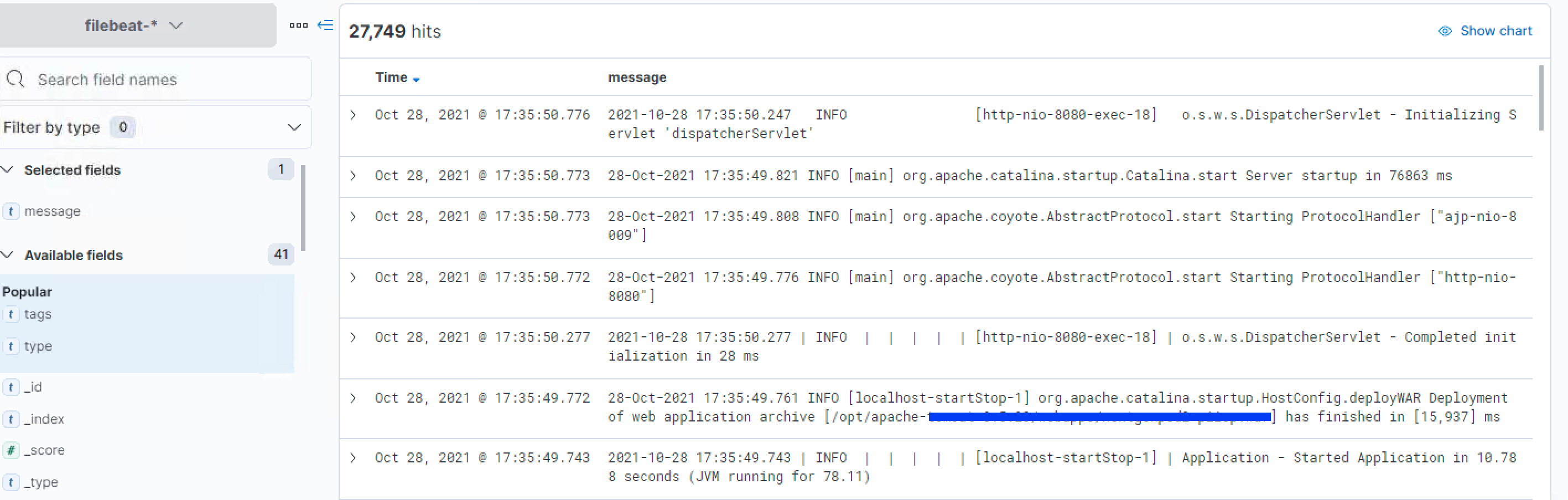
To keep things simple, I am just concentrating on order of logs for now (even if some of the logs are not getting parsed or indexed due to such config missing in filter config)
2 - Not sure why but some of these logs are going into `filebeat` index, whereas they all should go into `next-api` index only. I have not got any logs in `logstash-plain.log` while doing this activity to indicate any error or something.
(same screenshot as above but with `_index` filed )

Below is the `output` filter config for this index.
```auto
output {
if [log_type] == "next-api_app_server1" {
elasticsearch {
hosts => ['http://es_server1:9200', 'http://es_server2:9200', 'http://es_server3:9200']
index => "next-api"
template_name => "next-api"
template_overwrite => "false"
user => elastic
password => "${es_pwd}"
}
}
elasticsearch {
hosts => ['http://es_server1:9200', 'http://es_server2:9200', 'http://es_server3:9200']
index => "%{[@metadata][beat]}-%{[@metadata][version]}-%{+YYYY.MM}"
user => elastic
password => "${es_pwd}"
}
}
```
Thanks,
---
### Author:  [@Badger](https://discuss.elastic.co/u/Badger)
#### Post date: [October 28, 2021, 10:44pm UTC](https://discuss.elastic.co/t/need-to-make-logs-in-order/287845/7 "2021-10-28T22:44:35Z")
If you have two different log file formats you can make grok match against a list of patterns. Similarly for the date filter.
```
grok {
pattern_definitions => {
"MY_DATE_PATTERN" => "(%{YEAR}-%{MONTHNUM}-%{MONTHDAY}|%{MONTHDAY}-%{MONTH}-%{YEAR})[T]%{TIME}"
"MY_UUID" => "[A-Fa-f0-9]{8}-[A-Fa-f0-9]{2}-(?:[A-Fa-f0-9]{4}-){2}[A-Fa-f0-9]{10}"
"D" => " +\| "
}
match => {
"message" => [
"^%{MY_DATE_PATTERN:timestamp}%{D}%{LOGLEVEL:level}%{D}%{DATA}%{D}(%{MY_UUID:ConsentID}){0,1}%{D}%{D}%{DATA:TraceID}%{D}%{DATA:TransactionID}%{D}%{GREEDYDATA:messagetext}",
"^%{MY_DATE_PATTERN:timestamp} %{LOGLEVEL:level} \[%{DATA}\] (?[.\w]+) %{GREEDYDATA:messagetext}"
]
}
}
date { match => ["timestamp", "YYYY-MM-dd HH:mm:ss.SSS", "dd-MMM-YYYY HH:mm:ss.SSS"] }
```
---
### Author:  [@cool999](https://discuss.elastic.co/u/cool999)
#### Post date: [October 29, 2021, 2:38pm UTC](https://discuss.elastic.co/t/need-to-make-logs-in-order/287845/8 "2021-10-29T14:38:25Z")
Hi @Badger,
Thanks. It worked. I can see single line logs are appearing in order.
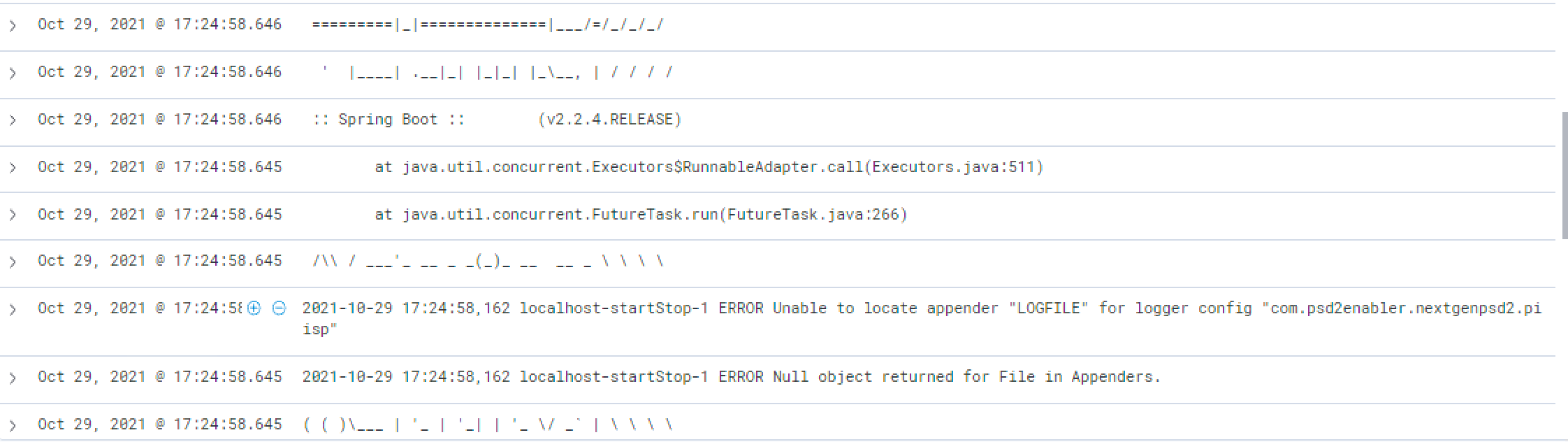
There are still images like below or multiline code not getting parsed properly.
server logs -

At `kibana` - above logo getting split also there seems to be issue with multiline code getting parsed as single lines.
Thanks,
---
### Author:  [@cool999](https://discuss.elastic.co/u/cool999)
#### Post date: [November 1, 2021, 1:22pm UTC](https://discuss.elastic.co/t/need-to-make-logs-in-order/287845/9 "2021-11-01T13:22:43Z")
Hi @Badger,
Can you please reply.
Thanks,
---
### Author:  [@Badger](https://discuss.elastic.co/u/Badger)
#### Post date: [November 1, 2021, 3:54pm UTC](https://discuss.elastic.co/t/need-to-make-logs-in-order/287845/10 "2021-11-01T15:54:12Z")
You will need to add additional patterns to the match array if there are additional formats. Put the most specific patterns first.
---
### Author:  [@cool999](https://discuss.elastic.co/u/cool999)
#### Post date: [November 2, 2021, 12:13pm UTC](https://discuss.elastic.co/t/need-to-make-logs-in-order/287845/11 "2021-11-02T12:13:54Z")
Hi @Badger,
> [@Badger](#):
>
> You will need to add additional patterns to the match array if there are additional formats. Put the most specific patterns first.
Are you saying to add more patterns to the match array in `logstash.conf`?
Currently here we have two match pattern
> [@Badger](#):
>
> ```auto
> match => {
> "message" => [
> "^%{MY_DATE_PATTERN:timestamp}%{D}%{LOGLEVEL:level}%{D}%{DATA}%{D}(%{MY_UUID:ConsentID}){0,1}%{D}%{D}%{DATA:TraceID}%{D}%{DATA:TransactionID}%{D}%{GREEDYDATA:messagetext}",
> "^%{MY_DATE_PATTERN:timestamp} %{LOGLEVEL:level} \[%{DATA}\] (?[.\w]+) %{GREEDYDATA:messagetext}"
> ]
>
> ```
I think to match multiline code i need to add such regex in `filebeat.yml` and not in `logstash.conf`
> **[Manage multiline messages | Filebeat Reference \[6.8\] | Elastic](https://www.elastic.co/guide/en/beats/filebeat/6.8/multiline-examples.html#multiline-examples)**
Below is what I already have in `filebeat.yml`.
```auto
- type: log
fields_under_root: true
fields:
log_type: next-api_app_server
app_id: app
multiline.pattern: ^[[:space:]]+(at|\.{3})\b|^Caused by:|^java|^...|^-
multiline.negate: true
multiline.match: after
paths:
- /opt/tomcat/logs/catalina.out
```
I am testing multi line code on [Go Playground](https://play.golang.org/)
I am asking this for messages like below.
```auto
2021-10-27 16:49:58.648 | TRACE | | | | | [http-nio-8080-exec-30] | o.h.t.d.s.BasicBinder - binding parameter [1] as [BIGINT] - [1764448]
2021-10-27 16:49:58.656 | DEBUG | | | | | [http-nio-8080-exec-30] | o.h.SQL -
select
pidata0_.id as id1_3_,
pidata0_.cli_id as cli_id2_3_,
pidata0_.cou_code as cou_code3_3_,
pidata0_.creation_time as creation_time4_3_,
pidata0_.pay_data as pay_data5_3_,
pidata0_.pay_type as pay_type6_3_,
pidata0_.resume_path as resume_path7_3_,
pidata0_.sc as sc8_3_,
pidata0_.tp_cli_id as tp_cli_id9_3_,
pidata0_.uid as uid10_3_
from
pg_data pidata0_
where
pidata0_.uuid=?
2021-10-27 16:49:58.656 | TRACE | | | | | [http-nio-8080-exec-30] | o.h.t.d.s.BasicBinder - binding parameter [1] as [VARCHAR] - [0ecb28a0-111f-4292-acb8-8bbd9740d15e]
2021-10-27 16:49:58.658 | TRACE | | | | | [http-nio-8080-exec-30] | o.h.t.d.s.BasicExtractor - extracted value ([id1_3_] : [BIGINT]) - [1764447]
```
Thanks,
---
### Author:  [@Badger](https://discuss.elastic.co/u/Badger)
#### Post date: [November 2, 2021, 4:38pm UTC](https://discuss.elastic.co/t/need-to-make-logs-in-order/287845/12 "2021-11-02T16:38:49Z")
I would change the multiline configuration so that anything that does not start with a date and time is appended to the previous line, rather than specifying all the patterns that might occur on a non-matching line.
---
### Author:  [@cool999](https://discuss.elastic.co/u/cool999)
#### Post date: [November 2, 2021, 5:30pm UTC](https://discuss.elastic.co/t/need-to-make-logs-in-order/287845/13 "2021-11-02T17:30:13Z")
Hi @Badger,
Yes. thank you.
I was asking all these matching for multiline code (which I will try) needs to define in `filebeat.yml` right and not in `logstash.yml`
Thanks,
---
### Author:  [@cool999](https://discuss.elastic.co/u/cool999)
#### Post date: [November 3, 2021, 4:16pm UTC](https://discuss.elastic.co/t/need-to-make-logs-in-order/287845/14 "2021-11-03T16:16:11Z")
Hi @Badger,
Can you please reply. I will close this discussion after this.
Thanks for the help.
Thanks,
---
### Author:  [@Badger](https://discuss.elastic.co/u/Badger)
#### Post date: [November 3, 2021, 7:54pm UTC](https://discuss.elastic.co/t/need-to-make-logs-in-order/287845/15 "2021-11-03T19:54:26Z")
Yes, a filebeat multiline pattern is configured in filebeat.yml
---
### Author:  [@cool999](https://discuss.elastic.co/u/cool999)
#### Post date: [November 3, 2021, 8:05pm UTC](https://discuss.elastic.co/t/need-to-make-logs-in-order/287845/16 "2021-11-03T20:05:23Z")
Thank you for your kind reply.
---
### Author:  [@system](https://discuss.elastic.co/u/system)
#### Post date: [December 1, 2021, 8:05pm UTC](https://discuss.elastic.co/t/need-to-make-logs-in-order/287845/17 "2021-12-01T20:05:51Z")
This topic was automatically closed 28 days after the last reply. New replies are no longer allowed.