# No data showing in SIEM Detection tab
**URL:** https://discuss.elastic.co/t/no-data-showing-in-siem-detection-tab/293712
**Category:** SIEM
**Tags:** detection-rules
**Created:** [January 7, 2022, 8:01am UTC](https://discuss.elastic.co/t/no-data-showing-in-siem-detection-tab/293712 "2022-01-07T08:01:34Z")
**Posts on this page:** 6
**Page:** 1
### Author:  [@subham](https://discuss.elastic.co/u/subham)
#### Post date: [January 7, 2022, 8:01am UTC](https://discuss.elastic.co/t/no-data-showing-in-siem-detection-tab/293712/1 "2022-01-07T08:01:34Z")
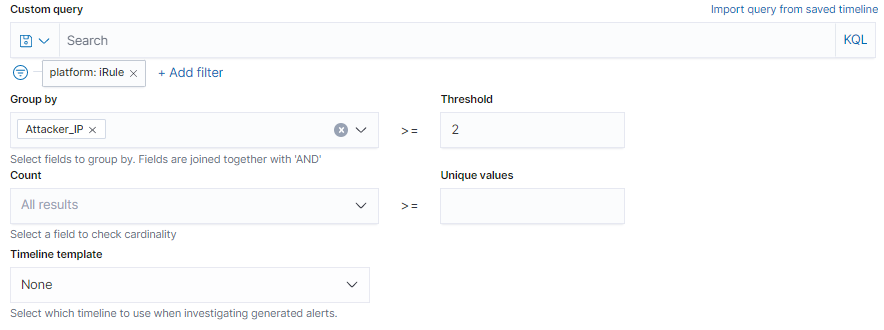
Hi Everyone, We have create a detection rule threshold in SIEM but it's not showing any output or alerts. We can see the results in Preview Results but no alert is scene. Please check the image below for reference and suggest here.

---
### Author:  [@spong](https://discuss.elastic.co/u/spong)
#### Post date: [January 7, 2022, 5:24pm UTC](https://discuss.elastic.co/t/no-data-showing-in-siem-detection-tab/293712/2 "2022-01-07T17:24:00Z")
Hey there @subham 👋
Can you please provide the stack version you're working on?
Regardless of version, here are some things to check:
- What is the Rule's configured schedule (interval/lookback)? The preview will default to `Last hour`, so if your Rule runs every 5 minutes + 4 minute lookback, it'll only be querying the previous 9 minutes, and so will not be looking at the same daterange as the preview. You can increase the interval/lookback to cover a larger range and see if that works in testing.
- Is there a `Timestamp override` field configured? If I recall correctly, the preview will use `@timestamp` as the date field when querying for results, so if you have a different `Timestamp override` field configured (under `About->Advanced settings` when editing a rule) you may see a mis-match here.
- Is the Rule executing successfully? If you go to the `Rule Details` page for this Rule, is the `Last Response` as the top `succeeded`? Is an error banner displayed, or do you see any specific errors under the `Failure History` tab at the bottom of the page? If so, can you share the error?
Hope this helps! Let us know your version or if any of the above works and we can help debug further! 🙂
Cheers!
Garrett
---
### Author:  [@subham](https://discuss.elastic.co/u/subham)
#### Post date: [January 10, 2022, 11:05am UTC](https://discuss.elastic.co/t/no-data-showing-in-siem-detection-tab/293712/3 "2022-01-10T11:05:29Z")
Hi @spong , Thanks for the reply. I made changes in the Scheduled interval time and it's working now.
Can you tell if we can export these raw alerts cause I can't see any option to export.
---
### Author:  [@spong](https://discuss.elastic.co/u/spong)
#### Post date: [January 10, 2022, 5:11pm UTC](https://discuss.elastic.co/t/no-data-showing-in-siem-detection-tab/293712/4 "2022-01-10T17:11:49Z")
Awesome -- glad to hear it's working now! 🙂
As for exporting raw alerts, there isn't an explicit feature within the Security App to do this, but you can hop on over to `Discover`, select your alerts index (may need to create one first for `.siem-signals-*`, which will match all alerts in all spaces) and then use the `CSV Reports` export feature.

Alternatively, depending on what you're trying to do with them, you can configure one of the `Rule Actions` to push your alert data elsewhere once detected (or at regular intervals), e.g. using the `webhook` action.

And of course there's the numerous [`elasticsearch` clients available](https://www.elastic.co/guide/en/elasticsearch/client/index.html) for fetching this data programmatically.
That said, if these don't meet your needs please feel free to [open a feature request](https://github.com/elastic/kibana/issues/new?assignees=&labels=&template=Feature_request.md) (adding the `Security Solution` label) outlining your usecase.
Hope this helps!
Cheers!
Garrett
---
### Author:  [@subham](https://discuss.elastic.co/u/subham)
#### Post date: [January 11, 2022, 6:03am UTC](https://discuss.elastic.co/t/no-data-showing-in-siem-detection-tab/293712/5 "2022-01-11T06:03:26Z")
Thanks for the help Garrett, I'm able to export the alerts by creating the index (.siem-signals).
---
### Author:  [@system](https://discuss.elastic.co/u/system)
#### Post date: [February 8, 2022, 6:03am UTC](https://discuss.elastic.co/t/no-data-showing-in-siem-detection-tab/293712/6 "2022-02-08T06:03:52Z")
This topic was automatically closed 28 days after the last reply. New replies are no longer allowed.