# Not able to login even after correct credentials in x-pack
**URL:** https://discuss.elastic.co/t/not-able-to-login-even-after-correct-credentials-in-x-pack/317926
**Category:** Elasticsearch
**Tags:** elastic-stack-security
**Created:** [November 1, 2022, 9:10pm UTC](https://discuss.elastic.co/t/not-able-to-login-even-after-correct-credentials-in-x-pack/317926 "2022-11-01T21:10:34Z")
**Posts on this page:** 10
**Page:** 1
### Author:  [@Murali\_Krishna2](https://discuss.elastic.co/u/Murali_Krishna2)
#### Post date: [November 1, 2022, 9:10pm UTC](https://discuss.elastic.co/t/not-able-to-login-even-after-correct-credentials-in-x-pack/317926/1 "2022-11-01T21:10:34Z")
Hi Team,
I am not able to login to elastic even after typing the correct username and password.
Screenshot of the user details :

In the above image, role is "viewer".
We are able to login to those users whose role is "superadmin" only.
Previously the normal users were also working fine but from few days we are not able to login.
It is showing this error:
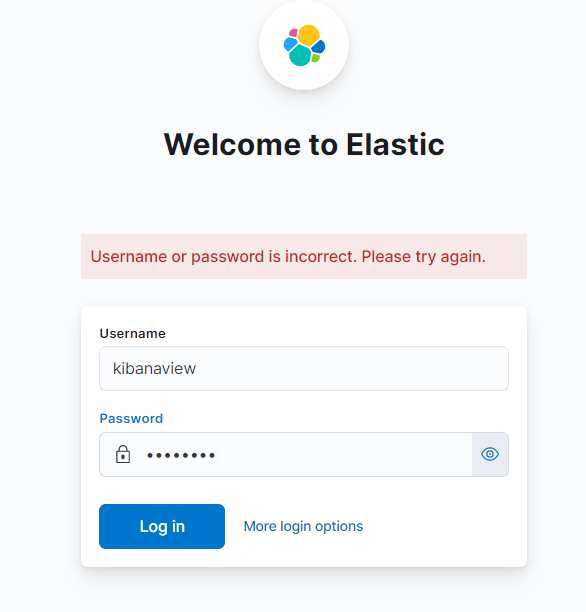
Please help us to resolve this. Thank You.
---
### Author:  [@Yang\_Wang](https://discuss.elastic.co/u/Yang_Wang)
#### Post date: [November 2, 2022, 12:36am UTC](https://discuss.elastic.co/t/not-able-to-login-even-after-correct-credentials-in-x-pack/317926/2 "2022-11-02T00:36:55Z")
To help diagnosis, could you please enable trace logging on the Elasticsearch side, capture and share Elasticsearch logs when your login fails? You can enable trace logging with
```auto
PUT _cluster/settings
{
"transient": {
"logger.org.elasticsearch.xpack.security.authc": 'trace'
}
}
```
It is also worth to try authenticate directly to Elasticsearch to narrow down the problem. You can do that with a curl command like:
```auto
curl -u kibanaview -k https://Host_Addess_of_Elasticsearch:PORT/_security/_authenticate
```
---
### Author:  [@Murali\_Krishna2](https://discuss.elastic.co/u/Murali_Krishna2)
#### Post date: [November 2, 2022, 5:38am UTC](https://discuss.elastic.co/t/not-able-to-login-even-after-correct-credentials-in-x-pack/317926/3 "2022-11-02T05:38:17Z")
Hi Yang\_Wang,
Thanks for the reply.
Command :
```auto
curl -u kibanaview -k https://Host_Addess_of_Elasticsearch:PORT/_security/_authenticate
```
Output:
```auto
{"error":{"root_cause":[{"type":"exception","reason":"[prefix] queries cannot be executed when 'search.allow_expensive_queries' is set to false. For optimised prefix queries on text fields please enable [index_prefixes]."}],"type":"search_phase_execution_exception","reason":"all shards failed","phase":"query","grouped":true,"failed_shards":[{"shard":0,"index":".security-7","node":"OfKm4JGPRVeE0hxRjBFO9w","reason":{"type":"query_shard_exception","reason":"failed to create query: [prefix] queries cannot be executed when 'search.allow_expensive_queries' is set to false. For optimised prefix queries on text fields please enable [index_prefixes].","index_uuid":"YS35eNaIQMaSMyhLYObY6Q","index":".security-7","caused_by":{"type":"exception","reason":"[prefix] queries cannot be executed when 'search.allow_expensive_queries' is set to false. For optimised prefix queries on text fields please enable [index_prefixes]."}}}],"caused_by":{"type":"exception","reason":"[prefix] queries cannot be executed when 'search.allow_expensive_queries' is set to false. For optimised prefix queries on text fields please enable [index_prefixes]."}},"status":400}
```
Is there anyway to resolve the issue without removing "search.allow\_expensive\_queries:false" ??
Thank You.
---
### Author:  [@Yang\_Wang](https://discuss.elastic.co/u/Yang_Wang)
#### Post date: [November 2, 2022, 6:18am UTC](https://discuss.elastic.co/t/not-able-to-login-even-after-correct-credentials-in-x-pack/317926/4 "2022-11-02T06:18:09Z")
Thanks for the additional information.
What is the exact definition of the `viewer` role? Is it the built-in one? What version of Elasticsearch are you using?
The error you are having most likely means you have a wildcard in your application privilege definition. If the `viewer` role is the built-in one, that should not happen. The other possibility is anonymous roles. Do you have anonymous access enabled?
Also, please try grant `superuser` role to your `kibanaview` user and execute the curl command again. Please provide the response for diagnosis. Thanks!
---
### Author:  [@Murali\_Krishna2](https://discuss.elastic.co/u/Murali_Krishna2)
#### Post date: [November 2, 2022, 7:56pm UTC](https://discuss.elastic.co/t/not-able-to-login-even-after-correct-credentials-in-x-pack/317926/5 "2022-11-02T19:56:50Z")
Hi,
**viewer** role is the build-in one provided by elastic.
Yes I have anonymous access. For guest user, I have provide the main elastic username and password provide by x-pack authentication.
When i grant superuser role to kibanaview user. I am able to login.
Output of curl command:
```auto
{"username":"kibanaview","roles":["viewer","superuser"],"full_name":"kibanaview","email":"","metadata":{},"enabled":true,"authentication_realm":{"name":"default_native","type":"native"},"lookup_realm":{"name":"default_native","type":"native"},"authentication_type":"realm"}
```
Thank You
---
### Author:  [@Yang\_Wang](https://discuss.elastic.co/u/Yang_Wang)
#### Post date: [November 3, 2022, 6:54am UTC](https://discuss.elastic.co/t/not-able-to-login-even-after-correct-credentials-in-x-pack/317926/6 "2022-11-03T06:54:18Z")
> Yes I have anonymous access. For guest user, I have provide the main elastic username and password provide by x-pack authentication.
That is _not_ the same [anonymous access](https://www.elastic.co/guide/en/elasticsearch/reference/current/anonymous-access.html) that I was referring to. Based on the output of Authenticate API, I think you don't actually have anonymous access enabled.
The builtin `viewer` should not be causing any issue by itself. I am running out of ideas. Could you please kindly enable server side trace logging for the authorization process and share the log? You can enable the trace log with
```auto
PUT _cluster/settings
{
"transient": {
"logger.org.elasticsearch.xpack.security.authz": "trace"
}
}
```
You can remove it afterwards with
```auto
PUT _cluster/settings
{
"transient": {
"logger.org.elasticsearch.xpack.security.authz": null
}
}
```
Thanks!
---
### Author:  [@Murali\_Krishna2](https://discuss.elastic.co/u/Murali_Krishna2)
#### Post date: [November 16, 2022, 7:55pm UTC](https://discuss.elastic.co/t/not-able-to-login-even-after-correct-credentials-in-x-pack/317926/7 "2022-11-16T19:55:56Z")
Hello,
As suggested I have enabled server-side trace logging.
Will summarize the issue again:
1. I have disabled expensive queries (search.allow\_expensive\_queries: false) in our Elasticsearch cluster. After this changes :
- If the user has "superuser role" access then only i am able to login.
- Other than superuser, no other users are able to login. Example : I have a user with only viewier (in-built) access. It is giving error in this case
1. If I enable expensive queries in our Elasticsearch cluster, then everything is working fine.
Currently, expensive queries are disabled. Below are logs for both the user.
i. User having superuser role
```auto
{"username":"kibanauser","roles":["viewer","superuser"],"full_name":"kibanaview","email":"","metadata":{},"enabled":true,"authentication_realm":{"name":"default_native","type":"native"},"lookup_realm":{"name":"default_native","type":"native"},"authentication_type":"realm"}
```
ii. User with non-superuser role
```auto
{"error":{"root_cause":[{"type":"exception","reason":"[prefix] queries cannot be executed when 'search.allow_expensive_queries' is set to false. For optimised prefix queries on text fields please enable [index_prefixes]."}],"type":"search_phase_execution_exception","reason":"all shards failed","phase":"query","grouped":true,"failed_shards":[{"shard":0,"index":".security-7","node":"OfKm4JGPRVeE0hxRjBFO9w","reason":{"type":"query_shard_exception","reason":"failed to create query: [prefix] queries cannot be executed when 'search.allow_expensive_queries' is set to false. For optimised prefix queries on text fields please enable [index_prefixes].","index_uuid":"YS35eNaIQMaSMyhLYObY6Q","index":".security-7","caused_by":{"type":"exception","reason":"[prefix] queries cannot be executed when 'search.allow_expensive_queries' is set to false. For optimised prefix queries on text fields please enable [index_prefixes]."}}}],"caused_by":{"type":"exception","reason":"[prefix] queries cannot be executed when 'search.allow_expensive_queries' is set to false. For optimised prefix queries on text fields please enable [index_prefixes]."}},"status":400}
```
---
### Author:  [@leandrojmp](https://discuss.elastic.co/u/leandrojmp)
#### Post date: [November 16, 2022, 8:51pm UTC](https://discuss.elastic.co/t/not-able-to-login-even-after-correct-credentials-in-x-pack/317926/8 "2022-11-16T20:51:50Z")
> [@Murali\_Krishna2](#):
>
> If I enable expensive queries in our Elasticsearch cluster, then everything is working fine
I think it is better to open an issue in Github, it seems that there are a lot of things in Kibana that needs `search.allow_expensive_queries` set as `true`, for example, the SIEM module and the Alerts will break if you set it to false.
But I think that this being `false` shouldn't break things like users logging in.
---
### Author:  [@Yang\_Wang](https://discuss.elastic.co/u/Yang_Wang)
#### Post date: [November 17, 2022, 12:28am UTC](https://discuss.elastic.co/t/not-able-to-login-even-after-correct-credentials-in-x-pack/317926/9 "2022-11-17T00:28:54Z")
> [@Murali\_Krishna2](#):
>
> As suggested I have enabled server-side trace logging.
>
> Below are logs for both the user.
What you have shared is client side response, not server side logs (let alone trace logs). You have shared them before and unfortunately they are _not_ sufficient to pin down exactly what triggers the exception.
@leandrojmp is right that many features won't work without `search.allow_expensive_queries`. So if you are after those features, you'll have to set it to `true`.
The setting can affect authentication in a very specific way and it should not happen for the builtin `viewer` role and that's where I'd like to dig a bit more to pin down the exact cause of it.
---
### Author:  [@system](https://discuss.elastic.co/u/system)
#### Post date: [December 15, 2022, 12:29am UTC](https://discuss.elastic.co/t/not-able-to-login-even-after-correct-credentials-in-x-pack/317926/10 "2022-12-15T00:29:07Z")
This topic was automatically closed 28 days after the last reply. New replies are no longer allowed.