# Problem. Filebeat 7.4.0 excesive syslog size
**URL:** https://discuss.elastic.co/t/problem-filebeat-7-4-0-excesive-syslog-size/208291
**Category:** Beats
**Tags:** filebeat
**Created:** [November 18, 2019, 10:57am UTC](https://discuss.elastic.co/t/problem-filebeat-7-4-0-excesive-syslog-size/208291 "2019-11-18T10:57:17Z")
**Posts on this page:** 20
**Page:** 1
### Author:  [@salva](https://discuss.elastic.co/u/salva)
#### Post date: [November 18, 2019, 10:57am UTC](https://discuss.elastic.co/t/problem-filebeat-7-4-0-excesive-syslog-size/208291/1 "2019-11-18T10:57:17Z")
Hi.
I have a problem with Filebeats 7.4.0.
It generates a very large syslog. If I don't stop the service, it would take up all the disk space.
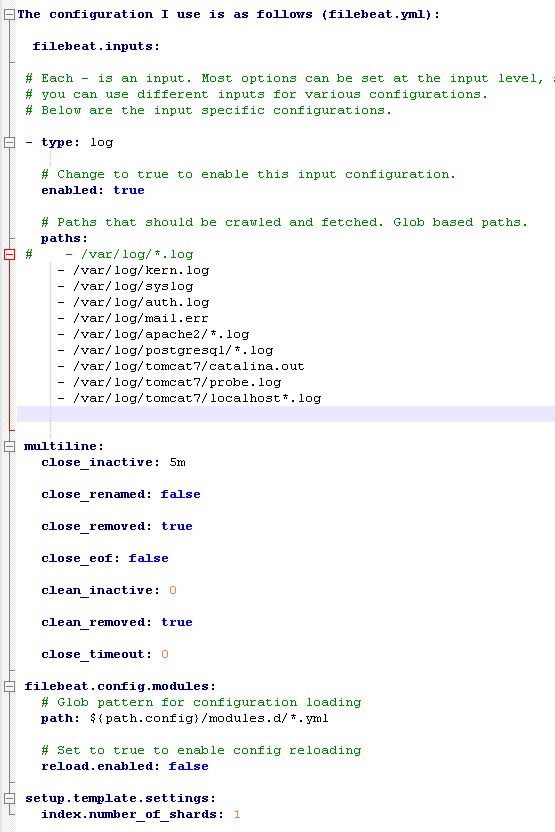
Attached configuration (filebeat.yml):
---
### Author:  [@kvch](https://discuss.elastic.co/u/kvch)
#### Post date: [November 18, 2019, 11:24am UTC](https://discuss.elastic.co/t/problem-filebeat-7-4-0-excesive-syslog-size/208291/2 "2019-11-18T11:24:54Z")
What do you mean exactly by very large syslog? Do you mean that its logs are big? Or the events forwarded are too big? Or are you getting too many events?
Looking quickly at your config, I can see an issue with it. But I am not sure if it is going to resolve your problem, as you haven't provided much information. You need to remove or configure `multiline` correctly. If you want to use `multiline` settings, you need to put it under your `input` and provide some settings: [https://www.elastic.co/guide/en/beats/filebeat/current/multiline-examples.html](https://www.elastic.co/guide/en/beats/filebeat/current/multiline-examples.html)
Example config:
```auto
filebeat.inputs:
- type: log
enabled: true
paths:
- /var/log/*.log
multiline.pattern: '^\['
multiline.negate: true
multiline.match: after
close_inactive: 5m
```
---
### Author:  [@salva](https://discuss.elastic.co/u/salva)
#### Post date: [November 18, 2019, 11:27am UTC](https://discuss.elastic.co/t/problem-filebeat-7-4-0-excesive-syslog-size/208291/3 "2019-11-18T11:27:38Z")
Thanks for answering. I mean the size of the syslog file when the filebeats service is running.
In the attached image you can see how it occupies more than 200GB.
If I stop the filebeats service, the growth of the syslog file is slow. 
---
### Author:  [@kvch](https://discuss.elastic.co/u/kvch)
#### Post date: [November 18, 2019, 4:59pm UTC](https://discuss.elastic.co/t/problem-filebeat-7-4-0-excesive-syslog-size/208291/4 "2019-11-18T16:59:54Z")
Could you please share the debug logs (`./filebeat -e -d "*"`)?
---
### Author:  [@salva](https://discuss.elastic.co/u/salva)
#### Post date: [November 19, 2019, 7:21am UTC](https://discuss.elastic.co/t/problem-filebeat-7-4-0-excesive-syslog-size/208291/5 "2019-11-19T07:21:11Z")
Thank you. here it is. I had filebeat running for 30 seconds. has generated a 15mb file. very big, right?
uploaded file to google drive
> **[filebeat.log](https://drive.google.com/file/d/1m5IJeq1JEJ3WJJ8SqeXUgJATipIVNnLt/view?usp=drive_open)**
>
> Google Drive file.
---
### Author:  [@kvch](https://discuss.elastic.co/u/kvch)
#### Post date: [November 19, 2019, 1:04pm UTC](https://discuss.elastic.co/t/problem-filebeat-7-4-0-excesive-syslog-size/208291/6 "2019-11-19T13:04:18Z")
I don't see any unusual or suspicious thing in your logs. Everything is normal.
But if you are not happy with the log file sizes of Filebeat, you can configure it. I suggest you set `logging.files.rotateeverybytes` to a number which fits your infrastructure ([https://www.elastic.co/guide/en/beats/filebeat/current/configuration-logging.html#\_logging\_files\_rotateeverybytes](https://www.elastic.co/guide/en/beats/filebeat/current/configuration-logging.html#_logging_files_rotateeverybytes)). You can also set `logging.files.keepfiles` to limit the number of rotated files ([https://www.elastic.co/guide/en/beats/filebeat/current/configuration-logging.html#\_logging\_files\_keepfiles](https://www.elastic.co/guide/en/beats/filebeat/current/configuration-logging.html#_logging_files_keepfiles)). You can find further logging options on the same page I have linked above if you need more control.
---
### Author:  [@salva](https://discuss.elastic.co/u/salva)
#### Post date: [November 19, 2019, 2:08pm UTC](https://discuss.elastic.co/t/problem-filebeat-7-4-0-excesive-syslog-size/208291/7 "2019-11-19T14:08:25Z")
The problem does not come from the filebeats log. The problem occurs when the filebeats service is active, the syslog increases disproportionately.
If the service is stopped, syslog increases very little.
The links you provide correspond to the filebeat log, right?
---
### Author:  [@kvch](https://discuss.elastic.co/u/kvch)
#### Post date: [November 19, 2019, 3:25pm UTC](https://discuss.elastic.co/t/problem-filebeat-7-4-0-excesive-syslog-size/208291/8 "2019-11-19T15:25:40Z")
Yes, it corresponds to the Filebeat log.
So just to make sure I understand you issue correctly, the problem is not with the amout of log written by Filebeat, right? Is there some service which depends on it and logs too much?
---
### Author:  [@salva](https://discuss.elastic.co/u/salva)
#### Post date: [November 20, 2019, 6:43am UTC](https://discuss.elastic.co/t/problem-filebeat-7-4-0-excesive-syslog-size/208291/9 "2019-11-20T06:43:18Z")
Right.
but it only happens when the filebeat service is running.
---
### Author:  [@kvch](https://discuss.elastic.co/u/kvch)
#### Post date: [November 20, 2019, 7:05am UTC](https://discuss.elastic.co/t/problem-filebeat-7-4-0-excesive-syslog-size/208291/10 "2019-11-20T07:05:25Z")
Can you share a few logs which are generated when Filebeat is running?
---
### Author:  [@salva](https://discuss.elastic.co/u/salva)
#### Post date: [November 20, 2019, 7:39am UTC](https://discuss.elastic.co/t/problem-filebeat-7-4-0-excesive-syslog-size/208291/11 "2019-11-20T07:39:31Z")
ok, first I will enable filebeat to reproduce the issue
---
### Author:  [@salva](https://discuss.elastic.co/u/salva)
#### Post date: [November 20, 2019, 8:03am UTC](https://discuss.elastic.co/t/problem-filebeat-7-4-0-excesive-syslog-size/208291/12 "2019-11-20T08:03:17Z")
attached.
> **[syslog](https://drive.google.com/file/d/1Wfv-Yl8CPyhJt-M8dJFK6qCf8Hm23H0H/view?usp=drive_open)**
>
> Google Drive file.
---
### Author:  [@salva](https://discuss.elastic.co/u/salva)
#### Post date: [November 25, 2019, 7:21am UTC](https://discuss.elastic.co/t/problem-filebeat-7-4-0-excesive-syslog-size/208291/13 "2019-11-25T07:21:26Z")
any idea?
---
### Author:  [@mfries](https://discuss.elastic.co/u/mfries)
#### Post date: [November 25, 2019, 10:15am UTC](https://discuss.elastic.co/t/problem-filebeat-7-4-0-excesive-syslog-size/208291/14 "2019-11-25T10:15:36Z")
You´re watching /var/log/syslog and filebeat is logging to /var/log/syslog? Maybe you´ve created a loop?
Try to disable watching of /var/log/syslog. And check if it´s getting better.
---
### Author:  [@mfries](https://discuss.elastic.co/u/mfries)
#### Post date: [November 25, 2019, 1:40pm UTC](https://discuss.elastic.co/t/problem-filebeat-7-4-0-excesive-syslog-size/208291/15 "2019-11-25T13:40:33Z")
I took a look at the syslogfile you´ve attached.
The file ist 206MB. After deleting all Event with ""Cannot index event" the file is only 96MB. After filtering "blocked by: [FORBIDDEN/12/index read-only / allow delete (api)];. The file is only 70MB.
I´ll try to go deeper.
---
### Author:  [@mfries](https://discuss.elastic.co/u/mfries)
#### Post date: [November 25, 2019, 1:58pm UTC](https://discuss.elastic.co/t/problem-filebeat-7-4-0-excesive-syslog-size/208291/16 "2019-11-25T13:58:19Z")
It seem that filebeat logs SQL-statements (coming from another logfile) to you syslog. I would guess that this is the most of the 70MB.
---
### Author:  [@salva](https://discuss.elastic.co/u/salva)
#### Post date: [November 26, 2019, 6:43am UTC](https://discuss.elastic.co/t/problem-filebeat-7-4-0-excesive-syslog-size/208291/17 "2019-11-26T06:43:11Z")
Why is filebeat writing in / var / log / syslog? I don't see any settings to write about this file.
This problem is only generated when the filebeat service is running. Right now with the service stopped, syslog has a size of 322Kb
---
### Author:  [@mfries](https://discuss.elastic.co/u/mfries)
#### Post date: [November 26, 2019, 7:11am UTC](https://discuss.elastic.co/t/problem-filebeat-7-4-0-excesive-syslog-size/208291/18 "2019-11-26T07:11:01Z")
Try to set the loglevel to "info":
[https://www.elastic.co/guide/en/beats/filebeat/current/configuration-logging.html](https://www.elastic.co/guide/en/beats/filebeat/current/configuration-logging.html)
You also have to fix the
"blocked by: [FORBIDDEN/12/index read-only / allow delete
Try this: [https://stackoverflow.com/questions/50609417/elasticsearch-error-cluster-block-exception-forbidden-12-index-read-only-all](https://stackoverflow.com/questions/50609417/elasticsearch-error-cluster-block-exception-forbidden-12-index-read-only-all)
---
### Author:  [@mfries](https://discuss.elastic.co/u/mfries)
#### Post date: [November 26, 2019, 7:17am UTC](https://discuss.elastic.co/t/problem-filebeat-7-4-0-excesive-syslog-size/208291/19 "2019-11-26T07:17:22Z")
Or you configure filebeat to log to a different file. That can also be found here:
[https://www.elastic.co/guide/en/beats/filebeat/current/configuration-logging.html](https://www.elastic.co/guide/en/beats/filebeat/current/configuration-logging.html)
---
### Author:  [@salva](https://discuss.elastic.co/u/salva)
#### Post date: [November 26, 2019, 7:37am UTC](https://discuss.elastic.co/t/problem-filebeat-7-4-0-excesive-syslog-size/208291/20 "2019-11-26T07:37:35Z")
> [@mfries](#):
>
> Or you configure filebeat to log to a different file. That can also be found here:
> [Configure logging | Filebeat Reference [8.11] | Elastic](https://www.elastic.co/guide/en/beats/filebeat/current/configuration-logging.html)
filebeat is logging by default in /var/log/filebeat/filebeat.log
I continue reading the links you have given me
[Next page](https://discuss.elastic.co/t/problem-filebeat-7-4-0-excesive-syslog-size/208291.md?page=2)