# Purpose of Time filter in Kibana
**URL:** https://discuss.elastic.co/t/purpose-of-time-filter-in-kibana/370986
**Category:** Kibana
**Created:** [November 23, 2024, 9:16pm UTC](https://discuss.elastic.co/t/purpose-of-time-filter-in-kibana/370986 "2024-11-23T21:16:53Z")
**Posts on this page:** 6
**Page:** 1
### Author:  [@zaeemmasood](https://discuss.elastic.co/u/zaeemmasood)
#### Post date: [November 23, 2024, 9:16pm UTC](https://discuss.elastic.co/t/purpose-of-time-filter-in-kibana/370986/1 "2024-11-23T21:16:53Z")
Hi All,
What is the significance of "Time filter" when setting up an index pattern or Data view?

When setting it up it says `Select a primary time field for use with the global time filter`
Thanks
---
### Author:  [@Tortoise](https://discuss.elastic.co/u/Tortoise)
#### Post date: [November 24, 2024, 4:58am UTC](https://discuss.elastic.co/t/purpose-of-time-filter-in-kibana/370986/2 "2024-11-24T04:58:37Z")
Hello,
As per my understanding this timestamp/timefilter will help you in reviewing the data which is indexed over time duration. As well as when you create a dashboard it will help, so if you do not select this field you will see all your data at once which might not be the ideal scenario.
---
### Author:  [@stephenb](https://discuss.elastic.co/u/stephenb)
#### Post date: [November 24, 2024, 4:12pm UTC](https://discuss.elastic.co/t/purpose-of-time-filter-in-kibana/370986/3 "2024-11-24T16:12:35Z")
> [@zaeemmasood](#):
>
> When setting it up it says `Select a primary time field for use with the global time filter`
It is the time field that will be used by the time picker to filter results in Discover, Dashboard and Curated UIs etc
---
### Author:  [@zaeemmasood](https://discuss.elastic.co/u/zaeemmasood)
#### Post date: [November 24, 2024, 5:45pm UTC](https://discuss.elastic.co/t/purpose-of-time-filter-in-kibana/370986/4 "2024-11-24T17:45:47Z")
Thanks. Can you please elaborate this? Discover still shows @timstamp field.
So in Discover would the messages appear sorted based on “recvdTime” in my case?
Thanks
---
### Author:  [@stephenb](https://discuss.elastic.co/u/stephenb)
#### Post date: [November 24, 2024, 6:01pm UTC](https://discuss.elastic.co/t/purpose-of-time-filter-in-kibana/370986/5 "2024-11-24T18:01:20Z")
> [@zaeemmasood](#):
>
> So in Discover would the messages appear sorted based on “recvdTime” in my case?
To be precise the discover results will be filtered by `recvdTime` and in general the default sorting is by the data view time field, but you can sort by other fields once the data is brought back.
> **[Create a data view | Kibana Guide \[8.16\] | Elastic](https://www.elastic.co/guide/en/kibana/current/data-views.html)**
> **[Discover | Kibana Guide \[8.16\] | Elastic](https://www.elastic.co/guide/en/kibana/current/discover.html)**
I suggest rolling up your sleeves and getting in there and try it.
You can create 2 dataviews... one on with `@timestamp` and one with `recvdTime` and compare and look at the differences...
> [@zaeemmasood](#):
>
> Discover still shows @timestamp field.
if it still in the first column then you probably did not set up the Data View Correctly
Also Setting the time field in the data view DOES not remove any fields so `@timestamp` will still be available.
See example below I created a data view with the time field set to `event.ingested`
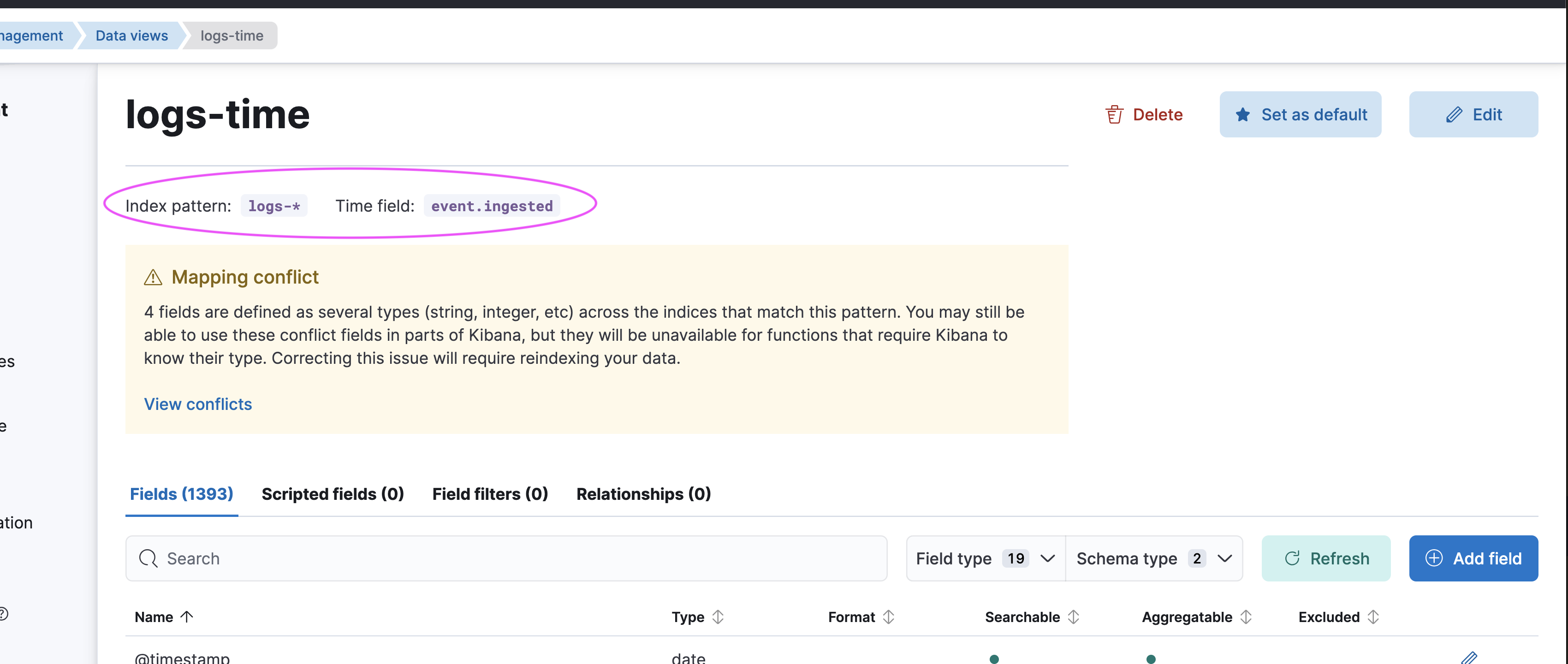
And then Discover filters and displays `event.ingested`

---
### Author:  [@zaeemmasood](https://discuss.elastic.co/u/zaeemmasood)
#### Post date: [November 25, 2024, 9:16pm UTC](https://discuss.elastic.co/t/purpose-of-time-filter-in-kibana/370986/6 "2024-11-25T21:16:49Z")
Thanks!