# Rename field after transform with processor / pipeline does not work
**URL:** https://discuss.elastic.co/t/rename-field-after-transform-with-processor-pipeline-does-not-work/380502
**Category:** Kibana
**Created:** [July 28, 2025, 2:01pm UTC](https://discuss.elastic.co/t/rename-field-after-transform-with-processor-pipeline-does-not-work/380502 "2025-07-28T14:01:36Z")
**Posts on this page:** 4
**Page:** 1
### Author:  [@StevenGR](https://discuss.elastic.co/u/StevenGR)
#### Post date: [July 28, 2025, 2:01pm UTC](https://discuss.elastic.co/t/rename-field-after-transform-with-processor-pipeline-does-not-work/380502/1 "2025-07-28T14:01:36Z")
Hello everybody
I have a transform job that writes the following fields from one index into a new index like so:
Group By:
ap.mac\_address\_normalized
Aggregated fields:
ap.hostname -\> raw1.ap.hostname
ap.mac\_address -\> raw2.ap.mac\_address
ap.radio\_mac\_address -\> raw3.ap.radio\_mac\_address
This is the json of my transform job:
```auto
{
"id": "ap_lookup",
"authorization": {
"roles": [
"superuser"
]
},
"version": "10.0.0",
"create_time": 1753697007593,
"source": {
"index": [
"logs-network-devices.log-default"
],
"query": {
"match_all": {}
}
},
"dest": {
"index": "ap_lookup",
"pipeline": "ap-lookup-flatten-fields"
},
"frequency": "60s",
"sync": {
"time": {
"field": "@timestamp",
"delay": "60s"
}
},
"pivot": {
"group_by": {
"ap.mac_address_normalized": {
"terms": {
"field": "ap.mac_address_normalized"
}
}
},
"aggregations": {
"raw1": {
"top_metrics": {
"metrics": [
{
"field": "ap.hostname"
}
],
"sort": {
"@timestamp": "desc"
}
}
},
"raw2": {
"top_metrics": {
"metrics": [
{
"field": "ap.mac_address"
}
],
"sort": {
"@timestamp": "desc"
}
}
},
"raw3": {
"top_metrics": {
"metrics": [
{
"field": "ap.radio_mac_address"
}
],
"sort": {
"@timestamp": "desc"
}
}
}
}
},
"settings": {}
}
```
Afterwards I want to flatten the fields out to be just a keyword / no object.
raw1.ap.hostname -\> hostname
raw2.ap.mac\_address -\> mac\_address
raw3.ap.radio\_mac\_address -\> radio\_mac\_address
The problem is that my ingest pipeline does nothing when I configure a rename processor that looks like this (this is just for mac\_address but it should be the same for the others):
```auto
[
{
"rename": {
"field": "raw2.ap.mac_address",
"target_field": "mac_address",
"ignore_failure": true
}
}
]
```
I have also tried a Set Processor with same result:
```auto
[
{
"set": {
"field": "mac_address",
"copy_from": "raw2.ap.mac_address",
"ignore_failure": true
}
}
]
```
The mappings of the new index looks like this:
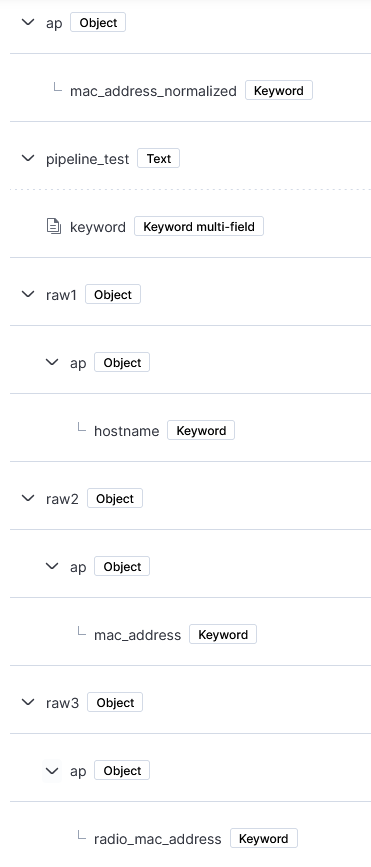
In Dev Tools with the command GET ap\_lookup/\_mapping it looks like this:
```auto
{
"ap_lookup": {
"mappings": {
"_meta": {
"created_by": "transform",
"_transform": {
"transform": "ap_lookup",
"version": {
"created": "10.0.0"
},
"creation_date_in_millis": 1753703871655
}
},
"properties": {
"ap": {
"properties": {
"mac_address_normalized": {
"type": "keyword"
}
}
},
"pipeline_test": {
"type": "text",
"fields": {
"keyword": {
"type": "keyword",
"ignore_above": 256
}
}
},
"raw1": {
"properties": {
"ap": {
"properties": {
"hostname": {
"type": "keyword"
}
}
}
}
},
"raw2": {
"properties": {
"ap": {
"properties": {
"mac_address": {
"type": "keyword"
}
}
}
}
},
"raw3": {
"properties": {
"ap": {
"properties": {
"radio_mac_address": {
"type": "keyword"
}
}
}
}
}
}
}
}
}
```
And this is a json from one document (I just have changed the values due to compliance reasons). For me the structure here looks different as for example ap.mac\_address is on one level and does not look like an object:
```auto
{
"_index": "ap_lookup",
"_id": "IFGFIQFE121083jjfoef",
"_version": 1,
"_score": 0,
"_source": {
"raw1": {
"ap.hostname": "AP-01"
},
"raw3": {
"ap.radio_mac_address": "AB12.CD34.EF56"
},
"ap": {
"mac_address_normalized": "AB12CD34EF56"
},
"raw2": {
"ap.mac_address": "1ED1.2DC3.34ED"
}
},
"fields": {
"raw2.ap.mac_address": [
"1ED1.2DC3.34ED"
],
"raw1.ap.hostname": [
"AP-01"
],
"ap.mac_address_normalized": [
"AB12CD34EF56"
],
"raw3.ap.radio_mac_address": [
"AB12.CD34.EF56"
]
}
}
```
I assured, that the pipeline is working as expected as I created a test field via a set processor that creates a field pipeline\_test with the value success. That worked so I know that the pipeline is used.
I also had the feeling, that the issue might be that the new field has the same name as the underlying field of the object (raw2.ap. **mac\_address** \<\> **mac\_address** ) but i also tried different names for the target field like just address or mac without success.
It feels like that it can not find the field raw2.ap.mac\_address although the mapping is defined as such. Here I also just tried ap.mac\_address and mac\_address.
I am fairly new to Elastic so please have mercy 🙂 I hope I explained it well enough. Please let me know if you need more details. Thank you very much in advance!
---
### Author:  [@StevenGR](https://discuss.elastic.co/u/StevenGR)
#### Post date: [July 29, 2025, 9:14am UTC](https://discuss.elastic.co/t/rename-field-after-transform-with-processor-pipeline-does-not-work/380502/2 "2025-07-29T09:14:50Z")
I have found a solution that works and I figured out the issue.
The transform job does not create an object from for example ap.hostname into an object like:
```auto
"raw1": {
"ap": {
"hostname": "AP-01",
```
But the ap.hostname is a key and the dot does not mean, that it is one level below of the object. ap.hostname is just the name of the field itself:
```auto
"raw3": {
"ap.hostname": "AP-01"
```
Therefore I can not use a simple set or rename processor as I can not address the field as the processor thinks I mean the field hostname in this object and not ap.hostname. I also tried a processor like this with \ to escape the dot but it does not understand what I mean:
```auto
{
"set": {
"field": "hostname",
"value": "{{raw1.\\ap.hostname}}"
}
}
```
Therefore I wrote a little script processor like this:
```auto
if (ctx.raw1 != null && ctx.raw1.containsKey('ap.hostname')) {
ctx.hostname = ctx.raw1['ap.hostname'];
```
This works fine but I would have been happy if I could have used the build in processors as I want to handle thinks as uncomplicated as can be.
Hope there is a better solution in the future to address those kind of fields. Thank you all nonetheless!
---
### Author:  [@stephenb](https://discuss.elastic.co/u/stephenb)
#### Post date: [July 29, 2025, 1:39pm UTC](https://discuss.elastic.co/t/rename-field-after-transform-with-processor-pipeline-does-not-work/380502/3 "2025-07-29T13:39:50Z")
@StevenGR
Sorry just saw this
As you figured out on your own ingest pipeline/ processors cannot work on dotted field names.
So you can use this to expand them into objects
> **[Dot expander processor | Reference](https://www.elastic.co/docs/reference/enrich-processor/dot-expand-processor)**
>
> Expands a field with dots into an object field. This processor allows fields with dots in the name to be accessible by other processors in the pipeline...
---
### Author:  [@StevenGR](https://discuss.elastic.co/u/StevenGR)
#### Post date: [July 29, 2025, 2:06pm UTC](https://discuss.elastic.co/t/rename-field-after-transform-with-processor-pipeline-does-not-work/380502/4 "2025-07-29T14:06:48Z")
I have not seen this processor but this will work perfectly! Thank you so much for your help 🙂