# Security Analytics Recipes - DNS Data Exfiltration
**URL:** https://discuss.elastic.co/t/security-analytics-recipes-dns-data-exfiltration/226868
**Category:** Elasticsearch
**Tags:** elastic-stack-machine-learning
**Created:** [April 7, 2020, 10:01am UTC](https://discuss.elastic.co/t/security-analytics-recipes-dns-data-exfiltration/226868 "2020-04-07T10:01:54Z")
**Posts on this page:** 12
**Page:** 1
### Author:  [@cezar996](https://discuss.elastic.co/u/cezar996)
#### Post date: [April 7, 2020, 10:01am UTC](https://discuss.elastic.co/t/security-analytics-recipes-dns-data-exfiltration/226868/1 "2020-04-07T10:01:54Z")
Hello everybody!
I try to implement the Security Analytics Recipe for DNS Data Exfiltration, posted here: [github](https://github.com/elastic/examples/blob/master/Machine%20Learning/Security%20Analytics%20Recipes/dns_data_exfiltration/EXAMPLE.md). In order to do this, I use ELK and Packetbeat _v. 7.6.2_. I took step by step all the explanations in the above link, with some little changes because many things from there are old and not applying to the current version (e.g. X-pack is already integrated and available with a trail license, there is no need for the ingest script as we can use the already defined fields _dns.question.subdomain_ and _dns.question.etld\_plus\_one_, etc.). For the Machine Learning (ML) job creation I utilize the UI provided by Kibana, using parameters in files job.json and data\_feed.json. Moreover, I use the _dns\_exfil\_random.sh_ script to generate the DNS Data Exfiltration signature, which works perfectly. Everything is fine, I got about 4000 docs processed in 2 hours, but I am not able to get any anomaly (aprox. 3000 events from all of them are generated running for 3 times the script with parameters like [vodkaroom.ru](http://vodkaroom.ru), [elastic.co](http://elastic.co) and [hp.com](http://hp.com)). For this job I chose the options, _Start time: Start now_ and _End time: Real-time search_.
I will present to you some pictures which describe the configuration I did for the ML job:


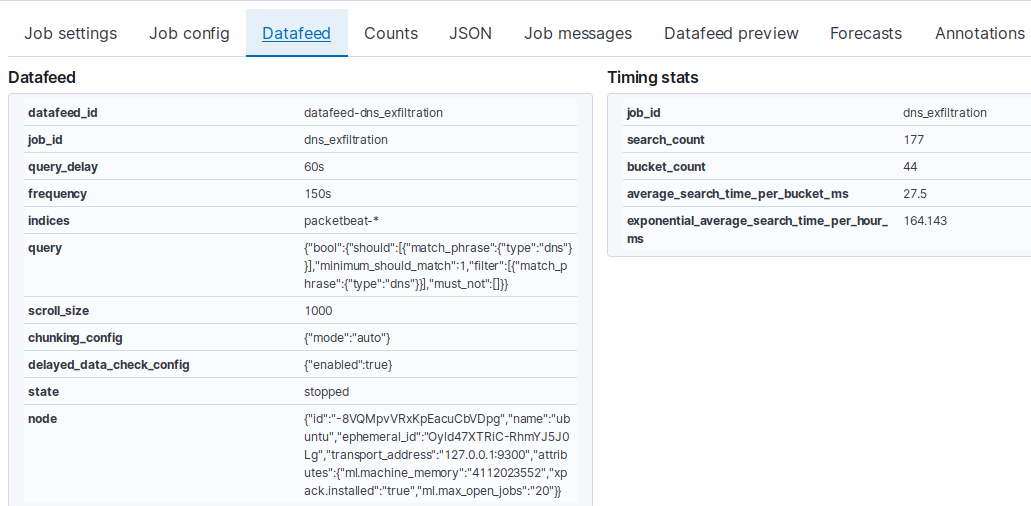
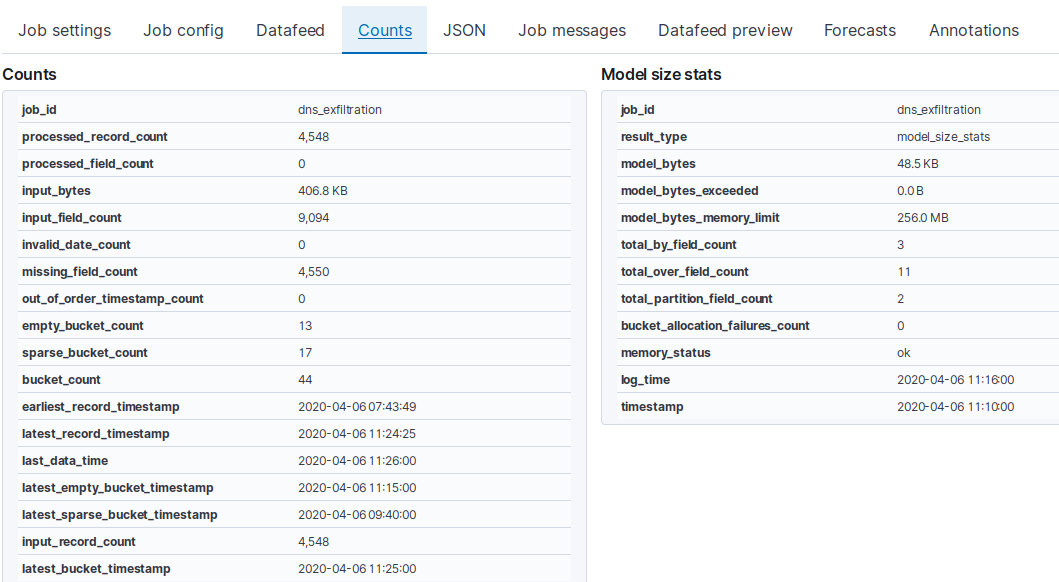


Looking to my explanations and my configuration photos please tell me where I am wrong and how could I get some results like the author in the following picture [Anomaly found](https://cloud.githubusercontent.com/assets/12695796/24838139/f91f6db2-1d39-11e7-96b0-2c41a6aabfea.png). I trust on your experience and professional skills.
Thanks in advance!
---
### Author:  [@richcollier](https://discuss.elastic.co/u/richcollier)
#### Post date: [April 8, 2020, 12:22pm UTC](https://discuss.elastic.co/t/security-analytics-recipes-dns-data-exfiltration/226868/2 "2020-04-08T12:22:49Z")
Are you sure you have a field called `dns.question.subdomain` in your data? In the screenshot of the Datafeed Preview there are only 3 fields being returned:
`timestamp`
`dns.question.etld_plus_one`
`host.name`
In other words, no field called `dns.question.subdomain` is being sent to the ML job. If the full DNS question field is:
`585fjaklkfjakejfjkl498f983nf893nfv903.elastic.co`
then the `dns.question.subdomain` should just be the value:
`585fjaklkfjakejfjkl498f983nf893nfv903`
If you don't have that field already isolated in the data you could create it via this method:
[https://www.elastic.co/guide/en/machine-learning/7.6/ml-configuring-transform.html#ml-configuring-transform8](https://www.elastic.co/guide/en/machine-learning/7.6/ml-configuring-transform.html#ml-configuring-transform8)
---
### Author:  [@richcollier](https://discuss.elastic.co/u/richcollier)
#### Post date: [April 8, 2020, 12:25pm UTC](https://discuss.elastic.co/t/security-analytics-recipes-dns-data-exfiltration/226868/3 "2020-04-08T12:25:40Z")
Another thing to consider - if you are fabricating a DNS exfil using a script...let the ML job first run on a few days of normal data - then run your script. If your script is run at the "beginning" of the data that ML sees, it does not yet have "normal" figured out yet!
---
### Author:  [@cezar996](https://discuss.elastic.co/u/cezar996)
#### Post date: [April 8, 2020, 2:10pm UTC](https://discuss.elastic.co/t/security-analytics-recipes-dns-data-exfiltration/226868/4 "2020-04-08T14:10:43Z")
Hi, @richcollier!
Thanks a lot for your great responses! You showed me some very important things I could hardly discover. I have carefully read your posts and put into practice all your indications. Using your link, I created the job (from Dev Tools Console) and now I get the _subdomain_ field in _Data Feed Preview_. Indeed, for performing DNS Data exfiltration, I utilize this script, [dns\_exfil\_random.sh](https://github.com/elastic/examples/blob/master/Machine%20Learning/Security%20Analytics%20Recipes/dns_data_exfiltration/scripts/dns_exfil_random.sh), which works perfectly. It helps me to make an attack based on the domain-flux method which is largely practiced by botnets. For the times being, I do some tests and I have installed ELK + Packetbeat and run the above script on the same local machine (my laptop). That's the reason I didn't want to let the job run few days, due to the lack of resources. Below there are the pictures which show how I implemented your indications:


If I would like to let the entire job run for 2 hours (118 min. for normal data and finally, 2 min. for script), it would be OK, considering I will expand the Bucket Time to 1 hour? Could I get some anomaly results in this situation? In order to generate normal data flow I use _nslookup_ for popular/whitelisted domains.
Thanks again for your help!
---
### Author:  [@richcollier](https://discuss.elastic.co/u/richcollier)
#### Post date: [April 8, 2020, 4:07pm UTC](https://discuss.elastic.co/t/security-analytics-recipes-dns-data-exfiltration/226868/5 "2020-04-08T16:07:46Z")
Hi - still looks like you have a problem in that the `sub` field doesn't contain the actual subdomain. Again, if the full domain is:
`585fjaklkfjakejfjkl498f983nf893nfv903.elastic.co`
then the `sub` should just be the value:
`585fjaklkfjakejfjkl498f983nf893nfv903`
my guess is that you're not passing the full domain name into the `domainSplit` function (you're passing the `query` field, but that might not be the right field. Pass whatever the name of this field is (circled in red):

---
### Author:  [@cezar996](https://discuss.elastic.co/u/cezar996)
#### Post date: [April 9, 2020, 5:16pm UTC](https://discuss.elastic.co/t/security-analytics-recipes-dns-data-exfiltration/226868/6 "2020-04-09T17:16:29Z")
Hi @richcollier!
You were perfectly right! You are a genius! I had to change the `query` field to `dns.question.name` field and now Data Feed gets the right fields:


I let the job ran for 7 hours and a half with the above configuration (bucket span: 30 min, etc.) and afterwards, I ran the script for generating random subdomains, [github](https://github.com/elastic/examples/blob/master/Machine%20Learning/Security%20Analytics%20Recipes/dns_data_exfiltration/scripts/dns_exfil_random.sh). Unfortunately I am not able to get any anomalies. Should I change the bucket span to a lower period? I wouldn't like to let the job run for some days and then run the script. If you have any suggestions, please help me!
Thanks again for your extremely important advice!
---
### Author:  [@richcollier](https://discuss.elastic.co/u/richcollier)
#### Post date: [April 9, 2020, 6:19pm UTC](https://discuss.elastic.co/t/security-analytics-recipes-dns-data-exfiltration/226868/7 "2020-04-09T18:19:44Z")
Of course I'm right - [I wrote the book on Elastic ML](https://www.packtpub.com/big-data-and-business-intelligence/machine-learning-elastic-stack?utm_source=github&utm_medium=repository). Hahahaha. 😉
Correct, with a `30m` value of `bucket_span`, waiting only 7 hours yields merely 14 observations for the ML algorithms, so clearly not enough data. A few hundred buckets worth of time is what is needed to establish a decent "model" before testing for anomalies.
You certainly could cut your bucket\_span down to `1m` (or maybe even `30s`) purely for the purposes of testing. I assume that your DNS exfil simulator will blast a bunch of requests as fast as possible, so if you can get a lot of requests into a single bucket\_span, that would work.
Otherwise, you could leverage historical "normal" data and have the ML datafeed look back in time before looking at the real-time data. Not sure how much historical data you have, but you may have a few day's worth (??). Just make sure you get rid of past "tests" of the DNS exfil simulator from the data set before doing so.
---
### Author:  [@cezar996](https://discuss.elastic.co/u/cezar996)
#### Post date: [April 10, 2020, 8:35am UTC](https://discuss.elastic.co/t/security-analytics-recipes-dns-data-exfiltration/226868/8 "2020-04-10T08:35:54Z")
Hi @richcollier!
Thanks again for your precious advice! 🙂 I have created a new job with a `bucket_span` of `30s` and I used a `Datafeed` of `7 hours` (the period with normal data before starting the script, as I said in the previous post). For this period of time and the `bucket_span` configuration I got `bucket-count: 778`. The `7 hours` data is selected from yesterday.


Today, I started the `Datafeed` from `now` to `real-time` and I ran the script. I got `bucket-count: 2699` in just max. 5 minutes the script ran. Quite strange, I think it also took all the data with no gap in time, although I selected 2 different time periods (one for normal data: 7 hours and one for script: 5 min max).


Afterwards, I stopped the `Datafeed` and opened the `Anomaly Explorer`. Unfortunately, again, no amonaly detected. After starting the `Datafeed`, should I firstly let it make some hundreds of `bucket_count` (e.g. 300-400) and then run the script and finally to stop the `Datafeed` and check for `Anomaly Detection`? Here, I am still referring to a `bucket_span` of `30s`. Please help me understand where I am wrong and what could I do in order to at least succeed in obtaining some anomaly results in my little tests.
Thanks again for the fact that you give me very important indications every time!
---
### Author:  [@richcollier](https://discuss.elastic.co/u/richcollier)
#### Post date: [April 10, 2020, 11:47am UTC](https://discuss.elastic.co/t/security-analytics-recipes-dns-data-exfiltration/226868/9 "2020-04-10T11:47:05Z")
So, now, I think you've stumbled into a different issue with your testing. Despite having created a scenario in which you've got a lot of bucket\_spans being presented to the ML models, the fact is that 90% of the buckets have no data in them:

So, in your packetbeat index you really don't have that many "normal" DNS requests. Is there a way you can get more "normal background DNS traffic" into your packetbeat index before you try your DNS exfil script?
---
### Author:  [@cezar996](https://discuss.elastic.co/u/cezar996)
#### Post date: [April 10, 2020, 1:29pm UTC](https://discuss.elastic.co/t/security-analytics-recipes-dns-data-exfiltration/226868/10 "2020-04-10T13:29:50Z")
Hi @richcollier!
Indeed, you are always right! You are the best! 😀 The problem was the high value of `empty_bucket_count`. In order to make it lower, I rapidly changed the `bucket_span` value to `5m` and got `empty_bucket_count: 187` and `bucket_count: 325`. This report is at least better than the previous one which was 90%. This way, I got my first results:

In order to assure "normal background DNS traffic" into my packetbeat index, I have created a script which queries at every 25 sec. for one of the domains ([google.com](http://google.com), [facebook.com](http://facebook.com), [youtube.com](http://youtube.com), [twitter.com](http://twitter.com), etc.). In the hours that come, I plan to increase the `bucket_span` value in order to get `empty_bucket_count: 0`. In this way, I think the ML model will be in a perfect state for detecting anomalies. I have a question: in the `Counts` Tab of a job, the only fields I should look for are `empty_bucket_count` and `bucket_count`? I guess the others are not so important for paying too much attention.
Thanks again for your precious replies! You are very professional!
---
### Author:  [@richcollier](https://discuss.elastic.co/u/richcollier)
#### Post date: [April 10, 2020, 2:21pm UTC](https://discuss.elastic.co/t/security-analytics-recipes-dns-data-exfiltration/226868/11 "2020-04-10T14:21:02Z")
All of the data on the "Counts" tab (or [available via the stats API](https://www.elastic.co/guide/en/elasticsearch/reference/7.6/ml-get-job-stats.html)) can be important for a variety of reasons - but too much to discuss now.
Best of luck and happy detecting!
---
### Author:  [@system](https://discuss.elastic.co/u/system)
#### Post date: [May 8, 2020, 2:21pm UTC](https://discuss.elastic.co/t/security-analytics-recipes-dns-data-exfiltration/226868/12 "2020-05-08T14:21:02Z")
This topic was automatically closed 28 days after the last reply. New replies are no longer allowed.