# The filter on apm ui did not work
**URL:** https://discuss.elastic.co/t/the-filter-on-apm-ui-did-not-work/243183
**Category:** APM
**Tags:** ui
**Created:** [July 30, 2020, 8:24am UTC](https://discuss.elastic.co/t/the-filter-on-apm-ui-did-not-work/243183 "2020-07-30T08:24:16Z")
**Posts on this page:** 10
**Page:** 1
### Author:  [@wajika](https://discuss.elastic.co/u/wajika)
#### Post date: [July 30, 2020, 8:24am UTC](https://discuss.elastic.co/t/the-filter-on-apm-ui-did-not-work/243183/1 "2020-07-30T08:24:17Z")
ELK version: 7.8.0
I have 2 questions
1.the filter on apm ui did not work
See gif picture for details
[https://drive.google.com/file/d/15kZ7qVO4rKI29kUXJSsnLLs4FZUvFhTP/view?usp=sharing](https://drive.google.com/file/d/15kZ7qVO4rKI29kUXJSsnLLs4FZUvFhTP/view?usp=sharing)
2.How is transaction interface information and error message related to each other? Similar to using actions to jump

It seems that only these (container id...) can be used to filter, but the operation is not very convenient.

Can't see the error message corresponding to transaction quickly
---
### Author:  [@dgieselaar](https://discuss.elastic.co/u/dgieselaar)
#### Post date: [July 30, 2020, 1:57pm UTC](https://discuss.elastic.co/t/the-filter-on-apm-ui-did-not-work/243183/2 "2020-07-30T13:57:46Z")
Hello @wajika! I'm not sure I entirely understand your question.
- Re #1, I cannot open the link you've provided. Also, can you clarify what your expectations are (re: "it did not work")?
- Re #2, can you clarify? Do you mean that you'd like to have a link for all errors related to a transaction?
---
### Author:  [@wajika](https://discuss.elastic.co/u/wajika)
#### Post date: [July 31, 2020, 4:00am UTC](https://discuss.elastic.co/t/the-filter-on-apm-ui-did-not-work/243183/3 "2020-07-31T04:00:03Z")
@dgieselaar
I've shared the file again. I don't know if you can see the picture.
[https://ac-data.info/d/X0aLj35itFM](https://ac-data.info/d/X0aLj35itFM)
> **[SendGB | Send Large Files | Free file sharing](https://www.sendgb.com/QRKUWg1AFrD)**
>
> Free and fast file sharing. Send large files easily. No needed registration. We transfer files up to 5GB. File upload with great functions. Mail big file now!
For #1
I chose to view only the content of http4XX,but the information displayed is http200.

For #2
We usually go to the transaction page to find the request method, but this page does not have error information, and the error page does not display the request method name. There is no association between the two and it is very troublesome to use
transaction page has no error content

The error page has "error" content, but the request method is not displayed directly

---
### Author:  [@dgieselaar](https://discuss.elastic.co/u/dgieselaar)
#### Post date: [July 31, 2020, 8:55am UTC](https://discuss.elastic.co/t/the-filter-on-apm-ui-did-not-work/243183/4 "2020-07-31T08:55:25Z")
For #1, what I think is happening is that the trace sample is not updated. The rest of the data should reflect the filters you have chosen. We have an open issue for this in the backlog: [https://github.com/elastic/kibana/issues/67744](https://github.com/elastic/kibana/issues/67744).
For #2, you can click through to the related errors. You can click on the square on the timeline, or on "1 error" after the transaction name. Would that help? You can also use the query bar in the errors view to search for certain errors, e.g. by specifying "request.method:GET".
---
### Author:  [@wajika](https://discuss.elastic.co/u/wajika)
#### Post date: [July 31, 2020, 9:22am UTC](https://discuss.elastic.co/t/the-filter-on-apm-ui-did-not-work/243183/5 "2020-07-31T09:22:29Z")
For #1
if it is an unresolved bug, then I will leave it alone for now.
For #2
Too many operations will bring a certain learning cost, I think the simpler the operation, the better.
But this depends on the judgment of the elastic team.
---
### Author:  [@wajika](https://discuss.elastic.co/u/wajika)
#### Post date: [August 3, 2020, 7:41am UTC](https://discuss.elastic.co/t/the-filter-on-apm-ui-did-not-work/243183/6 "2020-08-03T07:41:26Z")
In another case, if the error page contains a lot of content, how can I find the error content corresponding to the request method in the transaction page?
@dgieselaar
---
### Author:  [@dgieselaar](https://discuss.elastic.co/u/dgieselaar)
#### Post date: [August 5, 2020, 8:11am UTC](https://discuss.elastic.co/t/the-filter-on-apm-ui-did-not-work/243183/7 "2020-08-05T08:11:02Z")
@wajika what do you mean with content? And "content corresponding to the request method"?
---
### Author:  [@wajika](https://discuss.elastic.co/u/wajika)
#### Post date: [August 5, 2020, 8:34am UTC](https://discuss.elastic.co/t/the-filter-on-apm-ui-did-not-work/243183/8 "2020-08-05T08:34:54Z")


For example, if I am looking for POST CallCenter/InCall information, I can find it when I enter the transaction page. If I want to find error information, the interface information is not displayed on the error page.
If there are many errors on the error page, it is difficult to quickly find the information generated by POST CallCenter/InCall.
---
### Author:  [@wajika](https://discuss.elastic.co/u/wajika)
#### Post date: [August 6, 2020, 6:18am UTC](https://discuss.elastic.co/t/the-filter-on-apm-ui-did-not-work/243183/9 "2020-08-06T06:18:52Z")
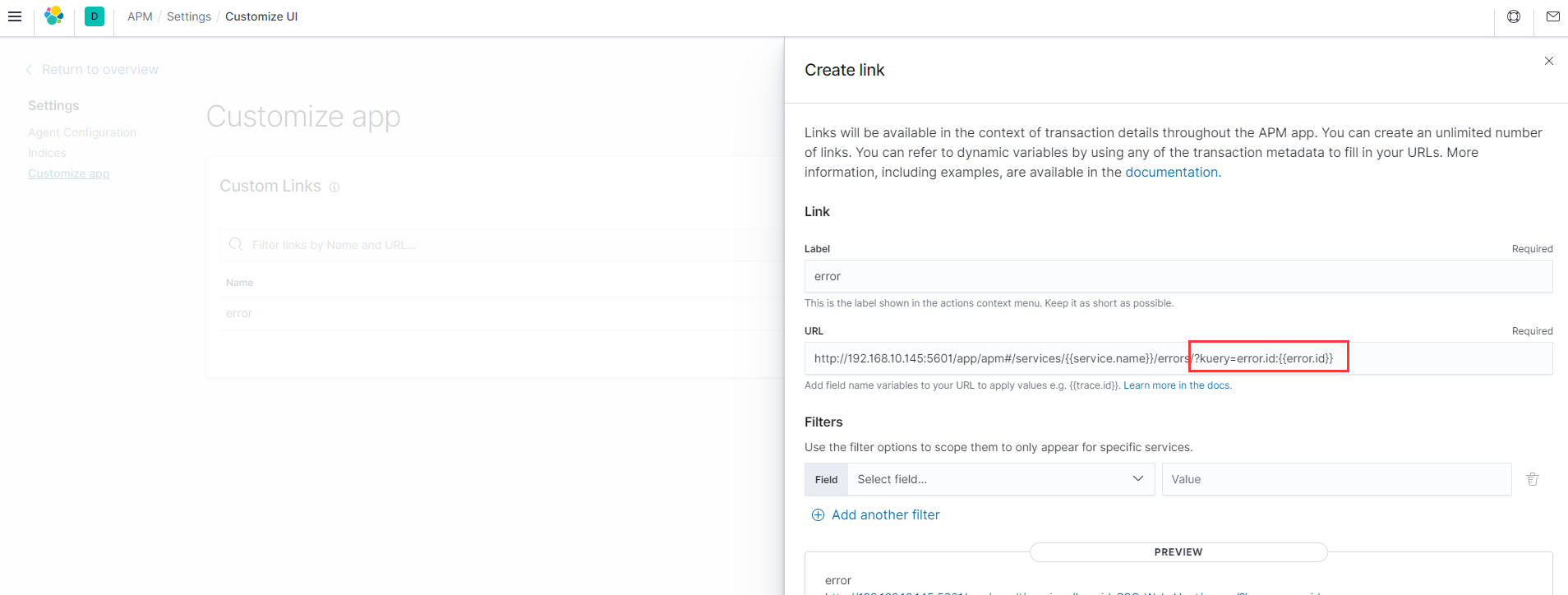
I found a way to set a custom link in transaction actions, but there is no associated field between transaction and error data
---
### Author:  [@system](https://discuss.elastic.co/u/system)
#### Post date: [August 27, 2020, 2:18am UTC](https://discuss.elastic.co/t/the-filter-on-apm-ui-did-not-work/243183/10 "2020-08-27T02:18:55Z")
This topic was automatically closed 20 days after the last reply. New replies are no longer allowed.