# Threshold security rule
**URL:** https://discuss.elastic.co/t/threshold-security-rule/362464
**Category:** SIEM
**Created:** [July 3, 2024, 12:55pm UTC](https://discuss.elastic.co/t/threshold-security-rule/362464 "2024-07-03T12:55:46Z")
**Posts on this page:** 10
**Page:** 1
### Author:  [@luizmeireles](https://discuss.elastic.co/u/luizmeireles)
#### Post date: [July 3, 2024, 12:55pm UTC](https://discuss.elastic.co/t/threshold-security-rule/362464/1 "2024-07-03T12:55:47Z")

I am trying to create a Threshold rule-based .. if I have 1 or more events with login failure, create an alert, As you can see in the image, in the Rule preview, some alerts were "found", but this rule is not generating any alert...
Is someone can try to explain to me why in the rule preview, the "rule" works, but it is not generating an alert?
Yes, it is enabled.
---
### Author:  [@RylandHerrick](https://discuss.elastic.co/u/RylandHerrick)
#### Post date: [July 3, 2024, 3:35pm UTC](https://discuss.elastic.co/t/threshold-security-rule/362464/2 "2024-07-03T15:35:11Z")
Hi @luizmeireles ,
The short answer for why rule preview shows alerts while your rule has not produced them is that _rule preview does not time travel_: it shows you the result of N simulated rule runs over a particular period of time (36 hours in your screenshot) _with all your current data_. Unless your data is static from the time of rule creation, the actual rule executions will differ from rule preview because _all of the data is present for rule preview_, but only some of that data was present during the actual rule execution.
[Ingestion pipeline delay](https://www.elastic.co/guide/en/security/current/alerts-ui-monitor.html#troubleshoot-ingestion-pipeline-delay), or late-arriving events in general, is a big source of false negatives, and why we recommend using e.g. `event.ingested` over `@timestamp`. I suspect this is what you're seeing in your environment. When coupled with rule preview, it can appear as though a rule missed an alert.
You can confirm this by increasing the lookback of your rule (which for a threshold rule isn't quite the same thing as running a "shorter" execution in the past, but should be sufficient for validation) far enough that you meet your alert threshold.
---
### Author:  [@luizmeireles](https://discuss.elastic.co/u/luizmeireles)
#### Post date: [July 4, 2024, 1:08pm UTC](https://discuss.elastic.co/t/threshold-security-rule/362464/3 "2024-07-04T13:08:15Z")
Hi @RylandHerrick , thank you for your reply..
Yes, for now, my look-back is 1 minute and my rule is run every 10 minutes

I will try to put the same time that my rule runs, 10 minutes, I am not sure If I understood you correctly.
---
### Author:  [@RylandHerrick](https://discuss.elastic.co/u/RylandHerrick)
#### Post date: [July 9, 2024, 10:04pm UTC](https://discuss.elastic.co/t/threshold-security-rule/362464/4 "2024-07-09T22:04:50Z")
A simple timeline of what I'm hypothesizing might help:
1. At time 0 (T0), a "login failure" event is generated at the data source, and is sent to elasticsearch with an `@timestamp` of `0` (I'm using integer times for simplicity).
2. At T11, the rule executes, and looks back over the `@timestamp` range `[T0, T11]`.
3. No alert is generated, because no events are found
4. The ingest processor finishes processing the `T0` event above, and it's now available (but this doesn't matter to the rule, because next time it runs it will be looking at the `@timestamp` range `[T10, T21]`).
You can see in the above example that running Rule Preview after step 4 would show an alert being generated, because the `T0` event is now there, even though the rule never caught it.
You might also observe that there are two solutions to this problem:
1. Increase you're rule's lookback so that it captures the `T0` event
- this is an imperfect solution because you're effectively setting the "maximum ingest lag" this way, and you're not guaranteed to catch all late-arriving events
2. Configure the rule to search based on ingest time (`event.ingested`) instead of observed time (`@timestamp`).
- This is the more robust solution, since it guarantees that events will not be missed. It does, however, require you modifying your ingest pipeline to add this field (if it does not already).
I hope that helps!
---
### Author:  [@Kiwisaki](https://discuss.elastic.co/u/Kiwisaki)
#### Post date: [July 11, 2024, 10:00am UTC](https://discuss.elastic.co/t/threshold-security-rule/362464/5 "2024-07-11T10:00:52Z")
Hi, I hope you dont mind me tagging on an additional question off the back of this topic. Does the "additional look-back time" dictate the time range threshold for the rule also? i.e, is this rule looking for \>=1 login failure over the additional look-back time period ? or is the time period for which to count instances relating to the threshold defined some other way ?
Thanks
---
### Author:  [@RylandHerrick](https://discuss.elastic.co/u/RylandHerrick)
#### Post date: [July 11, 2024, 4:25pm UTC](https://discuss.elastic.co/t/threshold-security-rule/362464/6 "2024-07-11T16:25:30Z")
Hey @Kiwisaki , good question. Yes, the rule includes the lookback time as part of its search. The range of data relevant to the threshold rule is defined as:
```
[now - (rule_interval + lookback), now]
```
---
### Author:  [@Kiwisaki](https://discuss.elastic.co/u/Kiwisaki)
#### Post date: [July 12, 2024, 8:49am UTC](https://discuss.elastic.co/t/threshold-security-rule/362464/7 "2024-07-12T08:49:52Z")
Hi @RylandHerrick, thanks for replying so quickly.
For the sake of being crystal clear then: if my rule runs every 5 minutes with an additional look-back time of 5 minutes, then the rule will execute every 5 minutes and run the query against the previous 10 minutes worth of data ?, and then repeat the process 5 minutes later - is that correct ?
Many thanks
---
### Author:  [@luizmeireles](https://discuss.elastic.co/u/luizmeireles)
#### Post date: [July 15, 2024, 12:14pm UTC](https://discuss.elastic.co/t/threshold-security-rule/362464/8 "2024-07-15T12:14:55Z")
Hi @Kiwisaki ,
I tried to change the configuration of the rule for event.ingested, but my rule is

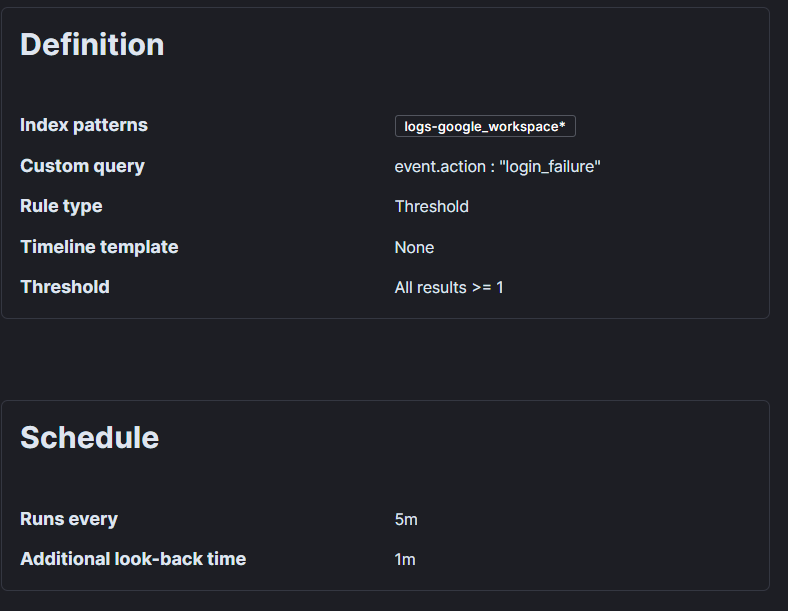
still not able to create an alert, I am not sure if I configured it correctly, I am sharing with you my rule configuration
---
### Author:  [@RylandHerrick](https://discuss.elastic.co/u/RylandHerrick)
#### Post date: [July 15, 2024, 8:59pm UTC](https://discuss.elastic.co/t/threshold-security-rule/362464/9 "2024-07-15T20:59:50Z")
@luizmeireles the recommendation for your situation is to use `event.ingested` as the [timestamp override field](https://www.elastic.co/guide/en/security/current/rules-ui-create.html#rule-ui-advanced-params), which is an advanced rule setting (instructions linked). It should not be needed for any other part of the rule configuration (e.g. the "Threshold Count" setting can/should go back to using `event.action`, if desired).
If your data does not have `event.ingested` populated, you'll need to [add an ingest pipeline](https://www.elastic.co/guide/en/elasticsearch/reference/current/ingest.html#access-ingest-metadata) yourself; the first example linked here shows how that might look.
---
### Author:  [@system](https://discuss.elastic.co/u/system)
#### Post date: [August 12, 2024, 9:00pm UTC](https://discuss.elastic.co/t/threshold-security-rule/362464/10 "2024-08-12T21:00:11Z")
This topic was automatically closed 28 days after the last reply. New replies are no longer allowed.