# Transform and get previous row value
**URL:** https://discuss.elastic.co/t/transform-and-get-previous-row-value/262881
**Category:** Kibana
**Tags:** transforms
**Created:** [February 1, 2021, 6:07pm UTC](https://discuss.elastic.co/t/transform-and-get-previous-row-value/262881 "2021-02-01T18:07:33Z")
**Posts on this page:** 5
**Page:** 1
### Author:  [@wicka](https://discuss.elastic.co/u/wicka)
#### Post date: [February 1, 2021, 6:07pm UTC](https://discuss.elastic.co/t/transform-and-get-previous-row-value/262881/1 "2021-02-01T18:07:33Z")
I've got elasticsearch setup to collect log from Jenkins. I want to visualize the duration on each build stage. However Jenkins logs is really unstructured, I find many difference way in elasticsearch and still not able to get this done.
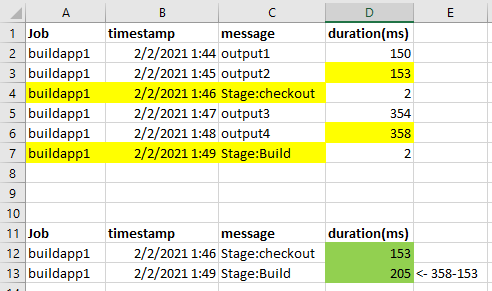
The log structure like the 1st table.
I created a transform, use prefix filter to query "Stage:" from message field, then group by Job and message.keyword, however by this my aggregations not able to get previous row duration because it is not belong to "Stage:" message which filtered out. I don't know why the duration not appear in Stage row and also why the duration is cumulative.
I tried to use transform and created nested message+duration array field, by script I can map and calculate the correct duration in the array data. However visual not able to pick and sort the nested field properly.
I want to finally get the result like 2nd table and allow me to form a stage duration visual. Hope some expert can help on this. Thanks a lot!
---
### Author:  [@Patrick\_Mueller](https://discuss.elastic.co/u/Patrick_Mueller)
#### Post date: [February 4, 2021, 5:46am UTC](https://discuss.elastic.co/t/transform-and-get-previous-row-value/262881/2 "2021-02-04T05:46:02Z")
This sounds like an Elasticsearch question - it would be better to ask in the Elasticsearch discuss forum.
When you say you are using a transform, it's this API? [Create transform API | Elasticsearch Reference [7.10] | Elastic](https://www.elastic.co/guide/en/elasticsearch/reference/7.10/put-transform.html)
Or is this within a visualization in Kibana?
How are you getting the Jenkins logs into Elasticsearch? Logstash? Filebeat?
You are correct that most Kibana visualizations can't handle nested array fields, so that's not a good path to go down if you plan on building visualizations with this data.
---
### Author:  [@Hendrik\_Muhs](https://discuss.elastic.co/u/Hendrik_Muhs)
#### Post date: [February 4, 2021, 11:37am UTC](https://discuss.elastic.co/t/transform-and-get-previous-row-value/262881/3 "2021-02-04T11:37:43Z")
For a transform you need 2 parts: the `group_by` and the `aggregation` part. It seems to me that you want to group by job, `buildapp1`, `buildapp2` etc.
As you want to reduce stages as well it seems logical to group by message, however this collides with you goal to get the value from the previous message. If you group by message the `Stage:Build` event is not able to see the `output 4` event. Therefore I suggest to skip grouping on message. I think it should still work for your visualization if the output document looks like this:
```auto
{
"job": "buildapp1",
"timestamp": 20210202...,
"duration" : {
"checkout": 153,
"build": 205
}
}
```
I think that having a consistent timestamp (start of the build) is better than having 2 timestamps, if not, you could also output 2 timestamps. (my timestamp is just `min(timestamp)`)
To get the desired fields: `checkout` and `build` there is no other way than to script it. The [`scripted_metric`](https://www.elastic.co/guide/en/elasticsearch/reference/current/search-aggregations-metrics-scripted-metric-aggregation.html) aggregations gives you that flexibility. In a nutshell you first collect all messages and than process them. I would use a SortedMap and collect the events in the map script, keyed by timestamp. Note: the map script is executed for _every_ shard. The main logic goes into the reduce script. You need to merge all the maps. Afterwards you can iterate the collected data in _sorted_ order. A variable remembers the _last_ value, so you can access it in the next iteration. The rest is text matching on the message, e.g. if the message contains `Build` you calculate the duration based on the current and last value. Finally you want to output the fields: a timestamp (from the 1st value?) and the checkout duration, build duration etc. The way to output multiple values is using (again) a Map, e.g. `HashMap` with fieldnames as key [\*].
I hope this gives you an idea, the implementation requires some work and probably some trial and error if you haven't worked with painless yet. For this special type of work, it might be more efficient to use the dev console and the `_preview` API from transform until you found the script.
The documentation does not contain an example that fits, but maybe it still helps to take a [look](https://www.elastic.co/guide/en/elasticsearch/reference/current/transform-painless-examples.html).
---
### Author:  [@wicka](https://discuss.elastic.co/u/wicka)
#### Post date: [February 17, 2021, 7:23am UTC](https://discuss.elastic.co/t/transform-and-get-previous-row-value/262881/4 "2021-02-17T07:23:21Z")
Thanks Hendrik. Yes, I've done exactly the same approach as you mention.
But since I'm not group by message field, finally I only got a nested data which cannot be Visualize as Patrick said.
```
{
"job": "buildapp1",
"messages" : [
{
"timestamp": 202102020146,
"stage": "checkout",
"duration": 153
},
{
"timestamp": 202102020149,
"stage": "Build",
"duration": 205
}
]
}
```
It would be good if there are any way to flatten up the nested data into the result like below. But seems no way to do so.
```
{
"job": "buildapp1",
"timestamp": 202102020146,
"stage": "checkout",
"duration": 153
},
{
"job": "buildapp1",
"timestamp": 202102020149,
"stage": "Build",
"duration": 205
}
```
Now I'm looking into echo a special message output manually by Jenkins script, which have the stage name and calculated duration together in one message output like "StageName: Build, duration:206" so that I can "order by" and use scripted metric to split them. Still in progress and see if this feasible on Jenkins side.
---
### Author:  [@system](https://discuss.elastic.co/u/system)
#### Post date: [March 17, 2021, 7:23am UTC](https://discuss.elastic.co/t/transform-and-get-previous-row-value/262881/5 "2021-03-17T07:23:55Z")
This topic was automatically closed 28 days after the last reply. New replies are no longer allowed.