### Author:  [@Suman\_Reddy1](https://discuss.elastic.co/u/Suman_Reddy1)
#### Post date: [April 6, 2018, 12:40pm UTC](https://discuss.elastic.co/t/unable-to-start-logstash-getting-error/126093/21 "2018-04-06T12:40:09Z")
try below.
`logstash -e "input {stdin {}}output {stdout {}}" --debug`
Everything looks fine to me.. Some environment is the issue, coz- am able to run w/o any issues. @camarar also able to start logstash.
I feel something is wrong with your Java/Logstash. Dont mind but try a new copy of logstash. Lets give it a try. I know thats not a solution, but we can pinpoint that, the problem is with the installation or something else.
> [@Exception while starting Logstash \[LoadError: load error: jopenssl/load -- java.lang.VerifyError: class org.bouncycastle.asn1.ASN1Primitive overrides final method equals\]](https://discuss.elastic.co/t/exception-while-starting-logstash-loaderror-load-error-jopenssl-load-java-lang-verifyerror-class-org-bouncycastle-asn1-asn1primitive-overrides-final-method-equals/51024):
>
> I am getting below exception while starting logstash [logstash-1.5.3]. Can any one please help me. LoadError: load error: jopenssl/load -- java.lang.VerifyError: class org.bouncycastle.asn1.ASN1Primitive overrides final method equals.(Ljava/lang/Object;)Z require at org/jruby/RubyKernel.java:1072 (root) at /home/release/release\_independent/elk/logstash/logstash-1.5.3/vendor/jruby/lib/ruby/shared/openssl.rb:1 require at org/jruby/RubyKernel.java:1072 (root) at /home/release/release\_independe…
>
>
> \- Version: logstash-2.4.0 and 5.5.0
> \- OS: macOS Sierra 10.12.5
>
> \- Steps to re…produce:
> Command: bin/logstash or bin/logstash -f pipeline.conf (you don't even need to specify the filename and it blows up)
>
> \- JDK:
> ls -l /Library/Java/JavaVirtualMachines/
> total 0
> drwxr-xr-x 3 root wheel 102 Sep 21 2016 jdk1.8.0\_101.jdk
>
> Issue:
> LoadError: load error: jopenssl/load -- java.lang.NoClassDefFoundError: org/bouncycastle/crypto/params/AsymmetricKeyParameter
> require at org/jruby/RubyKernel.java:1040
> (root) at /Users/nand/Development/elk/logstash-2.4.0/vendor/jruby/lib/ruby/shared/openssl.rb:1
> require at org/jruby/RubyKernel.java:1040
> (root) at /Users/nand/Development/elk/logstash-2.4.0/vendor/bundle/jruby/1.9/gems/logstash-core-2.4.0-java/lib/logstash/patches/stronger\_openssl\_defaults.rb:1
> require at org/jruby/RubyKernel.java:1040
> (root) at /Users/nand/Development/elk/logstash-2.4.0/vendor/bundle/jruby/1.9/gems/logstash-core-2.4.0-java/lib/logstash/patches/stronger\_openssl\_defaults.rb:2
> require at org/jruby/RubyKernel.java:1040
> (root) at /Users/nand/Development/elk/logstash-2.4.0/vendor/bundle/jruby/1.9/gems/logstash-core-2.4.0-java/lib/logstash/patches.rb:1
> require at org/jruby/RubyKernel.java:1040
> (root) at /Users/nand/Development/elk/logstash-2.4.0/vendor/bundle/jruby/1.9/gems/logstash-core-2.4.0-java/lib/logstash/patches.rb:5
> require at org/jruby/RubyKernel.java:1040
> (root) at /Users/nand/Development/elk/logstash-2.4.0/lib/bootstrap/environment.rb:68
You might have already visited those topics, just incase if you missed.
---
### Author:  [@camarar](https://discuss.elastic.co/u/camarar)
#### Post date: [April 6, 2018, 12:46pm UTC](https://discuss.elastic.co/t/unable-to-start-logstash-getting-error/126093/22 "2018-04-06T12:46:33Z")
@Shiv_Gupta, Everything is ok.
Try to follow this step, please:
1. Start your Elasticsearch and wait Elasticsearch to start completly.
2. use the telnet command "telnet localhost 9200" and verify if your 9200 port is up.
3. Start your Logstash.
After this steps, send to us a print of your command window.
---
### Author:  [@Shiv\_Gupta](https://discuss.elastic.co/u/Shiv_Gupta)
#### Post date: [April 6, 2018, 4:29pm UTC](https://discuss.elastic.co/t/unable-to-start-logstash-getting-error/126093/23 "2018-04-06T16:29:22Z")
 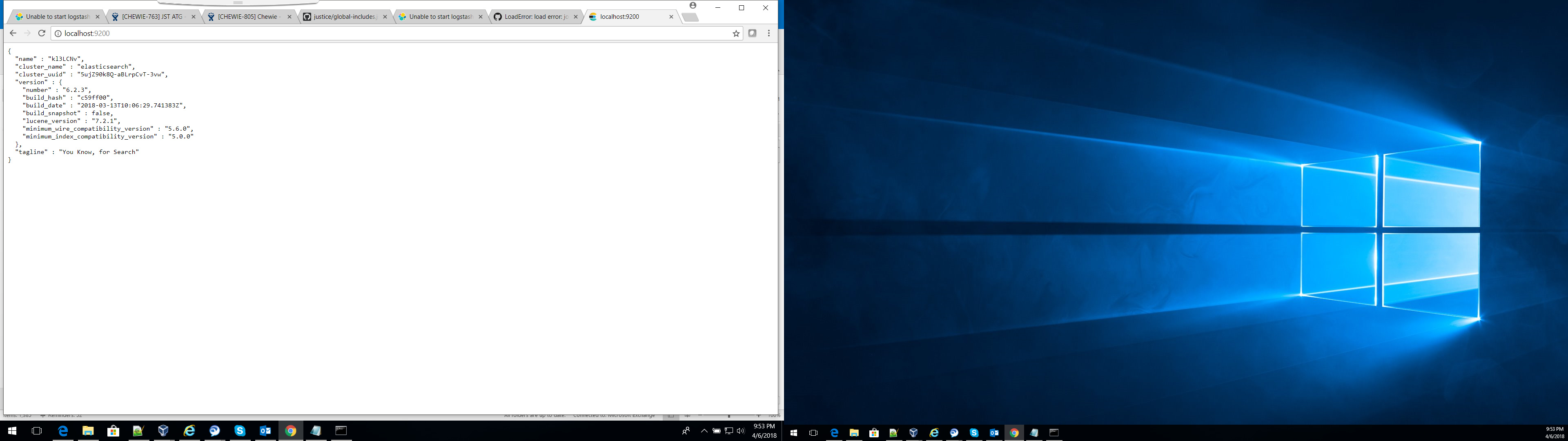 
Hello camarar,
please find attached file for elasticsearch , kibana and logstash
elasticsearch and kibana is running without any issues but logstash is not at all starting.
---
### Author:  [@Suman\_Reddy1](https://discuss.elastic.co/u/Suman_Reddy1)
#### Post date: [April 6, 2018, 5:31pm UTC](https://discuss.elastic.co/t/unable-to-start-logstash-getting-error/126093/24 "2018-04-06T17:31:09Z")
Can u try with a different installation of Java and Logstash
---
### Author:  [@camarar](https://discuss.elastic.co/u/camarar)
#### Post date: [April 6, 2018, 5:47pm UTC](https://discuss.elastic.co/t/unable-to-start-logstash-getting-error/126093/25 "2018-04-06T17:47:47Z")
@Shiv_Gupta,
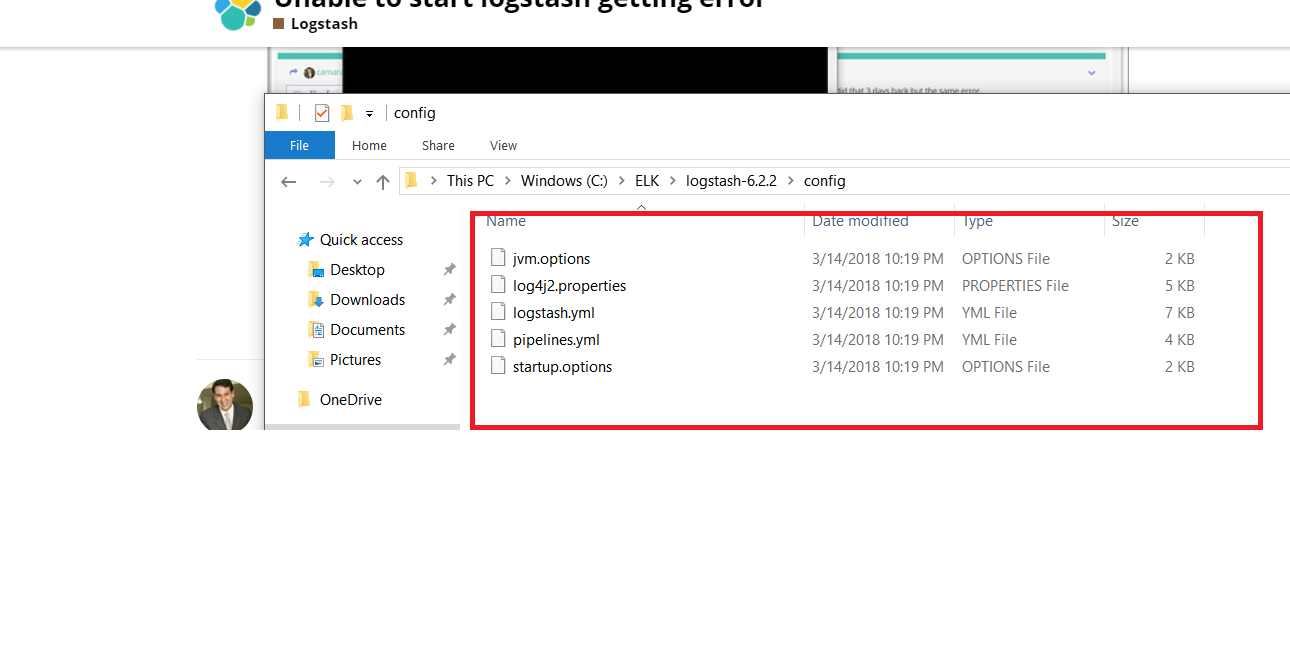
Which files are there in \logstash\config ?
Now you are using a different logstash config file that you said.

Now you are using "logstash\_asc\_log.config"

What the difference between "test.config" and "logstash\_asc\_log.config"?
Could you please try one more thing before you go to @Suman_Reddy1 suggestion?
Try to execute logstash with this command: logstash -f [CONFIG\_FILE\_PATH] -t --debug
ex: logstash -f ..\config\pipeline\test.config -t --debug
After this test, post here all result.
---
### Author:  [@Shiv\_Gupta](https://discuss.elastic.co/u/Shiv_Gupta)
#### Post date: [April 6, 2018, 6:27pm UTC](https://discuss.elastic.co/t/unable-to-start-logstash-getting-error/126093/26 "2018-04-06T18:27:06Z")
whatever suman suggested i already did that 3 days back but the same error.
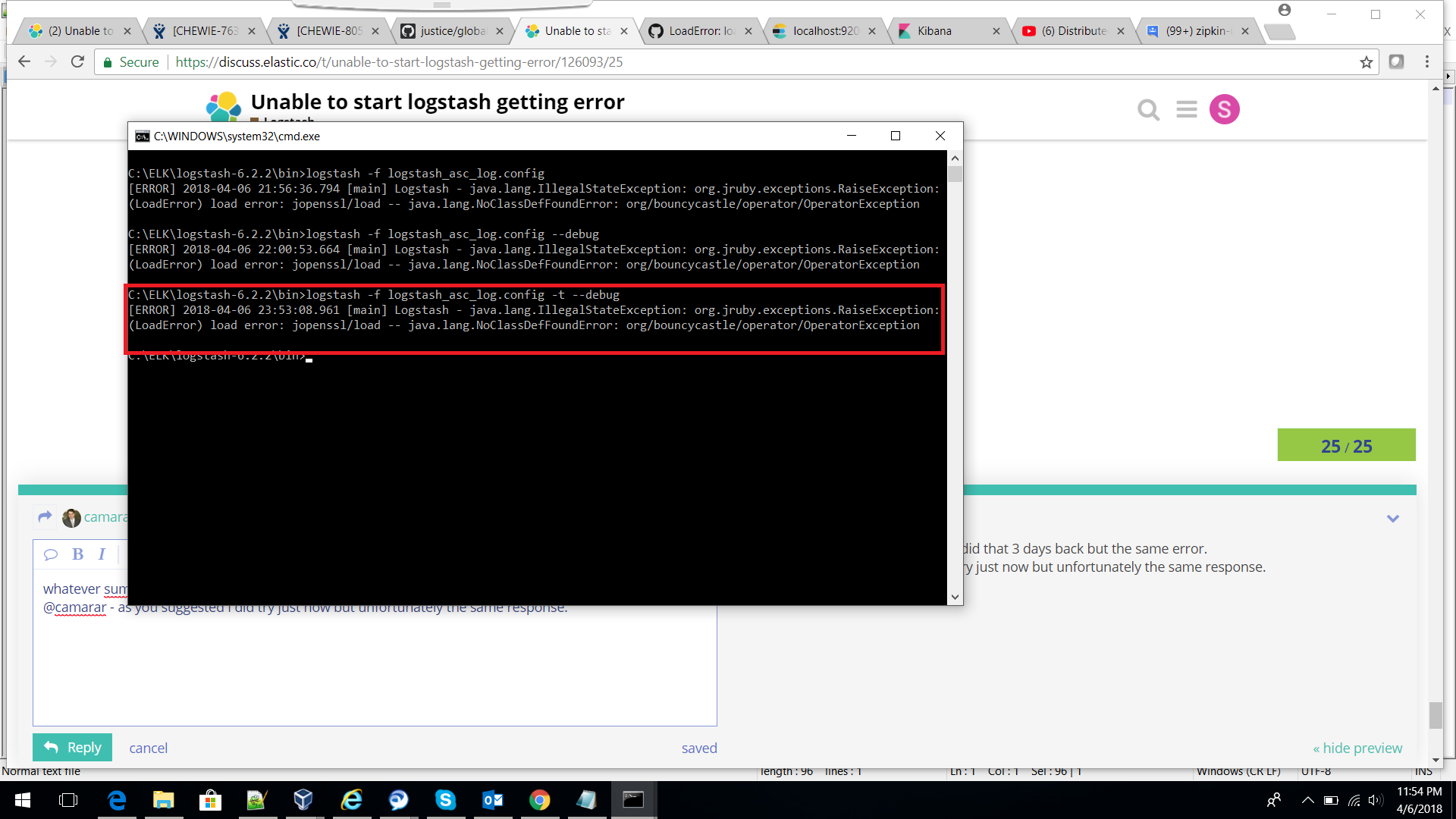
@camarar - there is no difference in the configuration its just i changes the file name and as you above suggested i did try just now but unfortunately the same response. find attached screen.
---
### Author:  [@camarar](https://discuss.elastic.co/u/camarar)
#### Post date: [April 6, 2018, 6:43pm UTC](https://discuss.elastic.co/t/unable-to-start-logstash-getting-error/126093/27 "2018-04-06T18:43:44Z")
@Shiv_Gupta,
Are you forget this question... Which files are there in \logstash\config ?
If possible, could you post a print this folder.
After this question, could you try one more test?
Try to execute logstash with this command: logstash --debug
Then, post here all result.
---
### Author:  [@Shiv\_Gupta](https://discuss.elastic.co/u/Shiv_Gupta)
#### Post date: [April 6, 2018, 6:54pm UTC](https://discuss.elastic.co/t/unable-to-start-logstash-getting-error/126093/28 "2018-04-06T18:54:04Z")
attached config folder files and the result after executing the logstash --debug option
---
### Author:  [@camarar](https://discuss.elastic.co/u/camarar)
#### Post date: [April 6, 2018, 7:00pm UTC](https://discuss.elastic.co/t/unable-to-start-logstash-getting-error/126093/29 "2018-04-06T19:00:43Z")
@Shiv_Gupta,
could you post a print these folders?
- \logstash-6.2.2\bin
- \logstash-6.2.2\
---
### Author:  [@Shiv\_Gupta](https://discuss.elastic.co/u/Shiv_Gupta)
#### Post date: [April 6, 2018, 7:17pm UTC](https://discuss.elastic.co/t/unable-to-start-logstash-getting-error/126093/30 "2018-04-06T19:17:07Z")
@camarar - find attached.
 
---
### Author:  [@darsan55](https://discuss.elastic.co/u/darsan55)
#### Post date: [April 6, 2018, 7:23pm UTC](https://discuss.elastic.co/t/unable-to-start-logstash-getting-error/126093/31 "2018-04-06T19:23:36Z")
> [@Suman\_Reddy1](#):
>
> logstash -e "input {stdin {}}output {stdout {}}" --debug
I am also having the same issue didn't find any solution yet.
---
### Author:  [@camarar](https://discuss.elastic.co/u/camarar)
#### Post date: [April 6, 2018, 7:26pm UTC](https://discuss.elastic.co/t/unable-to-start-logstash-getting-error/126093/32 "2018-04-06T19:26:30Z")
@Shiv_Gupta,
Could you check if are there any log file in \logstash-6.2.2\logs ?
If exist one file like "logstash-plain.txt", It open this file and delete all content and save this file.
After, try to start logstash again and send for us the new content inside the log file "logstash-plain.txt".
---
### Author:  [@Shiv\_Gupta](https://discuss.elastic.co/u/Shiv_Gupta)
#### Post date: [April 6, 2018, 7:26pm UTC](https://discuss.elastic.co/t/unable-to-start-logstash-getting-error/126093/33 "2018-04-06T19:26:53Z")
for me its something strange, initially it was working nicely then after few days suddenly started throwing the mentioned error and no clue what went wrong.
---
### Author:  [@darsan55](https://discuss.elastic.co/u/darsan55)
#### Post date: [April 6, 2018, 7:29pm UTC](https://discuss.elastic.co/t/unable-to-start-logstash-getting-error/126093/34 "2018-04-06T19:29:00Z")
Don't know its window latest version which is creating the problem may be.!
---
### Author:  [@darsan55](https://discuss.elastic.co/u/darsan55)
#### Post date: [April 6, 2018, 7:31pm UTC](https://discuss.elastic.co/t/unable-to-start-logstash-getting-error/126093/35 "2018-04-06T19:31:28Z")
@camarar
There is no folder name "logs" in the path you have specified.
---
### Author:  [@Shiv\_Gupta](https://discuss.elastic.co/u/Shiv_Gupta)
#### Post date: [April 6, 2018, 7:32pm UTC](https://discuss.elastic.co/t/unable-to-start-logstash-getting-error/126093/36 "2018-04-06T19:32:07Z")
@camarar - I deleted all the content then ran again the same command but now i can see there is not content at all, its blank.
---
### Author:  [@Shiv\_Gupta](https://discuss.elastic.co/u/Shiv_Gupta)
#### Post date: [April 6, 2018, 7:33pm UTC](https://discuss.elastic.co/t/unable-to-start-logstash-getting-error/126093/37 "2018-04-06T19:33:39Z")
@darsan55 - I don't think so.
---
### Author:  [@darsan55](https://discuss.elastic.co/u/darsan55)
#### Post date: [April 6, 2018, 7:38pm UTC](https://discuss.elastic.co/t/unable-to-start-logstash-getting-error/126093/38 "2018-04-06T19:38:13Z")
@camarar, @Shiv_Gupta
Hi,
can you check out below link.
[https://logstash.jira.com/browse/LOGSTASH-1227](https://logstash.jira.com/browse/LOGSTASH-1227)
>
---
### Author:  [@Shiv\_Gupta](https://discuss.elastic.co/u/Shiv_Gupta)
#### Post date: [April 6, 2018, 7:41pm UTC](https://discuss.elastic.co/t/unable-to-start-logstash-getting-error/126093/39 "2018-04-06T19:41:22Z")
@darsan55 - as per the above how to changes the logstash UUID any idea?
---
### Author:  [@camarar](https://discuss.elastic.co/u/camarar)
#### Post date: [April 6, 2018, 7:44pm UTC](https://discuss.elastic.co/t/unable-to-start-logstash-getting-error/126093/40 "2018-04-06T19:44:09Z")
Could you check if exist some folder like this pattern jruby-XXXX in this path "C:\Users[YOUR\_USER]\AppData\Local\Temp" ?
If exist, delete all folders like this parttern and try start logstash again.
And tell us if start it correctly.
[Previous page](https://discuss.elastic.co/t/unable-to-start-logstash-getting-error/126093.md?page=1)
[Next page](https://discuss.elastic.co/t/unable-to-start-logstash-getting-error/126093.md?page=3)