# Unable to start logstash getting error
**URL:** https://discuss.elastic.co/t/unable-to-start-logstash-getting-error/126093
**Category:** Logstash
**Created:** [March 29, 2018, 12:55pm UTC](https://discuss.elastic.co/t/unable-to-start-logstash-getting-error/126093 "2018-03-29T12:55:09Z")
**Posts on this page:** 7
**Page:** 4
### Author:  [@Suman\_Reddy1](https://discuss.elastic.co/u/Suman_Reddy1)
#### Post date: [April 8, 2018, 7:54am UTC](https://discuss.elastic.co/t/unable-to-start-logstash-getting-error/126093/61 "2018-04-08T07:54:20Z")
Oh.. it looks pretty similar as of mine. Except version, am using 6.2.2. That should not be any issue.
No idea Darsan.
---
### Author:  [@darsan55](https://discuss.elastic.co/u/darsan55)
#### Post date: [April 8, 2018, 8:48am UTC](https://discuss.elastic.co/t/unable-to-start-logstash-getting-error/126093/62 "2018-04-08T08:48:34Z")
So sad, How do i run logstash in windows then any help @Suman_Reddy1; @Shiv_Gupta; @elastic; @camarar
---
### Author:  [@camarar](https://discuss.elastic.co/u/camarar)
#### Post date: [April 8, 2018, 11:08am UTC](https://discuss.elastic.co/t/unable-to-start-logstash-getting-error/126093/63 "2018-04-08T11:08:48Z")
@darsan55 and @Shiv_Gupta,
Are you windows administrators in your Windows installation?
Are there permission to execute anything?
Could you send me a print of this folder "C:\Users[YOUR\_USER]\AppData\Local\Temp" ? (Organize this folder by date newer first)
Could you create a folder and copy one file on this path "C:\Users[YOUR\_USER]\AppData\Local\Temp" ?
When you try to execute logstash, are you open windows prompt using "Run as administrator"?
---
### Author:  [@darsan55](https://discuss.elastic.co/u/darsan55)
#### Post date: [April 8, 2018, 6:23pm UTC](https://discuss.elastic.co/t/unable-to-start-logstash-getting-error/126093/64 "2018-04-08T18:23:46Z")
@camarar
Yes i am running everything as administrator .
I have attached folder and file wise screen-shot. 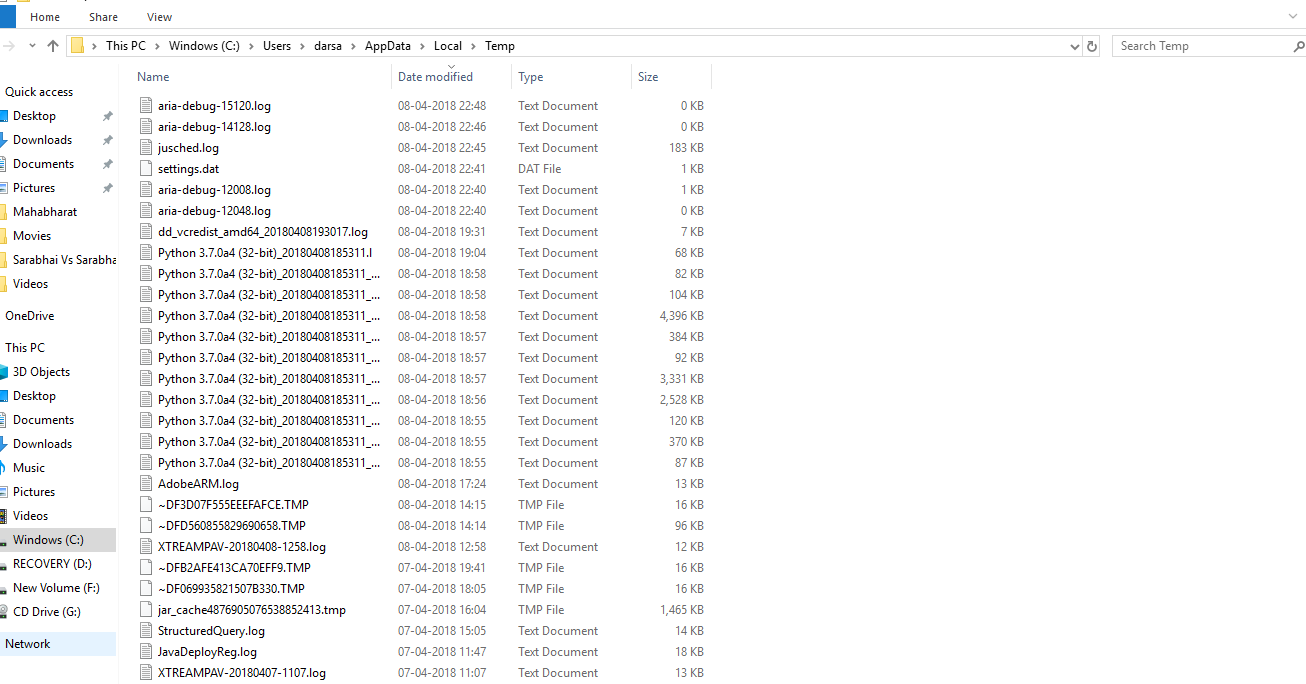

---
### Author:  [@camarar](https://discuss.elastic.co/u/camarar)
#### Post date: [April 8, 2018, 9:13pm UTC](https://discuss.elastic.co/t/unable-to-start-logstash-getting-error/126093/65 "2018-04-08T21:13:44Z")
@darsan55 and @Shiv_Gupta,
I believe this problem happens because you don't have suficient permission to create directories/files in the path alocated on system variable $HOME. This problem is related with Java.
Try to do theses steps:
- Create this directory "\ELK\logstash" in this path "C:\Users[USER]\AppData\Local\Temp"
- Change the point below on the file "jvm.options" on path "\logstash-6.2.2\config"
# set the I/O temp directory
#-Djava.io.tmpdir=$HOME
-Djava.io.tmpdir=C:\Users[USER]\AppData\Local\Temp\ELK\logstash\
- Try to start logstash again.
After these steps tell us if logstash running.
---
### Author:  [@darsan55](https://discuss.elastic.co/u/darsan55)
#### Post date: [April 11, 2018, 5:31pm UTC](https://discuss.elastic.co/t/unable-to-start-logstash-getting-error/126093/66 "2018-04-11T17:31:58Z")
@camarar
I have tried already but got same result. ☹
Don't know whats the problem with logstash, ElasticSearch and Kibana are running fine.
Anyway i have attached my error screen-shot please have a look.
---
### Author:  [@system](https://discuss.elastic.co/u/system)
#### Post date: [May 9, 2018, 5:32pm UTC](https://discuss.elastic.co/t/unable-to-start-logstash-getting-error/126093/67 "2018-05-09T17:32:02Z")
This topic was automatically closed 28 days after the last reply. New replies are no longer allowed.
[Previous page](https://discuss.elastic.co/t/unable-to-start-logstash-getting-error/126093.md?page=3)