# Use different columns for valueColumn and filterColumn in a Dropdown Filter
**URL:** https://discuss.elastic.co/t/use-different-columns-for-valuecolumn-and-filtercolumn-in-a-dropdown-filter/215890
**Category:** Kibana
**Tags:** canvas
**Created:** [January 21, 2020, 1:51pm UTC](https://discuss.elastic.co/t/use-different-columns-for-valuecolumn-and-filtercolumn-in-a-dropdown-filter/215890 "2020-01-21T13:51:21Z")
**Posts on this page:** 4
**Page:** 1
### Author:  [@steamed\_buns](https://discuss.elastic.co/u/steamed_buns)
#### Post date: [January 21, 2020, 1:51pm UTC](https://discuss.elastic.co/t/use-different-columns-for-valuecolumn-and-filtercolumn-in-a-dropdown-filter/215890/1 "2020-01-21T13:51:21Z")
Hello,
I am trying to understand how exactly the dropdown filter in Kibana works. Since I am able to separately specify columns for valueColumn and filterColumn, I assumed that it would be possible to use one column to display values in the dropdown and another column for the actual filter. But I cannot get this to work, so I was hoping you could clear things up for me.
This is what I am trying to accomplish:
- There are two indices
1. One index maps a display name to a UUID (and very possibly stores additional information)
2. Another index stores some data, where each entry can be mapped to one of the UUIDs
- On the canvas are
- a dropdown filter
- For the sake of clarity the dropdown menu should not display the UUIDs themselves, but their mapped display names
- a metric element
- depending on the selection the rows should be filtered based on the UUID
- **both elements are in the same filter group**
- and for testing purposes also two table elements, displaying the currently filtered rows of both indices
* * *
Expression for the dropdown filter:
```auto
essql query="
SELECT *
FROM \"dropdown-example*\"
"
| dropdownControl valueColumn="uuid" filterColumn="uuid.keyword" filterGroup="myfiltergroup"
| render
```
Expression for the metric element:
```auto
filters group="myfiltergroup" ungrouped=true
| essql query="
SELECT some_value, id
FROM \"my-metrics*\"
"
| math "sum(some_value)"
| metric "Units"
metricFont={font size=48 family="'Open Sans', Helvetica, Arial, sans-serif" color="#000000" align="center" lHeight=48}
labelFont={font size=14 family="'Open Sans', Helvetica, Arial, sans-serif" color="#000000" align="center"} metricFormat="0,0.[000]"
| render
```
And for completeness the expressions for the tables:
```auto
filters group="myfiltergroup" ungrouped=true
| essql query="SELECT * FROM \"dropdown-example*\""
| table
| render containerStyle={containerStyle border="1px solid "}
```
```auto
filters group="myfiltergroup" ungrouped=true
| essql query="SELECT * FROM \"my-metrics*\""
| table perPage=50
| render containerStyle={containerStyle border="1px solid "}
```
* * *
I populated the first index with two entries and the second with 15 (please see below for a quick python script).

I set the valueColumn to _'display\_name'_ and the filterColumn to _'uuid.keyword'_.
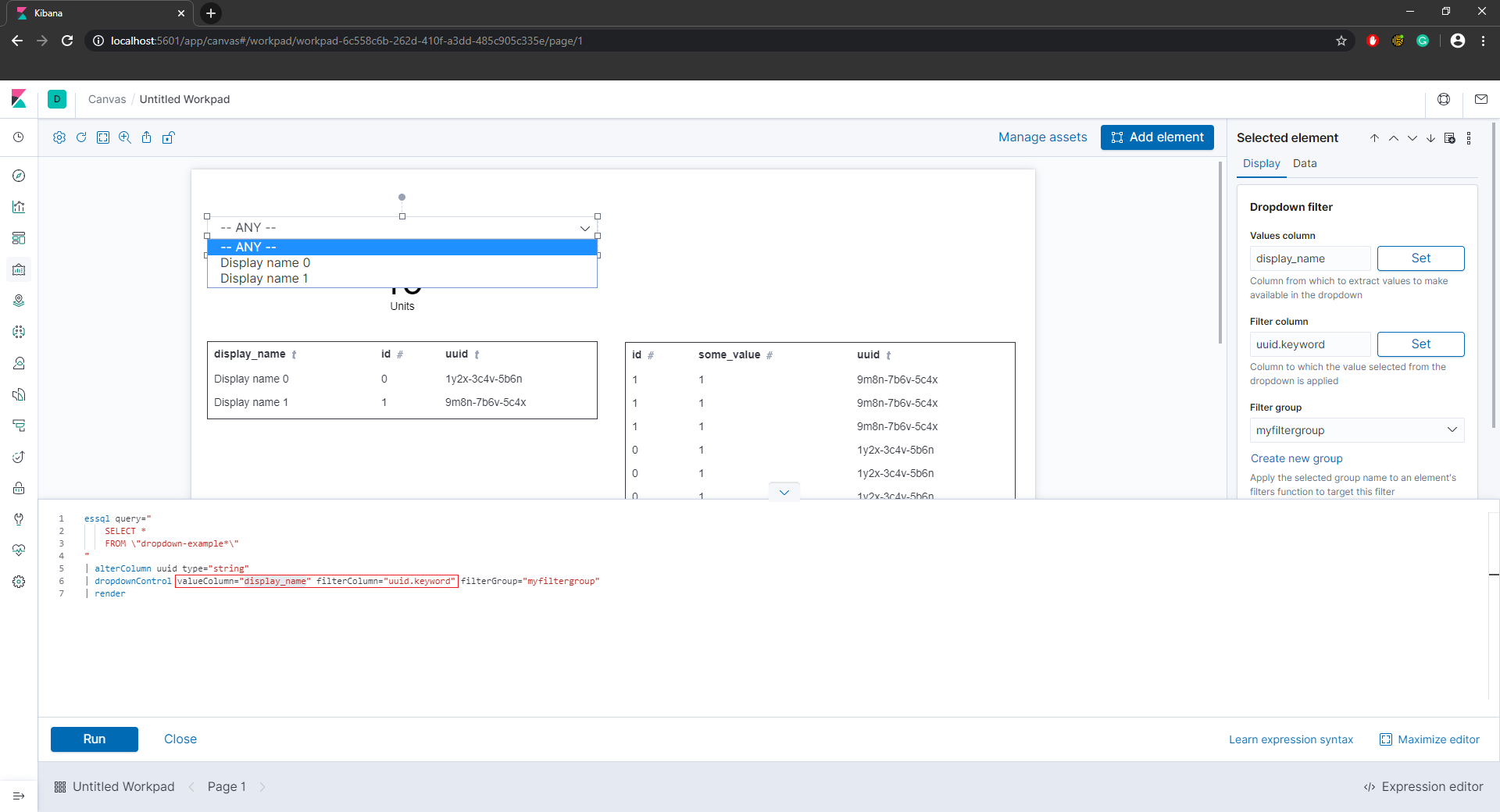
Any selection other then _'-- ANY --'_ now returns zero filtered entries for both indices.

I change the valueColumn from _'display\_name'_ to _'uuid'_.

Entries for both indices are now getting properly filtered, but the dropdown values are no longer 'intuitive'.

I also tried this without success with other column types (e.g. the number column _'id'_).
* * *
Quick python script to quickly populate the sample data:
```python
#!/usr/bin/env python
"""
Generate some test data in elastic search, to test in kibana.
"""
import random
from elasticsearch import Elasticsearch
uuids= [
'1y2x-3c4v-5b6n',
'9m8n-7b6v-5c4x'
]
def gen_dropdown_data(es_index_name, es_obj):
for idx in range(len(uuids)):
doc = {
'id': idx,
'uuid': uuids[idx],
'display_name': f'Display name {idx}'
}
res = es_obj.index(index=es_index_name, doc_type='_doc', id=uuids[idx],
body=doc)
print(res['result'])
def gen_metrics_data(es_index_name, es_obj):
for idx in range(15):
cur_choice = random.randint(0, len(uuids) - 1)
doc = {
'id': cur_choice,
'uuid': uuids[cur_choice],
'some_value': 1
}
res = es_obj.index(index=es_index_name, doc_type='_doc',
id=idx, body=doc)
print(res['result'])
def main():
es = Elasticsearch()
es_dropdown_index = 'dropdown-example-27x3kf5g'
es_metrics_index = 'my-metrics-27x3kf5g'
gen_dropdown_data(es_index_name=es_dropdown_index, es_obj=es)
gen_metrics_data(es_index_name=es_metrics_index, es_obj=es)
if __name__ == ' __main__':
main()
```
Thanks in advance 🙂
---
### Author:  [@corey.robertson](https://discuss.elastic.co/u/corey.robertson)
#### Post date: [January 28, 2020, 8:00pm UTC](https://discuss.elastic.co/t/use-different-columns-for-valuecolumn-and-filtercolumn-in-a-dropdown-filter/215890/2 "2020-01-28T20:00:40Z")
Hi @steamed_buns
The `Value column` is the column from your data source that will populate the drop down filter.
The `Filter column` is the column that the selected value will be used to filter.
So when you do `Value Column=display name` and `Filter Column = uuid` then it will do a filter where `uuid = selected display name`
You can make an element to help you debug what's going on with filters with the expression
`filters | render as="debug"`
Hope that helps!
---
### Author:  [@steamed\_buns](https://discuss.elastic.co/u/steamed_buns)
#### Post date: [January 29, 2020, 9:43am UTC](https://discuss.elastic.co/t/use-different-columns-for-valuecolumn-and-filtercolumn-in-a-dropdown-filter/215890/3 "2020-01-29T09:43:35Z")
Hi @corey.robertson
Thank you for the reply, seems like I truly misunderstood the functionality of this widget. I also tried the tip with `render as="debug"`, but at the moment it didn't really help me debug my problem.
Marked as solved!
---
### Author:  [@system](https://discuss.elastic.co/u/system)
#### Post date: [February 26, 2020, 9:43am UTC](https://discuss.elastic.co/t/use-different-columns-for-valuecolumn-and-filtercolumn-in-a-dropdown-filter/215890/4 "2020-02-26T09:43:38Z")
This topic was automatically closed 28 days after the last reply. New replies are no longer allowed.