# Users, role and index Management
**URL:** https://discuss.elastic.co/t/users-role-and-index-management/196342
**Category:** Kibana
**Created:** [August 22, 2019, 2:03pm UTC](https://discuss.elastic.co/t/users-role-and-index-management/196342 "2019-08-22T14:03:42Z")
**Posts on this page:** 18
**Page:** 1
### Author:  [@vishal\_M](https://discuss.elastic.co/u/vishal_M)
#### Post date: [August 22, 2019, 2:03pm UTC](https://discuss.elastic.co/t/users-role-and-index-management/196342/1 "2019-08-22T14:03:42Z")
Hello All,
I am working on the kibana dashboards, users, roles and index. Here is my usecase below.
I have two users ( user 1 and user 2) created via kibana UI. But, eventually i will have 100's of users..
i have two indexes ( index 1 and index2) created via kibana UI.
When i login as user 1.. i need to view the dashboard which has only access to index1 data but not index2.
when i login as user 2.. i need to view the dashboard which has only access to index2 but not index 1.
I see some default roles (superuser and etc )But, i don't think i can specify my index 1 and index 2 in it. Can someone help me in creating roles and mapping the right index to that role ?
Attaching you the screenshots for your reference 🙂
 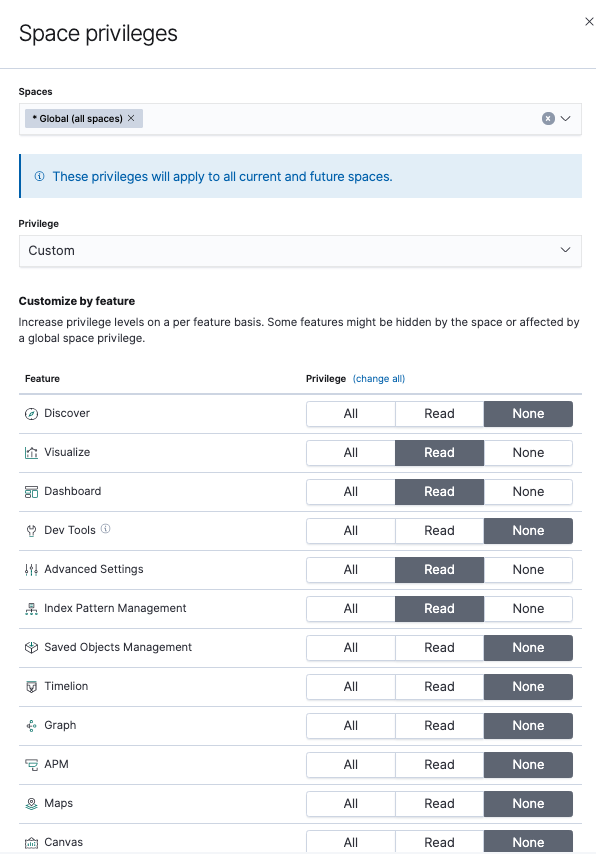
Thanks in Advance.
---
### Author:  [@tims](https://discuss.elastic.co/u/tims)
#### Post date: [August 22, 2019, 6:36pm UTC](https://discuss.elastic.co/t/users-role-and-index-management/196342/2 "2019-08-22T18:36:22Z")
Hi @vishal_M, this sounds like a good use-case for Kibana Spaces. Using Spaces you can disable all features except dashboards, move specific dashboards between Spaces and secure the Space to specific users. Here is some documentation on it: [https://www.elastic.co/blog/introducing-kibana-spaces-for-organization-and-security](https://www.elastic.co/blog/introducing-kibana-spaces-for-organization-and-security)
---
### Author:  [@vishal\_M](https://discuss.elastic.co/u/vishal_M)
#### Post date: [August 22, 2019, 8:15pm UTC](https://discuss.elastic.co/t/users-role-and-index-management/196342/3 "2019-08-22T20:15:45Z")
@tims, Thanks for your quick reply.
I believe, using "Spaces" i can only display the dashboard based on the "type of user" (Ex: Admin User, Normal User). This cannot solve my whole requirement.
As per your explanation, i need to create 100 spaces (each space to each user) ? Please correct me if i am understanding it wrongly.
l would like to explain my whole usecase .
1. I will have 100 normal users. (I thought of pushing all the 100 users data into a single index and filter it based on userid, create a single dashboard based on the single index and share the dashboard into a external page) But, i have a huge data, i am not willing to store it in single index . it might impact the performance.
2.Instead, I want to store each user data in each index(that means i will have 100 indexes).
But, if i store the data in separate index , do i need to create dashboard for each user separately ?
If i create separate dashboards, How can i get the dashboard id dynamically ? Does elastic search has any Api's which gives the list of dashboard & index-id's based on username or something? So that, i can pull the dashboard id and put it in the iframe URL ?
Your help is highly appreciated!
Thanks,
Vishal
---
### Author:  [@Christian\_Dahlqvist](https://discuss.elastic.co/u/Christian_Dahlqvist)
#### Post date: [August 22, 2019, 8:25pm UTC](https://discuss.elastic.co/t/users-role-and-index-management/196342/4 "2019-08-22T20:25:54Z")
Have a look at [this thread](https://discuss.elastic.co/t/how-to-create-individual-dashboards-for-different-2-clients/191517) as I think it covers a very similar scenario.
---
### Author:  [@vishal\_M](https://discuss.elastic.co/u/vishal_M)
#### Post date: [August 23, 2019, 6:10pm UTC](https://discuss.elastic.co/t/users-role-and-index-management/196342/5 "2019-08-23T18:10:21Z")
@Christian_Dahlqvist, Thanks for your reply.
I can create 100 spaces with similar dashboard. This can work when u login to kibana directly and select the spaces after logging in .But, my biggest problem is how do i embed it in my external webpage.
Ex: If i logged in as user1 (Assume, i have created a space "user1" and assigned the dashboard & user2 will have his own space with similar dashboard)
How do i specify the space names dynamically in the iframe url while embedding it into my external webpage ?
Ex: iframe src="[https://www.mykibana.com:5601/s/xfi11013a/app/kibana#/dashboard/{kibana\_dashboard\_id}?embed=true&\_g=(filters:!()](https://www.mykibana.com:5601/s/xfi11013a/app/kibana#/dashboard/%7Bkibana_dashboard_id%7D?embed=true&_g=(filters:!()))&\_a=(description:'',filters:!(),fullScreenMode:!f,options:(hidePanelTitles:!f,useMargins:!t),panels:!((embeddableConfig:(),gridData:(h:15,i:'1',w:24,x:0,y:0),id:c0e18780-c51d-11e9-b7d4-77ba2ea29a8e,panelIndex:'1',type:visualization,version:'7.3.0')),query:(language:kuery,query:''),timeRestore:!f,title:mercury-bcp-hosts,viewMode:view)" height="1200" width="1300"\>
---
### Author:  [@Christian\_Dahlqvist](https://discuss.elastic.co/u/Christian_Dahlqvist)
#### Post date: [August 23, 2019, 6:18pm UTC](https://discuss.elastic.co/t/users-role-and-index-management/196342/6 "2019-08-23T18:18:14Z")
If they all need the same dashboard, just backed with different data sets you do not necessarily need spaces at all. You can give them all access to the same dashboard and the roles will give them access to the appropriate data set.
---
### Author:  [@vishal\_M](https://discuss.elastic.co/u/vishal_M)
#### Post date: [August 23, 2019, 6:31pm UTC](https://discuss.elastic.co/t/users-role-and-index-management/196342/7 "2019-08-23T18:31:42Z")
@Christian_Dahlqvist, Thank for your quick reply.
Please may i know how to create the charts with multiple datasets (meaning every user have their own index & the structure in every index will be similar but values will be different for each user)) ?
---
### Author:  [@Christian\_Dahlqvist](https://discuss.elastic.co/u/Christian_Dahlqvist)
#### Post date: [August 23, 2019, 6:36pm UTC](https://discuss.elastic.co/t/users-role-and-index-management/196342/8 "2019-08-23T18:36:57Z")
Did you look at the thread I linked to earlier? The approach I described assumes the structure of data for all users and the dashboard(s) are identical.
---
### Author:  [@vishal\_M](https://discuss.elastic.co/u/vishal_M)
#### Post date: [August 23, 2019, 7:14pm UTC](https://discuss.elastic.co/t/users-role-and-index-management/196342/9 "2019-08-23T19:14:49Z")
@Christian_Dahlqvist , Thank you so much for your quick responses .
I am referring to the post you provided & i am excited to implement the second option..
" The easiest way to do this might be to have a single standard dashboard that each client has access to that you can copy to each customers space. This has to work against a standard index pattern, for which security need to only grant access to the correct set of data for the client. The most elegant way to do this would be through [document-level security](https://www.elastic.co/guide/en/elastic-stack-overview/current/document-level-security.html) as you can have all data in a single index. This is however a feature that require a commercial license and not available with the basic license. The other option is to use separate indices per client (but make sure you do not end up with a lot of small shards). In order to make this match the index pattern, you could include the client ID as the first component matched by the wildcard. `icingabeat-client1-...` and `icingabeat-client2-...` would both match the pattern `icingabeat-*` but you could use the role-based access controls to only give clients access to the right data set. "
I am assuming to follow the below steps:
Create six indexes naming
"kibana-user1-chart1",
"kibana-user1-chart2",
"kibana-user-2-chart1" ,
"kibana-user-2-chart2",
"kibana-user3-chart1"
"kibana-user3-chart2" indexes
Note: ( chart 1and chart2 has different structures at charts level but chart 1 in user 1 and chart1 in user 2 will have same structure with different values(based on user) )...
Let's take one step forward ( I need to create visualizations).
Can i create chart 1 (pie chart) using `kibana-*-chart1` index-pattern ?
Can i create chart 2 (pie chart) using `kibana-*-chart2` index-pattern ?
So that, i will create users/roles and give the access to specfic indexes.
Add these two charts in single dashboard and i will embed the dashboard in external webpage..
---
### Author:  [@Christian\_Dahlqvist](https://discuss.elastic.co/u/Christian_Dahlqvist)
#### Post date: [August 23, 2019, 7:20pm UTC](https://discuss.elastic.co/t/users-role-and-index-management/196342/10 "2019-08-23T19:20:04Z")
I would put the common prefix first and the user identifier towards the end so you can create the index pattern with a trailing wildcard.
---
### Author:  [@vishal\_M](https://discuss.elastic.co/u/vishal_M)
#### Post date: [August 23, 2019, 7:25pm UTC](https://discuss.elastic.co/t/users-role-and-index-management/196342/11 "2019-08-23T19:25:16Z")
@Christian_Dahlqvist, Let me create indexes with "kibana-chart1-user1", "kibana-chart2-user1", kibana-chart1-user2 and kibana-chart2-user2 indexes-pattern and create pie charts using `kibana-chart1-*` & `kibana-chart2-*` and will let you know the update
---
### Author:  [@Christian\_Dahlqvist](https://discuss.elastic.co/u/Christian_Dahlqvist)
#### Post date: [August 23, 2019, 7:29pm UTC](https://discuss.elastic.co/t/users-role-and-index-management/196342/12 "2019-08-23T19:29:22Z")
Unless there are mapping conflicts you can probably put all data in a single index. I do not understand why you need to separate it by chart. That would give you a single index pattern on top of which you can create multiple filtered saved searches to base visualisations on.
---
### Author:  [@vishal\_M](https://discuss.elastic.co/u/vishal_M)
#### Post date: [August 23, 2019, 7:46pm UTC](https://discuss.elastic.co/t/users-role-and-index-management/196342/13 "2019-08-23T19:46:58Z")
@Christian_Dahlqvist, We have huge data for each customer and each customer has many branches data (we will use filter mechanism in this case ) But, putting 100's of customers data in single index and updating it every minute will have many issues..
I have created 4 indexes as discussed earlier (please refer to the snapshot)

and i can see the index patterns but am not able to create pie charts by providing its index patterns "kibana-chart1-\*"

Please can you suggest me the next steps..
Thank you
---
### Author:  [@Christian\_Dahlqvist](https://discuss.elastic.co/u/Christian_Dahlqvist)
#### Post date: [August 23, 2019, 7:51pm UTC](https://discuss.elastic.co/t/users-role-and-index-management/196342/14 "2019-08-23T19:51:10Z")
> [@vishal\_M](#):
>
> We have huge data for each customer
How much data do you have or are you expecting per user?
Did you [create an index pattern](https://www.elastic.co/guide/en/kibana/7.3/index-patterns.html)?
---
### Author:  [@vishal\_M](https://discuss.elastic.co/u/vishal_M)
#### Post date: [August 23, 2019, 7:58pm UTC](https://discuss.elastic.co/t/users-role-and-index-management/196342/15 "2019-08-23T19:58:44Z")
@Christian_Dahlqvist, May be 10-15 MB of json data per each user and it has lots of nested data & may time to query and process the data
---
### Author:  [@Christian\_Dahlqvist](https://discuss.elastic.co/u/Christian_Dahlqvist)
#### Post date: [August 23, 2019, 8:01pm UTC](https://discuss.elastic.co/t/users-role-and-index-management/196342/16 "2019-08-23T20:01:29Z")
That is very little. General recommendations is to keep shard at least in GB size, so I see no reason to split unless there are mapping conflicts.
Kibana has quite limited support for nested documents. Have you verified that you can build the dashboards you want?
---
### Author:  [@vishal\_M](https://discuss.elastic.co/u/vishal_M)
#### Post date: [August 27, 2019, 6:42pm UTC](https://discuss.elastic.co/t/users-role-and-index-management/196342/17 "2019-08-27T18:42:06Z")
@Christian_Dahlqvist, Yes , I have created few indexes for each user and am able to create the charts i wanted. But, i am interested to combine multiple users data into single index and generate dashboards and filter using user id and additional parameters..
Thanks you
---
### Author:  [@system](https://discuss.elastic.co/u/system)
#### Post date: [September 24, 2019, 6:42pm UTC](https://discuss.elastic.co/t/users-role-and-index-management/196342/18 "2019-09-24T18:42:08Z")
This topic was automatically closed 28 days after the last reply. New replies are no longer allowed.