# Vega in kibana x-axis orient 'bottom' doesn't working properly
**URL:** https://discuss.elastic.co/t/vega-in-kibana-x-axis-orient-bottom-doesnt-working-properly/164977
**Category:** Kibana
**Tags:** vega
**Created:** [January 21, 2019, 5:11am UTC](https://discuss.elastic.co/t/vega-in-kibana-x-axis-orient-bottom-doesnt-working-properly/164977 "2019-01-21T05:11:31Z")
**Posts on this page:** 3
**Page:** 1
### Author:  [@teemoGod](https://discuss.elastic.co/u/teemoGod)
#### Post date: [January 21, 2019, 5:11am UTC](https://discuss.elastic.co/t/vega-in-kibana-x-axis-orient-bottom-doesnt-working-properly/164977/1 "2019-01-21T05:11:31Z")
hi. im using vega3, and my kibana version is 6.4.1
following is my axes config.
my axes config is placed in 'marks' config (inner axes)
```json
"marks" : [
"signals": [
{"name": "width", "value": 300},
{ "name": "requestHeightInterval", "update": "20" },
],
"scales" : [
{
"name": "YScale",
"type": "point",
"range": {
"step": {
"signal": "requestHeightInterval"
}
},
"domain": {
"data": "Data1",
"field": "controller.key",
"sort": {
"order": "ascending"
}
}
},
{
"name": "XScale",
"type": "linear",
"range": "width",
"nice": true,
"zero": true,
"domain": {
"data": "Data1",
"field": "profileDelay"
}
},
],
"axes": [
{
"orient": "bottom", // here
"scale": "XScale",
"title": "AVG_Controller_Perf (ms)"
"grid": true,
"gridScale": "YScale",
}
{
"orient": "left",
"scale": "YScale",
"title": "Controller"
"grid": true,
"gridScale": "XScale",
},
]
]
```
but graph's x-axis is not working properly like this.

so, i configed orient value of x-axis of axes to 'top' like this.
```json
"marks" : [
"signals": [
{"name": "width", "value": 300},
{ "name": "requestHeightInterval", "update": "20" },
],
"scales" : [
{
"name": "YScale",
"type": "point",
"range": {
"step": {
"signal": "requestHeightInterval"
}
},
"domain": {
"data": "Data1",
"field": "controller.key",
"sort": {
"order": "ascending"
}
}
},
{
"name": "XScale",
"type": "linear",
"range": "width",
"nice": true,
"zero": true,
"domain": {
"data": "Data1",
"field": "profileDelay"
}
},
],
"axes": [
{
"orient": "top", // here
"scale": "XScale",
"title": "AVG_Controller_Perf (ms)"
"grid": true,
"gridScale": "YScale",
}
{
"orient": "left",
"scale": "YScale",
"title": "Controller"
"grid": true,
"gridScale": "XScale",
},
]
]
```
and following is the result .

how can i fix this?
i tried following config, but this is not good and naive.
```auto
"axes": [
{
"orient": "top",
"scale": "XScale",
"grid": true,
"gridScale": "YScale",
"labels" :false,
"ticks" : false
},
{
"orient": "bottom",
"scale": "XScale",
"title": "AVG_Controller_Perf (ms)"
"gridScale": "YScale",
"offset" : 100
}
{
"orient": "left",
"scale": "YScale",
"title": "Controller"
"grid": true,
"gridScale": "XScale",
},
]
```
following is the result. (look good but not pretty configuration.)
this is what a wanted graph.
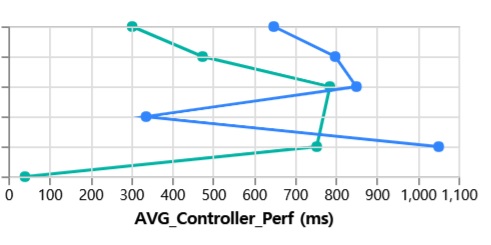
but i don't know that how set X-Axis's offset property's value dynamically. like this

thats why im using Axis 'top' instead 'bottom'.
---
### Author:  [@bhavyarm](https://discuss.elastic.co/u/bhavyarm)
#### Post date: [January 21, 2019, 4:30pm UTC](https://discuss.elastic.co/t/vega-in-kibana-x-axis-orient-bottom-doesnt-working-properly/164977/2 "2019-01-21T16:30:00Z")
@nyuriks can you please grab this?
Thanks,
Bhavya
---
### Author:  [@system](https://discuss.elastic.co/u/system)
#### Post date: [February 18, 2019, 4:30pm UTC](https://discuss.elastic.co/t/vega-in-kibana-x-axis-orient-bottom-doesnt-working-properly/164977/3 "2019-02-18T16:30:09Z")
This topic was automatically closed 28 days after the last reply. New replies are no longer allowed.