I deployed eck-operator on my microk8s system.
Then I used eck-operator to deploy Elasticsearch and Kibana.
Next, I wanted to deploy Fleet and its agent. I added the configuration to Kibana (as shown in Figure 1).
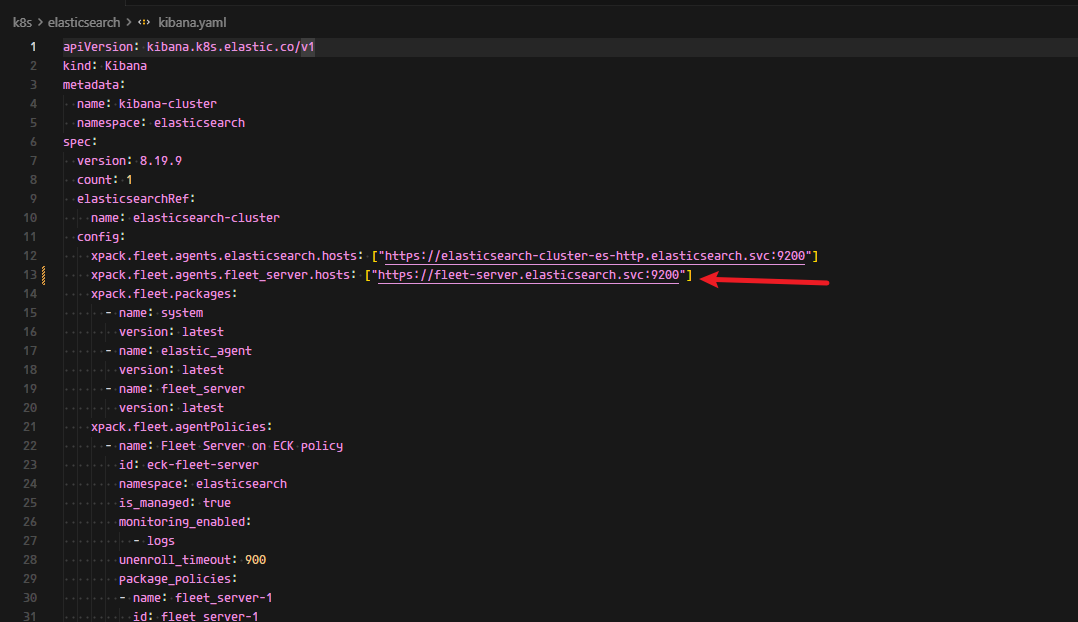
After adding the configuration, I deployed Fleet and its agent. When I saw an error on the Kibana Fleet page, I realized I had misspelled the Fleet configuration in Figure 1. It should be fleet-server-agent-http , but I wrote fleet-server instead.
So I deleted the Fleet and agent deployments, modified the Kibana Fleet configuration (See the Kibana source code below), and applied it to Kibana.
However, when I re-deployed Fleet and its agent, I found that they were still using the wrong Fleet address.
There are my deploy files:
Kibana:
apiVersion: kibana.k8s.elastic.co/v1
kind: Kibana
metadata:
  name: kibana-cluster
  namespace: elasticsearch
spec:
  version: 8.19.9
  count: 1
  elasticsearchRef:
    name: elasticsearch-cluster
  config:
    xpack.fleet.agents.elasticsearch.hosts: ["https://elasticsearch-cluster-es-http.elasticsearch.svc:9200"]
    xpack.fleet.agents.fleet_server.hosts: ["https://fleet-server-agent-http.elasticsearch.svc:8220"]
    xpack.fleet.packages:
      - name: system
        version: latest
      - name: elastic_agent
        version: latest
      - name: fleet_server
        version: latest
    xpack.fleet.agentPolicies:
      - name: Fleet Server on ECK policy
        id: eck-fleet-server
        namespace: elasticsearch
        is_managed: true
        monitoring_enabled:
          - logs
        unenroll_timeout: 900
        package_policies:
        - name: fleet_server-1
          id: fleet_server-1
          package:
            name: fleet_server
      - name: Elastic Agent on ECK policy
        id: eck-agent
        namespace: elasticsearch
        is_managed: true
        monitoring_enabled:
          - logs
        unenroll_timeout: 900
        package_policies:
          - name: system-1
            id: system-1
            package:
              name: system
  podTemplate:
    spec:
      imagePullSecrets:
      - name: harbor
      containers:
      - name: kibana
        resources:
          limits:
            memory: 4Gi
            cpu: 2
          requests:
            memory: 2Gi
            cpu: 1
Fleet:
apiVersion: agent.k8s.elastic.co/v1alpha1
kind: Agent
metadata:
  name: fleet-server
  namespace: elasticsearch
spec:
  version: 8.19.9
  elasticsearchRefs:
  - name: elasticsearch-cluster
  kibanaRef:
    name: kibana-cluster
  mode: fleet
  fleetServerEnabled: true
  policyID: eck-fleet-server
  deployment:
    replicas: 1
    podTemplate:
      spec:
        serviceAccountName: elastic-agent
        automountServiceAccountToken: true
        securityContext:
          runAsUser: 0
        imagePullSecrets:
          - name: harbor
---
apiVersion: rbac.authorization.k8s.io/v1
kind: ClusterRole
metadata:
  name: elastic-agent
rules:
- apiGroups: [""] # "" indicates the core API group
  resources:
  - pods
  - nodes
  - namespaces
  verbs:
  - get
  - watch
  - list
- apiGroups: ["coordination.k8s.io"]
  resources:
  - leases
  verbs:
  - get
  - create
  - update
- apiGroups: ["apps"]
  resources:
  - replicasets
  verbs:
  - list
  - watch
- apiGroups: ["batch"]
  resources:
  - jobs
  verbs:
  - list
  - watch
---
apiVersion: v1
kind: ServiceAccount
metadata:
  name: elastic-agent
  namespace: elasticsearch
---
apiVersion: rbac.authorization.k8s.io/v1
kind: ClusterRoleBinding
metadata:
  name: elastic-agent
subjects:
- kind: ServiceAccount
  name: elastic-agent
  namespace: elasticsearch
roleRef:
  kind: ClusterRole
  name: elastic-agent
  apiGroup: rbac.authorization.k8s.io
Agent:
apiVersion: agent.k8s.elastic.co/v1alpha1
kind: Agent
metadata:
  name: elastic-agent
  namespace: elasticsearch
spec:
  version: 8.19.9
  kibanaRef:
    name: kibana-cluster
  fleetServerRef:
    name: fleet-server
  mode: fleet
  policyID: eck-agent
  daemonSet:
    podTemplate:
      spec:
        serviceAccountName: elastic-agent
        automountServiceAccountToken: true
        securityContext:
          runAsUser: 0
        imagePullSecrets:
          - name: harbor
        volumes:
        - name: agent-data
          emptyDir: {}
 I was getting a little anxious because I had tried for a long time without success. I will wait quietly for the rest.

 I try to use the latest policies by changing the policies id, but it still not work, and the fleet-server even failed to start.